
This application is a prototype developed to prepare for the transition of CRYSTAL to a new technology stack — LARS (Leptos, Actix Web, Rust, ScyllaDB).
This prototype allows you to add, display, update, and delete text, demonstrating a full CRUD operation cycle with the ScyllaDB database.
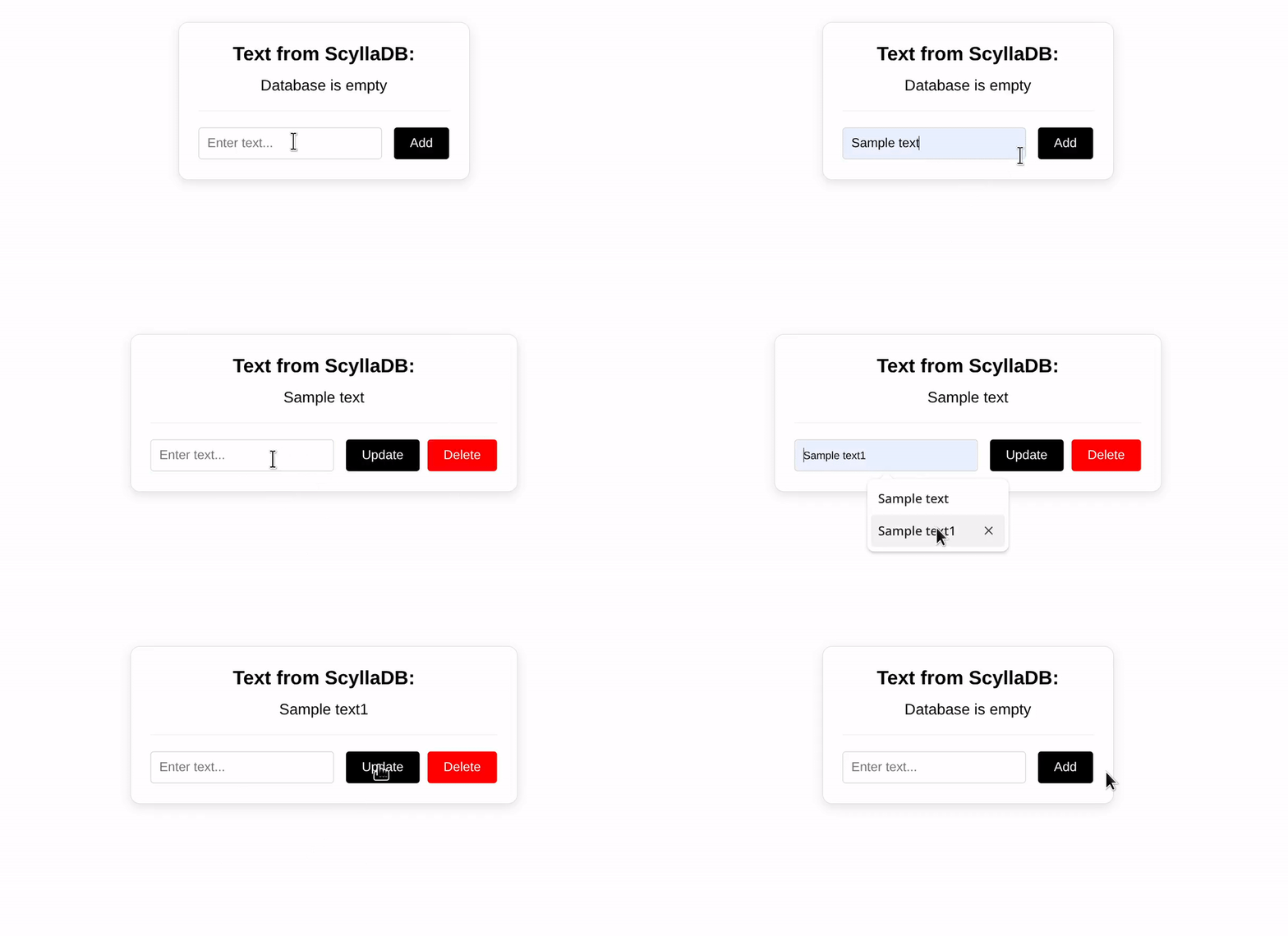
Contents:
- Project structure and local PC specifications
- Key Features
- Installation & Setup
- Database Preparation
- Launching the project
Composition:
Full code | Cargo.toml
Structure:
Leptos v0.8.2.
Actix Web v4.x.
Rust v1.92.0.
ScyllaDB v2025.4.0.
Local PC Specifications:
OS: Debian 12.
2.1. Auto-Schema, Single-Row Architecture, and Constant-id
Upon application startup, the data table is automatically created (if it does not exist) to store the entered text. During the save operation, a row is formed in the table, consisting of three columns: id (Primary Key), content (text data), and created_at (timestamp). A constant id of UUID format (11111111-1111-1111-1111-111111111111) is used for the entered text. Instead of creating multiple entries, the system uses the INSERT operation as an "upsert" (updating an existing record). Since the id is always the same, any save operation simply overwrites the data in the content column for this specific row:

Screenshot 1: Single Row View
2.2. Blocking SSR (SsrMode::PartiallyBlocked)
A blocking server-side rendering mode. This ensures that dynamic content from ScyllaDB (and all other site text) is "injected" into the HTML structure directly on the server. As a result, search engine crawlers receive a fully rendered document, ensuring 100% indexing and high SEO performance:

Screenshot 2: Server-Side Rendered (SSR). View source code in a browser (Ctrl+U)
2.3. Fine-grained Reactivity
When text is updated, only the specific DOM node containing that text is re-rendered, while the rest of the page remains untouched. This behavior is achieved through Leptos reactive signals.
2.4. Isomorphic Data Access & Reactive UI
The use of Resource::new_blocking ensures seamless state synchronization between the server and the client. It automatically monitors database changes via action versions, allowing the UI to instantly toggle buttons (e.g., switching between "Add" and "Update" or showing the "Delete" button) without a page reload.
2.5. Asynchronous ScyllaDB Integration
High-performance asynchronous connection via scylla-rust-driver. Thanks to the use of a shared Arc<Session>, the server efficiently distributes resources and can handle thousands of concurrent requests without blocking CPU threads. While the database is preparing a response, the CPU remains free for other tasks, ensuring maximum system responsiveness under extreme loads.
2.6. SSR Isolation
All database interaction code is protected by #[cfg(feature = "ssr")] macros. This guarantees that database drivers and sensitive logic never leave the server.
2.7. Informative Server Logging
The system outputs informative operation reports to the console:

Screenshot 3: ScyllaDB readiness log
Compatibility Note: This project is verified to work on Debian 12. Development on Windows is not recommended, as the installation process for Leptos and ScyllaDB on that system can cause critical errors. A Linux-based environment is required for correct operation.
3.1. Environment Preparation (Debian 12 and similar)
Installing system dependencies:
sudo apt update && sudo apt install build-essential pkg-config libssl-dev -y3.2. Installing Rust and Leptos Tools
3.2.1. Install Rust (installs the current stable version):
curl --proto '=https' --tlsv1.2 -sSf https://sh.rustup.rs | sh3.2.2. Configure environment variables:
source $HOME/.cargo/env3.2.3. Add WebAssembly support:
rustup target add wasm32-unknown-unknown3.2.4. Install the cargo-leptos build tool:
cargo install --locked cargo-leptos3.3 ScyllaDB Installation and Configuration.
Installation is performed directly on the Debian 12 system using the official ScyllaDB repository.
3.3.1. Update package indexes:
sudo apt-get update3.3.2. Install necessary system utilities:
sudo apt-get install -y apt-transport-https curl gnupg3.3.3. Add the official ScyllaDB repository to the system:
curl -sSf https://get.scylladb.com/server | sudo bash3.3.4. Interactive configuration and ScyllaDB installation:
sudo scylla_setup3.3.5. Start the ScyllaDB server service:
sudo systemctl start scylla-server3.3.6. Check the status of cluster nodes:
nodetool status
Before the first project launch, you must create a Keyspace in ScyllaDB.
Enter the database console using the:
cqlshand execute the query:
CREATE KEYSPACE IF NOT EXISTS prototype
WITH replication = {'class': 'SimpleStrategy', 'replication_factor': 1};
5.1. Cloning the project repository:
git clone https://github.com/AndrewShedov/enter-text--LARS && cd enter-text--LARS/main 5.2. Launch the project:
cargo leptos watchOnce the build is complete, the application will be available at:
The data table inside the prototype keyspace will be created automatically upon the application's first request to the database, enabled by the built-in Auto-Schema logic.
By default, ScyllaDB is configured to work with the address 127.0.0.1:9042.
You can verify the address by entering the command into the terminal:
cqlshAfter entering the command, the address should be displayed:
Connected to at 127.0.0.1:9042