Activity Visual Customization
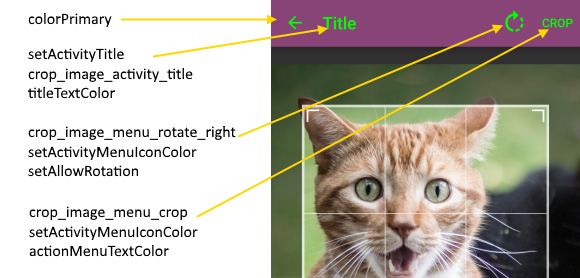
Most Action Bar visuals can be customized using standard theming:
<resources>
  <style name="MyTheme" parent="@style/Theme.AppCompat">
    <item name="colorPrimary">#847</item>
    <item name="titleTextColor">@color/green</item>
    <item name="actionMenuTextColor">@color/green</item>
    <item name="android:textColorPrimary">@color/green</item>
  </style>
</resources>
Activity title and menu items text can be modified using string resources (localization):
<resources>
  <string name="crop_image_activity_title">Title</string>
  <string name="crop_image_menu_rotate_right">Rotate</string>
  <string name="crop_image_menu_crop">Crop</string>
</resources>
Other customization are available via activity builder:
CropImage.activity(imageUri)
  .setActivityMenuIconColor(Color.GREEN)
  .setAllowRotation(true)
  .setActivityTitle("Title")
.start(this);The activity is derived from AppCompatActivity which requires that its theme to derive from Theme.AppCompat.
If your main theme is one of *.NoActionBar sub-theme's you must override CropImageActivity theme in the manifest with theme that includes action bar:
<activity android:name="com.theartofdev.edmodo.cropper.CropImageActivity"
android:theme="@style/Theme.AppCompat"/>Default: empty string
By default no title is shown on the crop image activity.
Override activity title using crop_image_activity_title string resource.
For dynamic title use .setActivityTitle("Title") activity builder method.
Default: left-hidden, right-shown, 90 degrees, Icons
Override text using crop_image_menu_rotate_left/crop_image_menu_rotate_right string resource.
Override icon using crop_image_menu_rotate_left/crop_image_menu_rotate_right drawable resource.
Modify icon color using .setActivityMenuIconColor(Color.GREEN) activity builder method.
Show counter-clockwise rotation button using .setAllowCounterRotation(true) activity builder method.
Hide by using .setAllowRotation(false) activity builder method.
Change rotation degrees by left/right buttons using .setRotationDegrees(15) activity builder method.
Default: "CROP" Text
Override text using crop_image_menu_crop string resource.
Set icon using crop_image_menu_crop drawable resource, If added the crop menu item will use that icon and the text will appear as tooltip.
Modify icon color using .setActivityMenuIconColor(Color.GREEN) activity builder method.
