中文 | English
For details about how to install Presenter Agent, see the installation guide.
Presenter is deployed on the Linux server where Mind Studio is located to display the inference result.
Presenter includes Presenter Server and Presenter Agent.
- Presenter Agent provides a series of APIs, which can be called to push media messages to Presenter Server.
- Presenter Server receives data from Presenter Agent, with the data displayed in the browser.
-
Description
Presenter Server is a software package that displays the result of inference. It is implemented based on Python 3.0 and uses the third-party web framework Tornado and underlying communication framework protobuf.
Presenter Server supports the image mode and video mode. In image mode, the image contains a single image. In video mode, consecutive images are displayed. Presenter Server marks different data sources based on channels. You can click Create in the browser to add channels and click** Delete **to delete channels. By default, two channels are supported, namely, image and video.
-
Sample Code
The Presenter Server source code is stored in the sample project directory. config is the configuration file directory. Modify config.conf to customize the IP address and port of the server. logging.conf is the configuration of the logging module. src is the source code directory. presenter_message_pb2.py defines the protobuf format, presenter_socket_server.py receives data in parallel, and webapp.py pushes data to Chrome for display. ui is the directory where the web interface materials are located.
Message communication with Presenter Agent:
The following figure shows the message communication between Presenter Server, Presenter Agent, and Chrome. Chrome initiates a channel creation operation. Presenter Server sends data to a specified channel. Chrome opens the channel and checks the inference result.
The structure of the message between Presenter Server and Presenter Agent contains the following information: total message length (4 bytes), message name length (1 byte), message name (XX bytes), and the protobuf content (XX bytes).
--------------------------------------------------------------
|total message len      |    int             |    4 bytes                  |
|--------------------------------------------------------------
|message name len    |    byte           |    1 byte                   |
|--------------------------------------------------------------
|message name          |    string         |    xx bytes                |
|--------------------------------------------------------------
|message body           |    protobuf    |    xx bytes                |
---------------------------------------------------------------
There are two main messages. One is the message for opening channels (OpenChannelRequest), and the other is the message for sending data (PresentImageRequest). The syntax in the protobuf is as follows:
message OpenChannelRequest {
string channel_name = 1; // Channel name
ChannelContentType content_type = 2; // Data mode, used to identify whether the channel is image or video
}

message PresentImageRequest {
ImageFormat format = 1; // Image format. Currently, only JPEG is supported.
uint32 width = 2; // Image width
uint32 height =3; // Image height
bytes data = 4; // Image data
}
The epoll API implements parallel working of multiple channels. The implementation pseudo code is as follows:
def _server_listen_thread(self):
"""socket server thread, epoll listening all the socket events"""
epoll = select.epoll()
epoll.register(self._sock_server.fileno(), select.EPOLLIN | select.EPOLLHUP)
try:
conns = {}
msgs = {}
while True:
events = epoll.poll(EPOLL_TIMEOUT)
# timeout, but no event come, continue waiting
if not events:
continue
for sock_fileno, event in events:
# new connection request from presenter agent
if self._sock_server.fileno() == sock_fileno:
self._accept_new_socket(epoll, conns)
# remote connection closed
# it means presenter agent exit withot close socket.
elif event & select.EPOLLHUP:
self._clean_connect(sock_fileno, epoll, conns, msgs)
# new data coming in a socket connection
elif event & select.EPOLLIN:
self._process_epollin(sock_fileno, epoll, conns, msgs)
# receive event not recognize
else:
self._clean_connect(sock_fileno, epoll, conns, msgs)
finally:
epoll.unregister(self._sock_server.fileno())
epoll.close()
self._sock_server.close()
In the message parsing process, the implementation pseudo code is as follows. First, the message is parsed, including the message length and message name, and finally the protobuf is read for processing.
def _read_sock_and_process_msg(self, sock_fileno, conns, msgs):
# Step1: read msg head
msg_total_len, msg_name_len = self._read_msg_head(sock_fileno, conns)
if msg_total_len is None:
return PRESENTER_ERR
# Step2: read msg name
msg_name = self._read_msg_name(conns[sock_fileno], msg_name_len)
if msg_name == SOCKET_RECEIVE_NULL:
return PRESENTER_ERR
try:
msg_name = msg_name.decode("utf-8")
except UnicodeDecodeError:
return PRESENTER_ERR
# Step3:  read msg body
msg_body_len = msg_total_len - MSG_HEAD_LENGTH - msg_name_len
ret = self._read_msg_body(sock_fileno, conns, msgs, msg_name, msg_body_len)
if ret == PRESENTER_ERR:
return ret
# Step4: process msg
ret = self._process_msg(conns[sock_fileno], msg_name, msgs[sock_fileno])
return ret
In the protobuf parsing process, there are three message requests from Presenter Agent, used for opening channels, sending data, and sending heartbeat messages, respectively.
def _process_msg(self, conn, msg_name, msg_data):
# process open channel request
if msg_name == OPEN_CHANNEL_REQUEST_FULL_NAME:
ret = self._process_open_channel(conn, msg_data)
# process image request, receive an image data from presenter agent
elif msg_name == PRESENT_IMAGE_REQUEST_FULL_NAME:
ret = self._process_image_request(conn, msg_data)
# process heartbeat request, it used to keepalive a channel path
elif msg_name == HEART_BEAT_MESSAGE_FULL_NAME:
ret = self._process_heartbeat(conn)
else:
ret = PRESENTER_ERR
return ret

Presenter Agent provides a series of APIs, which can be called to push media messages to Presenter. You can view the data in the browser. Currently, JPEG images can be pushed.
The following figure shows the process for calling the APIs:
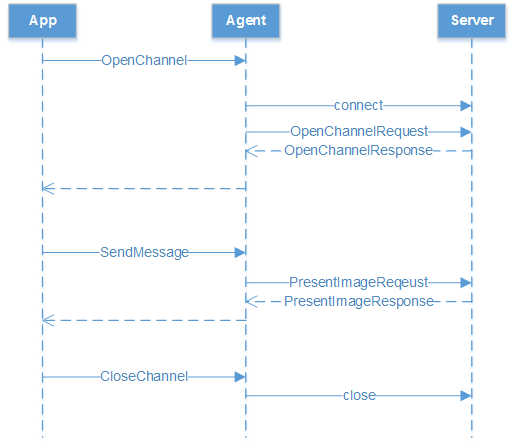
- The application calls the OpenChannel function to open the channel between the application and Presenter Server.
- The application calls the SendMessage function to push media messages in the channel. When pushing a message, you can draw a rectangle on the image to be pushed. You need to set the coordinates of the upper left and lower right points of the box and the box title in the PresentImageRequest object.
- After all images are sent, the application calls the CloseChannel function to release the allocated resources.
-
Sample Code
The following uses sending images as an example:
-
OpenChannelParam param; param.hostIp = "127.0.0.1"; //IP address of Presenter Server param.port = 7006; //port of present service param.channelName = "image"; param.contentType = ContentType::kImage; //content type is IMAGE Channel *channel = nullptr; PresenterErrorCode errorCode = OpenChannel(channel, param); if (errorCode != PresenterErrorCode::kNone) { return; } -
SendMessage
ascend::presenter::proto::PresentImageRequest request; request.set_data(string(reinterpret_cast<const char*>(buffer), size)); //image data buffer, image shuold be jpeg format request.set_width(1920); request.set_height(1280); //Set the rectangles info into request. ascend::presenter::proto::Rectangle_Attr *rectangle_attr = nullptr; rectangle_attr = request.add_rectangle_list(); //Add one rectangle rectangle_attr->mutable_left_top()-> set_x(100); rectangle_attr->mutable_left_top()-> set_y(100); rectangle_attr->mutable_right_bottom()->set_x(500); rectangle_attr->mutable_right_bottom()->set_y(500); rectangle_attr->set_label_text("This is a title"); //Set the title for the rectangle ascend::presenter::PresenterErrorCode error_code = ascend::presenter::SendMessage(channel, request) -
Close Channel
delete channel;
If you want to send images to display the video effect, change contentType in 1 to ContentType::kVideo,
and call the SendMessage function repeatedly.
-
-
Modifying Source Code
To compile the source code, you need to use the .protoc file to compile the .proto file. Obtain the software package protoc-3.5.1-linux-x86_64.zip from https://github.com/protocolbuffers/protobuf/releases/.
and install the package by referring to the readme file in the package.
The main source code structure is as follows:
common/presenter/agent               Root directory of the Presenter Agent source code.
├─proto                             Protobuf message definition.
├─include/ascendk/presenter/agent                          API header file.
   ├─channel.h                       Universal channel interface, which provides the function of sending and receiving protobuf messages.
   ├─errors.h                        Error code.
   ├─presenter_channel.h            Encapsulates the function of sending media data to Presenter Server.
   ├─presenter_types.h            Encapsulates the function of sending media data to Presenter Server.
├─src/asceddk/presenter/agent       Source code directory.
   ├─channel                        Source code related to the interaction with Presenter Server.
      ├─default_channel.cpp         Default implementation of the channel class, which maintains the long connection with the server.
      ├─default_channel.h           Header file for the default implementation of the channel class.
      ├─channel.cpp                 Header file for the default implementation of the channel class.
   ├─codec
   ├─connection                   Provides the APIs for sending and receiving protobuf messages.
   ├─net                           Network connection source code, which is used to receive and send byte arrays.
      ├─socket.cpp                 Socket abstract class.
      ├─socket_factory.cpp          Socket factory abstract class.
      ├─raw_socket.cpp              Raw socket based on Linux, which does not provide the channel encryption function.
      ├─raw_socket_factory.cpp       Raw docket factory class.
   ├─presenter                       Encapsulates the function of sending media data to Presenter Server.
   ├─util                           Source code of the tool class.
├─Makefile
If the** presenter_message.proto** file is modified, run the following command in the proto directory to compile the proto file:
protoc presenter_message.proto --cpp_out=./