New-AzResourceGroupDeployment fails if you add parameter -asjob #6644


-
|
When I am deploying a long running resource like Site to site VPN I would like to run it in background so I can continue with other deployments. Adding this parameter does not work for me, if I ran
value in bicep file is not hardcoded as it is red from *.json template file then name is constructed from this parameter in bicep file
|
Beta Was this translation helpful? Give feedback.
Replies: 5 comments 12 replies

-
|
I am not able to repro you scenario, can you please confirm you have the latest AZ PowerShell Modules, then also follow the steps below and let me know how you go.
get-module
ModuleType Version    PreRelease Name
Script     2.7.5                 Az.Accounts
Script     5.4.0                 Az.Resources
Here is a repro
param envname string
param location string
param now string = utcNow()

resource deploymentScript 'Microsoft.Resources/deploymentScripts@2020-10-01' = {
  name: 'testparamsasjob'
  location: location
  kind: 'AzurePowerShell'
  properties: {
    azPowerShellVersion: '6.6'
    arguments: ' -envname ${envname}'
    scriptContent: '''
      param (
        [string]$envname
      )
      echo $envname

      $DeploymentScriptOutputs = @{}
      $DeploymentScriptOutputs['envName'] = $envname
    '''
    forceUpdateTag: now
    cleanupPreference: 'OnSuccess'
    retentionInterval: 'P1D'
    timeout: 'PT3M'
  }
}

output deploymentScriptOutput object = deploymentScript.properties.outputs.envName
executed without -asjob
{
  "$schema": "https://schema.management.azure.com/schemas/2015-01-01/deploymentParameters.json#",
  "contentVersion": "1.0.0.0",
  "parameters": {
    "envname": {
      "value": "helloworld"
    },
    "location": {
      "value": "centralus"
    }
  }
}
New-AzResourceGroupDeployment -verbose -ResourceGroupName xyz -TemplateFile D:\asjob.bicep -TemplateParameterFile D:\asjob-params.json
Now test with -asjob and using a param file New-AzResourceGroupDeployment -asJob -verbose -ResourceGroupName xyz -TemplateFile D:\asjob.bicep -TemplateParameterFile D:\asjob-params.json
get-job | ft -AutoSize
Id Name PSJobTypeName State HasMoreData Location Command
-- ---- ------------- ----- ----------- -------- -------
1 Long Running Operation for 'New-AzResourceGroupDeployment' AzureLongRunningJob`1 Running True localhost New-AzResourceGroupDeployment
get-job | ft -AutoSize
Id Name PSJobTypeName State HasMoreData Location Command
-- ---- ------------- ----- ----------- -------- -------
1 Long Running Operation for 'New-AzResourceGroupDeployment' AzureLongRunningJob`1 Completed True localhost New-AzResourceGroupDeployment
get-job | Receive-Job -Keep | ft -AutoSize
ResourceGroupName OnErrorDeployment DeploymentName CorrelationId ProvisioningState Timestamp Mode TemplateLink TemplateLinkString DeploymentDebugLogLevel
----------------- ----------------- -------------- ------------- ----------------- --------- ---- ------------ ------------------ -----------------------
ACU1-BRW-AOA-RG-T5 asjob e831baa6-407a-4e26-86c0-a03e1b91286c Succeeded 4/30/2022 6:03:14 PM Incremental
$output = get-job | Receive-Job -Keep
$output
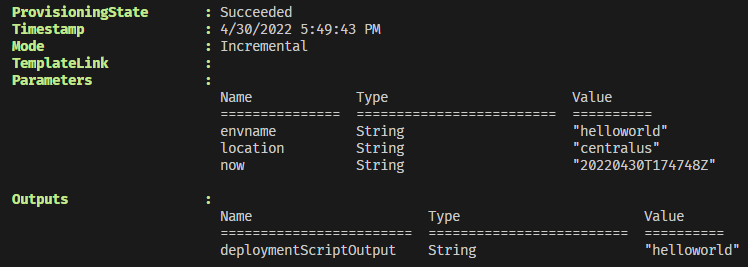
DeploymentName : asjob
ResourceGroupName : ACU1-BRW-AOA-RG-T5
ProvisioningState : Succeeded
Timestamp : 4/30/2022 6:03:14 PM
Mode : Incremental
TemplateLink :
Parameters :
Name Type Value
=============== ========================= ==========
envname String "helloworld"
location String "centralus"
now String "20220430T180120Z"
Outputs :
Name Type Value
======================== ========================= ==========
deploymentScriptOutput String "helloworld"
|
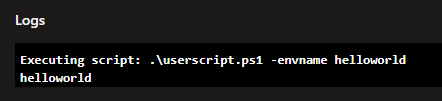


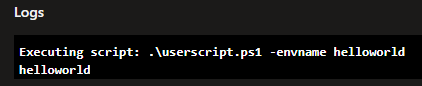
Beta Was this translation helpful? Give feedback.

-
|
Something else that came to mind, can you test with using the Fully qualified path to the param file e.g.
instead of
I actually didn't test this however was just a thought. you can always use the receive-job -keep as above to see any errors our output, as shown above. |
Beta Was this translation helpful? Give feedback.
-
|
Tagging @uky2019 for visibility |
Beta Was this translation helpful? Give feedback.
-
|
Hi thanks for all suggestions we had a national holiday here so I was away, will test your recommendations and will report back! |
Beta Was this translation helpful? Give feedback.
-
|
Sure no problem @uky2019 keep us posted on your progress and if you are still seeing issues, I can try to repro your issue on my side. |
Beta Was this translation helpful? Give feedback.
-
|
Hi @brwilkinson , I tested your recommendation and it solved my issue. I used fully qualified path to both template and parameter file and adding |
Beta Was this translation helpful? Give feedback.
-
|
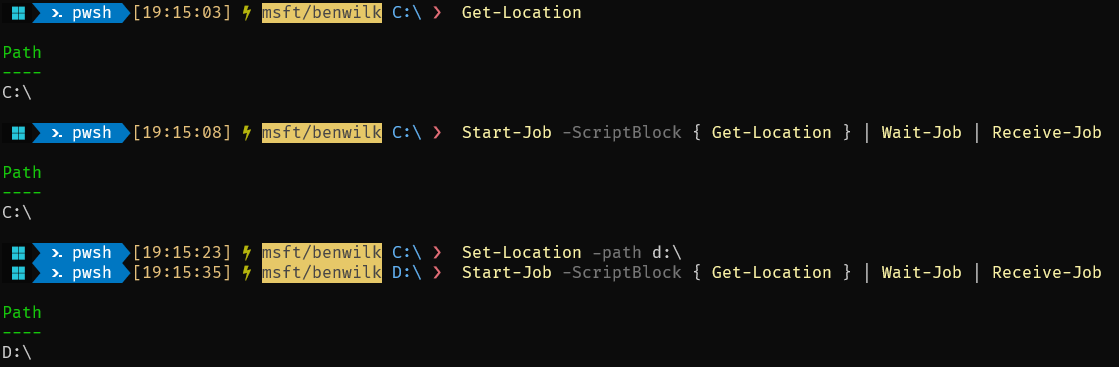
Hi @BethanyZhou I have another one here to take a look into.
The working directory is not being set in the background job, so the Full repro is above for the working scenario. For normal jobs the
|

Beta Was this translation helpful? Give feedback.
-
|
Also @uky2019 can you please share the original command that you were running? which caused the error. E.g. was there a variable in the path or was it a relative path Etc ?
new-azresourcegroupdeployment -templatefile d:\foo.bicep -Templateparameterfile $mypath\param.json
new-azresourcegroupdeployment -templatefile d:\foo.bicep -Templateparameterfile  .\param.json
new-azresourcegroupdeployment -templatefile .\foo.bicep -Templateparameterfile $mypath\param.json
new-azresourcegroupdeployment -templatefile .\foo.bicep -Templateparameterfile  .\param.json
new-azresourcegroupdeployment -templatefile $mypath\foo.bicep -Templateparameterfile $mypath\param.json
new-azresourcegroupdeployment -templatefile $mypath\foo.bicep -Templateparameterfile  .\param.json
# something else ? |
Beta Was this translation helpful? Give feedback.

-
|
Hi @brwilkinson , I'm investigating this issue. From code perspective, I think this issue will exist if
Using bicep file with relative path should be fine. bicep file path will be directed to a full path of generated json file before opening a new process by AsJob. |
Beta Was this translation helpful? Give feedback.
-
|
@brwilkinson I am deploying this from location where my modules are located like This one fails, but works normally without -asjob: This is error: This one works fine: |
Beta Was this translation helpful? Give feedback.
-
|
How about this one? New-AzResourceGroupDeployment |
Beta Was this translation helpful? Give feedback.

-
|
Hi this one works OK |
Beta Was this translation helpful? Give feedback.
-
|
Thanks @uky2019 , this results confirm my guess. This command parses the relative path of TemplateParameterFile to absolute path after opens a new thread. That's the root cause. Created an issue to track this problem. Azure/azure-powershell#18084 Will Fix it. |
Beta Was this translation helpful? Give feedback.
-
|
Thank you @BethanyZhou and @uky2019 |
Beta Was this translation helpful? Give feedback.
-
|
Thank you again @BethanyZhou for Azure/azure-powershell#18084 ... which is now closed. @uky2019 you will need to keep an eye out for new AZ.Resource Module release, however once that is out you should be good to go. |
Beta Was this translation helpful? Give feedback.


I am not able to repro you scenario, can you please confirm you have the latest AZ PowerShell Modules, then also follow the steps below and let me know how you go.
Ctrl + Cso long as the you seeVERBOSE: 11:07:55 AM - Template is valid.then you can stop the deployment and it will continue to run in Azure.Here is a repro
Bicepscript to test this scenario.asjob.bicep