Architecting your Mobile app
Whether you're building a small app for users inside your organization or the next SaaS hit, you'll want to be conscious of how to integrate Identity into your app. This article will focus on how the various app architectures available in the Microsoft Identity platform when considering ease of development, ability to scale, and speed of operations all while maintaining a strong security posture.
Before diving into the technical details, there's some key principles we'll keep in mind:
- Users expect operations to be quick and convey system status.
- The quality, speed, and coherence of interactions are critical to user engagement.
- Operationally speaking, they're generally accompanied by other clients (Web apps, Desktop apps).
The Microsoft Identity platform is built on open standards including OpenId Connect and OAuth2.0. The architectures discussed will focus on the most commons topologies these protocols support. Each section will walk through the basic layout, procs and cons of each architecture, and the best practices and links to getting started with that layout.
- Standalone Mobile app
- Mobile app + Service
- Mobile app + Serverless
No matter what architecture you ultimately pick, the goal is to build a great mobile app that delivers seamless experiences to your users. The simplest manifestation of this is a standalone mobile app that performs all API requests directly from the user's device.
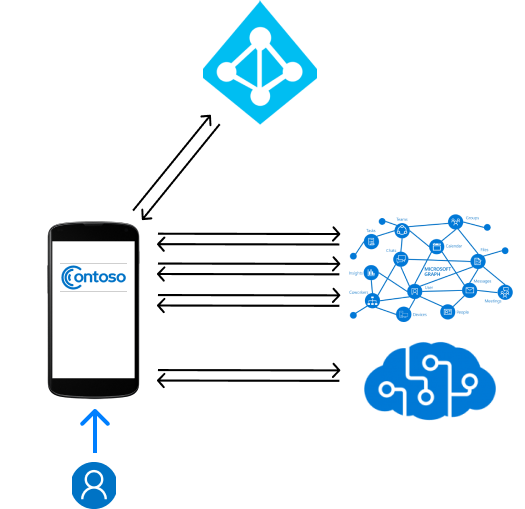
In this architecture, the code running on the device is responsible for everything including sign in, calling APIs, aggregating and applying meaning to the data, and presenting experiences to the user.
- Simple to develop and maintain.
- Reduces the complexity of handling user data.
- There are data privacy and regulatory implications when data passes through a service.
- Can build trust with users who are privacy conscious.
- User data never needs to leave the device.
- User data is more distributed in that it's only being gathered and used on the user's device.
- Signficantly more network requests and data over the netwrok
- Many user's have limited data plans.
- Users may be in low-network conditions that make it more difficult to handle large amounts of data being sent to the device.
- Reduces the capability for telemetry and diagnostics of user behavior.
- Reduces the capability to process large amounts of data for insights and personalized expereinces.
- Your app may want to perform several Microsoft Graph API calls and feed this into a Machine Learning service to provide more personalized experiences. This may be computationally intense for a mobile device.
If you've chosen to use MSAL to integrate and build a standalone app architecture, there are very few best practcies your app will be missing. MSAL automatically renews refresh tokens, handles most unique Azure AD scenarios (like Multi-factor Auth, SSO, and Conditional Access), and caching/managing accounts + tokens.
In addition to what MSAL does automatically, an app may also consider the following practices:
- MSAL + Identity
- Use MSAL to get an Access Token right before you make an API call.
- Do not look inside the Access token in your client app, these can change at any time.
- If you need information about the user, you can perform a request to Microsoft Graph /me.
- Always attempt
acquireTokenSilent(...)requets beforeacquireTokenInteractive(...).
- Network requests
- Research the API you're requesting data from and handle all error conditions.
- Most Microsoft APIs support and may throw HTTP 400, 401, 403, and 429.
- Try to use asynchronous requests where possible.
- If you know you will need to make an API call, do it in advance to minimize waiting time.
- For blocking requets, convey the current status through a visual cue.
- Research the API you're requesting data from and handle all error conditions.
The MSAL.Android getting started sample uses a standalone Mobile app architecture.
For more help, feel free to create a Github issue or post on StackOverflow with tag azure-active-directory.