Register your application with Azure Active Directory
Before using MSAL.NET you will have to register you applications with Azure AD.
Azure AD currently supports several kinds of applications, depending on type of users they target:
- Azure AD v1 applications, let users sign-in with their work and school account use ADAL.NET and need to be registered in the Azure portal (https://portal.azure.com).
- Azure AD v2 application let users sign-in with their work and school accounts or their personal accounts use MSAL.NET, which is a different library, currently in Preview.
If you are not familiar with v2 application registration, you might want to follow the following tutorial: Call the Microsoft Graph API from a Windows Desktop app. Reading the following article will also be valuable: Type of Apps in the V2 endpoint
The picture below shows in which case you want to use MSAL.NET: when you want the users of the application to sign-in with Azure AD (work and school accounts) or Microsoft (personal) accounts (MSA), or with Azure AD B2C.
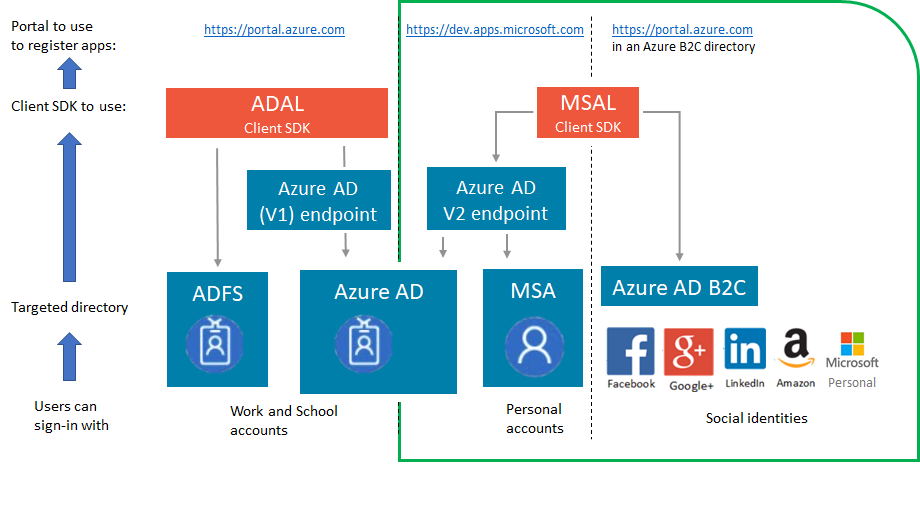
But you cannot use MSAL.NET yet if your application needs to sign-in users with Active Directory Federation Services (ADFS)
Before choosing to use MSAL.NET you might also want to read:
Note that MSAL is work in progress.