
Download the versions you desire from here: https://www.python.org/downloads/windows/
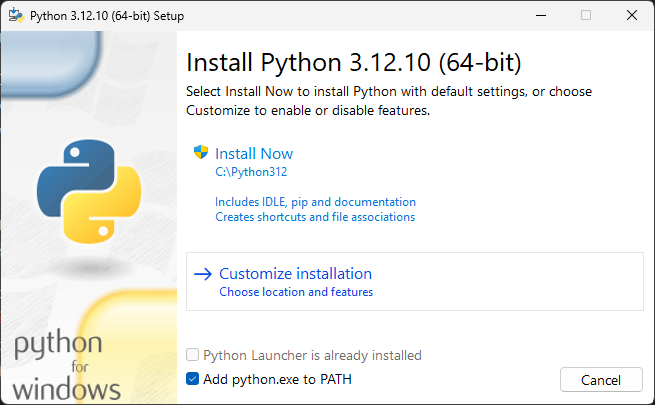
Select the following options (if available):
-
Add python.exe to PATH
-
Customize installation
- Maintain the defaults for 'Documentation', 'pip', 'tcl/tk and IDLE', and 'Python test suite', i.e., Enabled
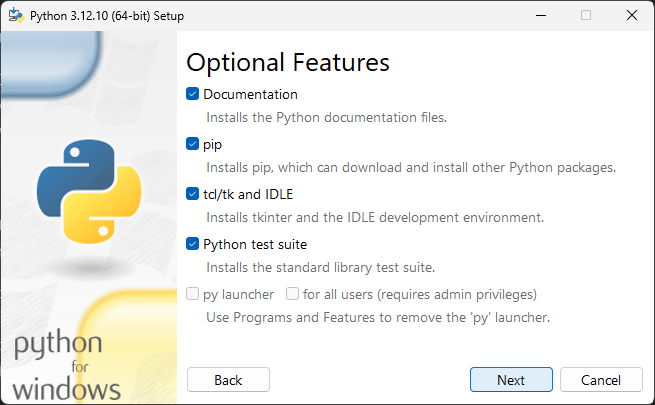
- Maintain the defaults for 'py launcher' and 'for all users', i.e., Disabled
- Maintain the defaults for 'Documentation', 'pip', 'tcl/tk and IDLE', and 'Python test suite', i.e., Enabled
Under advanced options:
- Enable 'Install Python for all users', 'Create shortcuts for installed applications', 'Add Python to environment variables', 'Precompile standard library'
- Choose a clear path, preferably one without spaces, example,
C:\Python312\instead ofC:\Program Files\Python312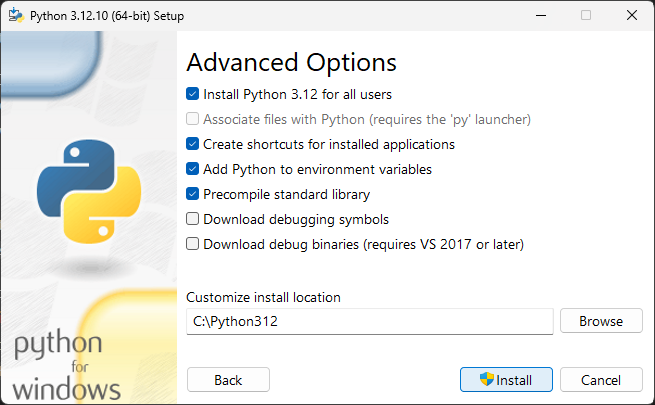

sudo apt update
sudo apt install -y \
  build-essential \
  libssl-dev \
  zlib1g-dev \
  libbz2-dev \
  libreadline-dev \
  libsqlite3-dev \
  libncursesw5-dev \
  xz-utils \
  tk-dev \
  libxml2-dev \
  libxmlsec1-dev \
  libffi-dev \
  liblzma-dev
sudo apt install gitcurl https://pyenv.run | bashvim ~/.bashrcAdd:
export PYENV_ROOT="$HOME/.pyenv"
export PATH="$PYENV_ROOT/bin:$PATH"
eval "$(pyenv init --path)"
eval "$(pyenv init -)"
Restart the terminal and confirm that pyenv is installed:
pyenv --versionExample:
pyenv install 3.12.10pyenv install 3.14.3pyenv versionsGlobal default:
pyenv global 3.12.10Example of setting the local default (per project):
cd my_project
pyenv local 3.12.0python --version
Download the versions you desire from here: https://www.python.org/downloads/macos/