| title | Immax 07573L control via MQTT |
|---|---|
| description | Integrate your Immax 07573L via Zigbee2MQTT with whatever smart home infrastructure you are using without the vendor's bridge or gateway. |
| addedAt | 2024-09-01 05:39:25 -0700 |
| pageClass | device-page |
| Model | 07573L |
| Vendor | Immax |
| Description | Smart circuit breaker |
| Exposes | temperature, temperature_threshold, temperature_breaker, power_threshold, power_breaker, over_current_threshold, over_current_breaker, over_voltage_threshold, over_voltage_breaker, under_voltage_threshold, under_voltage_breaker, switch (state), countdown, power_outage_memory, indicator_mode, power, current, voltage, energy |
| Picture | 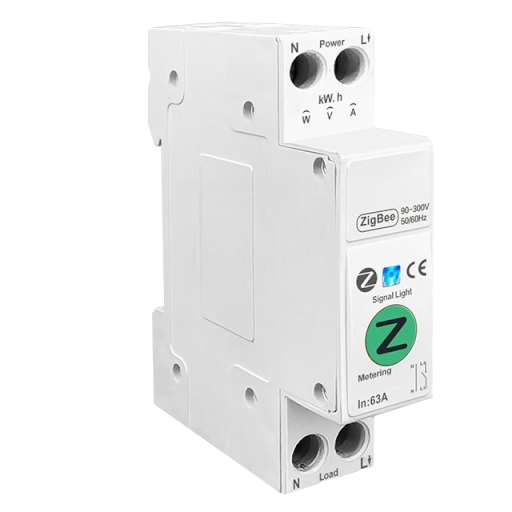 |
This device supports OTA updates, for more information see OTA updates.
How to use device type specific configuration
-
temperature_calibration: Calibrates the temperature value (absolute offset), takes into effect on next report of device. The value must be a number. -
temperature_precision: Number of digits after decimal point for temperature, takes into effect on next report of device. This option can only decrease the precision, not increase it. The value must be a number with a minimum value of0and with a with a maximum value of3 -
power_calibration: Calibrates the power value (percentual offset), takes into effect on next report of device. The value must be a number. -
power_precision: Number of digits after decimal point for power, takes into effect on next report of device. This option can only decrease the precision, not increase it. The value must be a number with a minimum value of0and with a with a maximum value of3 -
current_calibration: Calibrates the current value (percentual offset), takes into effect on next report of device. The value must be a number. -
current_precision: Number of digits after decimal point for current, takes into effect on next report of device. This option can only decrease the precision, not increase it. The value must be a number with a minimum value of0and with a with a maximum value of3 -
voltage_calibration: Calibrates the voltage value (percentual offset), takes into effect on next report of device. The value must be a number. -
voltage_precision: Number of digits after decimal point for voltage, takes into effect on next report of device. This option can only decrease the precision, not increase it. The value must be a number with a minimum value of0and with a with a maximum value of3 -
energy_calibration: Calibrates the energy value (percentual offset), takes into effect on next report of device. The value must be a number. -
energy_precision: Number of digits after decimal point for energy, takes into effect on next report of device. This option can only decrease the precision, not increase it. The value must be a number with a minimum value of0and with a with a maximum value of3 -
state_action: State actions will also be published as 'action' when true (default false). The value must betrueorfalse
High power threshold.
Value can be found in the published state on the power_threshold property.
It's not possible to read (/get) this value.
To write (/set) a value publish a message to topic zigbee2mqtt/FRIENDLY_NAME/set with payload {"power_threshold": NEW_VALUE}.
The minimal value is 1 and the maximum value is 26.
The unit of this value is kW.
High power breaker.
Value can be found in the published state on the power_breaker property.
It's not possible to read (/get) this value.
To write (/set) a value publish a message to topic zigbee2mqtt/FRIENDLY_NAME/set with payload {"power_breaker": NEW_VALUE}.
If value equals ON power breaker is ON, if OFF OFF.
Over-current threshold.
Value can be found in the published state on the over_current_threshold property.
It's not possible to read (/get) this value.
To write (/set) a value publish a message to topic zigbee2mqtt/FRIENDLY_NAME/set with payload {"over_current_threshold": NEW_VALUE}.
The minimal value is 1 and the maximum value is 64.
The unit of this value is A.
Over-current breaker.
Value can be found in the published state on the over_current_breaker property.
It's not possible to read (/get) this value.
To write (/set) a value publish a message to topic zigbee2mqtt/FRIENDLY_NAME/set with payload {"over_current_breaker": NEW_VALUE}.
If value equals ON over current breaker is ON, if OFF OFF.
Over-voltage threshold.
Value can be found in the published state on the over_voltage_threshold property.
It's not possible to read (/get) this value.
To write (/set) a value publish a message to topic zigbee2mqtt/FRIENDLY_NAME/set with payload {"over_voltage_threshold": NEW_VALUE}.
The minimal value is 220 and the maximum value is 265.
The unit of this value is V.
Over-voltage breaker.
Value can be found in the published state on the over_voltage_breaker property.
It's not possible to read (/get) this value.
To write (/set) a value publish a message to topic zigbee2mqtt/FRIENDLY_NAME/set with payload {"over_voltage_breaker": NEW_VALUE}.
If value equals ON over voltage breaker is ON, if OFF OFF.
Under-voltage threshold.
Value can be found in the published state on the under_voltage_threshold property.
It's not possible to read (/get) this value.
To write (/set) a value publish a message to topic zigbee2mqtt/FRIENDLY_NAME/set with payload {"under_voltage_threshold": NEW_VALUE}.
The minimal value is 76 and the maximum value is 240.
The unit of this value is V.
Under-voltage breaker.
Value can be found in the published state on the under_voltage_breaker property.
It's not possible to read (/get) this value.
To write (/set) a value publish a message to topic zigbee2mqtt/FRIENDLY_NAME/set with payload {"under_voltage_breaker": NEW_VALUE}.
If value equals ON under voltage breaker is ON, if OFF OFF.
The current state of this switch is in the published state under the state property (value is ON or OFF).
To control this switch publish a message to topic zigbee2mqtt/FRIENDLY_NAME/set with payload {"state": "ON"}, {"state": "OFF"} or {"state": "TOGGLE"}.
To read the current state of this switch publish a message to topic zigbee2mqtt/FRIENDLY_NAME/get with payload {"state": ""}.
Countdown to turn device off after a certain time.
Value can be found in the published state on the countdown property.
To read (/get) the value publish a message to topic zigbee2mqtt/FRIENDLY_NAME/get with payload {"countdown": ""}.
To write (/set) a value publish a message to topic zigbee2mqtt/FRIENDLY_NAME/set with payload {"countdown": NEW_VALUE}.
The minimal value is 0 and the maximum value is 43200.
The unit of this value is s.
Recover state after power outage.
Value can be found in the published state on the power_outage_memory property.
To read (/get) the value publish a message to topic zigbee2mqtt/FRIENDLY_NAME/get with payload {"power_outage_memory": ""}.
To write (/set) a value publish a message to topic zigbee2mqtt/FRIENDLY_NAME/set with payload {"power_outage_memory": NEW_VALUE}.
The possible values are: on, off, restore.
LED indicator mode.
Value can be found in the published state on the indicator_mode property.
To read (/get) the value publish a message to topic zigbee2mqtt/FRIENDLY_NAME/get with payload {"indicator_mode": ""}.
To write (/set) a value publish a message to topic zigbee2mqtt/FRIENDLY_NAME/set with payload {"indicator_mode": NEW_VALUE}.
The possible values are: off, off/on, on/off, on.
Instantaneous measured power.
Value can be found in the published state on the power property.
It's not possible to read (/get) or write (/set) this value.
The unit of this value is W.
Instantaneous measured electrical current.
Value can be found in the published state on the current property.
It's not possible to read (/get) or write (/set) this value.
The unit of this value is A.
Measured electrical potential value.
Value can be found in the published state on the voltage property.
It's not possible to read (/get) or write (/set) this value.
The unit of this value is V.
Sum of consumed energy.
Value can be found in the published state on the energy property.
It's not possible to read (/get) or write (/set) this value.
The unit of this value is kWh.