To begin with, here is a table with all logical symbols accepted by the program.
| Logical name | Symbol(s) |
|---|---|
| Proposition | Any upper case letter |
| False | ⊥, False or false |
| Negation | ~ or ¬ |
| Conjunction | & or ∧ |
| Disjunction | v or ∨ |
| Conditional | -> or → |
| Biconditional | <-> or ↔ |
| Single turnstile | |- or ⊢ |
For example, the inference A v B, ~A |- B.
The accepted Fitch-style justifications are:
| Rule | Explanation | Symbol(s) |
|---|---|---|
| Premise | Pr, PR or Premise |
|
| Assumption | As, AS or Assumption |
|
| Reiteration | 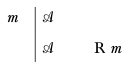 |
R m |
| Conjunction introduction | 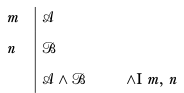 |
&I m, n or ∧I m, n |
| Conjunction elimination | 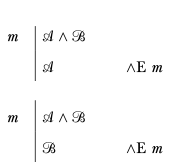 |
&E m or ∧I m |
| Disjunction introduction | 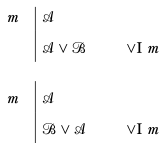 |
vI m or ∨I m |
| Disjunction elimination | 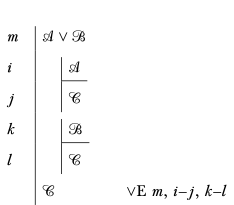 |
vE m, i-j, k-l or ∨I m, i-j, k-l |
| Conditional introduction | 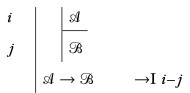 |
->I i-j or →I i-j |
| Conditional elimination | 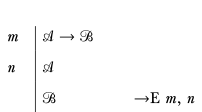 |
->E m, n or →E m, n |
| Negation introduction | 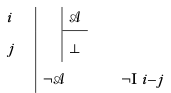 |
~I i-j or ¬I i-j |
| Negation elimination | 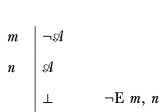 |
~E m, n or ¬E m, n |
| Biconditional introduction | 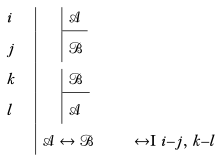 |
<->I i-j, k-l or ↔I i-j, k-l |
| Biconditional elimination | 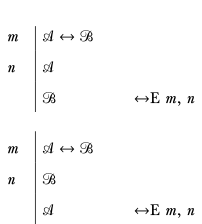 |
<->E m, n or ↔E m, n |
For conditional elimination, both directions of the lines cited are accepted.
The program also supports using previously proved inferences as meta-theorems, with the syntax Apply <inference> <line numbers to cite> (or apply in lowercase).
A proof file starts with optional import statements, indicated by the keyword #import.
Each proof starts with the keyword proof, followed by the inference to prove.
Each line consists of:
- An optional line number, constiting of a number followed by a period (the line numbers are ignored by the interpreter)
- The line's main formula
- The line's justification, written after the keyword
by
Comments are written after a % sign.
The Fitch langage uses significant indentation. Between two lines:
- Increasing the indentation means increasing the subproof level, i.e. starting a new subproof
- Decreasing the indentation means decreasing the subproof level, i.e. discharging an assumption.
If an assumption is encountered while the indentation is the same as the previous line, the previous assumption will be discharged before taking the line into account.
Here is an example proof of
proof (A & B) v (A & C) |- A
    1. (A & B) v (A & C) by Premise
        2. A & B by Assumption
        3. A by &E 2

        4. A & C by Assumption
        5. A by &E 4

    6. A by vE 1, 2-3, 4-5
More examples can be found in the examples folder:
- additional_rules.ftc: a collection of additional rules that can be imported and used for proofs
- proof_examples.ftc: a file containing over 30 example proofs. They are my solutions to most of the Fitch-style proof exercises in the Forall x: Calgary textbook on formal logic. The output generated from the file can be found in the output folder of the examples directory.