| title | date | authorURL | originalURL | translator | reviewer |
|---|---|---|---|---|---|
为什么 stdout 比 stderr 更快? |
2024-12-02 04:08:32 UTC |
31 分钟阅读 发布时间:2024-01-10 我最近意识到在 Rust 中 stdout 比 stderr 快得多。以下是我深入研究这个问题后的发现。

我已经使用终端(即命令行)处理日常大部分事务有一段时间了。我一直对命令行的快速和便捷感到着迷,这就是为什么在可能的情况下,我提倡使用 CLI(命令行)或 TUI(终端用户界面)应用程序而非 GUI(图形用户界面)应用程序。除了我已有的偏好外,在看到终端用户体验的最新发展,如 Zellij 和 GPU 驱动的终端模拟器如 Alacritty/Wezterm/Rio 后,我开始全心全意地相信终端就是未来。当这种巨大潜力与像 Rust 这样强大的系统编程语言结合时,结果通常是非常流畅的终端和开发体验,我认为每个开发者在考虑效率、速度和安全性时都会欣赏这一点。 这很可能就是我最初被吸引去用 Rust 构建终端用户界面应用程序的原因。当我构建我的第一个 Rust/TUI 项目 kmon 时,我惊讶于像终端这样简单的东西的限制可以被突破,构建出让你更加沉迷于使用终端的应用程序。几年后,我成为了 Ratatui 的维护者之一,这是一个用于制作 TUI 的 Rust 库,我很荣幸成为核心团队成员之一,去年我们重新激活了无人维护的 tui-rs 库,将其改名为 Ratatui。 考虑到这一切,作为一个日常终端用户和命令行开发者,我每天都在解决新的终端相关问题。有时我会遇到非常有趣的问题和挑战。正如你可能预期的那样,这篇博文就是其中一个问题的成果。
为什么 stdout 比 stderr 更快?
好的,现在让我们退一步,首先尝试理解这个问题。在一切之前,我们需要掌握一些关于 UNIX 的概念。
目录
UNIX 操作系统为计算机世界带来了许多突破性的进步,其中之一无疑是标准流。根据 UNIX,每个进程在启动时都会为其打开三个流:
- 标准输入(
stdin): 用于读取输入 - 标准输出 (
stdout): 用于写入常规输出。 - 标准错误 (
stderr): 用于打印诊断或错误消息。
这里有一个过度简化的例子来演示这些流:
# 从 stdin 读取 foo 的值
$ read -r foo
test

# print the value of foo to stdout
$ echo "value of foo is '$foo'"
value of foo is 'test'

# "echoo" 命令不存在,所以错误消息会被打印到 stderr
$ echoo "$foo"
bash: echoo: command not found
这些 I/O(输入/输出)流通常通过 tty(电传打字机)连接到用户的终端,tty 可以被描述为一个能够访问终端的接口。
正如你可能多次听说的,根据 UNIX 哲学,一切皆文件。这意味着 I/O 流也应该是文件,事实上确实如此:
$ file /dev/stdin /dev/stdout /dev/stderr

/dev/stdin:  symbolic link to /proc/self/fd/0
/dev/stdout: symbolic link to /proc/self/fd/1
/dev/stderr: symbolic link to /proc/self/fd/2
If you have realized, the file descriptor (unique identifier) of these abstract files are the same as the initial list given above (starts from 0).
So if they are files, we should be able to read them right?
Actually, no-
types quickly
$ cat /dev/stdout
Why nothing is happening?
*sigh* It is because they are not real files, they are just file descriptors linked to TTY or PTY (i.e. emulated TTY AKA PseudoTeletYpe).
$ ls -l /proc/self/fd/
lrwx------ - orhun 0 -> /dev/pts/20
lrwx------ - orhun 1 -> /dev/pts/20
lrwx------ - orhun 2 -> /dev/pts/20As you can see, the standard streams are attached to PTYs (i.e. pseudo-terminals) under /dev/pts.
Wait, so /dev/stdout is a symlink to a file descriptor at /proc/self/fd/1 and that file descriptor is a symlink to /dev/pts/20!?
What even is /dev/pts/20 in this case?
$ file /dev/pts/20

/dev/pts/20: character special (136/20)
bruh, what?
In Unix, character special files are files that access to I/O devices such as a NULL file (/dev/null) and file descriptors. In our case, stdout is a file descriptor (1) so it is a character special file. (The name "character special" actually comes from the fact that each character is handled individually.)
Each character special file has a device major number, which identifies the device type, and device minor number, which identifies a specific device of a given device type. So what you see on the right (136/20) means:
$ rg '136' /proc/devices

136 pts- Major 136: a PTS device (
/dev/pts) - Minor 20: device 20 (
/dev/pts/20)
Ok cool, but why am I not able to read from /dev/stdout?
Oh that, yes. When you try to read data from stdout, it keeps running because it's waiting for data to read from the file descriptor. So if you give it input, then you can read it back:
$ cat /dev/stdout

foo # input
foo
bar #input
bar
Now that we have a general understanding of I/O streams, we can jump to the real world examples and make progress towards answering our question.
The following section makes use of the Rust programming language but the overall concepts are generally appliable to any programming language - even HolyC.
Terminal user interfaces leverages the terminal by drawing widgets/components such as text inputs, spinners and styled text on it, similar to the traditional graphical user interfaces. The terminal is able to render such elements thanks to the custom handling of ANSI escape codes. These ANSI sequences are used to control the cursor location, color and styling of the terminal.
So in order the create a terminal user interface, we need a low-level library for controlling both the terminal and I/O streams and also rendering the UI components. Usually, this two step process is split between different libraries for ease-of-use and the sake of single responsibility principle.
For example, while ncurses (one of the oldest TUI libraries written in C) is taking care of the low-level interface to the terminal, CDK (curses development kit) provides a sets of widgets to build GUI-like applications in the terminal.
Similarly in the Rust ecosystem, the following libraries are the most preferred ones for this task today:
- crossterm: pure-Rust cross-platform terminal manipulation library.
- ratatui: lightweight library that provides a set of widgets and utilities - supports different backends including
crossterm.
So let's build a very simple TUI using these libraries:
simple-tui.rs (click here to expand)
#!/usr/bin/env rust-script

//! ```cargo
//! [dependencies]
//! crossterm = "0.27.0"
//! ratatui = "0.25.0"
//! ```

use std::io::{self, stdout};

use crossterm::{
    event::{self, Event, KeyCode, KeyEventKind},
    terminal::{disable_raw_mode, enable_raw_mode, EnterAlternateScreen, LeaveAlternateScreen},
    ExecutableCommand,
};
use ratatui::{prelude::*, widgets::*};

/// Handle key events.
fn handle_events() -> io::Result<bool> {
    if event::poll(std::time::Duration::from_millis(50))? {
        if let Event::Key(key) = event::read()? {
            // Quit when 'q' is pressed.
            if key.kind == KeyEventKind::Press && key.code == KeyCode::Char('q') {
                return Ok(true);
            }
        }
    }
    Ok(false)
}

/// Render the widgets.
fn ui(frame: &mut Frame) {
    frame.render_widget(
        Paragraph::new("__QQ\n(_)_\">")
            .alignment(Alignment::Center)
            .block(
                Block::default()
                    .title("blog.orhun.dev")
                    .borders(Borders::ALL),
            ),
        frame.size(),
    );
}

fn main() -> io::Result<()> {
    enable_raw_mode()?;
    stdout().execute(EnterAlternateScreen)?;
    let mut terminal = Terminal::new(CrosstermBackend::new(stdout()))?;

    let mut should_quit = false;
    while !should_quit {
        terminal.draw(ui)?;
        should_quit = handle_events()?;
    }

    disable_raw_mode()?;
    stdout().execute(LeaveAlternateScreen)?;
    Ok(())
}
You can run this using rust-script as follows:
$ cargo install rust-script
# [...]

$ chmod +x simple-tui.rs

$ ./simple-tui.rs
Depending on your terminal size, you will get a result similar to this:
┌blog.orhun.dev──────────────────────────┐
│                  __QQ                  │
│                 (_)_">                 │
│                                        │
└────────────────────────────────────────┘
That's cool! How does that happen?
Let's break down the code into multiple steps to understand what's going on:
1. Initializing the terminal
In the main function, we use crossterm to set up our terminal on stdout and tell ratatui to use the crossterm backend.
use std::io::stdout;
use ratatui::{Terminal, backend::CrosstermBackend};

crossterm::terminal::enable_raw_mode()?;
stdout().execute(EnterAlternateScreen)?;
let mut terminal = Terminal::new(CrosstermBackend::new(stdout()))?;
Raw mode and alternate screen?
Enabling raw mode means that we won't be using the default behavior of the terminal (no input handling and special keys) and we would like to have full control over it. We are also entering an alternative screen (i.e. new buffer) on the terminal since we don't want to lose our actual terminal/command-line and go back to it when 'q' is pressed.
Speaking of input handling, here is how we do it:
2. Handling key events
We are simply polling events from crossterm in handle_events function and quit when 'q' is pressed:
use crossterm::event::{self, Event, KeyCode};

if crossterm::event::poll(std::time::Duration::from_millis(50))? {
    if let Event::Key(key) = event::read()? {
        if key.kind == KeyEventKind::Press && key.code == KeyCode::Char('q') {
            return Ok(true);
        }
    }
}
3. Rendering widgets
And lastly, this is where ratatui shines:
use ratatui::{prelude::*, widgets::*};

frame.render_widget(
    Paragraph::new("__QQ\n(_)_\">")
        .alignment(Alignment::Center)
        .block(
            Block::default()
                .title("blog.orhun.dev")
                .borders(Borders::ALL),
        ),
    frame.size(),
);
Here, we are creating two widgets:
ratatui provides many other widgets and makes it surprisingly easy to build complex interfaces. Also, as you can see from the example, it is actually easy to center a div text.
Going back to our original topic, if you take a look at the main function again, this all happens on stdout:
use std::io::stdout;

let mut terminal = Terminal::new(CrosstermBackend::new(stdout()))?;
Obviously, we can try changing all the references of std::io::stdout to std::io::stderr and try running again.
-let mut terminal = Terminal::new(CrosstermBackend::new(std::io::stdout()))?;
+let mut terminal = Terminal::new(CrosstermBackend::new(std::io::stderr()))?;
... then what happens?
Well, nothing changes visually and we can't tell a difference. It is the same result.
Or is it?
We need a way of measuring the performance of the rendered TUI and see the difference between using stdout and stderr. For that, I came up with a FPS (frames per second) counter application along with some monochrome colors for visualization (based on ratatui's colors_rgb template).
stdout-vs-stderr.rs (click here to expand)
#!/usr/bin/env rust-script

//! ```cargo
//! [dependencies]
//! anyhow = "1.0.76"
//! crossterm = "0.27.0"
//! palette = "0.7.3"
//! rand = "0.8.5"
//! ratatui = "0.25.0"
//! ```
//!

use anyhow::Result;
use std::{
    fmt,
    io::{stderr, stdout, Write},
    time::{Duration, Instant},
};

use crossterm::{
    event::{self, Event, KeyCode, KeyEventKind},
    terminal::{disable_raw_mode, enable_raw_mode, EnterAlternateScreen, LeaveAlternateScreen},
    ExecutableCommand,
};
use palette::{convert::FromColorUnclamped, Hsv, Srgb};
use ratatui::{prelude::*, widgets::*};

#[derive(Copy, Clone, Debug, Default)]
enum IoStream {
    #[default]
    Stdout,
    Stderr,
}

impl fmt::Display for IoStream {
    fn fmt(&self, f: &mut fmt::Formatter<'_>) -> fmt::Result {
        write!(f, "{}", format!("{:?}", self).to_lowercase())
    }
}

impl IoStream {
    fn as_stream(&self) -> Box<dyn Write> {
        match self {
            IoStream::Stdout => Box::new(stdout()),
            IoStream::Stderr => Box::new(stderr()),
        }
    }
}

#[derive(Debug)]
struct Fps {
    frame_count: usize,
    last_instant: Instant,
    fps: Option<f32>,
}

impl Default for Fps {
    fn default() -> Self {
        Self {
            frame_count: 0,
            last_instant: Instant::now(),
            fps: None,
        }
    }
}

impl Fps {
    fn tick(&mut self) {
        self.frame_count += 1;
        let elapsed = self.last_instant.elapsed();
        // update the fps every second, but only if we've rendered at least 2 frames (to avoid
        // noise in the fps calculation)
        if elapsed > Duration::from_secs(1) && self.frame_count > 2 {
            self.fps = Some(self.frame_count as f32 / elapsed.as_secs_f32());
            self.frame_count = 0;
            self.last_instant = Instant::now();
        }
    }
}

struct FpsWidget<'a> {
    fps: &'a Fps,
}

impl<'a> Widget for FpsWidget<'a> {
    fn render(self, area: Rect, buf: &mut Buffer) {
        if let Some(fps) = self.fps.fps {
            let text = format!("{:.1} fps", fps);
            Paragraph::new(text).render(area, buf);
        }
    }
}

struct RgbColorsWidget<'a> {
    /// the colors to render - should be double the height of the area
    colors: &'a Vec<Vec<Color>>,
    /// the number of elapsed frames that have passed - used to animate the colors
    frame_count: usize,
}

impl Widget for RgbColorsWidget<'_> {
    fn render(self, area: Rect, buf: &mut Buffer) {
        let colors = self.colors;
        for (xi, x) in (area.left()..area.right()).enumerate() {
            // animate the colors by shifting the x index by the frame number
            let xi = (xi + self.frame_count) % (area.width as usize);
            for (yi, y) in (area.top()..area.bottom()).enumerate() {
                let fg = colors[yi * 2][xi];
                let bg = colors[yi * 2 + 1][xi];
                buf.get_mut(x, y).set_char('▀').set_fg(fg).set_bg(bg);
            }
        }
    }
}

struct AppWidget<'a> {
    title: Paragraph<'a>,
    fps_widget: FpsWidget<'a>,
    rgb_colors_widget: RgbColorsWidget<'a>,
}

impl<'a> AppWidget<'a> {
    fn new(app: &'a App) -> Self {
        let title = Paragraph::new(vec![Line::styled(
            app.current_stream.to_string(),
            Style::new().bold(),
        )])
        .alignment(Alignment::Center);
        Self {
            title,
            fps_widget: FpsWidget { fps: &app.fps },
            rgb_colors_widget: RgbColorsWidget {
                colors: &app.colors,
                frame_count: app.frame_count,
            },
        }
    }
}

impl Widget for AppWidget<'_> {
    fn render(self, area: Rect, buf: &mut Buffer) {
        let main_layout = Layout::default()
            .direction(Direction::Vertical)
            .constraints([Constraint::Length(1), Constraint::Min(0)])
            .split(area);
        let title_layout = Layout::default()
            .direction(Direction::Horizontal)
            .constraints([Constraint::Min(0), Constraint::Length(8)])
            .split(main_layout[0]);

        self.title.render(title_layout[0], buf);
        self.fps_widget.render(title_layout[1], buf);
        self.rgb_colors_widget.render(main_layout[1], buf);
    }
}

#[derive(Debug, Default)]
struct App {
    should_quit: bool,
    switch_stream: bool,
    current_stream: IoStream,
    // a 2D vector of the colors to render
    // calculated when the size changes as this is expensive to calculate every frame
    colors: Vec<Vec<Color>>,
    last_size: Rect,
    fps: Fps,
    frame_count: usize,
}

impl App {
    pub fn run(io_stream: IoStream) -> Result<bool> {
        let mut terminal = init_terminal(io_stream.as_stream())?;
        let mut app = App {
            current_stream: io_stream,
            ..Default::default()
        };

        while !app.should_quit && !app.switch_stream {
            app.tick();
            terminal.draw(|frame| {
                let size = frame.size();
                app.setup_colors(size);
                frame.render_widget(AppWidget::new(&app), size);
            })?;
            app.handle_events()?;
        }
        restore_terminal(io_stream.as_stream())?;
        Ok(app.should_quit)
    }

    fn tick(&mut self) {
        self.frame_count += 1;
        self.fps.tick();
    }

    fn handle_events(&mut self) -> Result<()> {
        if event::poll(Duration::from_secs_f32(1.0 / 60.0))? {
            if let Event::Key(key) = event::read()? {
                if key.kind == KeyEventKind::Press && key.code == KeyCode::Char('q') {
                    self.should_quit = true;
                }
                if key.kind == KeyEventKind::Press && key.code == KeyCode::Char(' ') {
                    self.switch_stream = true;
                };
            }
        }
        Ok(())
    }

    fn setup_colors(&mut self, size: Rect) {
        // only update the colors if the size has changed since the last time we rendered
        if self.last_size.width == size.width && self.last_size.height == size.height {
            return;
        }
        self.last_size = size;
        let Rect { width, height, .. } = size;
        // double the height because each screen row has two rows of half block pixels
        let height = height * 2;
        self.colors.clear();
        use rand::Rng;
        let mut rng = rand::thread_rng();
        for y in 0..height {
            let mut row = Vec::new();
            // more randomness towards the bottom
            let randomness_factor = (height - y) as f32 / height as f32;
            for _ in 0..width {
                let base_value = randomness_factor * ((height - y) as f32 / height as f32);
                // adjust the range as needed
                let random_offset: f32 = rng.gen_range(-0.1..0.1);
                let value = base_value + random_offset;
                // clamp the value to ensure it stays within the valid range [0.0, 1.0]
                let value = value.max(0.0).min(1.0);
                // set hue to 0 for grayscale
                let color = Hsv::new(0.0, 0.0, value);
                let color = Srgb::<f32>::from_color_unclamped(color);
                let color: Srgb<u8> = color.into_format();
                let color = Color::Rgb(color.red, color.green, color.blue);
                row.push(color);
            }
            self.colors.push(row);
        }
    }
}

fn init_terminal<W>(mut stream: W) -> Result<Terminal<CrosstermBackend<W>>>
where
    W: Write,
{
    enable_raw_mode()?;
    stream.execute(EnterAlternateScreen)?;
    let mut terminal = Terminal::new(CrosstermBackend::new(stream))?;
    terminal.clear()?;
    terminal.hide_cursor()?;
    Ok(terminal)
}

fn restore_terminal<W>(mut stream: W) -> Result<()>
where
    W: Write,
{
    disable_raw_mode()?;
    stream.execute(LeaveAlternateScreen)?;
    Ok(())
}

fn main() -> Result<()> {
    let mut io_stream = IoStream::Stderr;
    loop {
        match io_stream {
            IoStream::Stdout => {
                io_stream = IoStream::Stderr;
            }
            IoStream::Stderr => {
                io_stream = IoStream::Stdout;
            }
        };
        if App::run(io_stream)? {
            break;
        }
    }
    Ok(())
}
Press space to switch between stdout and stderr:
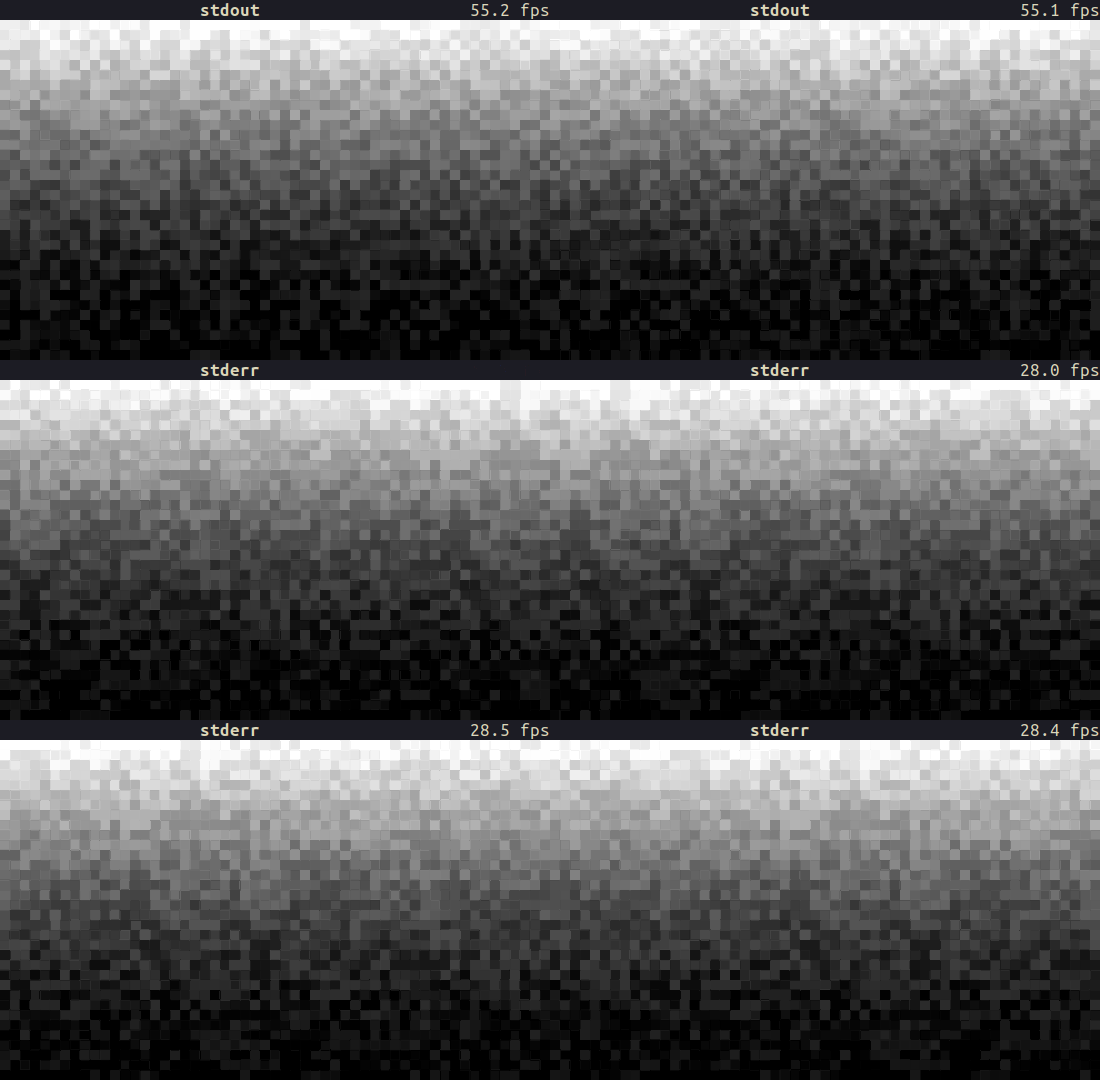
Did you notice the FPS drop? stdout is ~2x faster than stderr on a 550x360 terminal!
Before diving into the Rust code, let's take a look at the runtime externally via observing the CPU and system calls to understand what is going on.
For this task I will use a profiling tool called samply.
samplyis a command line CPU profiler which uses the Firefox Profiler as its UI.
It records a profile of the given command's execution and then opens profiler.firefox.com in the browser where we can inspect a bunch of stuff like which functions were running for how long, flame graphs and timelines. We can even see the source code for the calls and which lines were sampled how many times.
Let's start by installing samply:
$ cargo install samply(I recently packaged it for Arch Linux so it is also available via pacman -S samply btw)
And then we need to make some changes to the code that we are going to profile. For Rust projects, it is recommended that we build in release mode with debug info for getting inline stacks and source code view. So we can add the following profile to our Cargo.toml:
[profile.profiling]
inherits = "release"
debug = true
Also, I made some changes to the previous stdout-vs-stderr.rs:
- Removed the parts such as FPS widget which are irrelevant for profiling.
- Added
STREAMenvironment variable for starting the TUI with the specified I/O stream.- Accepts either "stdout" or "stderr"
- Added
DURATIONenvironment variable for exiting the TUI after a certain number of seconds.
stdout-vs-stderr-profiler.rs (click here to expand)
#!/usr/bin/env rust-script

//! ```cargo
//! [dependencies]
//! anyhow = "1.0.76"
//! crossterm = "0.27.0"
//! palette = "0.7.3"
//! rand = "0.8.5"
//! ratatui = "0.25.0"
//! ```
//!

use anyhow::Result;
use std::{
    env,
    io::{stderr, stdout, Write},
    time::{Duration, Instant},
};

use crossterm::{
    event::{self, Event, KeyCode, KeyEventKind},
    terminal::{disable_raw_mode, enable_raw_mode, EnterAlternateScreen, LeaveAlternateScreen},
    ExecutableCommand,
};
use palette::{convert::FromColorUnclamped, Hsv, Srgb};
use ratatui::{prelude::*, widgets::*};

#[derive(Copy, Clone, Debug, Default)]
enum IoStream {
    #[default]
    Stdout,
    Stderr,
}

impl From<String> for IoStream {
    fn from(value: String) -> Self {
        match value.to_lowercase().as_str() {
            "stdout" => Self::Stdout,
            "stderr" => Self::Stderr,
            _ => Self::default(),
        }
    }
}

struct RgbColorsWidget<'a> {
    /// The colors to render - should be double the height of the area
    colors: &'a Vec<Vec<Color>>,
    /// the number of elapsed frames that have passed - used to animate the colors
    frame_count: usize,
}

impl Widget for RgbColorsWidget<'_> {
    fn render(self, area: Rect, buf: &mut Buffer) {
        let colors = self.colors;
        for (xi, x) in (area.left()..area.right()).enumerate() {
            // animate the colors by shifting the x index by the frame number
            let xi = (xi + self.frame_count) % (area.width as usize);
            for (yi, y) in (area.top()..area.bottom()).enumerate() {
                let fg = colors[yi * 2][xi];
                let bg = colors[yi * 2 + 1][xi];
                buf.get_mut(x, y).set_char('▀').set_fg(fg).set_bg(bg);
            }
        }
    }
}

struct AppWidget<'a> {
    rgb_colors_widget: RgbColorsWidget<'a>,
}

impl<'a> AppWidget<'a> {
    fn new(app: &'a App) -> Self {
        Self {
            rgb_colors_widget: RgbColorsWidget {
                colors: &app.colors,
                frame_count: app.frame_count,
            },
        }
    }
}

impl Widget for AppWidget<'_> {
    fn render(self, area: Rect, buf: &mut Buffer) {
        let main_layout = Layout::default()
            .direction(Direction::Vertical)
            .constraints([Constraint::Length(1), Constraint::Min(0)])
            .split(area);
        self.rgb_colors_widget.render(main_layout[1], buf);
    }
}

#[derive(Debug, Default)]
struct App {
    should_quit: bool,
    // a 2d vec of the colors to render, calculated when the size changes as this is expensive
    // to calculate every frame
    colors: Vec<Vec<Color>>,
    last_size: Rect,
    frame_count: usize,
}

impl App {
    pub fn run<W>(io_stream: IoStream, stream: W, exit_after: Duration) -> Result<()>
    where
        W: Write,
    {
        let mut terminal = init_terminal(stream)?;
        let mut app = Self::default();
        let start_time = Instant::now();
        while !app.should_quit {
            app.tick();
            terminal.draw(|frame| {
                let size = frame.size();
                app.setup_colors(size);
                frame.render_widget(AppWidget::new(&app), size);
            })?;
            app.handle_events()?;
            if start_time.elapsed() >= exit_after {
                break;
            }
        }
        match io_stream {
            IoStream::Stdout => restore_terminal(stdout())?,
            IoStream::Stderr => restore_terminal(stderr())?,
        }

        Ok(())
    }

    fn tick(&mut self) {
        self.frame_count += 1;
    }

    fn handle_events(&mut self) -> Result<()> {
        if event::poll(Duration::from_secs_f32(1.0 / 60.0))? {
            if let Event::Key(key) = event::read()? {
                if key.kind == KeyEventKind::Press && key.code == KeyCode::Char('q') {
                    self.should_quit = true;
                }
            }
        }
        Ok(())
    }

    fn setup_colors(&mut self, size: Rect) {
        // only update the colors if the size has changed since the last time we rendered
        if self.last_size.width == size.width && self.last_size.height == size.height {
            return;
        }
        self.last_size = size;
        let Rect { width, height, .. } = size;
        // double the height because each screen row has two rows of half block pixels
        let height = height * 2;
        self.colors.clear();

        use rand::Rng;
        let mut rng = rand::thread_rng();
        for y in 0..height {
            let mut row = Vec::new();
            let randomness_factor = (height - y) as f32 / height as f32; // More randomness towards the bottom
            for _ in 0..width {
                let base_value = randomness_factor * ((height - y) as f32 / height as f32);
                let random_offset: f32 = rng.gen_range(-0.1..0.1); // Adjust the range as needed
                let value = base_value + random_offset;
                // Clamp the value to ensure it stays within the valid range [0.0, 1.0]
                let value = value.max(0.0).min(1.0);
                let color = Hsv::new(0.0, 0.0, value); // Set hue to 0 for grayscale
                let color = Srgb::<f32>::from_color_unclamped(color);
                let color: Srgb<u8> = color.into_format();
                let color = Color::Rgb(color.red, color.green, color.blue);
                row.push(color);
            }
            self.colors.push(row);
        }
    }
}

fn init_terminal<W>(mut stream: W) -> Result<Terminal<CrosstermBackend<W>>>
where
    W: Write,
{
    enable_raw_mode()?;
    stream.execute(EnterAlternateScreen)?;
    let mut terminal = Terminal::new(CrosstermBackend::new(stream))?;
    terminal.clear()?;
    terminal.hide_cursor()?;
    Ok(terminal)
}

fn restore_terminal<W>(mut stream: W) -> Result<()>
where
    W: Write,
{
    disable_raw_mode()?;
    stream.execute(LeaveAlternateScreen)?;
    Ok(())
}

fn main() -> Result<()> {
    let stream = env::var("STREAM").map(IoStream::from).unwrap_or_default();
    let duration = env::var("DURATION")
        .ok()
        .and_then(|v| v.parse::<u64>().ok())
        .map(Duration::from_secs)
        .unwrap_or_else(|| Duration::from_secs(5));
    match stream {
        IoStream::Stdout => App::run(stream, stdout(), duration)?,
        IoStream::Stderr => App::run(stream, stderr(), duration)?,
    }
    Ok(())
}
Now we can build the binary with the profiling profile:
$ cargo build --profile profilingTo record a profile, simply run samply:
$ export STREAM="stdout"
$ export DURATION=5

$ samply record target/profiling/stdout-vs-stderr-profiler
(Or you can use my run-profiler.sh script which does everything for you.)
Once the TUI exits after 5 seconds, samply will greet us with profiler.firefox.com:
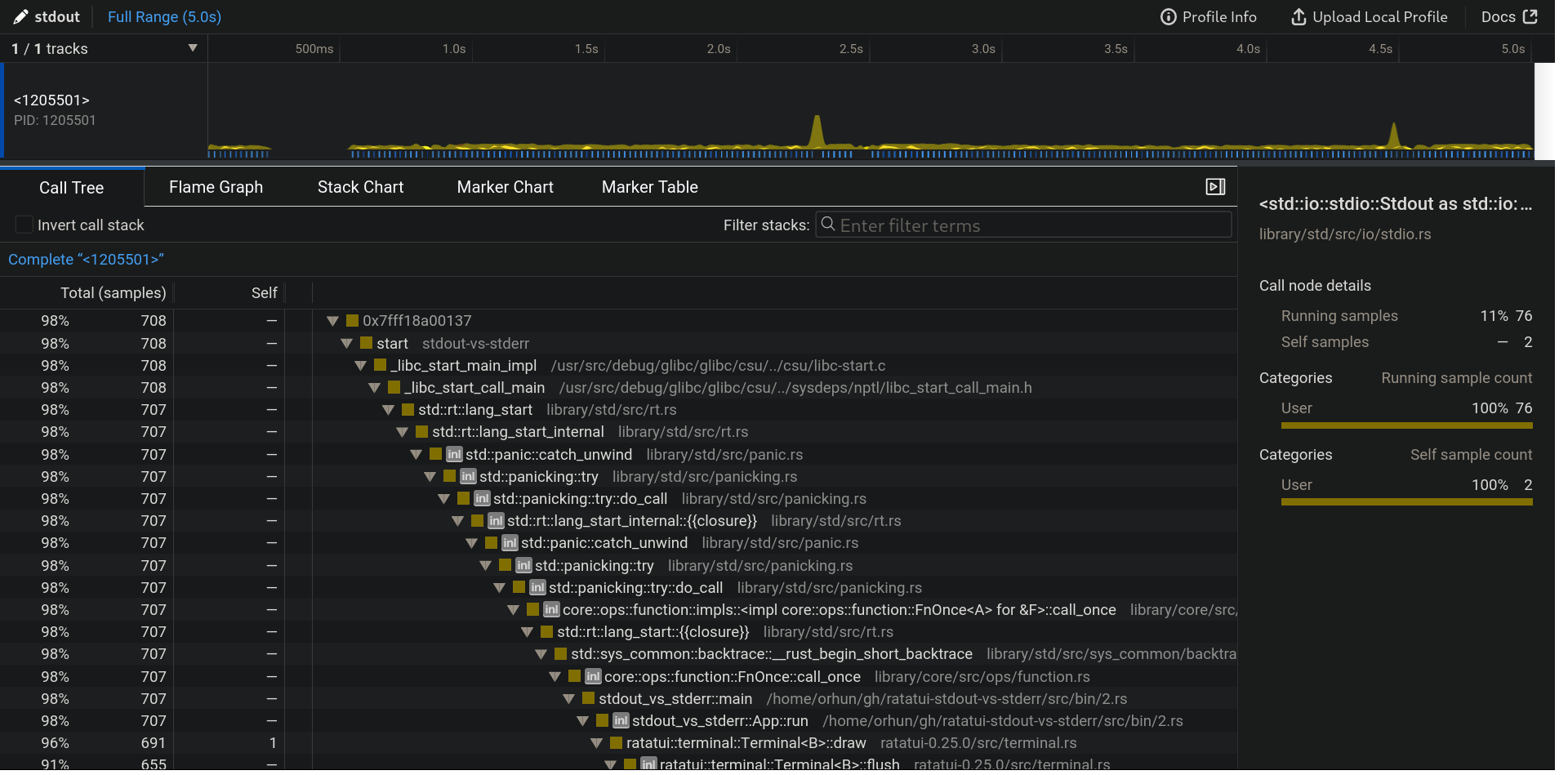
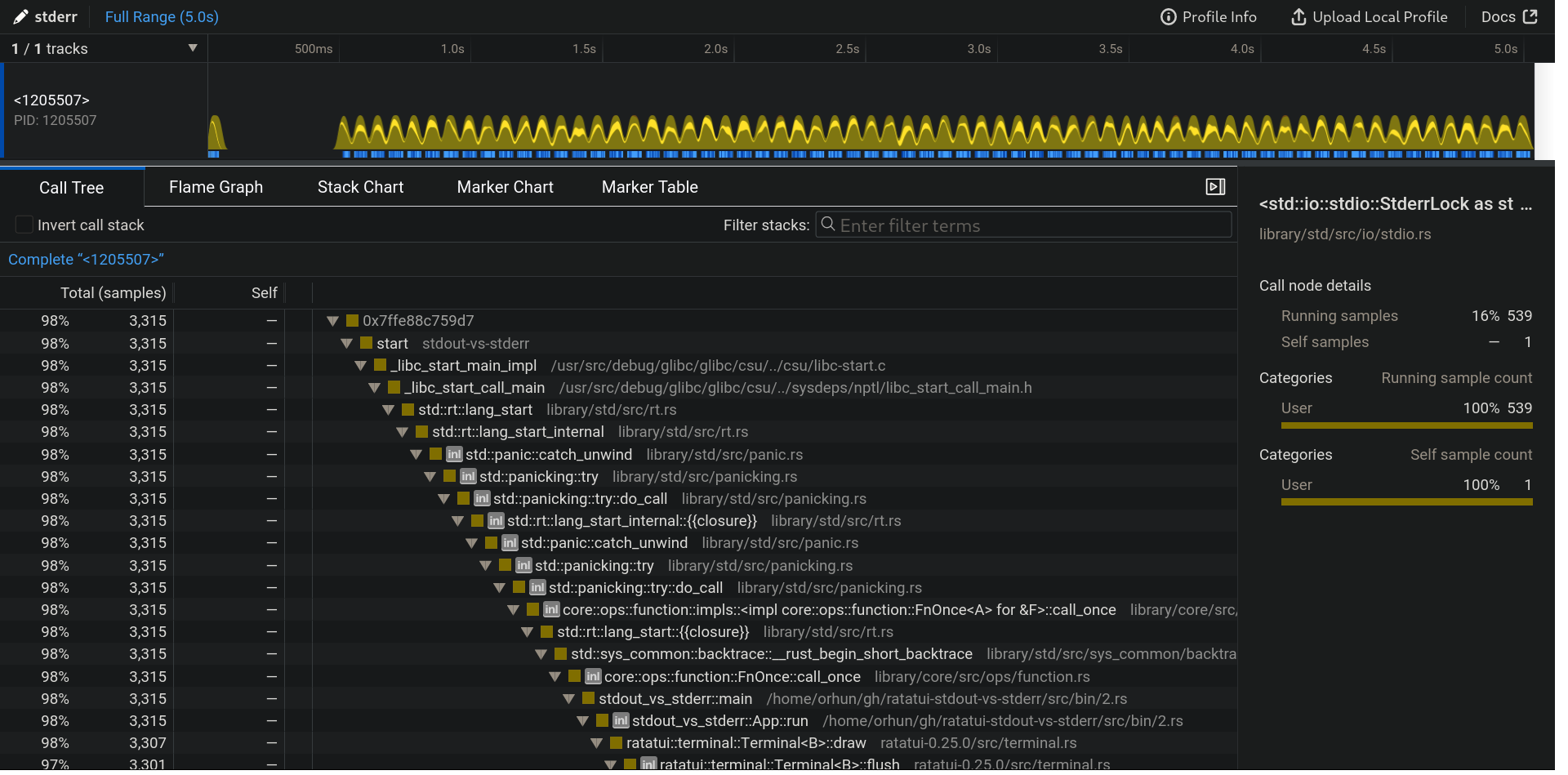
After we do the same for stderr via STREAM="stderr", we can start comparing what went differently for the I/O streams.
These profiles are also available for online browsing if you want to experiment yourself:
Right off the bat, you can see the difference on the CPU view (first one being stdout):


stdout has 708 samples compared to stderr which has 3,315 which means stdout made 4x less calls than stderr in the course of 5 seconds! We are definitely on to something.
Next, we can figure out the characteristics of the each call. It is safe to assume that there will be some write calls to the terminal for each render. We can zoom in on the CPU view to see the each render more clearly:


As you can see, stdout rendered more frames in the same timespan as stderr. Also, there are more lighter yellow spikes happening for stderr (on every render) compared to stdout (occasionally).
We will figure out what those spikes are shortly.
We can zoom in even more and take a look at the calls that have happened for each render:
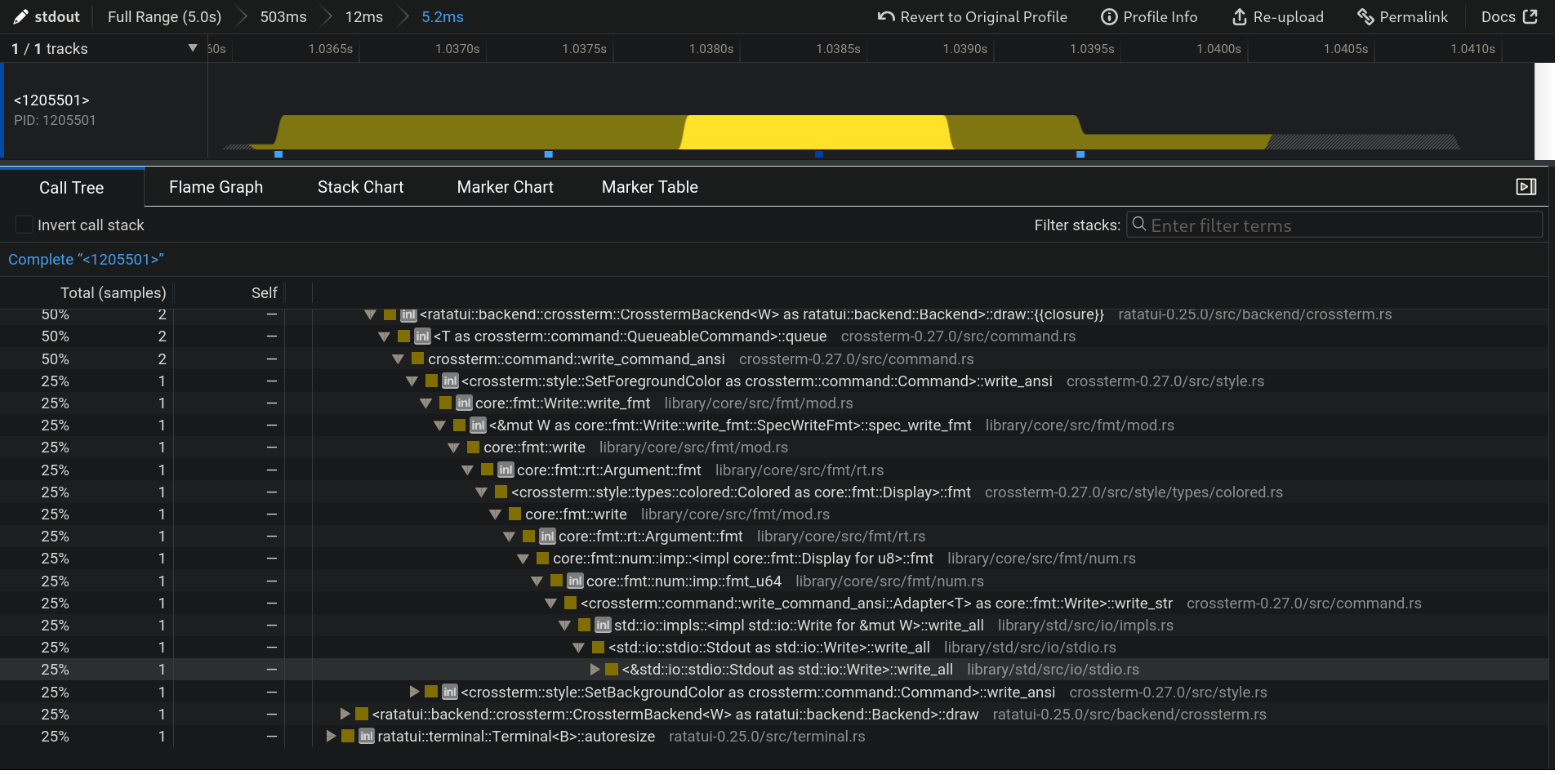
<&std::io::stdio::Stdout as std::io::Write>::write_all
Full Stack Trace (click here to expand)
<std::io::stdio::Stdout as std::io::Write>::write_all [library/std/src/io/stdio.rs]
std::io::impls::<impl std::io::Write for &mut W>::write_all [library/std/src/io/impls.rs]
<crossterm::command::write_command_ansi::Adapter<T> as core::fmt::Write>::write_str [crossterm-0.27.0/src/command.rs]
core::fmt::num::imp::fmt_u64 [library/core/src/fmt/num.rs]
core::fmt::num::imp::<impl core::fmt::Display for u8>::fmt [library/core/src/fmt/num.rs]
core::fmt::rt::Argument::fmt [library/core/src/fmt/rt.rs]
core::fmt::write [library/core/src/fmt/mod.rs]
<crossterm::style::types::colored::Colored as core::fmt::Display>::fmt [crossterm-0.27.0/src/style/types/colored.rs]
core::fmt::rt::Argument::fmt [library/core/src/fmt/rt.rs]
core::fmt::write [library/core/src/fmt/mod.rs]
<&mut W as core::fmt::Write::write_fmt::SpecWriteFmt>::spec_write_fmt [library/core/src/fmt/mod.rs]
core::fmt::Write::write_fmt [library/core/src/fmt/mod.rs]
<crossterm::style::SetForegroundColor as crossterm::command::Command>::write_ansi [crossterm-0.27.0/src/style.rs]
crossterm::command::write_command_ansi [crossterm-0.27.0/src/command.rs]
<T as crossterm::command::QueueableCommand>::queue [crossterm-0.27.0/src/command.rs]
<ratatui::backend::crossterm::CrosstermBackend<W> as ratatui::backend::Backend>::draw::{{closure}} [ratatui-0.25.0/src/backend/crossterm.rs]
core::result::Result<T,E>::and_then [library/core/src/result.rs]
<ratatui::backend::crossterm::CrosstermBackend<W> as ratatui::backend::Backend>::draw [crossterm-0.27.0/src/macros.rs]
ratatui::terminal::Terminal<B>::flush [ratatui-0.25.0/src/terminal.rs]
ratatui::terminal::Terminal<B>::draw [ratatui-0.25.0/src/terminal.rs]
stdout_vs_stderr::App::run [/home/orhun/gh/ratatui-stdout-vs-stderr/src/bin/2.rs]
stdout_vs_stderr::main [/home/orhun/gh/ratatui-stdout-vs-stderr/src/bin/2.rs]
core::ops::function::FnOnce::call_once [library/core/src/ops/function.rs]
std::sys_common::backtrace::__rust_begin_short_backtrace [library/std/src/sys_common/backtrace.rs]
std::rt::lang_start::{{closure}} [library/std/src/rt.rs]
core::ops::function::impls::<impl core::ops::function::FnOnce<A> for &F>::call_once [library/core/src/ops/function.rs]
std::panicking::try::do_call [library/std/src/panicking.rs]
std::panicking::try [library/std/src/panicking.rs]
std::panic::catch_unwind [library/std/src/panic.rs]
std::rt::lang_start_internal::{{closure}} [library/std/src/rt.rs]
std::panicking::try::do_call [library/std/src/panicking.rs]
std::panicking::try [library/std/src/panicking.rs]
std::panic::catch_unwind [library/std/src/panic.rs]
std::rt::lang_start_internal [library/std/src/rt.rs]
std::rt::lang_start [library/std/src/rt.rs]
_libc_start_call_main [/usr/src/debug/glibc/glibc/csu/../sysdeps/nptl/libc_start_call_main.h]
_libc_start_main_impl [/usr/src/debug/glibc/glibc/csu/../csu/libc-start.c]
start [stdout-vs-stderr]
0x7fff18a00137
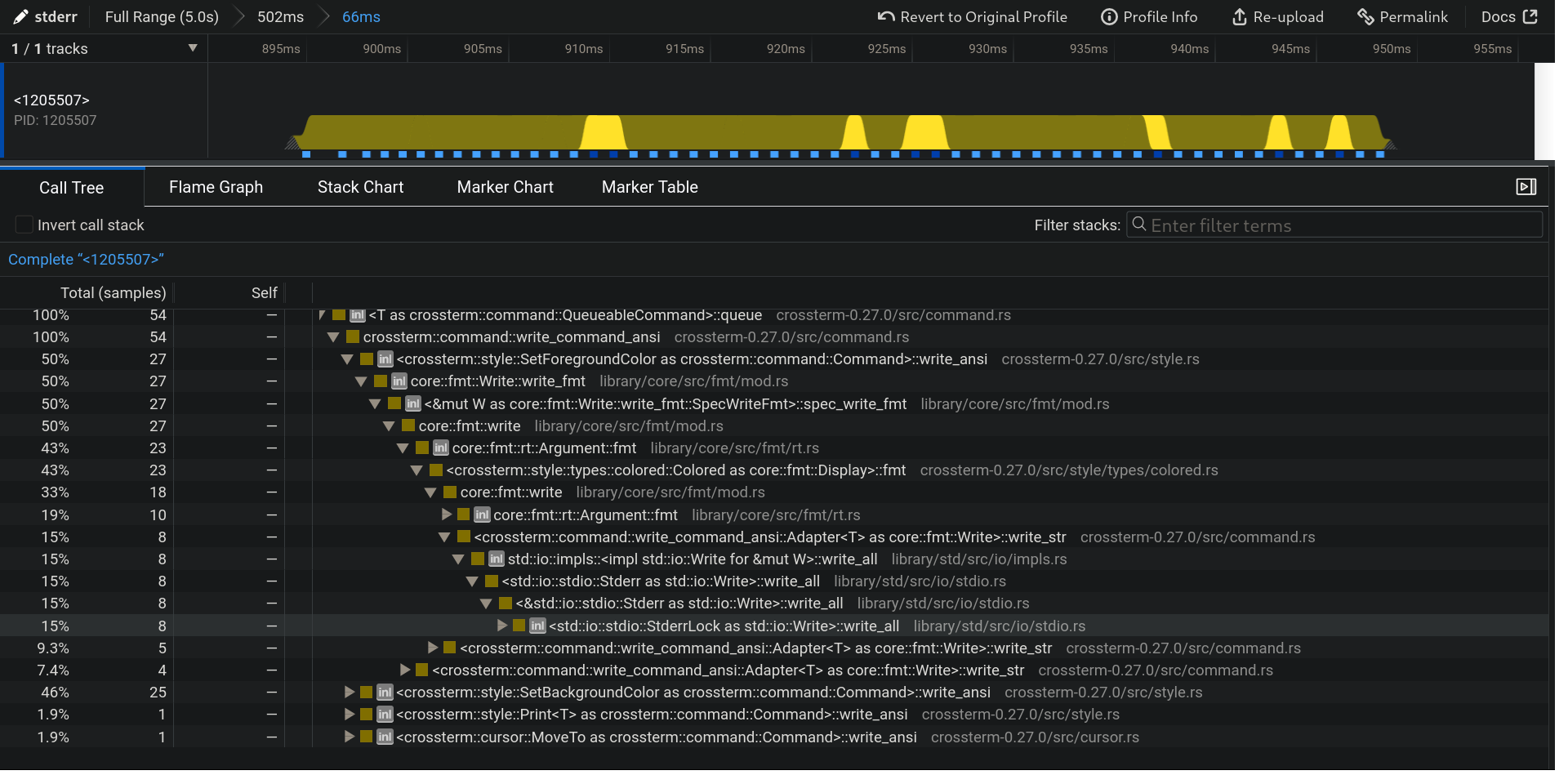
<std::io::stdio::StderrLock as std::io::Write>::write_all
Full Stack Trace (click here to expand)
<std::io::stdio::StderrLock as std::io::Write>::write_all [library/std/src/io/stdio.rs]
<&std::io::stdio::Stderr as std::io::Write>::write_all [library/std/src/io/stdio.rs]
<std::io::stdio::Stderr as std::io::Write>::write_all [library/std/src/io/stdio.rs]
std::io::impls::<impl std::io::Write for &mut W>::write_all [library/std/src/io/impls.rs]
<crossterm::command::write_command_ansi::Adapter<T> as core::fmt::Write>::write_str [crossterm-0.27.0/src/command.rs]
core::fmt::write [library/core/src/fmt/mod.rs]
<crossterm::style::types::colored::Colored as core::fmt::Display>::fmt [crossterm-0.27.0/src/style/types/colored.rs]
core::fmt::rt::Argument::fmt [library/core/src/fmt/rt.rs]
core::fmt::write [library/core/src/fmt/mod.rs]
<&mut W as core::fmt::Write::write_fmt::SpecWriteFmt>::spec_write_fmt [library/core/src/fmt/mod.rs]
core::fmt::Write::write_fmt [library/core/src/fmt/mod.rs]
<crossterm::style::SetForegroundColor as crossterm::command::Command>::write_ansi [crossterm-0.27.0/src/style.rs]
crossterm::command::write_command_ansi [crossterm-0.27.0/src/command.rs]
<T as crossterm::command::QueueableCommand>::queue [crossterm-0.27.0/src/command.rs]
<ratatui::backend::crossterm::CrosstermBackend<W> as ratatui::backend::Backend>::draw::{{closure}} [ratatui-0.25.0/src/backend/crossterm.rs]
core::result::Result<T,E>::and_then [library/core/src/result.rs]
<ratatui::backend::crossterm::CrosstermBackend<W> as ratatui::backend::Backend>::draw [crossterm-0.27.0/src/macros.rs]
ratatui::terminal::Terminal<B>::flush [ratatui-0.25.0/src/terminal.rs]
ratatui::terminal::Terminal<B>::draw [ratatui-0.25.0/src/terminal.rs]
stdout_vs_stderr::App::run [/home/orhun/gh/ratatui-stdout-vs-stderr/src/bin/2.rs]
stdout_vs_stderr::main [/home/orhun/gh/ratatui-stdout-vs-stderr/src/bin/2.rs]
core::ops::function::FnOnce::call_once [library/core/src/ops/function.rs]
std::sys_common::backtrace::__rust_begin_short_backtrace [library/std/src/sys_common/backtrace.rs]
std::rt::lang_start::{{closure}} [library/std/src/rt.rs]
core::ops::function::impls::<impl core::ops::function::FnOnce<A> for &F>::call_once [library/core/src/ops/function.rs]
std::panicking::try::do_call [library/std/src/panicking.rs]
std::panicking::try [library/std/src/panicking.rs]
std::panic::catch_unwind [library/std/src/panic.rs]
std::rt::lang_start_internal::{{closure}} [library/std/src/rt.rs]
std::panicking::try::do_call [library/std/src/panicking.rs]
std::panicking::try [library/std/src/panicking.rs]
std::panic::catch_unwind [library/std/src/panic.rs]
std::rt::lang_start_internal [library/std/src/rt.rs]
std::rt::lang_start [library/std/src/rt.rs]
_libc_start_call_main [/usr/src/debug/glibc/glibc/csu/../sysdeps/nptl/libc_start_call_main.h]
_libc_start_main_impl [/usr/src/debug/glibc/glibc/csu/../csu/libc-start.c]
start [stdout-vs-stderr]
0x7ffe88c759d7
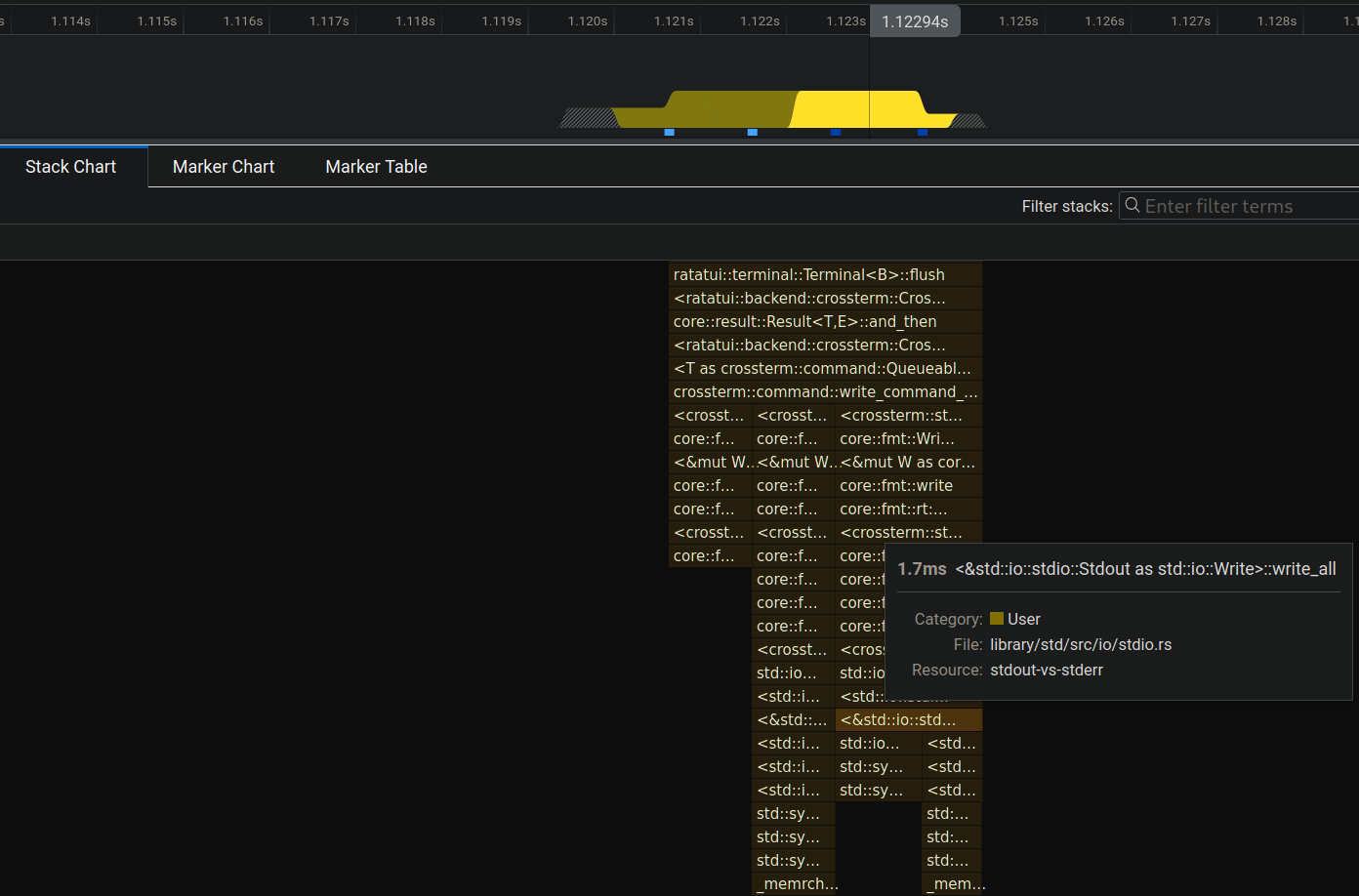
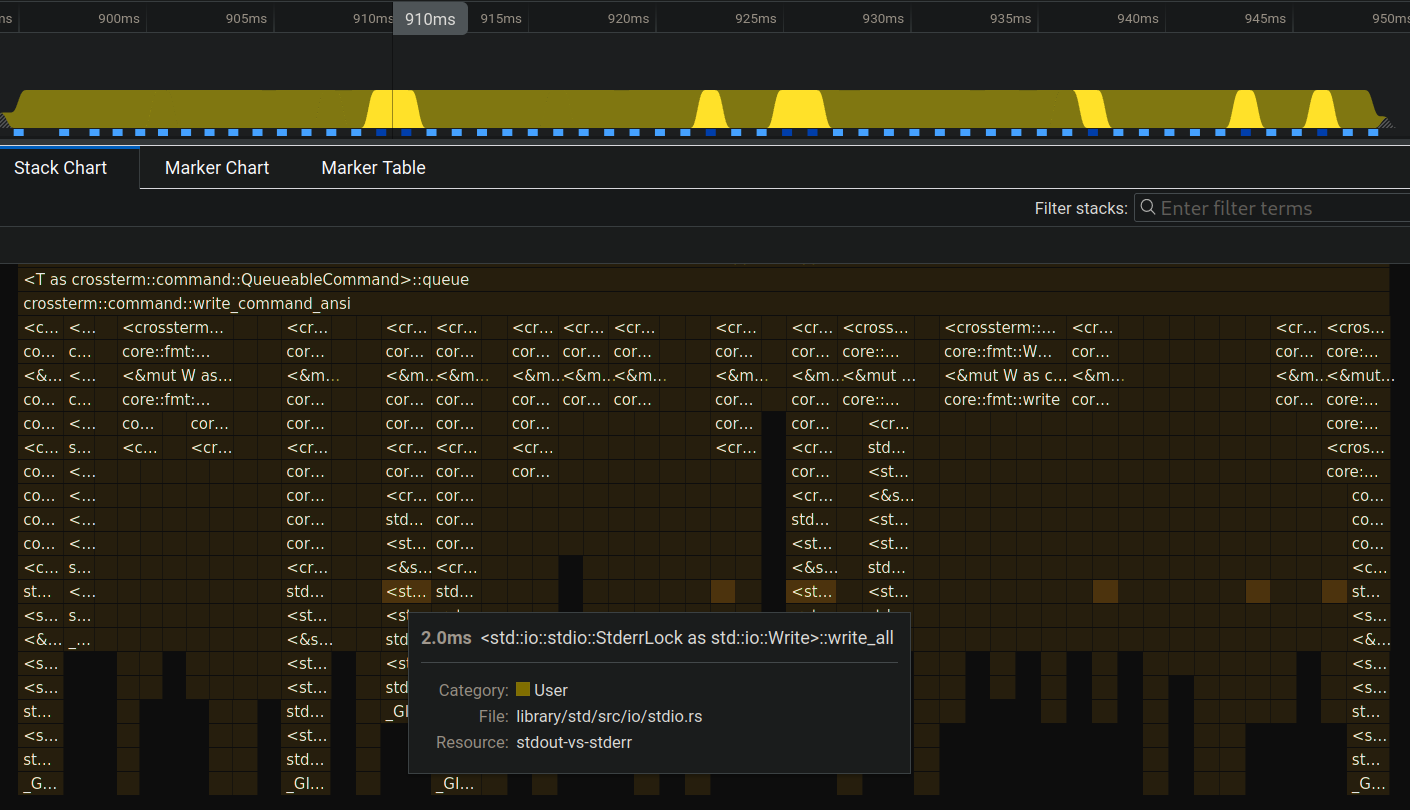
Now it makes sense, those spikes were write_all calls. It is nice to find that out, but what does that even mean?
It means that:
- stdout called
write_allonce in 5.2ms and it happens every once in a while. - stderr called
write_all5 times in 66ms and it is called multiple times for almost every render.
We can see this more clearly from the stack chart (first one being stdout):
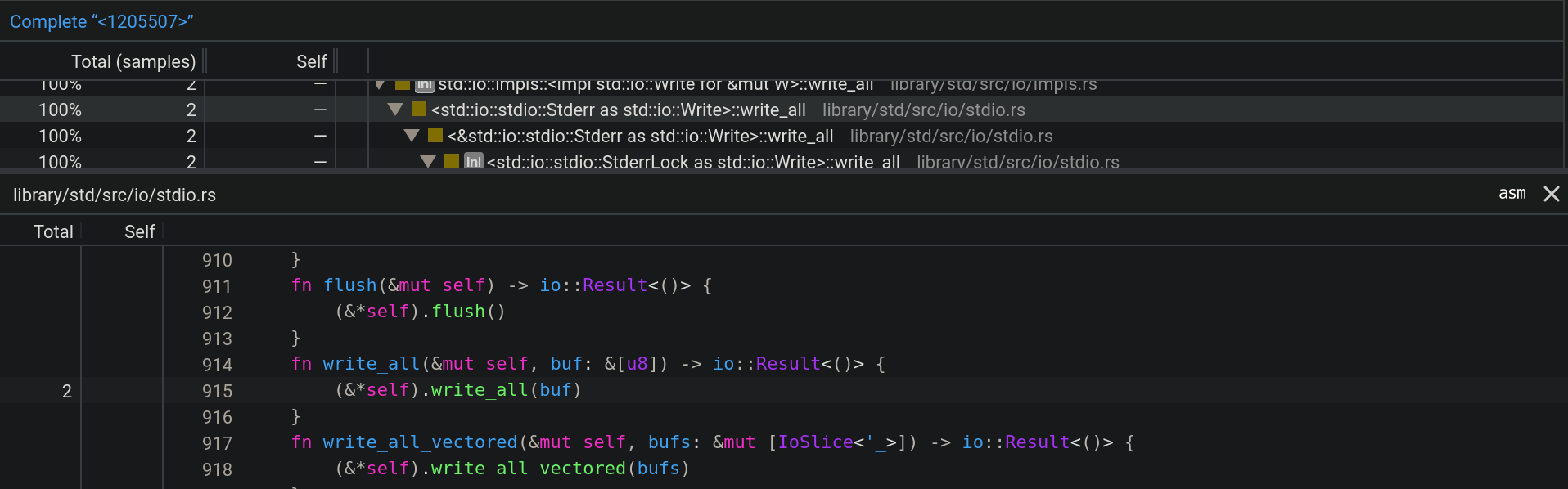
Lastly, we can check the code of this call but it is not really helpful since it is abstracted:
So, what is the take away from all of this?
The conclusion is that stdout making less write calls thus able to render more frames in the same amount of time. In other words, stderr blocks until the write function for each frame is rendered to the terminal whereas stdout returns faster.
There must be some buffering happening for stdout.
Let's remember the change that we have made which led us to this point:
-let mut terminal = Terminal::new(CrosstermBackend::new(std::io::stdout()))?;
+let mut terminal = Terminal::new(CrosstermBackend::new(std::io::stderr()))?;
So, something internal changes when we do this. ratatui's CrosstermBackend is a good place to look first:
The
CrosstermBackendstruct is a wrapper around a writer implementingWrite, which is used to send commands to the terminal. It provides methods for drawing content, manipulating the cursor, and clearing the terminal screen.
/// A Backend implementation that uses Crossterm to render to the terminal.
pub struct CrosstermBackend<W: Write> {
    writer: W,
}

impl<W> CrosstermBackend<W>
where
    W: Write,
{
    pub fn new(writer: W) -> CrosstermBackend<W> {
        CrosstermBackend { writer }
    }
}Write?
Write is a Rust trait for objects that can be used for writing byte streams. It has methods such as write, flush and most importantly write_all which we encountered before. The code above means that CrosstermBackend can work with anything that implements Write such as File, &mut [8] and other types including Stdout. This abstraction helps us to use the backend with different structs.
That's why the compiler is not complaining when we change the argument from Stdout to Stderr.
Okay so ratatui uses stdout as a writer and sends it to crossterm for writing. In this case, we need to go one layer deeper to crossterm to see what it is doing different for stdout and stderr.
Actually, no. Take a look at this diagram:
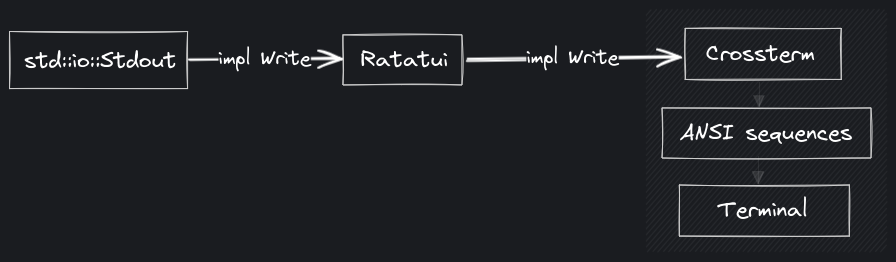
As you go deeper, the capabilities of the passed type are constrained by the implementation. In other words, if you accept a parameter that is Write, you have only a set of functionality you can work with (write, write_all, etc.) In this case, crossterm does not have any chance to tell stdout from stderr to act different upon it, because it only knows about "a type" that is write.
That's why we need to go shallower, that being the point we started, Stdout and Stderr structs.
Wait, are you saying that we need to check out the source code of the Rust standard library to get an answer to this? Doesn't that mean that stdout is not always faster than stderr and it depends on the implementation details?
Exactly. "Everything is a file", remember? stdout and stderr are also files which are no different. Rust must be doing some magic in this case. 🪄
To find out the magic, we can take a look at the definition of Stdout:
pub struct Stdout {
    // FIXME: this should be LineWriter or BufWriter depending on the state of
    //        stdout (tty or not). Note that if this is not line buffered it
    //        should also flush-on-panic or some form of flush-on-abort.
    inner: &'static ReentrantMutex<RefCell<LineWriter<StdoutRaw>>>,
}Now let's see Stderr:
pub struct Stderr {
    inner: &'static ReentrantMutex<RefCell<StderrRaw>>,
}Take a look at the diff:
-ReentrantMutex<RefCell<LineWriter<StdoutRaw>>>
+ReentrantMutex<RefCell<StderrRaw>>
Hmm... So Stdout is additionally wrapped in another struct called LineWriter.
Yes, do you see where this is going?
LineWriterwraps a writer and buffers output to it,
flushing whenever a newline (0x0a,'\n') is detected.
Bingo!
We can use
LineWriterto write one line at a time, significantly reducing the number of actual writes to the file.
This is what we were looking for all along. Let's try it!
use std::io::{self, LineWriter, Write};
use std::thread;
use std::time::Duration;

let stdout = io::stdout();
let mut writer = LineWriter::new(stdout);

writer.write_all(b"In Rust's domain where choices gleam,")?;
eprintln!("[waiting for newline]");
thread::sleep(Duration::from_secs(1));

// No bytes are written until a newline is encountered
// (or the internal buffer is filled).
writer.write_all(b"\n")?;
eprintln!("\n[writing the rest]");
thread::sleep(Duration::from_secs(1));

// Write the rest.
writer.write_all(
    b"Ratatui's path, a unique stream.
Terminal canvas, colors bright,
Untraveled road, a different light.
That choice, the difference, in code's delight.",
)?;

// The last line doesn't end in a newline,
// so we have to flush or drop the `LineWriter` to finish writing.
eprintln!("\n[flush or drop to finish writing]");
thread::sleep(Duration::from_secs(1));
writer.flush()?;If we run this code:
[waiting for newline]
In Rust's domain where choices gleam,

[writing the rest]
Ratatui's path, a unique stream.
Terminal canvas, colors bright,
Untraveled road, a different light.

[flush or drop to finish writing]
That choice, the difference, in code's delight.
From this output, we can observe:
- First
eprintln!message is printed and the writer waits for newline character to write to stdout (even though we already calledwrite_allbefore). - The second part of the poem is printed as a whole until the last line.
- Last line is not being printed until we flush the stdout.
Although this might seem like a pretty weird behavior at first glance, it actually has a huge performance benefit and it is the reason why stdout is much faster than stderr!
See you in another blog pos-
Wait! Is that it?
You're right, we can actually do more with this information.
Let's go back to the standard library definition of Stdout:
pub struct Stdout {
    // FIXME: this should be LineWriter or BufWriter depending on the state of
    //        stdout (tty or not). Note that if this is not line buffered it
    //        should also flush-on-panic or some form of flush-on-abort.
    inner: &'static ReentrantMutex<RefCell<LineWriter<StdoutRaw>>>,
}Yeah, what's up with that FIXME comment there? Also, what is BufWriter?
Good questions, the documentation explains BufWriter very well:
A
BufWriterkeeps an in-memory buffer of data and writes it to an underlying writer in large, infrequent batches.BufWritercan improve the speed of programs that make small and repeated write calls to the same file or network socket.
In other words, BufWriter writes data to its internal buffer instead of the actual stream and then infrequently writes this collected data to the stream.
Isn't that the same thing as LineWriter?
Good point! They actually have a distinction when it comes to flushing (i.e. when the buffered data is written to the stream).
BufWriter: flushes when the internal buffer is full.LineWriter: same behavior asBufWriterbut also flushes for each line (when0x0aor\nis detected).
Also, they both flush when the writer goes out of scope.
To make it more clear:

Let's change our previous LineWriter example to use BufWriter:
use std::io::{self, BufWriter, Write};
use std::thread;
use std::time::Duration;

let stdout = io::stdout();
let mut writer = BufWriter::new(stdout);

writer.write_all(b"In Rust's domain where choices gleam,")?;
eprintln!("[writing the first line]");
thread::sleep(Duration::from_secs(1));

// No bytes are written until a newline is encountered
// (or the internal buffer is filled).
writer.write_all(b"\n")?;
eprintln!("\n[writing the rest]");
thread::sleep(Duration::from_secs(1));

// Write the rest.
writer.write_all(
    b"Ratatui's path, a unique stream.
Terminal canvas, colors bright,
Untraveled road, a different light.
That choice, the difference, in code's delight.",
)?;

// The last line doesn't end in a newline,
// so we have to flush or drop the `LineWriter` to finish writing.
eprintln!("\n[flush or drop to finish writing]");
thread::sleep(Duration::from_secs(1));
writer.flush()?;We will see that nothing is printed until we flush the BufWriter:
[writing the first line]

[writing the rest]

[flush or drop to finish writing]
In Rust's domain where choices gleam,
Ratatui's path, a unique stream.
Terminal canvas, colors bright,
Untraveled road, a different light.
That choice, the difference, in code's delight.
When it comes to the comment on the stdout struct:
This should be LineWriter or BufWriter depending on the state of stdout (tty or not).
What is being said here is that stdout should automatically decide between line buffering (LineWriter) and block buffering (BufWriter) based on whether if it is attached to a TTY or not.
So stdout should no longer be line buffered when outputting to a non-terminal (like piping output to a file).
I didn't get it, what is the advantage of using BufWriter in this case?
In the case of a non-TTY, let's say writing to a file, this would mean that the output will be block buffered thus we won't be making system calls for each line. In other words, we won't be flushing continuously which is a huge performance benefit. This can save us from substantial overhead when working with larger files.
And this is actually implemented in Rust but the pull request is not merged: #115652
Also, it would be super nice have a way to opt-in for block buffering for stdout in the future. There is a related discussion here: #60673
What would be the benefit of that?
Check out this code for example:
for i in 1..1000000 {
    println!("{}", i);
}
Keep in mind that println! is writing to stdout and it is line buffered (i.e. uses LineWriter) as default. In other words, it flushes the terminal for each line and performs a system call!
Now take a look at this:
let stdout = io::stdout();
let mut output = BufWriter::new(stdout);
for i in 1..1000000 {
    writeln!(output, "{}", i)?;
}
Here, we are wrapping stdout in a BufWriter which makes it block buffered ✨
block-buffered-stdout.rs (click here to expand)
#!/usr/bin/env rust-script

use std::{
    io::{self, BufWriter, Result, Write},
    time::Instant,
};

fn main() -> Result<()> {
    let first = Instant::now();
    for i in 1..1000000 {
        println!("{}", i);
    }
    let first_elapsed = first.elapsed();

    let second = Instant::now();
    let stdout = io::stdout();
    let mut output = BufWriter::new(stdout);
    for i in 1..1000000 {
        writeln!(output, "{}", i)?;
    }
    let second_elapsed = second.elapsed();
    output.flush()?;

    println!("Line buffered: {:?}", first_elapsed);
    println!("Block buffered: {:?}", second_elapsed);

    Ok(())
}
When we run it:
$ chmod +x block-buffered-stdout.rs

$ ./block-buffered-stdout.rs

# [...]
Line buffered: 1.080789949s
Block buffered: 408.105636ms
Block buffered stdout runs ~2x faster!
Nice! I wonder what happens if we apply this to our TUI app.
We can try by doing this change:
-let mut terminal = Terminal::new(CrosstermBackend::new(stdout()))?;
+let mut terminal = Terminal::new(CrosstermBackend::new(BufWriter::new(stdout())))?;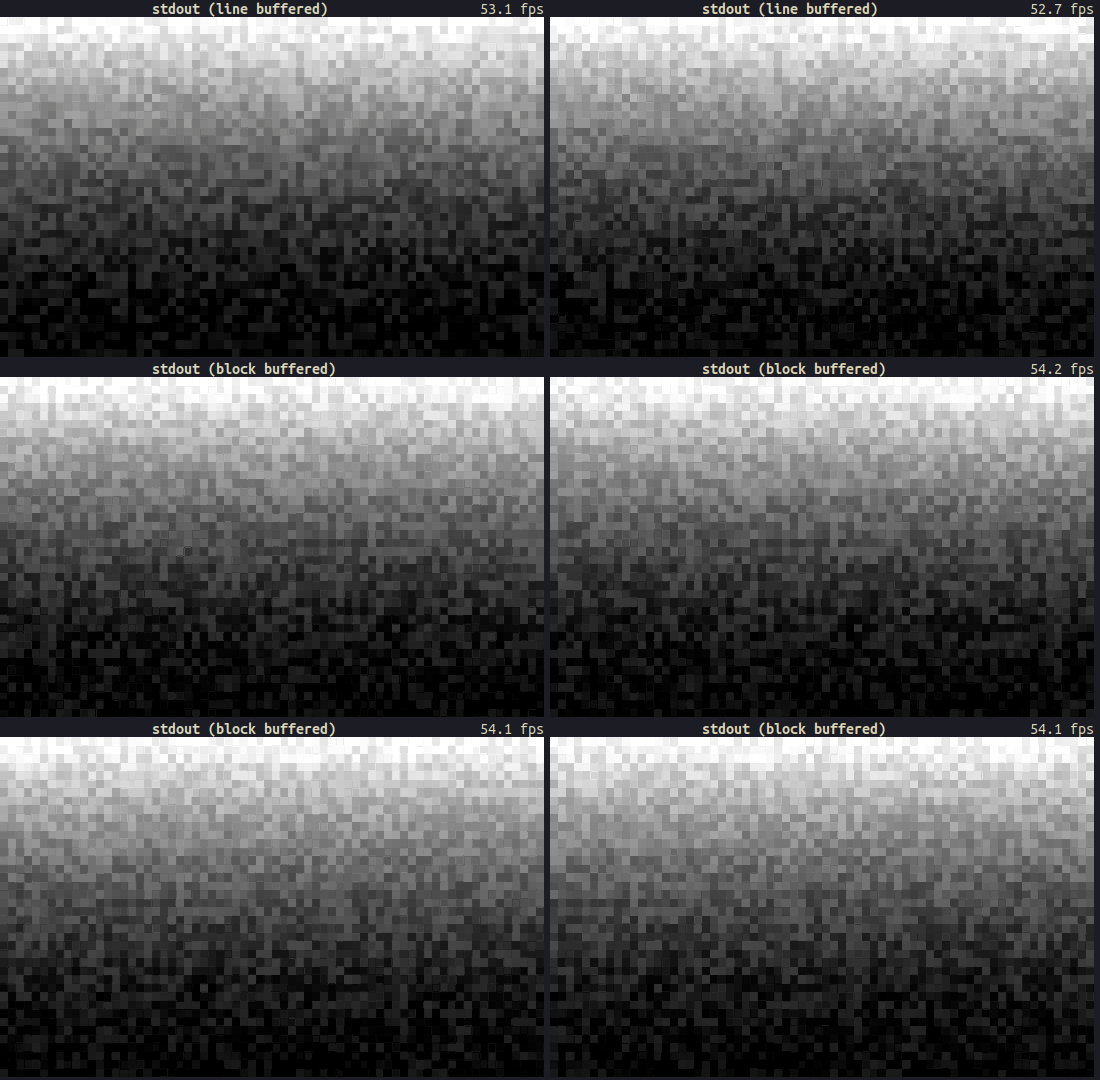
Hmm, there isn't a noticeable increase in performance. What if we try something more substantial like using a block buffered stderr. The default stderr is not buffered, remember?
Yeah... Oh! I have a better idea. How about making the stderr line buffered? Stdout is also line buffered so are we going to get the same performance?
Yes, let's try that!
// line buffered stdout (as default)
let mut terminal = Terminal::new(CrosstermBackend::new(stdout()))?;

// line buffered stderr
let mut terminal = Terminal::new(CrosstermBackend::new(LineWriter::new(stderr())))?;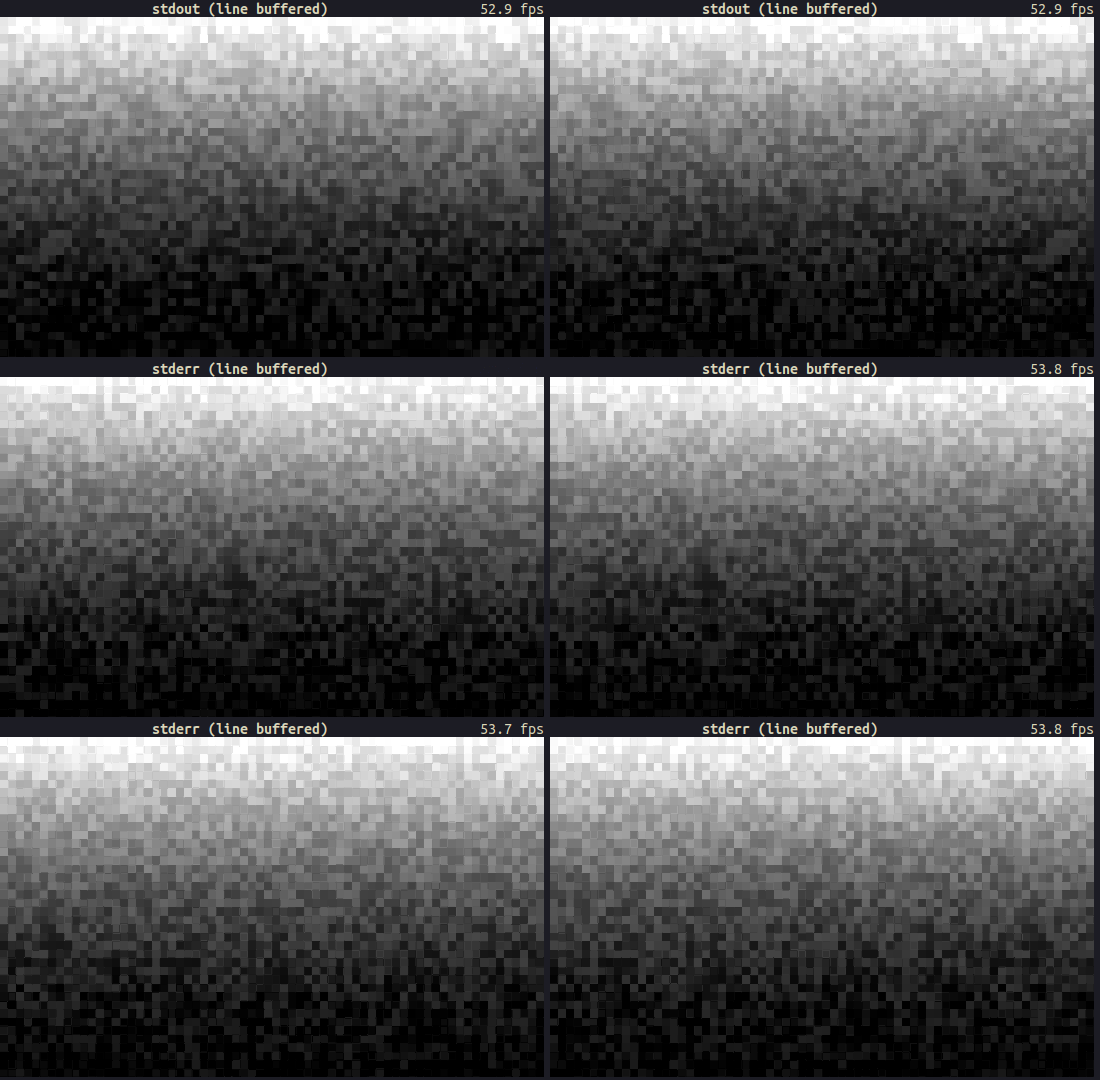
Damn, did we just make the performance of stderr identical to stdout just by making it line buffered?
Oh yeah, looks like it!
How about we do the opposite of what we have done so far and try to make stdout unbuffered. This would degrade the performance and we should probably get a result similar to using the default stderr. Let's prove our hypothesis!
If we take a look at our findings so far:
| I/O Stream | Buffering |
|---|---|
std::io::stderr() |
Unbuffered/raw |
LineWriter<std::io::stderr()> |
Line buffered |
BufWriter<std::io::stderr()> |
Block buffered |
std::io::stdout() |
Line buffered |
| ???
| Unbuffered/raw |
Since stderr() returns a raw stream as default (i.e. StderrRaw), it is easier to implement a buffering layer on top of it. However, stdout() function already returns a buffered stream so we need to somehow get a raw stream.
If you remember the contents of Stdout:
/// A handle to the global standard output stream of the current process.
pub struct Stdout {
    inner: &'static ReentrantMutex<RefCell<LineWriter<StdoutRaw>>>,
}We need the StdoutRaw for an unbuffered stream rather than having it wrapped inside LineWriter. The type definition also confirms the unbuffered behavior:
/// A handle to a raw instance of the standard output stream of this process.
///
/// This handle is not synchronized or buffered in any fashion. Constructed via
/// the `std::io::stdio::stdout_raw` function.
struct StdoutRaw(stdio::Stdout);Nice. This comment leads us to stdout_raw function:
/// Constructs a new raw handle to the standard output stream of this process.
///
/// The returned handle has no external synchronization or buffering layered on
/// top.
const fn stdout_raw() -> StdoutRaw {
    StdoutRaw(stdio::Stdout::new())
}Easy, we can just construct a raw stdout via calling stdout_raw!
Not really, that is a private function.
std::io::stdio::stdout_raw();
         ^^^^^  ---------- function `stdout_raw` is not publicly re-exported
         |
         private module
There is actually a tracking issue from 2019 about exposing raw stdout/stderr/stdin: #58326
Currently there is not easy/obvious way to get an unbuffered Stdout/err/in. The types do exist in stdio, however they are not public for reasons not noted. For example these types would be useful for CLI applications that write a lot of data at once without it getting unnecessarily flushed.
And sadly, there isn't still an easy/obvious way to get an unbuffered I/O streams as of now :(
But!
This issue gives us some hints about possible workarounds. One thing that is reiterated a couple of times in the issue is that we can use from_raw_fd on Linux as a workaround.
Let me guess, from_raw_fd takes a file descriptor and we are simply going to use the file descriptor of stdout (which is "1") to create an unbuffered stream.
Exactly!
use std::fs::File;

let mut raw_stdout = File::from_raw_fd(1);
writeln!(raw_stdout, "test");
But...
error[E0133]: call to unsafe function is unsafe and requires unsafe function or block
   |
55 |                 let raw_stdout = File::from_raw_fd(1);
   |                                  ^^^^^^^^^^^^^^^^^^^^ call to unsafe function
   |
   = note: consult the function's documentation for information on how to avoid undefined behavior
If we read the documentation of from_raw_fd:
Safety: The
fdpassed in must be an owned file descriptor; in particular, it must be open.
There are more details to it (which I will cover in another blog post) but the moral of the story is, we need to put our code in a unsafe block like so:
use std::fs::File;

// SAFETY: no other functions should call `from_raw_fd`, so there
// is only one owner for the file descriptor.
let raw_stdout = unsafe { File::from_raw_fd(1) };
writeln!(raw_stdout, "test");
If you run it, you will see "test" on stdout. Yay! \o/
However, as mentioned briefly in the previous section, there is still a big problem with this code. Going back to the documentation of from_raw_fd:
This function is typically used to consume ownership of the specified file descriptor. When used in this way, the returned object will take responsibility for closing it when the object goes out of scope.
What this means is that raw_stdout variable takes ownership of the file descriptor and it will close the stdout when it goes out of scope. In other words, when the created File is dropped, stdout is closed.
RIP.
We can confirm this behavior with this code:
use std::fs::File;
use std::io::{Result, Write};
use std::os::fd::FromRawFd;

fn print1() -> Result<()> {
    let mut raw_stdout = unsafe { File::from_raw_fd(1) };
    writeln!(raw_stdout, "test1")
}

fn print2() -> Result<()> {
    let mut raw_stdout = unsafe { File::from_raw_fd(1) };
    writeln!(raw_stdout, "test2")
}

fn main() -> Result<()> {
    print1()?;
    print2()?;
    Ok(())
}What you expect to see is "test1" and "test2", however, stdout is closed after we leave the first function. When we try to open it again, it will panic because of the safety rule (the fd passed in must be an owned file descriptor + it must be open).
$ ./raw-stdout-broken.rs

test1
Error: Os { code: 9, kind: Uncategorized, message: "Bad file descriptor" }
That's bad. What do we do?
In our case, we want the open file to live through the entire program. Let's also assume that this is a TUI program and we have separate functions where passing the raw_stdout value around isn't possible.
Well, there is still one quick dirty workaround: lazily initialize stdout and make it globally available via lazy_static (or another crate such as once_cell):
use std::fs::File;
use std::io::{Result, Write};
use std::os::fd::FromRawFd;
use std::sync::Mutex;

lazy_static! {
    static ref RAW_STDOUT: Mutex<File> = unsafe { Mutex::new(File::from_raw_fd(1)) };
}

fn print1() -> Result<()> {
    writeln!(RAW_STDOUT.lock().unwrap(), "test1")
}

fn print2() -> Result<()> {
    writeln!(RAW_STDOUT.lock().unwrap(), "test2")
}

fn main() -> Result<()> {
    print1()?;
    print2()?;
    Ok(())
}$ ./raw-stdout-1.rs
test1
test2Okay okay, this is a bit too much. I mean lazy, static, mutex, locking etc... Don't we have a better way to handle this? Besides, you can't really construct any other stdout instances with this code.
Actually there is a better way. The documentation of FromRawFd gives us a hint:
Consuming ownership is not strictly required. Use a
From<OwnedFd>::fromimplementation for an API which strictly consumes ownership.
Sounds like we can work around closing the stdout if we use OwnedFd.
An owned file descriptor. This closes the file descriptor on drop. It is guaranteed that nobody else will close the file descriptor.
So we can create a ✨ global unbuffered stdout that does not consume the ownership of the underlying file descriptor ✨ like so:
use lazy_static::lazy_static;
use std::fs::File;
use std::io::{Result, Write};
use std::os::fd::{FromRawFd, OwnedFd};

lazy_static! {
    static ref RAW_STDOUT_FD: OwnedFd = unsafe { OwnedFd::from_raw_fd(1) };
}

fn print1() -> Result<()> {
    let mut raw_stdout = File::from(RAW_STDOUT_FD.try_clone()?);
    writeln!(raw_stdout, "test1")
}

fn print2() -> Result<()> {
    let mut raw_stdout = File::from(RAW_STDOUT_FD.try_clone()?);
    writeln!(raw_stdout, "test2")
}

fn main() -> Result<()> {
    print1()?;
    print2()?;
    Ok(())
}$ ./raw-stdout-2.rs
test1
test2If we want a more elegant solution, we can go for as_raw_fd function of Stdout instead of using plain "1":
static ref RAW_STDOUT_FD: OwnedFd = {
    let stdout = std::io::stdout();
    let raw_fd = stdout.as_raw_fd();
    unsafe { OwnedFd::from_raw_fd(raw_fd) }
};
All of this pain, why?
So that we can do this:
let stdout = std::io::stdout();
let raw_fd = stdout.as_raw_fd();
let raw_stdout = unsafe { File::from_raw_fd(raw_fd) };

// initialize the terminal with raw/unbuffered stdout
let mut terminal = Terminal::new(CrosstermBackend::new(BufWriter::new(raw_stdout)))?;
Yeah, I almost forgot we were doing TUI stuff. I think the original question was "Is raw stdout as slow as raw stderr?".
Yes, let's find that out:
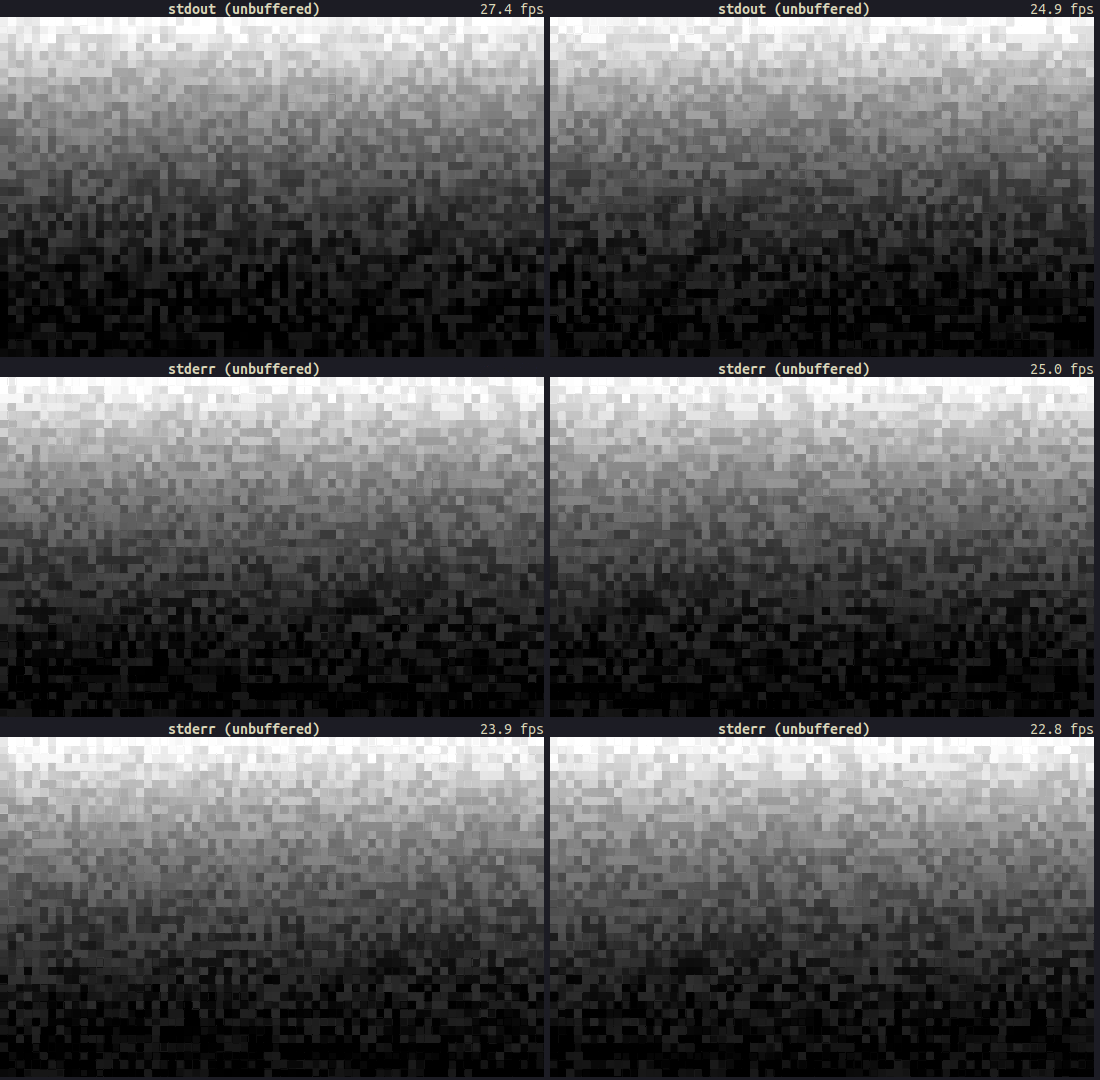
And that concludes it, raw stdout has the same performance as raw stderr.
All of the things we have done so far begs the question: can we make stdout faster?
Well, we now know that the reason why stderr is slower than stdout is that it is not buffered. So can we somehow achieve a faster (more performant) I/O with stdout by doing something like "better buffering"?
One other thing we can do to achieve a better FPS is that reducing the write calls that are made. However, crossterm/ratatui is already doing some optimizations such as not rendering the cells that are not changed. Our issue is that the FPS counter example we are using has cells that are always changing so this optimization has no effect. On top of that, we set both background and foreground colors so each render essentially takes multiple write calls.
In the screencast below, I modified the crossterm backend of ratatui to highlight the cells that are not being changed between renders. You can clearly see from the number of red cells that we are not able skip a lot of write calls since mostly everything is changing on the terminal:
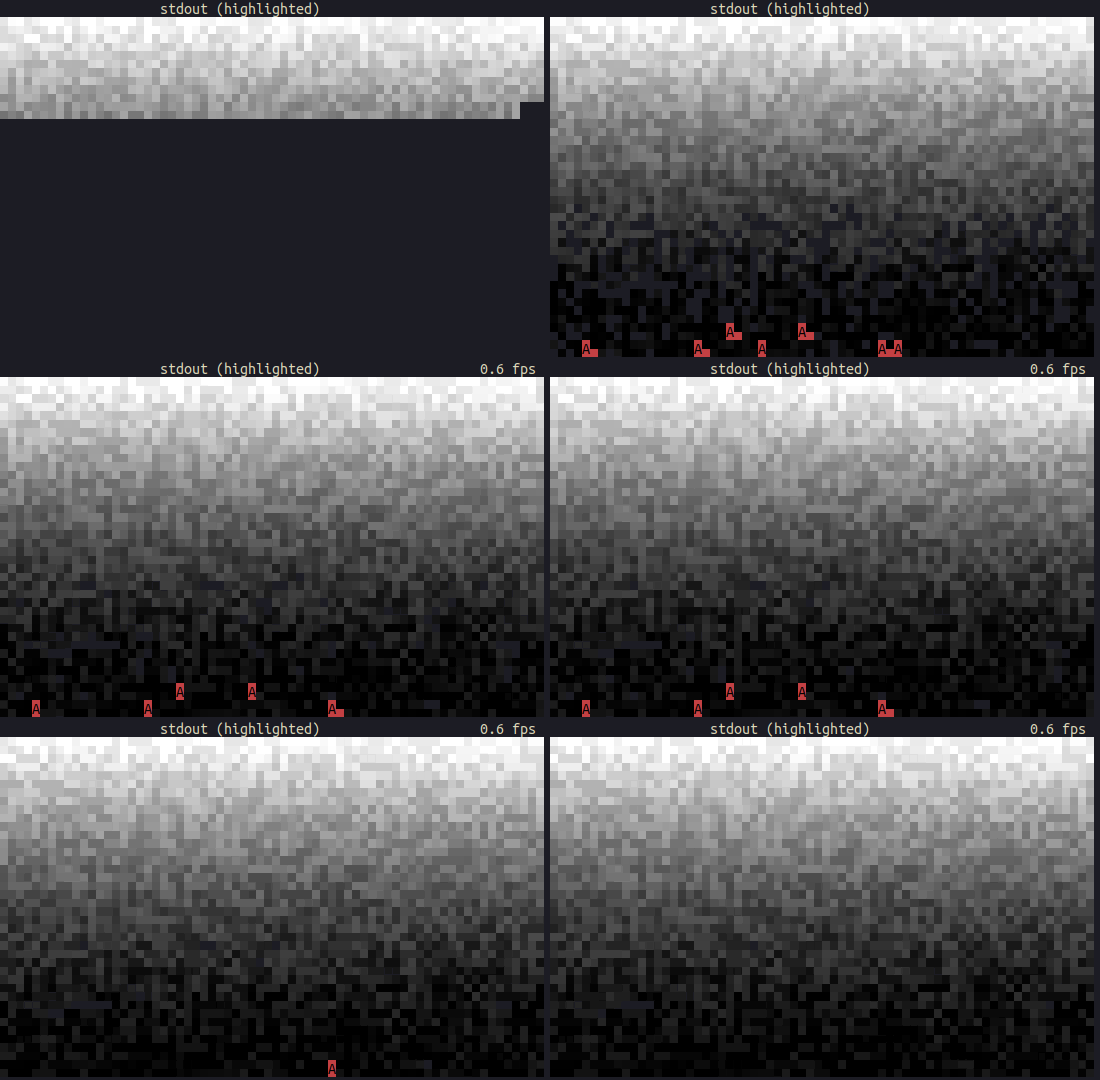
However this is not the case for most of the TUI applications and this optimization actually saves us from re-rendering the majority of the screen.
Another interesting thing to look at is the buffer size. We can observe the following with a smaller buffer size (100 bytes) and delay between renders:
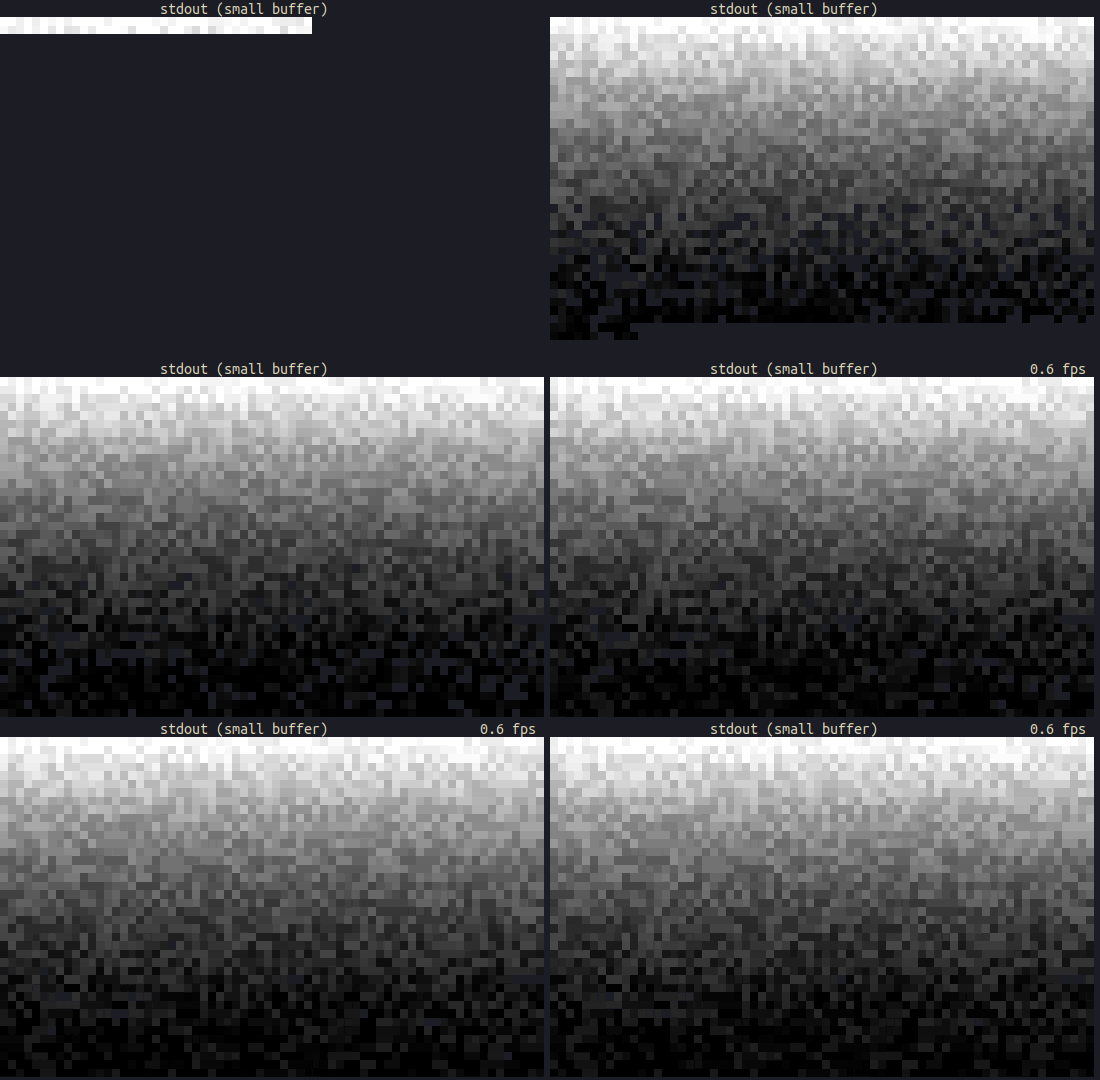
Whereas a bigger buffer renders bigger chunks:
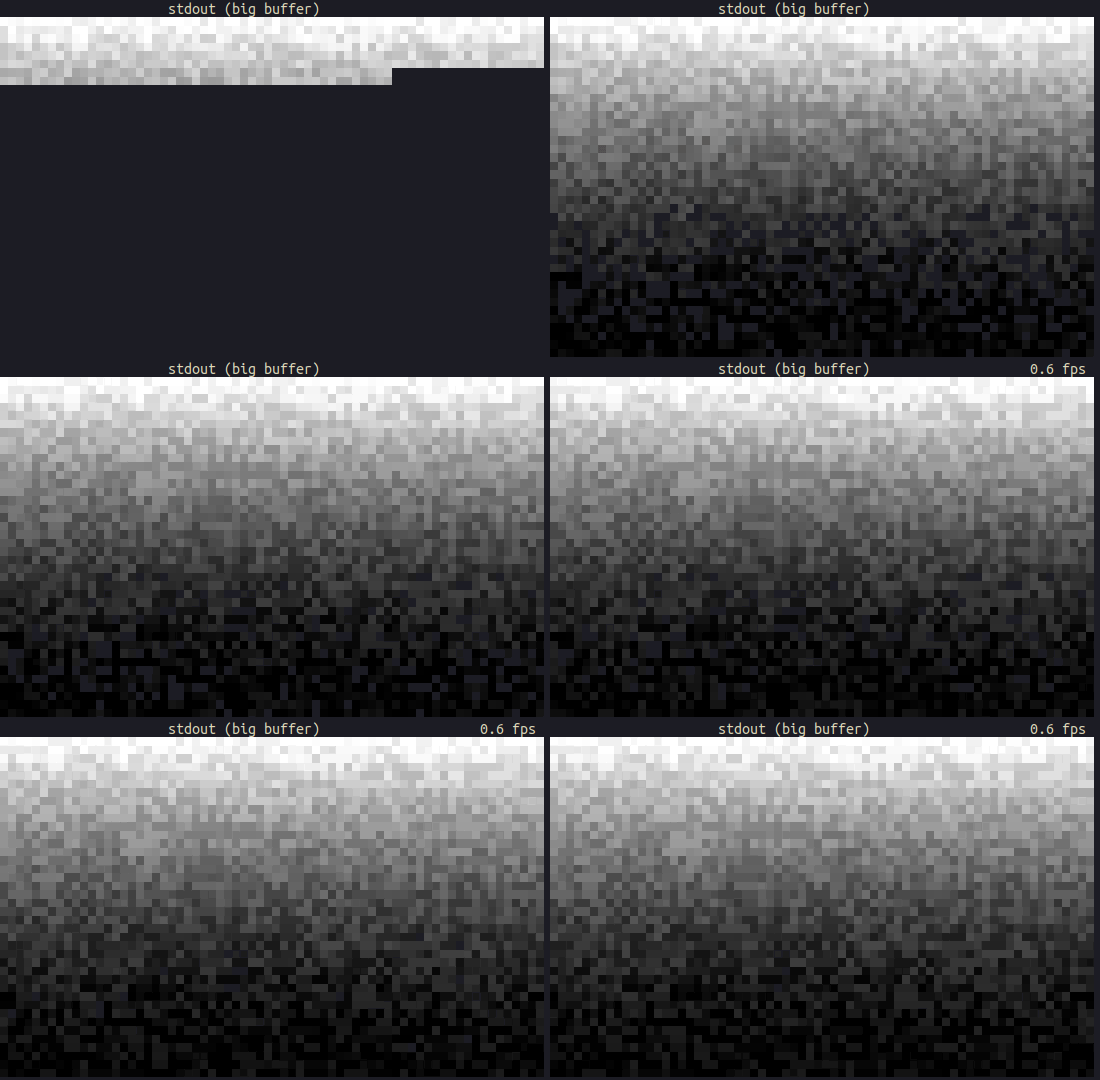
We won't see a big difference if we remove the sleep except if we use very small/big buffer then the FPS drops vastly. We can probably experiment with the buffer size to draw a single line for each render but I wasn't able to get a better FPS in my attempts.
One other thing to mention, there were recent developments on ratatui to achieve a better performance for rendering cells. However, this doesn't have a big impact on FPS but definitely an improvement for using less resources.
We can keep experimenting with the low level functions of crossterm / ratatui to further optimize things but I feel like that would be a better topic for the part 2 of this post.
While writing this, I wasn't able to achieve a "faster stdout" so feel free to leave comments about your suggestions!
Here is the ratatui + crossterm rendering comparison for stdout and stderr using unbuffered / line-buffered / block-buffered writes:
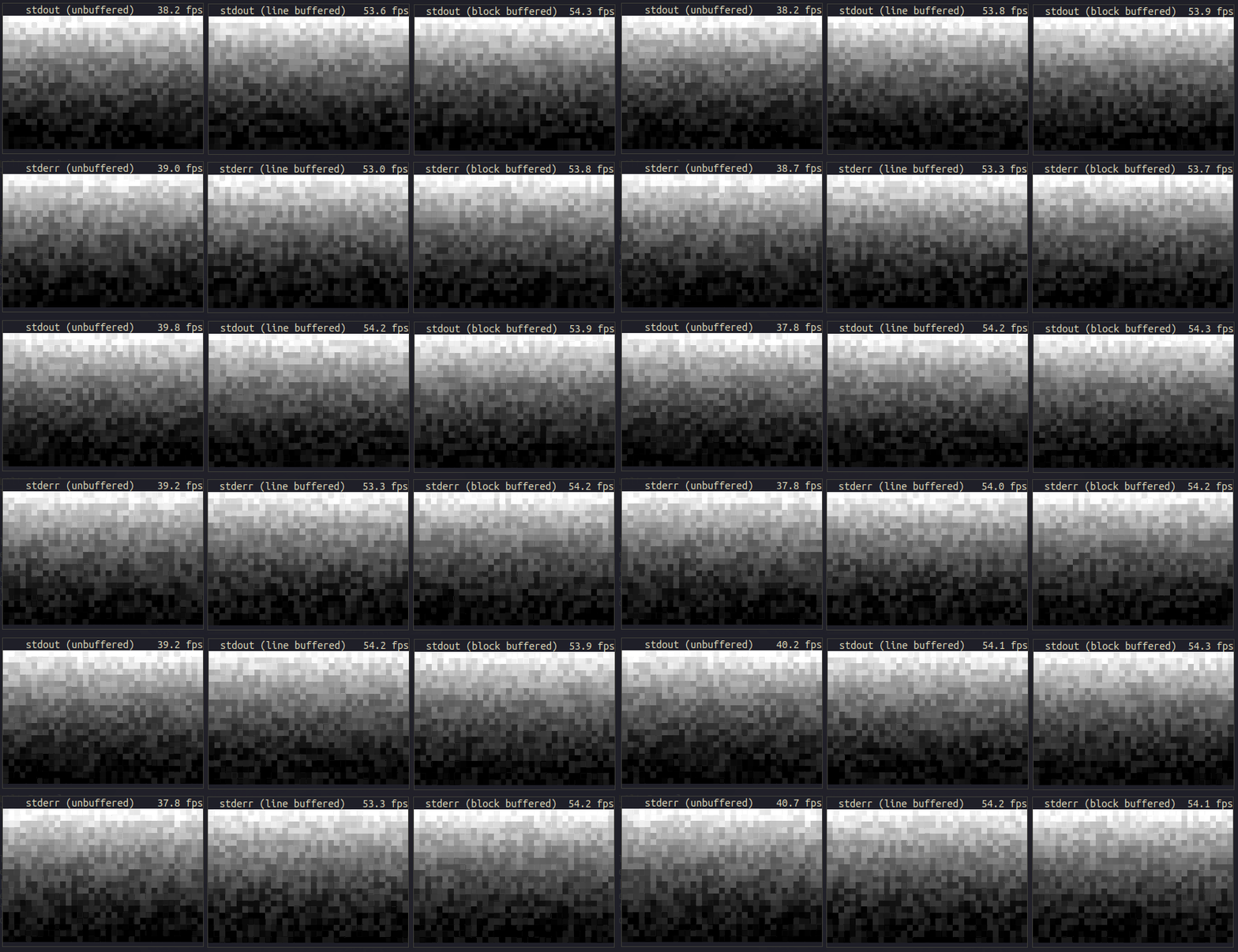
The takeaway from this is that I/O streams have similar performances when the same buffering technique is used. We can also say that std::io::stdout() is faster than std::io::stderr() because the use of line-buffered vs no buffering.
If you want to reproduce the same results, I used the following environment in my experiments:
- Backend: crossterm
- TUI/rendering: ratatui
- Terminal: alacritty
- CPU: AMD Ryzen 7 4700U with Radeon Graphics (8) @ 2.000GHz
- GPU: AMD ATI Radeon RX Vega 6
- RAM: 24GB
I'm curious about how the results might change in different systems/terminals so feel free to share your findings below!
What we have covered so far only applies to Rust so it would be interesting to take a look at what other programming languages are doing in terms of buffered I/O.
os.Stdout is unbuffered as default. It is possible to make it buffered as follows:
f := bufio.NewWriter(os.Stdout)
defer f.Flush()
I'm guessing same applies for os.Stderr as well.
When printing interactively, sys.stdout is line buffered. Otherwise, it is block buffered like regular text files. The sys.stderr is line buffered in both cases.
One cool thing about Python is that we can actually make both streams unbuffered by passing the -u option or setting the PYTHONUNBUFFERED environment variable.
Now brace yourself because this might come as a bit of a surprise to you: when you
printf()orfprintf()or use any I/O functions like that, it does not normally work immediately. For the sake of efficiency, and to irritate you, the I/O on aFILE*stream is buffered away safely until certain conditions are met, and only then is the actual I/O performed.
As you can already tell, the I/O streams are buffered as default. However, this is configurable via setbuf() or setvbuf() function:
#include <stdio.h>
void setbuf(FILE *stream, char *buf);
int setvbuf(FILE *stream, char *buf, int mode, size_t size);
For example, to turn off buffering for stdout:
// _IONBF: stream will be unbuffered.
setvbuf(stdout, NULL, _IONBF, 0);
This documentation has a good explanation of the different buffering options and related examples.
Here is an example for line buffering:
FILE *fp;
char lineBuf[1024];

fp = fopen("somefile.txt", "r");
setvbuf(fp, lineBuf, _IOLBF, 1024);  // set to line buffering
// ...
fclose(fp);

fp = fopen("another.dat", "rb");
setbuf(fp, NULL); // set to unbuffered
// ...
fclose(fp);The I/O streams are unbuffered. We can achieve buffered writes as follows:
const std = @import("std");

pub fn main() !void {
    const out = std.io.getStdOut();
    var buf = std.io.bufferedWriter(out.writer());

    // Get the Writer interface from BufferedWriter
    var w = buf.writer();

    try w.print("check out my Zig Bits series as well!", .{});

    // Don't forget to flush!
    try buf.flush();
}std::cout is buffered according to this article.
Couldn't find your favorite programming language on this list? Have something to add/fix?
Feel free to contribute to this blog! ⚡
We have covered:
- How I/O streams work on Unix-like systems
- How terminal user interfaces work
- How to build terminal user interfaces using Rust (w/
ratatui/crossterm) - How to profile applications and observing system calls (w/
samply) - Buffering for I/O streams
- Line buffering (
LineWriter) - Block buffering (
BufWriter) - No buffering (
from_raw_fd)
- Line buffering (
- Rust compared to other programming languages
- And other things that I probably forgot to put here!
📂 The code snippets used in this post are available in this repository.
🎢 It was a wild ride and I learned a lot! I'm hoping that I was able to share at least one thing you didn't know before.
🤔 I might have skipped something very important or shared incomplete information. Feel free to comment below or contribute your edits case you have caught something. This is the beauty of these blog posts!
👏 I would like to give special thanks to the fellow ratatui maintainer Dheepak Krishnamurthy (@kdheepak) for pioneering the first steps of this research in this discussion and took time to investigate this further with me! Kudos!
Hope you enjoyed!
ciao!
💖 Liked this article? Want to sponsor my blog posts and have early access? Want to add your name/logo or company's badge here? Check out my GitHub sponsorship tiers!
Published by Orhun Parmaksız in Rust
<iframe src="https://github.com/sponsors/orhun/button" title="Sponsor @orhun" height="35" width="116" style="border: 0"></iframe>[][95]![https://cdn.buymeacoffee.com/buttons/v2/default-white.png)][95](https://cdn.buymeacoffee.com/buttons/v2/default-white.png)][95)
✨ Sponsored by:


