
Replies: 3 comments 1 reply

-
|
Does this solve the issue where reactor swaps the wrong faces in videos. Trying to understand the purpose of this. |
Beta Was this translation helpful? Give feedback.

-
Yes, this is for solve exact this problem - "reactor swaps the wrong faces in videos". |
Beta Was this translation helpful? Give feedback.
-
|
Alright works nice in a short video I did with 2 people. Is there a way to add a status bar to see what your progress is like. Because of the way the workflow is looping, you really cant see the overall progress. I am referring to the FaceFilter-FaceSwap-Video workflow. |
Beta Was this translation helpful? Give feedback.

-
It loops because it uses 'batch images': that way only one frame is saved in memory and not the whole video. That makes it possible to handle any video length and any video resolution. There is a way to see progress, though. In the console, you'll see appear a counter that will increase once a frame have been entirely analyzed, swapped, restored, and saved |
Beta Was this translation helpful? Give feedback.


Uh oh!
There was an error while loading. Please reload this page.
Uh oh!
There was an error while loading. Please reload this page.
-
Hi! I'm sharing the new node I wrote for ComfyUI enabling anyone to use reference pictures to target faces inside pictures and videos. I don't think there is an alternative or that if there is one, it is not well documented. So here you go, hope you'll like it, don't hesitate if you further questions.
Description
Basic workflow
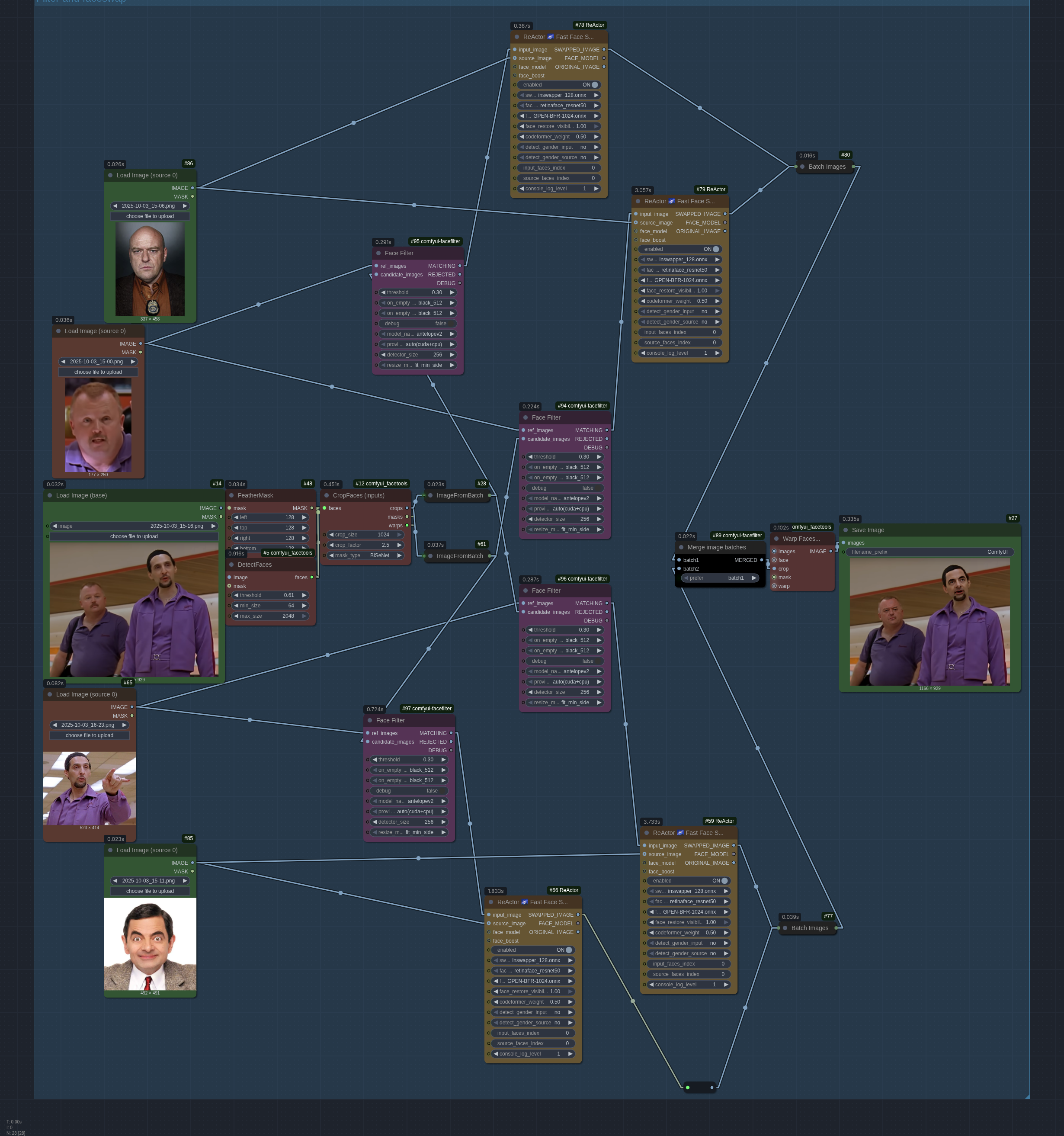
As a basis, I made a faceswap workflow that crops the faces from the input, performs the faceswap on those small images instead of the input one. Then I use GPEN-BFR-1024 or GPEN-BFR-2048, and the swaps are very good even in 8k (more details at the end in the notes). Using this, I could run ReActor successfully on VR 8K videos without OOEM my 8Gb GPU, which was not possible otherwise. Once the faces are cropped, they are batched, and sent to ReActor node, in order.
This is annoying because you have to know the order, and it can change mid-video. That's where my new node comes into play. The node itself is called ComfyUI-FaceFilter and is available in the manager (drop a star if you like it!). It allows for easy splitting of image batches depending on if they match reference images or not. This makes using faces to target people with ReActor way easier.
FaceFilter node
All the examples I'll use are available as ComfyUI workflows in json format here (filter, picture faceswap using pictures as references, video faceswap using pictures as reference).
For the demonstration, here's a workflow that shows exactly how the node works. A batch of images is either redirected to the matching batch output if they individually match a reference, otherwise they get moved to the rejected output:
Details
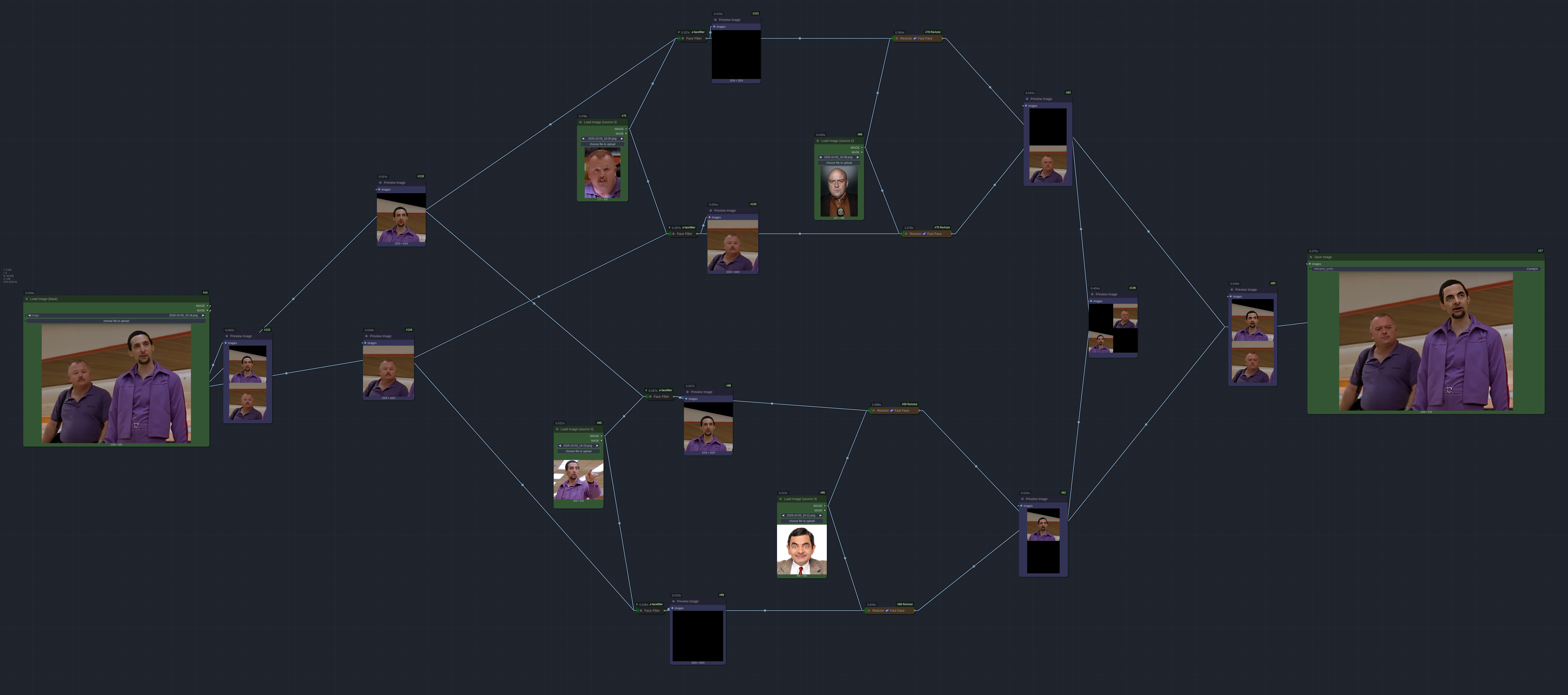
The idea is to run each input cropped faces into each possible filter. If they go through, then they match, and we can run ReActor with the test face on it. If not, the filter outputs a black image. Now we are almost there, but we have one batch for each face with multiple holes now, and we must have only one batch in the right order for the whole system to work.
MergeImageBatches node
That's the whole purpose of the additional node I shared. It allows, for each index in each batch, to pick the non-black image if the other (same index, different batch) is black or empty. Visually, for X images and 0 black images:
This recreates one batch, well-ordered, that we can feed back to the ImageWarp that put back the swapped faces where the non-swapped versions were.
Result
The result allows to do the following. All workflows (filter, picture faceswap, video faceswap) are in the FaceFilter repo, along with required other nodes and more details on usage.
With the evolution of the image batch through the workflow to make it easier to understand the logic:
Beta Was this translation helpful? Give feedback.
All reactions