


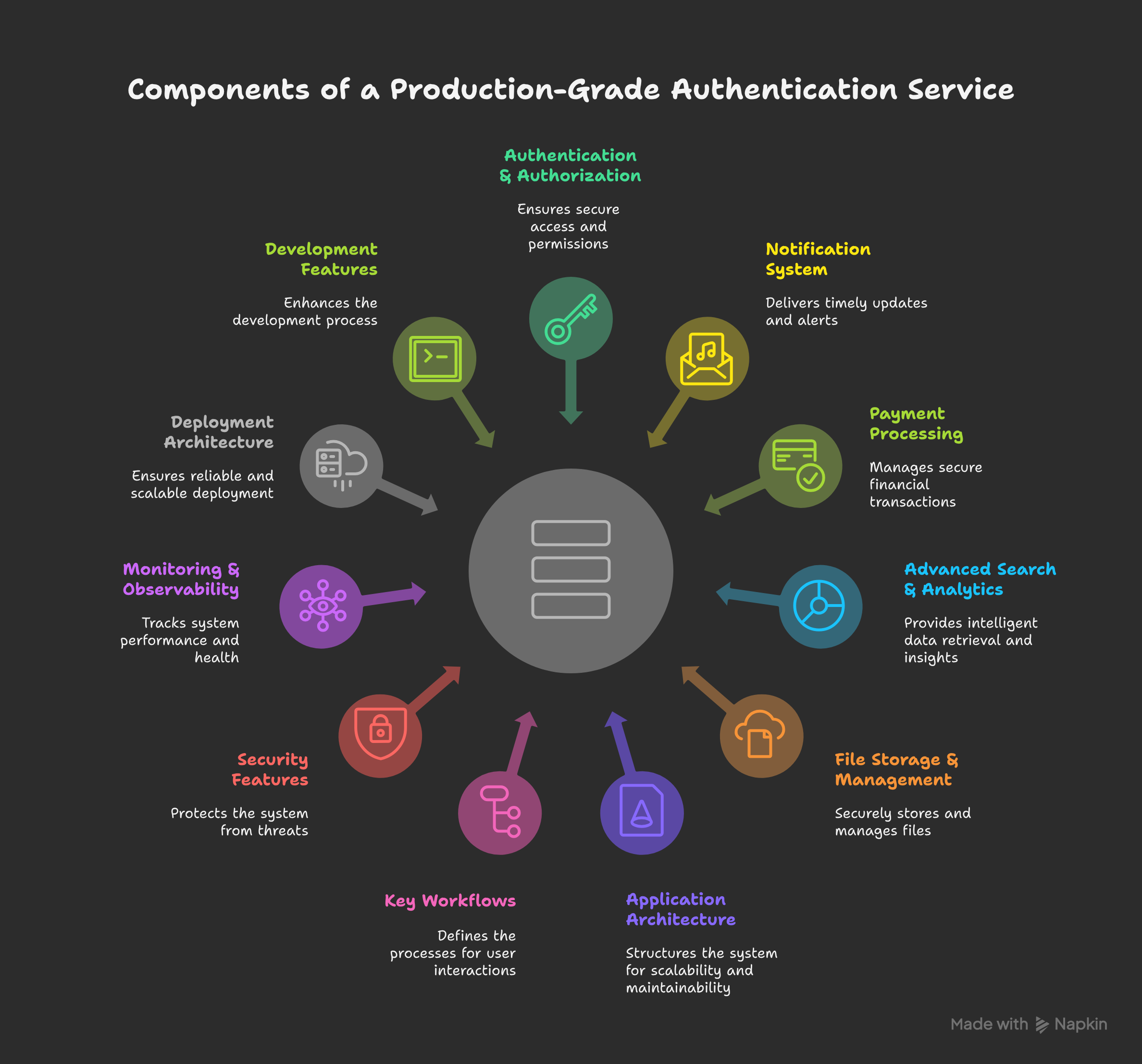
A comprehensive, production-ready Monolith template with authentication, search, notifications, payments, and fine-grained permissions built with Node.js, Express, MongoDB, Redis, and Elasticsearch.
📑 Table of Contents
- ✨ Features
- 📋 Prerequisites
- 🚀 Getting Started
- 📊 Project Structure
- ⚙️ Configuration
- 🛠️ Available Scripts
- � Search y& Analytics
- 🔔 Notifications
- 💳 Payment Integration
- � Permissi(ons & Authorization
- ☁️ Cloud Storage
- 📚 API Documentation
- 🔒 Security Features
- 🧪 Testing
- 🔄 API Endpoints
- 🤝 Contributing
- 📄 License
🔑 Complete Authentication System
- ✅ User registration with email verification
- ✅ Login with JWT (access and refresh tokens)
- ✅ Secure password reset flow
- ✅ Account confirmation mechanism
- ✅ Session management with Redis
- ✅ Secure password handling with bcrypt
- ✅ Refresh token rotation
🛡️ Security First Approach
- ✅ CORS protection with configurable origins
- ✅ Helmet security headers
- ✅ Intelligent rate limiting
- ✅ MongoDB sanitization against NoSQL injection
- ✅ XSS protection with input sanitization
- ✅ Secure HTTP-only cookies
- ✅ Comprehensive input validation with Joi
- ✅ Content security policies
🔍 Advanced Search & Analytics
- ✅ Elasticsearch integration with semantic search
- ✅ Vector embeddings with Google Gemini AI
- ✅ Full-text search with fuzzy matching
- ✅ Search analytics and performance metrics
- ✅ Custom search pipelines and aggregations
- ✅ Real-time indexing and data synchronization
- ✅ Search suggestions and autocomplete
🔔 Smart Notifications
- ✅ Multi-channel notifications (Email, SMS, Push, In-App)
- ✅ Novu integration for notification workflows
- ✅ User notification preferences management
- ✅ Device management for push notifications
- ✅ Notification templates and personalization
- ✅ Delivery tracking and analytics
- ✅ Scheduled and triggered notifications
💳 Payment Processing
- ✅ Razorpay integration for secure payments
- ✅ Subscription management and billing
- ✅ Payment webhooks and event handling
- ✅ Invoice generation and management
- ✅ Refund and dispute handling
- ✅ Payment analytics and reporting
- ✅ Multi-currency support
🔐 Fine-Grained Permissions
- ✅ OpenFGA integration for relationship-based access control
- ✅ Role-based and attribute-based permissions
- ✅ Dynamic permission evaluation
- ✅ Permission inheritance and delegation
- ✅ Audit trails for permission changes
- ✅ Real-time permission updates
- ✅ Custom authorization policies
☁️ Cloud Storage & CDN
- ✅ AWS S3 integration for file storage
- ✅ Secure file upload with presigned URLs
- ✅ Image processing and optimization
- ✅ CDN integration for fast delivery
- ✅ File versioning and backup
- ✅ Access control and permissions
- ✅ Automatic database backups to S3
🏭 Production Ready
- ✅ Dockerized deployment with HMR in development
- ✅ Request timeout configuration for reliability
- ✅ Webpack bundling for optimized builds
- ✅ Environment-specific configurations
- ✅ Comprehensive error handling with correlation IDs
- ✅ Interactive API documentation at
/api-docs - ✅ Structured logging with Loki integration
- ✅ Health check endpoints with dependency monitoring
- ✅ Prometheus metrics and Grafana dashboards
- ✅ RabbitMQ and Kafka for event-driven architecture
👨💻 Developer Experience
- ✅ Hot reloading in development
- ✅ Code linting and formatting with ESLint and Prettier
- ✅ Git hooks with Husky
- ✅ Comprehensive test suite
- ✅ Conventional commit messages
- ✅ Clear project structure
- ✅ Utility scripts for common tasks
| Node.js | ≥ 22.14.0 |
| npm | ≥ 10.7.0 |
| MongoDB | ≥ 7.0 |
| Redis | ≥ 7.0 |
| Elasticsearch | ≥ 8.0 |
| Docker & Docker Compose | For containerized deployment with HMR |
⬇️ Installation
- Clone the repository
git clone https://github.com/Harmeet10000/production-grade-auth-template.git
cd production-grade-auth-template- Install dependencies
npm i
pnpm i- Set up environment variables
Create a .env.development file in the root directory with the following variables:
# Server
# Server Configuration
NODE_ENV=development
PORT=8000
SERVER_URL=
FRONTEND_URL=http://localhost:5173

# Database Configuration
DATABASE=
DB_POOL_SIZE=

# Migration
MIGRATE_MONGO_URI=
MIGRATE_AUTOSYNC=true

# Redis Configuration
REDIS_HOST=
REDIS_PORT=
REDIS_USERNAME=
REDIS_PASSWORD=

# RabbitMQ Configuration
RABBITMQ_URL=
RABBITMQ_PRIVATE_URL=
RABBITMQ_NODENAME=
RABBITMQ_DEFAULT_USER=
RABBITMQ_DEFAULT_PASS=

# Kafka Configuration
KAFKA_BROKER=
KAFKA_USERNAME=
KAFKA_PASSWORD=
KAFKA_TOPIC=
KAFKA_SERVICE_URI=
KAFKA_HOST=
KAFKA_PORT=
KAFKA_SSL_CA_CERT=
KAFKA_SSL_CERT=
KAFKA_SSL_KEY=
KAFKA_SSL_ENABLED=true

# JWT Configuration
ACCESS_TOKEN_SECRET=
REFRESH_TOKEN_SECRET=
ACCESS_TOKEN_EXPIRY=
REFRESH_TOKEN_EXPIRY=

# Email Configuration
RESEND_KEY=

# Log Configuration
LOG_LEVEL=debug

# S3 Backup Configuration
S3_BACKUP_ENABLED=false
S3_BUCKET_NAME=db-backups
AWS_REGION=us-east-1
S3_PREFIX=mongodb-backups/
BUCKET_NAME=""
BUCKET_REGION="ap-south-1"
ACCESS_KEY=""
SECRET_ACCESS_KEY=""


# Backup Configuration
RUN_BACKUP_ONCE=false


# Google OAuth Configuration
GOOGLE_CLIENT_ID=
GOOGLE_CLIENT_SECRET=GOCSPX-
GOOGLE_REDIRECT_URIS=

# Gemini
GEMINI_API_KEY=


# OpenFGA Configuration
OPENFGA_API_URL=
OPENFGA_API_HOST=
OPENFGA_STORE_ID=
OPENFGA_STORE_NAME=
OPENFGA_MODEL_ID=

# Loki Configuration
LOKI_HOST=http://loki:3100
▶️ Running the Application
docker compose up -d
or
npm run devnpm run build
npm run start🐳 Docker Deployment
docker build -t auth-service-dev -f docker/dev.Dockerfile .
docker run -p 8000:8000 --env-file .env.development auth-service-devdocker build -t auth-service-prod -f docker/prod.Dockerfile .
docker run -p 8000:8000 --env-file .env.production auth-service-prod📝 API Documentation
Once the server is running, access the Swagger documentation at:
http://localhost:8000/api-docs
🗂️ Folder Organization
backend/
├── docker/                # Docker configuration files
│   ├── dev.Dockerfile
│   └── prod.Dockerfile
├── docs/                  # API documentation
│   ├── swagger-output.json
│   └── swagger.js
├── logs/                  # Application logs
├── nginx/                 # Nginx configuration for deployment
│   ├── http.conf
│   └── https.conf
├── scripts/               # Utility scripts
│   ├── cron.sh
│   ├── dbBackup.js
│   └── docker.sh
├── src/                   # Source code
│   ├── config/            # Configuration files
│   ├── connections/       # Database and external service connections
│   ├── examples/          # Code examples for various integrations
│   ├── features/          # Feature-based modules
│   │   ├── auth/          # Authentication feature
│   │   │   ├── authController.js
│   │   │   ├── authService.js
│   │   │   ├── authRepository.js
│   │   │   ├── authRoutes.js
│   │   │   ├── authValidation.js
│   │   │   ├── authMiddleware.js
│   │   │   ├── userModel.js
│   │   │   └── refreshToken.js
│   │   ├── health/        # Health check feature
│   │   ├── notifications/ # Notification system
│   │   ├── payments/      # Payment processing
│   │   ├── permissions/   # Authorization & permissions
│   │   ├── search/        # Search & analytics
│   │   ├── storage/       # File storage (S3)
│   │   └── subscription/  # Subscription management
│   ├── helpers/           # Helper utilities
│   │   ├── cache/         # Redis caching utilities
│   │   └── messaging/     # Message queue utilities
│   ├── middlewares/       # Express middlewares
│   ├── utils/             # General utility functions
│   ├── app.js             # Express application setup
│   └── index.js           # Application entry point
└── test/                  # Test files
    ├── e2e/               # End-to-end tests
    ├── unit/              # Unit tests
    ├── integration/       # Integration tests
    └── performance/       # Performance tests
📄 Configuration Files
- webpack.config.js: Configures bundling for production deployment
- eslint.config.js: JavaScript linting rules
- commitlint.config.js: Conventional commit message validation
- test-runner.js: Test runner configuration
- prometheus.yml: Prometheus monitoring configuration
📋 NPM Commands
| Command | Description |
|---|---|
npm run dev |
Start the development server with hot reload |
npm run build |
Build the production bundle |
npm run dev:prod |
Run production build with nodemon |
npm start |
Start the production server |
npm run swagger |
Generate Swagger documentation |
npm test |
Run the test suite |
npm run test:watch |
Run tests in watch mode |
npm run test:coverage |
Run tests with coverage report |
npm run lint |
Check code for linting errors |
npm run lint:fix |
Fix linting errors automatically |
npm run format |
Check code formatting |
npm run format:fix |
Fix formatting issues automatically |
npm run migrate:dev |
Run database migrations in development |
npm run migrate:prod |
Run database migrations in production |
🔐 Security Implementation
- JWT Authentication: Secure token-based authentication with refresh token rotation
- Password Security: Bcrypt hashing with appropriate salt rounds
- Rate Limiting: Protection against brute force attacks
- Data Validation: Joi schemas for request validation
- HTTP Security Headers: Using Helmet middleware
- Cookie Security: HTTP-only, secure cookies with proper domain and path settings
- MongoDB Sanitization: Protection against NoSQL injection
- XSS Protection: Sanitization of user input
🧠 Test Commands
Run all tests:
npm testRun tests in watch mode:
npm run test:watchGenerate test coverage report:
npm run test:coverage📜 Contribution Guidelines
- Fork the repository
- Create your feature branch (
git checkout -b feature/amazing-feature) - Commit your changes (
git commit -m 'feat: Add some amazing feature') - Push to the branch (
git push origin feature/amazing-feature) - Open a Pull Request
This project is licensed under the ISC License - see the LICENSE file for details.