This is only if you have very specific use case, or want to hook up your existing graphics solution with Equipe. We have built in support for TV-graphics, LED-screens and Info Screens.
- Find out your organizer_id, show_id and competition_id by looking at the url, or browsing the api end points
- GET starts.json
- GET people.json and horses.json if you need full details about the rider or horse
- Connect via WebSocket to Equipe ATU Connector for realtime data events
Login to your account. Visit you profile page and click show API-Key. This key should be set in the X-API-KEY header on every request.
GET /organizers/:organizer_id/meetings.json
[
  {
    "id": 1961,
    "name": "Knokke Hippique",
    "starts_on": "2016-06-29",
    "ends_on": "2016-07-03",
    "logo_id": "0004",
    "logo_group": "kbrsf"
  }
]GET /meetings/:show_id/competitions.json
[
  {
    "kq": 27,
    "clabb": "27",
    "klass": "CSI5* Grand Prix Table A (238.2.2a-GP) 1.60m"
  }
]| Attribute | Type | Description |
|---|---|---|
| kq | integer | ID |
| clabb | string | Competition number |
| klass | string | Name of the competition |
This gives details how the result list is sorted, where you find time and faults in the different rounds.
GET /meetings/:show_id/competitions/:competition_id/H/judgement.json
{
  "rounds": [
    {
      "faults_caption": "Faults",
      "caption": "First round",
      "time_faults_caption": "Time faults",
      "time_caption": "Time",
      "fence_faults_caption": "Fence faults",
      "time_column": "grundt",
      "faults_column": "grundf",
      "time_faults_column": "tfg",
      "round_no": 1,
      "max_time": 74,
      "eliminated_faults": 999,
      "eliminated_time": 999
    },
    {
      "faults_caption": "Faults",
      "caption": "Jump off",
      "time_faults_caption": "Time faults",
      "time_caption": "Time",
      "fence_faults_caption": "Fence faults",
      "time_column": "omh1t",
      "faults_column": "omh1f",
      "time_faults_column": "tf1",
      "round_no": 2,
      "max_time": 50,
      "eliminated_faults": 999,
      "eliminated_time": 999
    }
  ],
  "sorting": {
    "grundf": "asc",
    "omh1f": "asc",
    "omh1t": "asc",
    "grundt": "asc"
  }
}GET /meetings/:show_id/competitions/:competition_id/H/starts.json
[
  {
    "id": 11077,
    "kq": 11,
    "clabb_no": "11",
    "ord": 1000,
    "st": 1,
    "rider_name": "Max O'Reilly Hyland",
    "rider_country": "IRL",
    "rider_name_order": "O'Reilly HylandMax",
    "rider_short_name": "M. O'Reilly Hyland",
    "rnr": 10066,
    "horse_name": "Dorado",
    "horse_no": 600,
    "hnr": 10171,
    "re": 29,
    "a": "",
  },
  {
    "id": 10970,
    "kq": 11,
    "clabb_no": "11",
    "ord": 1001,
    "st": 2,
    "rider_name": "Christine Raaholt",
    "rider_country": "NOR",
    "rider_name_order": "RaaholtChristine",
    "rider_short_name": "C. Raaholt",
    "rnr": 10062,
    "horse_name": "Brandy",
    "horse_no": 602,
    "hnr": 10164,
    "re": 40,
    "a": ""
  }
]| Attribute | Type | Description |
|---|---|---|
| st | integer | Start number |
| kq | integer | Competition ID |
| ord | integer | Starting order |
| rider_name | string | Name of the rider |
| rider_country | string | Nation of the rider |
| horse_name | string | Name of the horse |
| horse_no | string | Horse number |
| re | integer | Rank |
| rnr | integer | Person ID |
| hnr | integer | Horse ID |
| a | string | See below |
It get more details about the rider or horse use
GET /meetings/:show_id/people/:person_id
GET /meetings/:show_id/horses/:horse_id
GET /meetings/:show_id/competitions/:competition_id/H/results.json
[
  {
    "id": 10673,
    "kq": 11,
    "clabb_no": "11",
    "ord": 1004,
    "ord_omh": null,
    "st": 5,
    "rider_name": "Ines Van Den Bosch",
    "rider_name_order": "Van Den BoschInes",
    "rider_short_name": "I. Van Den Bosch",
    "rider_country": "BEL",
    "rnr": 10082,
    "horse_name": "Watch ME",
    "horse_no": 612,
    "hnr": 10239,
    "re": 1,
    "grundf": 0,
    "grundt": 69.57,
    "tfg": 0,
    "or": "",
    "a": "",
    "rid": true,
    "result_preview": "0/69.57",
    "tida": null
  },
  {
    "id": 11102,
    "kq": 11,
    "clabb_no": "11",
    "ord": 1015,
    "ord_omh": null,
    "st": 16,
    "rider_name": "Leonie Peeters",
    "rider_name_order": "PeetersLeonie",
    "rider_short_name": "L. Peeters",
    "rider_country": "BEL",
    "rnr": 10085,
    "horse_name": "Sunny Girl",
    "horse_no": 638,
    "hnr": 10205,
    "re": 2,
    "grundf": 0,
    "grundt": 71.02,
    "tfg": 0,
    "or": "",
    "a": "",
    "rid": true,
    "result_preview": "0/71.02",
    "tida": null
  }
]| Attribute | Type | Description |
|---|---|---|
| id | integer | Start ID |
| st | integer | Start number |
| ord | integer | Start order |
| ord_omh | integer | Starting order jump off or following round |
| rider_name | string | Name of the rider |
| rider_country | string | Nation rider competing for |
| rnr | integer | Person ID |
| horse_name | string | Name of the horse |
| hnr | integer | Horse ID |
| re | integer | Rank |
| tida | string | Estimated start time |
| rid | boolean | Ridden |
| result_preview | string | Result summary for all rounds |
| or | string | Reason
|
| a | string | Status
|
This is also where you fetch the start list for jump off / following round, after the timekeeping operater switch. Starts qualified for jump off will have a non-null value in ord_omh.
Create a test show, where you can play with the timekeeping. Install the Equipe ATU Connector this can be run without the timekeeping hardware. Click Edit settings, Select ATU Type, choose Computer.
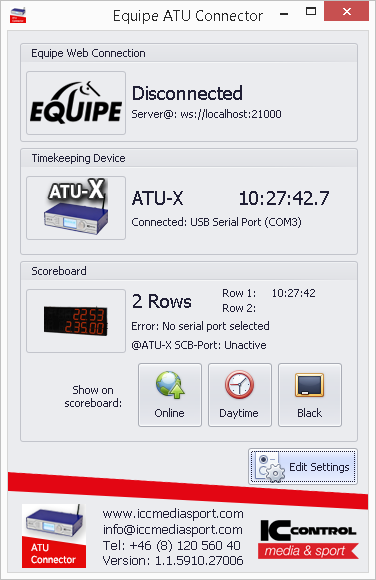
You get realtime timekeeping events by connecting to the Equipe ATU Connector via WebSocket and listen for the event output with this you are able to rebuild the timekeeping state.
{
  "type": "output",
  "payload": {
    "id": 10946,
    "rank": 999,
    "running": true,
    "countDown": false,
    "countDownDiff": null,
    "timekeepingOutputId": 46,
    "action": "output",
    "baseTime": "0.0",
    "time": 0,
    "timeToBeatTime": null,
    "timeToBeatDiff": null,
    "phase": 1,
    "round": 1,
    "previousTime": null,
    "faults": 0,
    "fenceFaults": null,
    "timeFaults": 0,
    "totalFaults": null,
    "startNo": 13,
    "rider": "Megan Laseur",
    "horse": "Especially For You"
  }
}
When output event is recevied, check the state of running/countDown and trigger your own timer.
receivedTimekeepingOutput(data){
  // If eliminated hide the clock
  data.isEliminated = !!ShowJumpingEvent[data.fenceFaults];

  // Normalize
  data.faults = data.faults || 0;
  if(!data.timeAdded)
    data.timeAdded = null;

  if(data.countDownValue)
    data.countDownValue = parseFloat(data.countDownValue, 10);

  if (data.countDown && !data.running)
    this.start(Date.now() - (data.countDownValue * 1000));
  else
    if(data.running)
      this.start(Date.now() - (parseFloat(data.time, 10) * 1000));
    else {
      if(this.state.countDown && !data.countDown)
        data.countDown = true;

      data.time = this.fixedTo(parseFloat(data.time, 10) || 0, 2);
      data.countDownValue = this.fixedTo(parseFloat(data.countDownValue, 10), 2);
      this.stop();
    }

  this.setState(data);
}
See full working example in examples/equipe_timekeeping_client