NOTE: This chapter's code builds off of chapter 2's code.
Up to this point we have assumed that both the model & optimizer fully fit on a single GPU. So each GPU during our training process fully contains a copy of the model and optimizer.
This becomes an issue once the model becomes big enough - either the model itself cannot fit, or the optimizer (which usually contains 1-4x the memory of the model) cannot fit anymore.
Sharding refers to spreading the storage of a combination of: optimizer state, gradients, and/or model parameters across your GPUs. The execution of layers DOES NOT CHANGE.
What this means:
- Each layer of your model still needs to pull the entire layer's parameters/gradients/optimizer states into GPU memory. After the layer is done, then those pieces are resharded.
- There are synchronization costs to un-shard and re-shard before and after each layer.
- Sharding does not reduce the peak memory cost of your biggest layer.
Sharding is a data parallel technique! NOT a model/tensor/pipeline parallel technique.

At a high level FSDP works as follow:
- In constructor:
- Shard model parameters and each rank only keeps its own shard
- In forward path:
- Run all_gather to collect all shards from all ranks to recover the full parameter in this FSDP unit
- Run forward computation
- Discard parameter shards it has just collected
- In backward path:
- Run all_gather to collect all shards from all ranks to recover the full parameter in this FSDP unit
- Run backward computation
- Run reduce_scatter to sync gradients
- Discard parameters.
Reference description of the process (from pytorch docs):
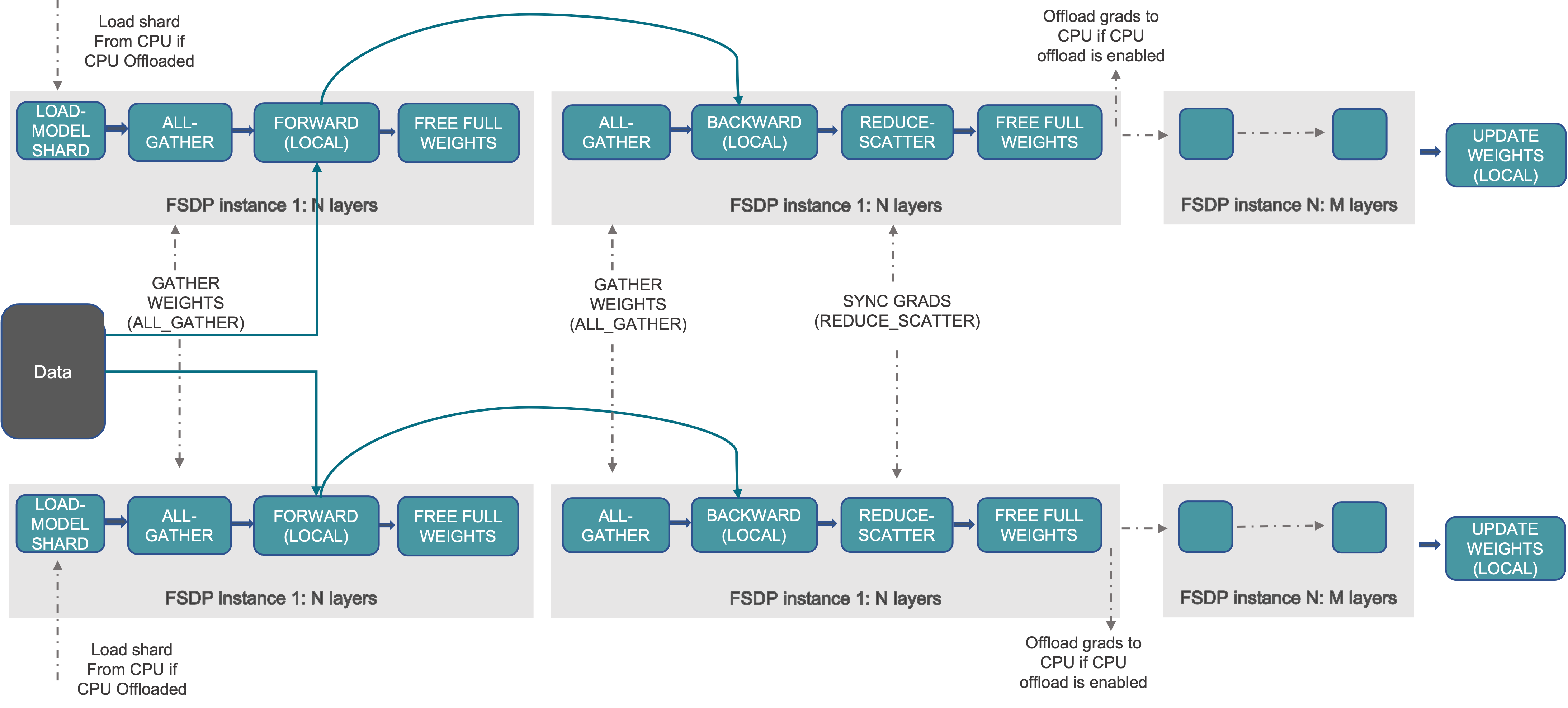
References:
The meta device does not allocate any memory at all! It makes model initialization extremely fast. It's used for FSDP because we don't want to initialize weights until after the sharding happens.
with torch.device("meta"):
model = AutoModelForCausalLM.from_config(config, dtype=dtype)To do this we will the fsdp2 api from pytorch: fully_shard().
This basically splits our model (still on the meta device) across all of our GPUs.
fsdp_config = dict(
    reshard_after_forward=True,
    offload_policy=CPUOffloadPolicy() if args.cpu_offload else None,
)
for decoder in model.model.layers:
    fully_shard(decoder, **fsdp_config)
fully_shard(model, **fsdp_config)
An important note here is that we are applying sharding at the decoder layer level. What implications does this have?
fully_shard() inserts an all-gather where you put it.
So we are saying there should be an all-gather of each decoder layer right before it executes. If you want the all-gathers to happen at a different place, you will need to apply fully_shard() differently.
As the graphic at the top shows, typically parameters are resharded right after the forward pass completes. This is standard because it saves us more GPU memory through the forward pass.
If we set reshard_after_forward=False, we don't actually reshard things until after the backwards pass completes.
From the CPUOffloadPolicy docs:
This offload policy offloads parameters, gradients, and optimizer states to CPU.
This option heavily reduces memory requirements - at the cost of a lot of compute and memory bandwidth. The forward & backward pass runs on the GPU, then gradients are offloaded to CPU and the optimizer runs on the CPU:
Sharded gradients are copied device-to-host in backward, and the optimizer.step() runs on CPU with CPU optimizer states.
Note that this option will NOT reduce peak GPU memory requirements - each layer will still be fully executed in the GPU. However there may be more memory for each layer to use as more memory is stored in the CPU.
First we allocate the memory with to_empty and then we reset all the parameters with the standard reset_parameters()
model.to_empty(device="cpu" if args.cpu_offload else device)
model.apply(
    lambda m: m.reset_parameters() if hasattr(m, "reset_parameters") else None
)
Note that some modules like RotaryEmbedding have buffers and not parameters. These will get deallocated with to_empty() but not reset with reset_parameters(). You'll have to handle these manually:
from transformers.models.llama.modeling_llama import LlamaRMSNorm, LlamaRotaryEmbedding

def reset_rope(self: LlamaRotaryEmbedding):
    self.inv_freq, self.attention_scaling = self.rope_init_fn(
        self.config, self.inv_freq.device
    )
    self.original_inv_freq = self.inv_freq


LlamaRMSNorm.reset_parameters = lambda self: torch.nn.init.ones_(self.weight)
LlamaRotaryEmbedding.reset_parameters = reset_ropeSince model parameters may be sharded across GPUs, we need to do checkpointing a little bit differently. The fastest and least memory intensive will be sharded checkpoints, which will just save whatever shard the GPU currently has. Sharded checkpoints are what we recommend.
Here are the imports you need to do this:
from torch.distributed.checkpoint.state_dict import (
    get_state_dict,
    set_state_dict,
    StateDictOptions,
)
from torch.distributed.checkpoint import load, save
Additionally, we are going to set up our StateDictOptions, because it is used multiple places:
# NOTE: full_state_dict=False means we will be saving sharded checkpoints.
ckpt_opts = StateDictOptions(full_state_dict=False, cpu_offload=True)
If we were to set full_state_dict=True, then we'd be doing full state dicts.
A notable difference to normal checkpoint is that we have to save on every rank, because we are doing sharded checkpoints, we need all the shards from every rank.
if state["global_step"] % args.ckpt_freq == 0:
    dist.barrier()
    # NOTE: we have to call this on ALL ranks
    sharded_model_state, sharded_optimizer_state = get_state_dict(
        model, optimizer, options=ckpt_opts
    )
    save(
        dict(model=sharded_model_state, optimizer=sharded_optimizer_state),
        checkpoint_id=exp_dir / "checkpoint",
    )
torch.distributed.checkpoint.state_dict.get_state_dict() takes in a normal model/optimizer and extracts a state dict that contains the sharded checkpoints.
Then we just call torch.distributed.checkpoint.state_dict_saver.save() to save this sharded checkpoint.
After this runs, the directory you specify will contain a file per rank!
Loading a sharded checkpoint is a little bit more complicated, since we have to convert back and forth between various formats for the checkpoints.
First, we call torch.distributed.checkpoint.state_dict.get_state_dict(), just like we did in saving a checkpoint. This will construct the sharded checkpoint dictionaries just like they were constructed when saving:
sharded_model_state, sharded_optimizer_state = get_state_dict(
    model, optimizer, options=ckpt_opts
)
Next we call the opposite of save, torch.distributed.checkpoint.state_dict_loader.load(). At this point the sharded state dicts will contain exactly what we saved earlier.
load(
    dict(model=sharded_model_state, optimizer=sharded_optimizer_state),
    checkpoint_id=exp_dir / "checkpoint",
)
Finally, we need to apply these sharded checkpoint state dicts to the actual model parameters in our last step, with torch.distributed.checkpoint.state_dict.set_state_dict():
set_state_dict(
    model,
    optimizer,
    model_state_dict=sharded_model_state,
    optim_state_dict=sharded_optimizer_state,
    options=ckpt_opts,
)If you want to convert between formats (like sharded to full state dict), pytorch has a set of utilities for this already. Find the guide here:
https://pytorch.org/tutorials/recipes/distributed_checkpoint_recipe.html#formats
Same command as normal:
cd distributed-training-guide/04-sharding-fsdp
export TORCHELASTIC_ERROR_FILE=../error.json
export OMP_NUM_THREADS=1
export HF_HOME=../.cache
torchrun --nproc-per-node gpu \
    --redirects 3 \
    --log-dir ../logs \
    train_llm.py \
    -d tatsu-lab/alpaca \
    -m openai-community/gpt2 \
    --cpu-offload