Tclock-Win10 startup error / Tclock-Win10 起動エラー #10

Description

When I log in to Windows 10 (22H2), this error message appears:
["smiley" icon] "Failed to modify clock: 1"
Screenshot: https://i.postimg.cc/JnxZRc6R/Tclock-Win10-startup-error.png
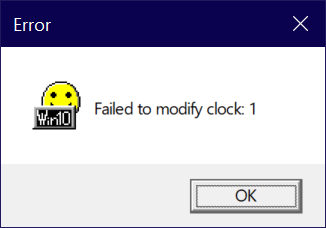
I close the message, then run Tclock manually, and it works. I gave Tclock's .exe permission to access my protected folders, so that's not the problem.
(BTW, why isn't there a way to attach screenshots here? Isn't it important to show GUI events?)
Thanks, Andy
Windows 10 (22H2) にログインすると、次のエラー メッセージが表示されます:
【「スマイリー」アイコン付き】 "Failed to modify clock: 1"
Screenshot: https://i.postimg.cc/JnxZRc6R/Tclock-Win10-startup-error.png
メッセージを閉じてから、Tclock を手動で実行すると、動作します。
Tclock の .exe に保護されたフォルダーへのアクセス許可を与えたので、それは問題ではありません。
ここにスクリーンショットを添付したいのですが、そのためのボタンが表示されません。
(ところで、ここにスクリーンショットを添付する方法がないのはなぜですか? GUI イベントを表示することは重要ではありませんか?)
ありがとう、Andy