Git & Github
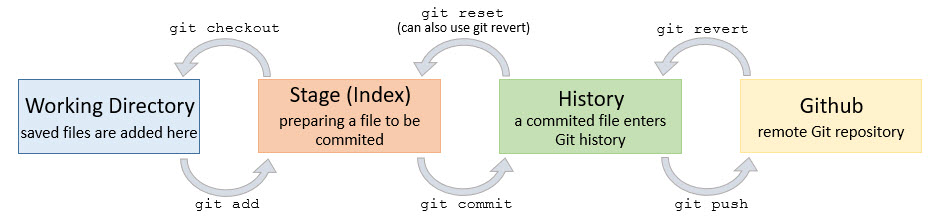
Useful info from the Ocean Health Index blog.
- Generating a new ssh key to connect to github (done once per computer)
- Hint: On mac OS, to see your .ssh folder while in Finder, press Command+Shift+G, then enter ~/. ssh
- Making sure the local repository points to the origin through ssh rather than https (done once per repository from that computer)
- Alternative for https: Generate a personal access token to use instead of password
- Create a personal access token as described above
- Initiate the commit from the container
- Enter your github username when prompted
- When prompted for your password, enter your token instead of your github password
- Quick clean: run
git gc - In-depth cleaning:
- Run
git gcas a first pass - Check if any deleted branches are still listed in the packed-refs file in the .git folder
- If so, delete the lines of the pack file containing the deleted branches' names
- Run
git reflog expire --all --expire=now - Run
git gc --prune=now --aggressive - Admire how much space you have freed up on your computer
- Run
- open terminal
- navigate to git directory (
DIRon Windows,lson Mac) - run
git reset --soft HEAD~1 - this undoes your last commit
- remove the large file from your commit (add to gitignore) and re-commit
- Run
git push -f origin HEAD^:main(or whichever branch you made the mistake on) - This undoes the most recent commit on the remote and locally.
- The commit is entirely gone. You can't recover it. Beware!