Test PR #1856 #103

Replies: 1 comment 3 replies

-
|
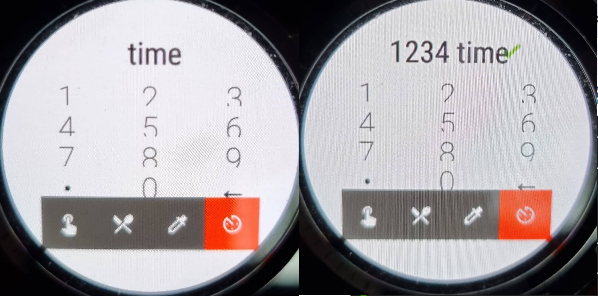
Huawei Watch 2 LTE screen 390x390 |
Beta Was this translation helpful? Give feedback.

-
|
Thanks so much. Please let me explain. I believe that there is code inside xDrip to address Android wear. So, there is a lot of redundant code in xDrip for that reason. Again, my limited understanding is that there are some watches out there that are full Android. That means they don't use Android wear. Thay are like a phone that can be on your watch. So, they would use exactly the same code a phone uses. On a phone, when you go to that page, you see "When", not "Time". That's why I suspect what you are showing is Android wear. Am I wrong? |
Beta Was this translation helpful? Give feedback.
-
|
This is the PR that is help up because of this: NightscoutFoundation#1856 |
Beta Was this translation helpful? Give feedback.

-
|
You're right I completely misunderstood the request. Sorry about that. 😅 |
Beta Was this translation helpful? Give feedback.


Uh oh!
There was an error while loading. Please reload this page.
Uh oh!
There was an error while loading. Please reload this page.
-
If you have a full Android watch (not a smartwatch that uses Android wear) and are willing to perform a test, please read.
You will need to install an xDrip that uses a different key than the one on the official releases. Therefore, you will need to uninstall. But, if you do that, you will lose all your data history and settings.
Please first save your xDrip database on your Android watch. It is explained here:
https://github.com/Navid200/xDrip/wiki/Restore-Database
Save the database and settings files in a safe area.
Uninstall xDrip from your Android watch.
Now, install this version: https://github.com/Navid200/xDrip/releases/tag/TestBuild2021_11_06
Running this test version, open the treatment menu by tapping on the syringe icon on the main screen.
Choose the time page by tapping on the watch icon at the bottom of the form.
Please take a screenshot.
Now, type 4 digits. But, don't enter. For example, type 1230. Now, take another screenshot.
Please post both screenshots here in this thread.
Please include the brand and model of your watch as well as its screen resolution.
Now, uninstall the test version of xDrip from your watch. Install the original release you had before or any other release you like from the official repository as explained here: https://github.com/Navid200/xDrip/wiki/Download-xDrip
Restore the database and settings files you saved.
Thanks for your help.
Beta Was this translation helpful? Give feedback.
All reactions