Index out of bounds error with certain dataset in Line graph #18

Description

Steps to reproduce
run the following script:
ipmo Graphical
$TestData = @(
    146.2869, 125.8676, 131.6403, 126.1095, 125.2327, 129.3879, 121.1957, 121.1715, 133.5654, 123.1936, 121.2738, 128.1564, 115.8329, 120.6185, 129.975
    119.184, 127.2515, 121.1354, 127.3241, 130.5228, 139.8449, 119.9533, 127.9957, 121.745, 120.0916, 134.3705, 117.8509, 128.0231, 119.3807, 129.5753
    117.3724, 122.7834, 126.122, 120.2665, 120.1368, 119.297, 114.8186, 117.6453, 120.0503, 117.5853, 123.487, 122.6258, 130.8383, 123.5863, 120.5457
    130.3574, 119.6901, 120.0723, 130.4798, 122.0327
)

Show-Graph -Datapoints $TestData -Type Bar
Show-Graph -Datapoints $TestData -Type Scatter
Show-Graph -Datapoints $TestData -Type Line
Expected result
it should show all three types of graphs without errors
Actual result
all three graph types are shown, but there are some errors for the Line graph
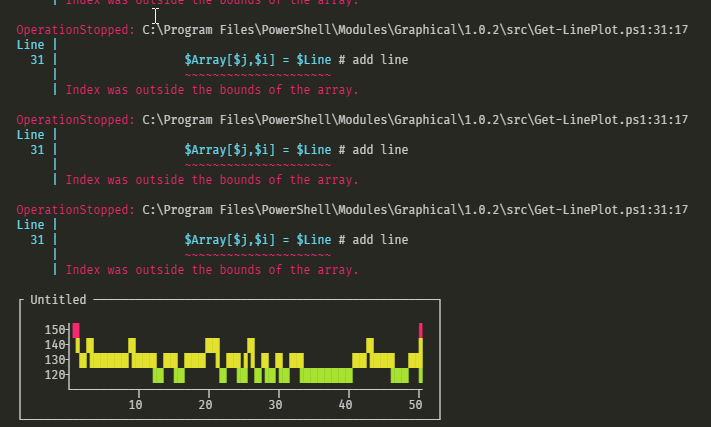
Additional information
Bar and Scatter graphs are shown without errors for the exact same dataset
VersionInfo
Graphical Module:
1.0.2
Powershell
PSVersion 7.0.2
PSEdition Core
GitCommitId 7.0.2
OS Microsoft Windows 10.0.18363
Platform Win32NT
PSCompatibleVersions {1.0, 2.0, 3.0, 4.0…}
PSRemotingProtocolVersion 2.3
SerializationVersion 1.1.0.1
WSManStackVersion 3.0
OS
Windows 10 Pro
Version 1909