SDD Warm Up
Prepared by Robert Kleffner, Tao Zhang and Jordan Leithart
Warm Up Game - Version 1.0
- Change Log
- Introduction
- Purpose
- Scope
- Glossary
- Overview
- References
- Architectural Design
- Overview
- Interface Design
- Tools
- Navigation
- System Features
- Appendix A: Reference
| Date | Person | Change |
|---|---|---|
| 2014-05-08 | Rob Kleffner | Initial Design Document |
###Purpose
This Software Design Document details the design of Red Card Dev's second game, KickShot: Warm Up. The expected audience of the game goes from children at the age of 5 to adults of any age. The intended audience of this report is for technical users who wish to understand the design and implementation choices made in the development of Warm Up.
###Scope
This document contains a complete description of the design of KickShot: Warm Up. Rather than focus purely on Android, the decision was made early in production to develop for both Android and iOS devices, or all mobile devices which support HTML5 if possible. This will bring KickShot to a much wider audience, but introduces new design difficulties and implementation issues.
KickShot: Warm Up is also much more strategic than the Junior level, requiring the game state to be aware of more rules and handle them correctly. Input validation will be a large part of the interface design for Warm Up, to assure that the user can take certain actions only when those actions are permitted.
###Overview The application will have two main components and eight sub-components:
- Activities:
- Rules: The set of rules for the current game selected.
- Actions: The set of actions that occur when different things happen during the course of the game.
- Each action will have animation from the VTD group currently working on the project
- Game: The main loop that controls the game logic.
- Cards: The action chosen to be performed by the user. Click card to select and press 'Play Card'
- Views:
- Board: The background of the viewport.
- Dice: Dice that change based on a roll dice function.
- Action Menu: Four buttons which allow the player to perform an action upon their turn.
- Hand: The set of cards which are available to the player at any given time.
- Cards: Cards which are playable appear in color; cards which cannot be played are grayed out and cannot be selected
###Navigation
- The application will use buttons that the user can click to navigate between menus.
- The application will use buttons for performing actions on the player's turn, including navigating between the different subviews.
- The application will utilize the touch input for button clicking.
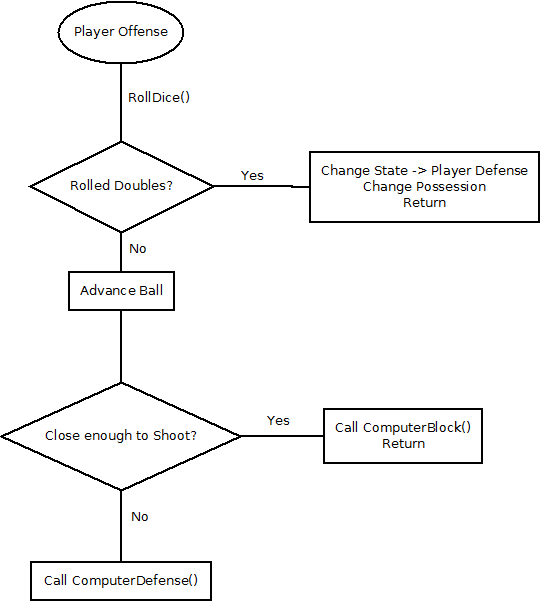
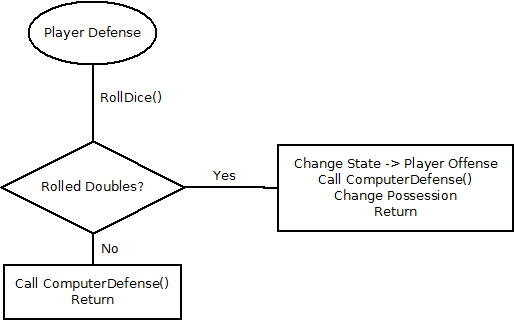
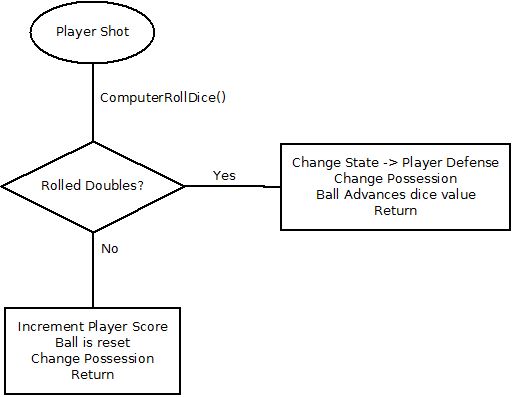
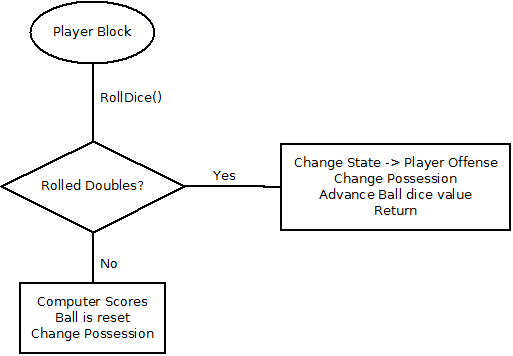
This section further explains game states in the application:
###Player Offense
Currently the project is using Java for the Warm Up game prototype. However, when the transition to cross platform app development occurs at the beginning of next semester, the language may change to more widely supported tool set such as Haxe or HTML5 and JavaScript.