
Replies: 2 comments 3 replies

-
|
Have you tried a sync fan curve?
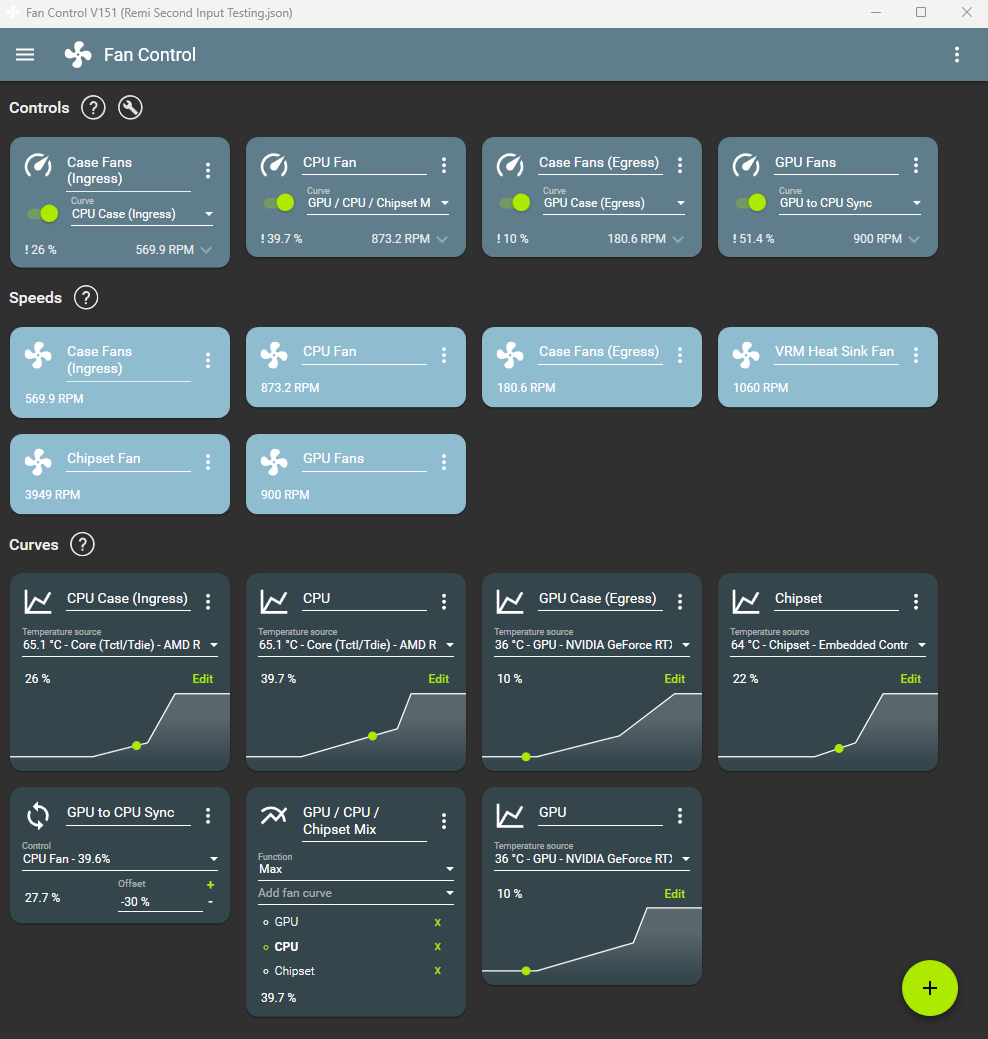
You could set a negative proportional offset (like -30%) and add a positive offset to your GPU fan. Basically: Make a sync fan curve target the CPU control. Set a negative -30% proportional offset. Set a +27 offset on the gpu control, apply the sync fan curve to the gpu control. My math might be a bit loose, but I think this general idea should give the desired behavior. Play with the numbers until it's good enough. |

Beta Was this translation helpful? Give feedback.

-
|
Hey Rémi, Thank you for this. Your math was pretty much bang on, thank you. However, whilst this works to an extent, it's introduced a new problem. There is a clear lag / delay when using sync in that the fans don't ramp up and ramp down the same, despite them having he same settings and being sync'ed. It seems like the master fan (CPU) needs to change and then the slave fan (GPU) needs to catch up. This is more of an issue in games than it is in CPU heavy workloads where a fast response is nescasary. Therefore, I have spent most of today playing around with this configuration trying to get the GPU to be the master and the CPU to sync to it, but I just can't get it to work reliably. I think the main issue is trying to work out what the proportional offset should be as the range of usable percentage is smaller with the GPU due to the ~27% delta in inertia required to start the fan spinning. Any additional thoughts please on how I can resolve this? I can see what the proportional offset is intended to do (#1491) , but I don't think it's the same as my "reset zero percent and stretch the remaining percentage" to normalise the fan controllers idea? Many thanks in advance. Regards, |
Beta Was this translation helpful? Give feedback.

-
There is an inherent 1 second lag with a sync, since the fan curves are updated first, then the controls. However that should be it, 1 second. Make sure your step up/downs on your controls are high enough to not introduce more lag. Now your other issues of CPU needed to heat up first, you could set a mix fan curve with a trigger for your GPU. Setup would be: (Trigger and Sync) => Mix fan curve (max function). Now for the normalization idea, that's a different subject. I don't hate the idea, but my fear is that it would become a UX nightmare. How do you explain to the user that the % he is seeing is normalized, or not? Keeping the % absolute makes the software consistent and easier to understand. The % on the control card would be different than the % shown on the fan curve card, and so on. |
Beta Was this translation helpful? Give feedback.

-
|
Hey Rémi, Thank you for your swift and verbose response. I will try your suggestion above tomorrow. I’m glad you don’t hate the normalisation idea, I think it would be really powerful. I agree the UX would need some careful planning. My first thought would be an “advanced user mode” toggle. Perhaps this could contain other more advanced settings such as the proportional offset, or plugins? Most users would never need to go into this screen and it would keep it simple for them. Maybe add a warning message? Alternatively, maybe have a toggle between absolute and normalised views? Or overlay one on top of the other? if I was any good with graphic design I’d try and knock up a demo. I will see what I can cobble together though. thanks for considering this feature. Regards, |
Beta Was this translation helpful? Give feedback.
-
|
Hey Rémi, Thanks again for your swift replies. I've spent the last couple of weeks playing around with the suggestions above and have ultimately settled on your initial suggestion. Even with the lag, it's the best option. I'll just have to keep my fingers crossed that you implement my suggestion at some point in the future. Thanks again for your exceptional work. Regards,
|
Beta Was this translation helpful? Give feedback.


Uh oh!
There was an error while loading. Please reload this page.
-
Hey Rémi,
First off, thank you for creating this amazing software!
I’m not sure how exactly to place a feature request, so please forgive me if I’ve put this in the wrong place and I will move it.
I have multiple fans and fan controllers in my Ncase M1, and I am looking for a way to normalize the percentages of the fan controllers. I cannot see this feature within Fan Controller. I think the closest feature is offset, which does not help in my scenario (I have tried countless hours to use offset to achieve the normalisation and failed)…..
I would like to use the mix function to drive my fans for the CPU cooler and the GPU based on whichever is hottest. This works perfectly. However, the issue I have is that the fan controllers are not normalised at the percentage level against each other. Let me explain what I mean…..
I have a Noctua NF-A12x25 connected to my motherboard’s (Asus ROG Strix x570-i Gaming) CPU fan header. I also have an identical Noctua NF-A12x25 connected to my graphics card’s (Asus ROG Strix RTX 3070ti 8G Gaming) fan header.
The issue is that the CPU fan header can start and stop the fan at ~10% which spins it at its minimal rotational speed (~255RPM). But the GPU fan header needs more power to overcome the inertia required to start the fan at ~37% which spins it at its minimal rotational speed (~255RPM).
This means that the CPU fan’s usable range is 10% - 100%. However, the GPU fan’s usable range is 37% - 100%. Both fans are able to step through the same percentages and achieve the same results, it’s just that one starts at 10% and the other starts at 37%. This means that when using mix, the GPU fan spins at a significantly higher RPM when using the same style of curve or vice versa (obviously different parameters to account for the higher percentage to start the fan spinning).
What would be brilliant is if there was a way to normalise the fan controllers against each other. For example, reset where “0%” actually is. So on the CPU fan header the starting usable range (0%) would start at 10%, and for the GPU fan header the starting usable range (0%) would actually be at 37%. I guess at this point the graph would need to be “stretched” to alter the new usable range.
This should result in the various fan headers being “normalised” at the same percentages vs temperature.
I hope that makes sense? I’ve included some screen caps below to try and better explain what I mean:
CPU Fan header:

GPU fan header:
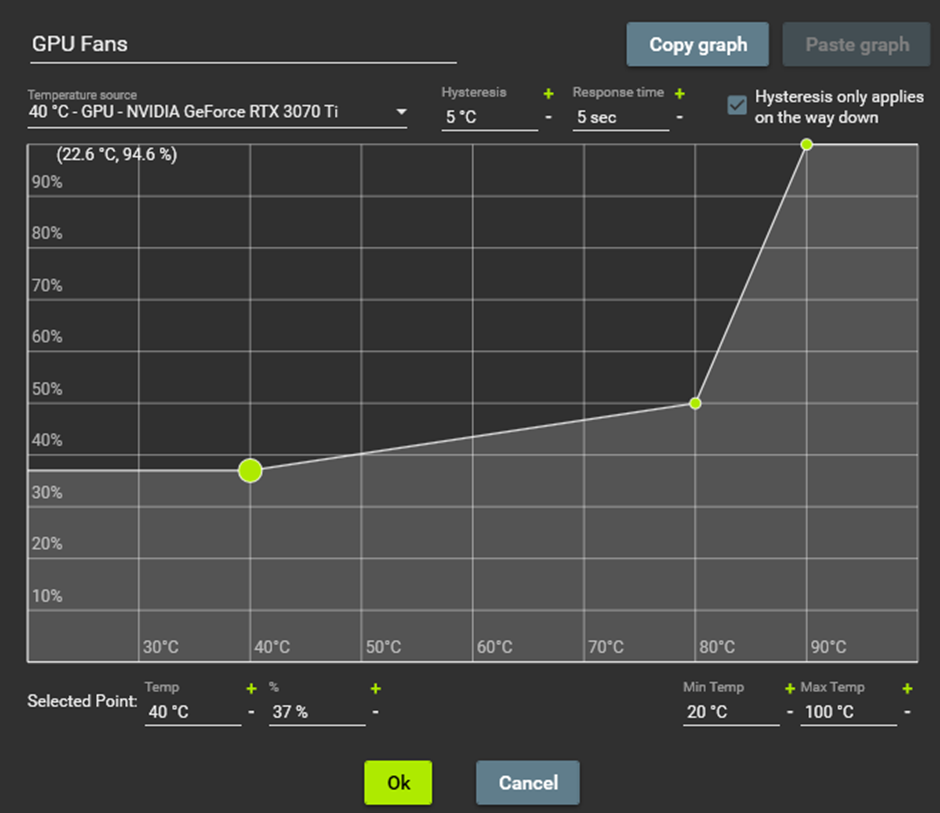
As you can see, if the temperature in mix mode was say 60 degrees, then the CPU fan would be spinning at 30%, whilst the GPU fan would be spinning significantly quicker at ~45%. The net result of this when using two identical fans is that the noise is annoyingly louder, despite the temperature control point being the same.
I really hope this is a feature that has value that you’d consider adding please. I can see it being useful to many others, especially those that deshroud their GPU.
Anyway, thank you very much for your time, please keep up the great work! :-)
Beta Was this translation helpful? Give feedback.
All reactions