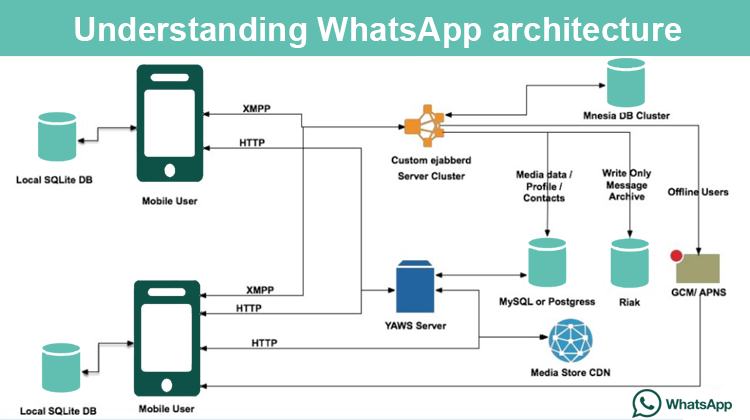
-
Ping v. Heartbeat v. Polling
-
Ping: Send packet to specific IP. In the context of web communication protocols, ping is typically used to diagnose network issues and is not used as a mechanism for maintaining a stable connection.
-
Heartbeat: If a response is not received within a certain time interval, it can indicate that the connection has been lost, and appropriate actions can be taken to reconnect or close the connection. -> Best way to maintain stable socket connection
-
Polling: Polling is a mechanism used to request and receive data from a server by sending periodic requests at a regular interval. Polling is typically used when the client needs to receive periodic updates from the server. -> For HTTP connection at specific interval
-
-
Socket connection recovery https://socket.io/docs/v4/connection-state-recovery
- Socket connection can "inevitably" occur
- Use "recovery" for quick disconnections
const io = new Server(httpServer, {

connectionStateRecovery: {
    // the backup duration of the sessions and the packets
    maxDisconnectionDuration: 2 *60* 1000,
    // whether to skip middlewares upon successful recovery
    skipMiddlewares: true,
}
});
- For server
io.on("connection", (socket) => {

if (socket.recovered) {
    // recovery was successful: socket.id, socket.rooms and socket.data were restored
} else {
    // new or unrecoverable session
}
});
- For client
socket.on("connect", () => {
if (socket.recovered) {
    // any missed packets will be received
} else {
    // new or unrecoverable session
}
});
-
카카오톡과 유사한 대량 통신 아키텍쳐
https://knight76.tistory.com/entry/%EC%B9%B4%EC%B9%B4%EC%98%A4%ED%86%A1-Data-Storage-%EC%95%84%ED%82%A4%ED%85%8D%EC%B2%98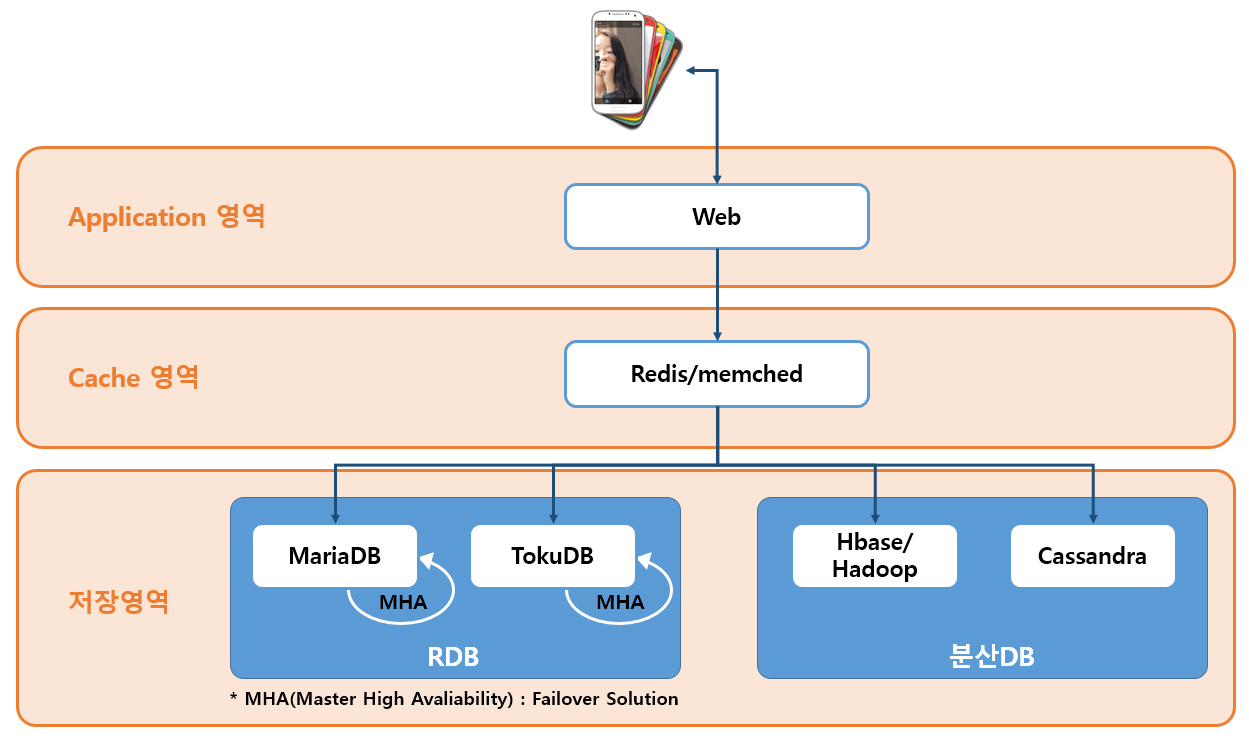
-
Cache 영역
-
Redis is an in-memory data structure store that can be used for caching and storing real-time data. Redis can be used in a chatting app for:
-
Caching: Redis can be used to cache frequently accessed data, such as user profiles and chat messages, to improve application performance and reduce the load on the database.
-
Pub/Sub messaging: Redis can be used to implement pub/sub messaging, allowing users to subscribe to chat channels and receive real-time updates when new messages are posted.
-
Session management: Redis can be used to store session data, such as user authentication and authorization data, to improve application security and reduce the load on the database.
-
-
Memcached, on the other hand, is an in-memory caching system that can be used to store key-value data pairs. Memcached can be used in a chatting app for:
-
Caching: Memcached can be used to cache frequently accessed data, such as user profiles and chat messages, to improve application performance and reduce the load on the database.
-
Load balancing: Memcached can be used for load balancing by distributing cache data across multiple servers, which can improve application scalability and reduce the load on individual servers.
-
-
-
저장 영역
-
An RDB can be used to store metadata related to users and their chat histories, such as user account information, chat room details, and messages sent between users.
-
Distributed databases can be useful for storing large amounts of unstructured data, such as chat messages, user posts, and media files. Distributed databases can handle high volumes of data and scale horizontally to handle increasing loads, making them useful for handling spikes in traffic or large amounts of concurrent users.
-
-
Logging
-
output.logfile
2022-03-01 13:09:11,787 DEBUG app Thread-3 : debug log info
2022-03-01 13:09:11,788 INFO app Thread-3 : Info log information
2022-03-01 13:09:11,788 WARNING app Thread-3 : Warning log info
2022-03-01 13:09:11,788 ERROR app Thread-3 : Error log info
2022-03-01 13:09:11,788 CRITICAL app Thread-3 : Critical log info
2022-03-01 13:09:11,788 INFO werkzeug Thread-3 : 127.0.0.1 - - [01/Mar/2022 13:09:11] "GET / HTTP/1.1" 200 -
- Node.js:
console.log,errLoghttps://yceffort.kr/2021/02/logging-in-nodejsconsole.log은 어떤 문제인지 불명확하므로 비추- Winson같은 라이브러리 사용이 나음
-
Debugging
- Flask:
debugMode-> 서버 재가동 없이 수정사항 반영 - Node.js:
ISDEBUG-> 브레이크 포인트 추가 후 "Run and Debug"
- Flask: