



Caution
Just workflows, charts, banners, and traffic data lives here.
More as We Need them.
Clone/Mirror these flows in your own Repos to show banners and Graphs.
Just change Naming Conventions to align with you're Systems.
(Instructions below)
Use:
# Clone the repo
git clone https://github.com/statikfintechllc/WorkFlowRepo.git
cd WorkFlowRepo
ls
cd .github/workflows
ls
cd .. && cd ..
cd docs
ls
cd ticker-bot
ls && cd ..
cd graph
ls
cd .. && cd ..
Important
The above fully Installs, and Displays in terminal ALL folder content. To ensure easy navigation.
🔎 Expand for Setup 🔍
-
Go to:
https://github.com/settings/tokens→ Fine-grained tokens -
Click → Generate new token
-
Set Token name: workflow-access
-
Expiration: No expiration
-
Select Repo: choose your target repo
-
Permissions:
- ✅ Contents: Read and Write
- ✅ Metadata: Read-only
- Generate token → Copy it
-
Go to your repo:
https://github.com/<your-username>/<your-repo>/settings/secrets/actions -
Click → New repository secret
- Name: PAT_GITHUB
- Value: (Paste the token you copied)
- Find and update Lin 31 in the traffic_graph.yml workflow file change:
REPO: statikfintechllc/AscendAITo match you're repo's naming.
on:
  schedule:
  #  - cron: "*/5 * * * *"
To:
on:
  schedule:
- cron: "*/5 * * * *"REPOS = [
"statikfintechllc/AscendAI",
"statikfintechllc/Mobile-Developer",
"statikfintechllc/AscendDocs-of-GovSeverance",
"statikfintechllc/GodCore",
"statikfintechllc/AscendNet",
"statikfintechllc/WorkFlowRepo"
]To match you're repo's naming.
🌀 Expand to See Options 🌀
The Ticker-Bot

The Graph
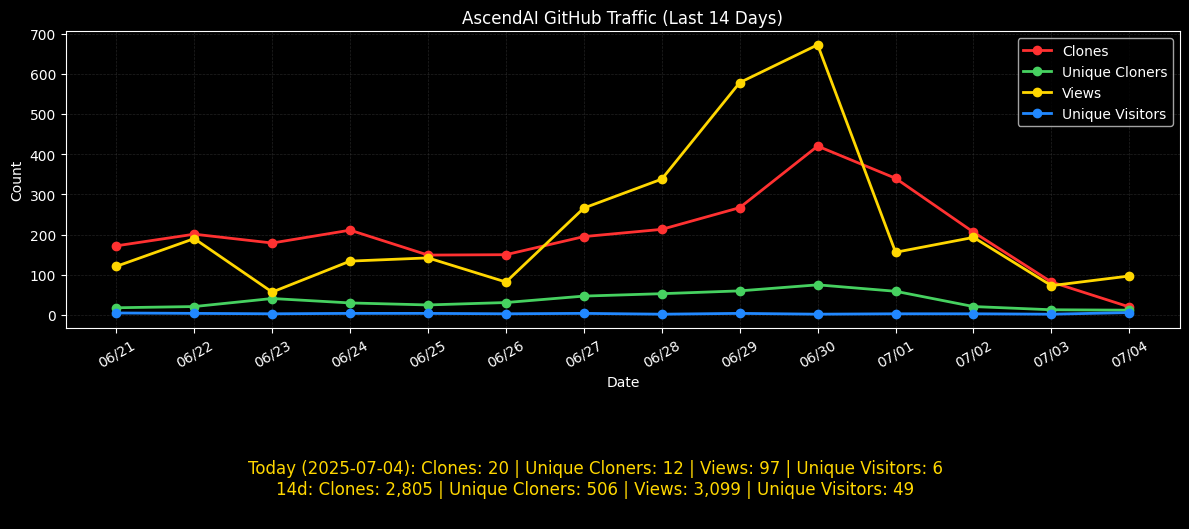
Enjoy!