In this section, let's explore the data layer in our system design. We will learn about:
2.Non Relational Database or NOSQL
5.Database Sharding and Database Replication
These techniques improve data access, performance, and fault tolerance for our data layer.
A relational database stores data in tables, which are similar to spreadsheets with rows and columns.
Relational databases are ideal for storing well-structured data, such as user data.
User data is considered structured because it is organized into predefined fields, such as:
- Name
- Phone Number
- Address
Some popular relational databases include:
- MySQL
- PostgreSQL

Imagine saving social media posts in a table with columns for text, images, and videos.
- If a post has only text, the image and video columns remain empty.
- Similarly, a post with only a video leaves the text and image columns empty.
This leads to many empty spaces in the table, which is inefficient and wastes resources.

This is where we use NoSQL databases. They are ideal for storing data that doesn’t have a fixed structure.
- MongoDB
- Cassandra
- DynamoDB
NoSQL databases come in various types, each suited to different needs:
- Key-Value Stores
- Document Databases
- Graph Databases
- Wide-Column Databases
- Time-Series Databases

The natural question that arises here is how to choose between SQL vs NoSQL database.
Here are some general guidelines that you can follow, but DO REMEMBER it’s not always black and white. A lot depends on the project needs.
| Criteria | SQL | NoSQL |
|---|---|---|
| Fast Data Access | Slower compared to NoSQL | Faster |
| Scalability | Less scalable for large-scale data | Performs better at large scale |
| Data Structure | Fixed schema (structured data) | Flexible schema (unstructured/semi-structured data) |
| Query Complexity | Best for complex queries | Better for simple queries |
| Data Evolution | Rigid structure, harder to modify | Flexible, supports frequent changes |
In Object Storage, we store objects.
Each object is either a photo, video, audio, or file. Effectively, they are simply units of data composed of bits/bytes.
This type of storage is perfect for keeping large amounts of data that don't follow a regular structure, such as:
- Pictures
- Videos
- Music
- Documents
- Backups
Some popular object storage services include:
- Amazon S3
- Google Cloud Storage
- Microsoft Azure Blob Storage

Database sharding splits a large database into smaller sections called shards.
- Each shard stores a part of the data.
- This speeds up searches and reduces stress on any single server.
- If one shard has a problem and stops working, the other shards keep functioning.
- This ensures that the whole system doesn’t go down, making the database more reliable.

Database replication is the process of making copies of a database so that if one fails, others can take over.
- This enhances fault tolerance and availability.
- Replication ensures data redundancy, improving disaster recovery.

Accessing data from a database takes a long time. But if we want to access it faster, we use a cache.
Accessing from a cache is ~50 to 100 times faster than accessing from a database.
Cache is a type of memory that is super fast but has limited capacity (much less compared to a database).
That is why we use cache to store frequently accessed data.
It is like keeping snacks close to you at your desk (cache) while you study.
Instead of walking to the kitchen (database) each time you're hungry, you simply grab a snack from your desk.
- Cache Hit: When the data is found in the cache.
- Cache Miss: When the data is not found in the cache.
- Cache Hit:
User1's data is found in the cache, so it is quickly fetched from the cache without the need for accessing the database.

- Cache Miss:
User4's data isn't in the cache initially. It's fetched from the database (slow) and the cache is updated.

The next request for User4 is quickly served from the cache because User4's data is now in the cache.

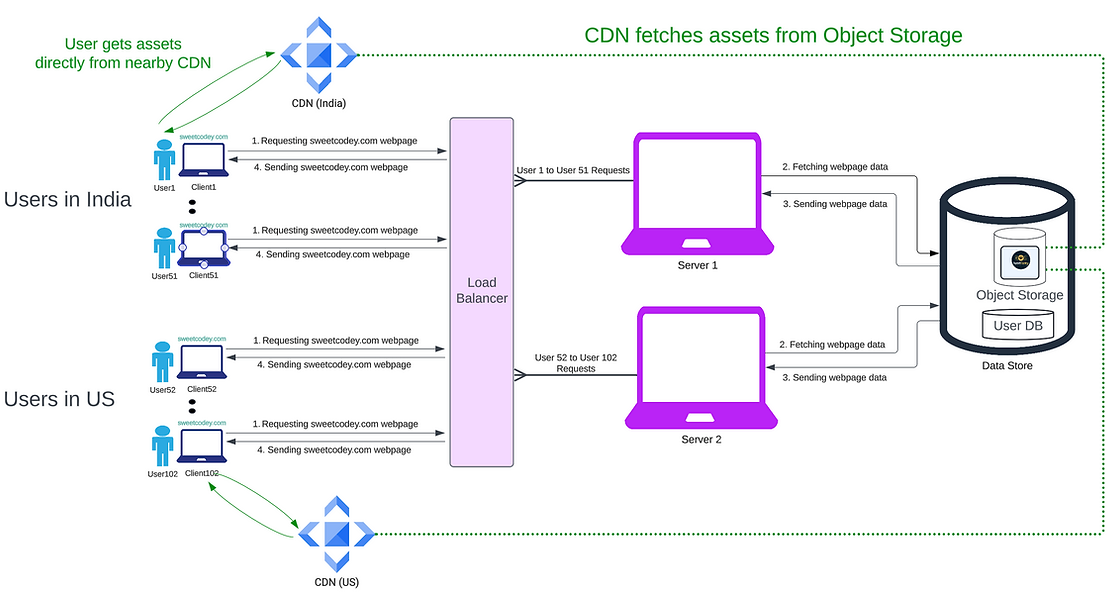
Let's say Sweet Codey has all its servers in the US. A user from India tries to open sweetcodey.com.
The website assets (Images, Videos, etc.) are bulky content. This bulky content has to travel a long distance, which increases latency significantly.
A CDN (Content Delivery Network) comes in handy in this case.
It stores copies of your website’s static content (static content = data that doesn’t change too often) at various locations around the world.
- Reduced Latency – The user gets content from the nearest server.
- Faster Load Times – No need to fetch data from the original US server.
- Efficient Bandwidth Usage – Less strain on the main server.
Now, the user can quickly access static content (images, videos, etc.) directly from a CDN server closer to them.