In this section, we'll cover the foundational networking concepts essential for system design. We'll explore:
Just as every person in this world is known by their name, each computer on the internet is known by its IP address.
An IP address looks something like this:
- IPv4 Example:
172.217.22.14 - IPv6 Example:
2001:db8:3333:4444:5555:6666:7777:8888
Well, that’s a very horrible name!

When you type sweetcodey.com in your browser, your browser requests sweetcodey’s home page from servers.
But how does your browser know where sweetcodey’s servers are?
That’s the purpose of DNS.
DNS (Domain Name System) is a service that takes the website name (like sweetcodey.com) and provides the IP address of the server.
- The user types sweetcodey.com in the browser.
- The browser requests the IP address of sweetcodey.com from a DNS server.
- The DNS server responds with the correct IP address.
- Now, the browser knows sweetcodey’s IP address and fetches the homepage from it.

A computer that requests information.
A computer that serves the requested information from the client.
-
Your Smart TV requests movies (aka streaming) from Netflix
- Your Smart TV is the client requesting information from the Netflix Server.
-
Your phone gets directions from Google Maps
- Your phone is the client requesting information from the Google Maps Server.

Just as people use grammatical rules to communicate, computers also follow certain rules while communicating.
The rules that computers follow are Protocols.
Based on what the task is, we use different rules/protocols for it.
Example:
If the task is to perform common web interactions like sending and receiving web pages or updating content, we use the HTTP protocol.
Similarly, if the task is to transfer files, we use the FTP protocol.

Let's say you are streaming a movie, and after the first scene, you see the climax directly. That's confusing, right?
Well, TCP prevents this from happening.
TCP ensures your data packets are delivered in the correct sequence, so you watch the movie in the proper order.
Whenever proper ordering is necessary, like in email or streaming video, TCP is used.

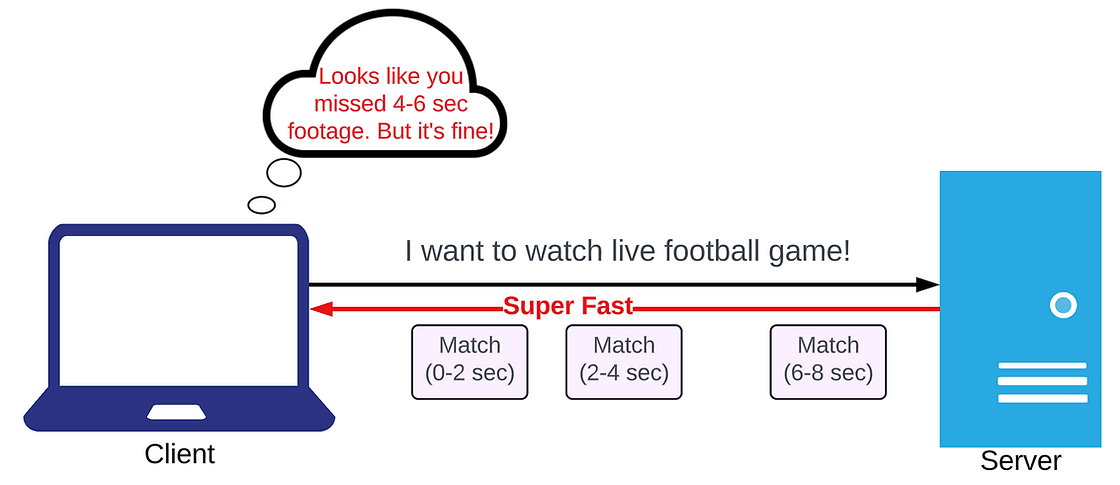
Imagine you're watching a live football game. You want it to feel live with barely any delay.
UDP helps with this!
It sends video fast, though sometimes a few pieces might get lost.
- UDP is very fast but doesn't guarantee the delivery of all data packets.
- It is perfect for tasks where speed is more important than reliability.
Key Difference:
- Unlike UDP, which prioritizes speed and might skip some data,
- TCP focuses on reliability, ensuring everything is complete and in order—so you don’t miss any part of your movie.
HTTP is the most commonly used protocol on the internet.
It operates on a simple principle:
You request something from the server, and the server responds.
Consider shopping online.
Each time you click on a product, your browser (client) sends a request to the store's server for product details.
The server then fetches this information from its database and sends it back to your browser as a webpage.

In standard protocols like HTTP, the interaction is one-directional.
- The client sends a request, and then the server responds.
- Without a request from the client, the server cannot initiate sending data.
With Websockets, both the client and the server can send data to each other at any time. This makes the communication bi-directional.
Consider a live chat application.
Your device can’t constantly send requests to the server every second, asking:
"Do you have a new message?"—That would be inefficient.
With Websockets, whenever a message arrives for a client, the server immediately sends it to that client.
This makes it very efficient.

This is how different protocols serve different purposes based on the task at hand.
A Forward Proxy is like a personal assistant for your outdoor requests.
- Whenever you need something from outside, you just tell your assistant what you need, and they go get it for you.
- Similarly, a forward proxy sits between you (the client) and the internet.
- You send your requests to the proxy, and it fetches the information from the internet on your behalf.

A Reverse Proxy is like a personal assistant for your family.
- Instead of people contacting your family directly, they go through your assistant.
- The assistant filters the messages/calls and forwards only the important ones to your family members.
- Similarly, a reverse proxy sits between the internet and your services (a collection of servers specializing in a task).
- It receives requests from clients and forwards those requests to the appropriate service.

- If a user sends a login request, the reverse proxy routes it to the Authentication Service.
- If a user requests content, the reverse proxy routes it to the Content Service.