Below is a structured table displaying various requirements and their descriptions.
| Requirement | Description |
|---|---|
| Create Social Media Posts | User can create / edit their social media post. A social media post can be a Text Post, Image Post, or a Video Post. |
| Follow / Unfollow Users | Users can follow/unfollow other users. |
| News Feed | Users can view news feed. The feed shows posts from people they follow, listed from newest to oldest. |
| Like / Comment | Users can like or comment on each other's posts. |
| User Notification | The user will be notified when someone likes/comments on their post. |
| Requirement | Description |
|---|---|
| Availability | The system should be highly available - 99.999% uptime |
| Eventual Consistency | If a user posts something, it's okay if it doesn't show up immediately but appears within a few seconds (1-2 seconds) |
| Low Latency | The news feed should load within 1 or 2 seconds |
| Scalability | The system should support global users and traffic will be from multiple geographic regions |
| The system should support 500 million Daily Active Users (DAU) | |
| The system should support 2 billion Monthly Active Users (MAU) | |
| Extensibility | The design of our system should be such that it is easier to extend it in the future. Example: If we need to add features like replying to a comment, post recommendations, or ads |
| Usability | The rendering should be fast. Example: It's frustrating if a post loads in parts (like the image first, then text, etc.). The post should appear almost instantly. |
- 500 million
- 2 billion
Let's calculate how many reads and writes we do to the system.
There are only three possible ways to write (add data into the system) as per our functional requirements:
- Creating Posts
- Following
- Commenting/Liking
Assume 10% of all Daily Active Users (DAU) create posts in a day.
- Total DAU = 500 million
- 10% of DAU create posts = 50 million users create posts daily
- This results in 50 million 'create post' requests per day
Similarly, there is only one primary way to read data from our system:
- User viewing news feed
Assume an average user reads 100 posts per day.
- Total DAU = 500 million
- Each user reads 100 posts per day
- Total read requests = 500 million × 100 = 50 billion read requests per day
Text posts are usually around 100 KB, image posts around 0.5 MB, and video posts around 20 MB.
From throughput estimation, we know there are 50 million ‘create post’ requests per day.
Now, assume:
- 20% of posts are text posts
- 60% of posts are image posts
- 20% of posts are video posts
(0.2 * 50M) * 100KB = 1TB/day
(0.6 * 50M) * 0.5MB = 15TB/day
(0.2 * 50M) * 20MB = 200TB/day
1TB + 15TB + 200TB = 216TB/day
216TB/day * 365 * 10 = 750PB
Accessing data from the database takes a long time, but if we want to access it faster, we use cache.
The amount of cache memory required every day can simply be calculated as: 1% of the daily storage = 0.01 × 216 TB = 2 TB/day
Network / Bandwidth estimation tells us how much data flows in and out of our system per second.
Incoming data in a day is ultimately saved in storage.
- Data stored in a day = 216 TB per day
- Incoming data per second:
216 TB ÷ 86,400 = 2.5 GB/s
Outgoing data refers to the data read from our system.
- Total read requests per day = 50 billion
- Average post size:
(0.2 × 100 KB) + (0.6 × 0.5 MB) + (0.2 × 20 MB) = 4.32 MB - Total post reads per day:
50 billion × 4.32 MB = 216 PB per day - Outgoing data per second:
216 PB ÷ 86,400 = 2.5 TB/s
Let's zoom into the 'communication' for creating a text post and understand exactly what's happening.
When we ask the server to create a text post, we use an API call. This is how computers talk to each other.
We will use a REST API for this communication. Here are the technical details:

This tells the server what action to perform. Since we want to create something new on the server, we use the POST action.
This tells the server where to perform that action. Since we are creating a post, we will use the /v1/posts endpoint of the server.
Note:
'v1' means version 1. It is a good practice to version your APIs.
If, for example, you want to create a new user account, you would use the POST method and send the request to the /v1/users endpoint.
- The action → What to do? →
POST - The target → Where to do it? →
/v1/users(endpoint)
We have told the server to create a text post, but we haven't provided the details of the text post itself. This information is sent in the request body:
{
  "userId": "Your unique identifier",
  "text": "The content of your post",
  "hashtags": "The tags you include in your post"
}Let's now zoom into the 'communication' for creating an image or video post and understand exactly what's happening.
Again, we will use a REST API for this communication. Here are the technical details:

This tells the server what action to perform. Since we are creating something on the server, we will use the POST action.
This tells the server where to perform that action. Since we are creating a post, we will use the /v1/posts endpoint of the server.
We use the HTTP Body to provide more details about the image post:
- userId: Your unique identifier.
- mediaUrl: The web address (URL) where your uploaded image or video is stored.
- description: The caption you write under your image or video.
- hashtags: The tags you include in your post.
The flow for an image post and a video post is the same - only the media URL changes to a video file.
Let's zoom into the 'communication' for liking or commenting on a post and understand exactly what's happening.
We will use a REST API for this communication. Here are the technical details:

This tells the server what action to perform. Since we are adding something to the server, we will use the POST action.
This tells the server where to perform that action. Since we are adding a comment, we will use the /v1/comments endpoint of the server.
We use the HTTP Body to provide more details about the comment:
{
  "userId": "Your unique identifier",
  "postId": "The unique identifier of the post you are commenting on",
  "comment": "The text of your comment"
}Let's zoom into the 'communication' when we follow another user and understand exactly what's happening.
We will use a REST API for this communication. Here are the technical details:

This tells the server what action to perform. Since we are creating data on the server (a new follow relationship), we will use the POST action.
This tells the server where to perform that action. Since we are following a user, we will use the /v1/follow endpoint of the server.
We use the HTTP Body to provide more details about the follow request:
{
  "followerId": "Your unique identifier",
  "followeeId": "The unique identifier of the user you want to follow"
}Let's zoom into the 'communication' for reading our news feed and understand exactly what's happening.
We will use a REST API for this communication. Here are the technical details:

This tells the server what action to perform. Since we want to fetch data from the server, we use the GET method.
This tells the server where to perform the action. Since we are fetching the user's news feed, we will use the following endpoint:
/v1/feeds/{userId}
GET requests do not include a body because they are used to fetch information, not to send data.

When the user follows or unfollows another user, the following steps are involved, corresponding to the numbers in the diagram:
-
Follow Request
When the user follows another user, aPOSTrequest is sent to the/v1/followendpoint with the following request body:{ "followerId": "UserID1", "followeeId": "UserID2" } -
API Gateway Handling The API Gateway handles the incoming request and routes it to the Follow Service via the Load Balancer.
-
Database Update The Follow Service updates the Follow Database (Graph DB) to reflect the new follower-followee relationship.
-
Confirmation The client receives confirmation of the successful follow request.
The following steps are involved in creating a text post, corresponding to the numbers in the diagram:

- When the user writes a text post and clicks submit, a POST Request is sent with the details of the text post.
- The API Gateway handles the incoming request and routes it to the Post Writer Service via the Load Balancer.
- The Post Writer Service saves the new post in the Posts Database (Posts DB).
- The Client receives confirmation of the successful post.
Effectively, up to this point, we've taken the user's post and saved it in the database.
When a user sends a request to read their news feed, we need to determine what the feed consists of. The news feed contains posts from accounts the user follows.
To retrieve these posts, the News Feed Reader Service performs the following steps:
- Finds all followed accounts from the Follow DB.
- Reads posts from these accounts using the Posts DB.
- Sorts all posts in reverse chronological order (newest to oldest).
- The sorted posts are returned as the user's news feed.

Following this design, reading the news feed involves multiple steps:
- Read from the Follow DB
- Read from the Posts DB
- Sort the posts
Each time someone reads their news feed, these operations are performed, which can slow down the process. Since users frequently check their news feeds, this delay can be frustrating.
However, in applications like Instagram, the news feed loads very quickly.
So, we definitely need to optimize our design.
What can we do? 🤔
What if we can prepare the news feed in advance? This way, when someone tries to read their news feed, it will be instant because it is already prepared.
Let's see how this optimization works in the next steps.
- As soon as the Post Writer Service saves a post in the Posts DB, it also puts an event (user ID and post ID) in a Message Queue (MQ).
- The News Feed Generator Service will consume these events and add the new post to the news feed of all followers.
- This ensures that the news feed of all followers is pre-populated with the new post.
- The Post Writer Service can put the event in the Message Queue and immediately move on to the next request. It doesn't have to wait for a response from the News Feed Generator Service.
- Meanwhile, the News Feed Generator Service processes each event from the queue and updates the affected news feeds for all followers. Updated Flow(Refer to the steps below the image):

-
User writes a text post and clicks submit.
- A
POSTrequest is sent with the text post.
- A
-
API Gateway handles the request.
- It routes the request to the Post Writer Service via a Load Balancer.
-
Post Writer Service saves the new post in the Posts DB.
-
Client receives confirmation of the successful post.
-
Post Writer Service puts the event (
postId,userId) in a Message Queue (MQ). -
News Feed Generator Service pulls the event from the Message Queue for processing.
-
News Feed Generator Service fetches the new post data from Posts DB using
postId. -
News Feed Generator Service finds all followers of the user using Follow DB.
-
News Feed Generator Service updates all followers' news feeds in the Feeds DB.
- The Feeds DB maps each UserId to their NewsFeed:
UserId → { Post1, Post2, Post3 ... }
- The Feeds DB maps each UserId to their NewsFeed:
-
Feed Cache is updated for faster access.
By implementing this approach, the news feed is preloaded, leading to an instant and seamless experience for users.
When creating a text post, we send the text data in the body. But how do we send image posts? Let's see.
Sending images directly in a POST request body is not efficient. Images are large and can slow down the process.
Instead of sending the entire image in the request body, we:
- First upload the image to the server.
- Get the URL of the uploaded image, which points to the image location.
- Send this URL in the request.

The following steps outline the entire process of creating an image or video post:
The client requests a pre-signed URL from the API Gateway to upload the image/video.
Note: A pre-signed URL is a special URL that allows the client to upload the image directly to Object Storage.
- API Gateway receives this request and routes it to the Pre-Signed URL Generator Service via Load Balancer.
- The Pre-Signed URL Generator Service generates the pre-signed URL and returns it to the client.
- The client uploads the image/video directly to Object Storage using the pre-signed URL.
- Object Storage returns the URL of the uploaded image/video to the client.
- The client uses this uploaded image/video URL in the request body & sends a
POSTrequest to the API Gateway.
- The API Gateway handles the incoming request and routes it to the Post Writer Service via Load Balancer.
- The Post Writer Service saves the new post in the Posts DB.
- The client receives confirmation of the successful post.
- The Post Writer Service also puts this event (
postId,userId) in a Message Queue (MQ).
- The News Feed Generator Service pulls this event from the Message Queue for further processing.
- The News Feed Generator Service fetches the new post data from the Posts DB using
postId.
- The News Feed Generator Service finds all followers for this user using Follow DB.
- The News Feed Generator Service adds the new post to all followers' feeds.
- This information is stored in the Feeds DB. Each entry in the Feeds DB maps
UserIdto their News Feed
UserId → { Post1, Post2, Post3 ... }
- The same information is also updated in the Feed Cache for faster access.
Let's look at the end-to-end flow for reading the news feed. The following steps are involved, corresponding to the numbers in the diagram:

-
User Request:
When the user tries to load their news feed, aGETrequest is sent to the API Gateway on the/v1/feeds/{userId}endpoint. -
API Gateway Processing:
The API Gateway receives the request and forwards it to the NewsFeed Reader Service via the Load Balancer. -
Fetching News Feed:
The NewsFeed Reader Service fetches the pre-built news feed from the Feed Cache. -
Returning the News Feed:
The NewsFeed Reader Service sends the news feed back to the user. -
Fetching Media Files:
- The news feed only contains the URLs for the images and videos, not the actual media files.
- The client fetches the actual images and videos from the CDN using these URLs.
- If the content is not present in the CDN, it is retrieved from the Object Storage.
This is why sometimes images/videos fail to load if the internet connection is weak.
When the user comments on a post, the following steps are involved, corresponding to the numbers in the diagram:

-
User Submits a Comment
- The user writes a comment and submits it.
- A
POSTrequest is sent to/v1/commentswith the comment data.
-
API Gateway Processing
- The API Gateway handles the incoming request.
- It routes the request to the Comment Service via a Load Balancer.
-
Comment Processing & Storage
- The Comment Service processes the comment.
- It stores the comment in the Comments Database.
-
Client Confirmation
- The client receives confirmation that the comment was successfully posted.
-
Event Sent to Message Queue (MQ)
- The Comment Service puts an event (
userId,postId) into a Message Queue (MQ).
- The Comment Service puts an event (
-
Post Owner Notification
- The Notification Service pulls the event from the Message Queue.
- It notifies the post owner about the new comment.
When the user likes a post, the following steps are involved, corresponding to the numbers in the diagram. Most of the flow is very similar to the "Comment on a Post" flow.

-
User Action
- The user likes a post and submits it.
- A
POSTrequest is sent to/v1/likeswith the like data.
-
API Gateway
- The API Gateway handles the incoming request and routes it to the Like Service via a Load Balancer.
-
Like Processing
- The Like Service processes the like and stores it in the Likes DB.
-
Cache Update
- To speed up access, the Likes Cache is updated, mapping
postIdto the likes count, which appears in the news feed.
- To speed up access, the Likes Cache is updated, mapping
-
Event Queueing
- The Like Service also puts this event (
userId,postId) in a Message Queue (MQ).
- The Like Service also puts this event (
-
Notification Service
- The Notification Service pulls this event from the Message Queue and notifies the post owner.
As you observed, we updated the Likes Cache so that the number of likes can be displayed efficiently in the news feed. However, we haven't shown how the Likes Cache is actually used in the read news feed flow, so let's add that (Step - 3b).
In order to decide the DB type, here are some general guidelines that you can follow, but DO REMEMBER it’s not always black and white. A lot of things depend on the project needs.
| Criteria | SQL | NoSQL |
|---|---|---|
| Fast Data Access | ❌ | ✔️ |
| Handles Large Scale | ❌ | ✔️ |
| Fixed Structure | ✔️ | ❌ |
| Complex Queries | ✔️ | ❌ |
| Frequent/Evolving Data Changes | ❌ | ✔️ |
| Database | Deciding Factors | Decision |
|---|---|---|
| PostsDB |
Social media posts can include text, images, videos, and metadata. Some posts have only text, some have only image or video. In short, it doesn't have a fixed structure. Need to support 50 million create post requests per day, requires high scalability. Simple query pattern - We are only reading posts by PostID in the news feed generation flow. |
NoSQL |
| FeedsDB |
Stores data as UserId -> [Post1, Post2, ...]. Post data doesn't have a fixed structure, so FeedDB is also unstructured. As discussed, incoming number of posts have high scale (50 million), therefore FeedDB also needs to support high scale. Simple query pattern - We are only reading news feed by userID in the news feed generation flow. |
NoSQL |
| CommentsDB |
Extremely high scale and throughput - 1.5 billion activities/day. No fixed schema - Data may evolve in future to include replies to a comment aka nested comments (comment inside a comment). Simple query pattern - We only need to find all the comments for a post. |
NoSQL |
| LikesDB |
Extremely high scale and throughput - 1.5 billion activities/day. No fixed schema - Data may evolve in future to include like 'types' aka reactions (funny, wow, sad, love, ...). Simple query pattern - We only do either of the things: - Calculate # of likes and put in the Likes cache. - Find all the users who liked a particular post. |
NoSQL |
| FollowDB |
In Follow DB, we are storing user connections and relationships - follower and followee data. We can use graphs to model this type of information - Users represented as nodes and their connections (follow/friend) as edges. Using graph representation will also help to efficiently find followers and followees lists for a user. We need to support a large number of users and their relationships. |
Graph DB |
- Database Type: NoSQL
- Common Queries: Reading posts by
postIdin the news feed generation flow. - Indexing:
postId

Note:
Because we have this common query to grab posts by postId, we create an index on the postId field. Indexing on postId will set a shortcut to quickly find the data by postId.

- Database Type: NoSQL
- Common Queries: Reading news feed by
userIdin the news feed generation flow. - Indexing:
userId
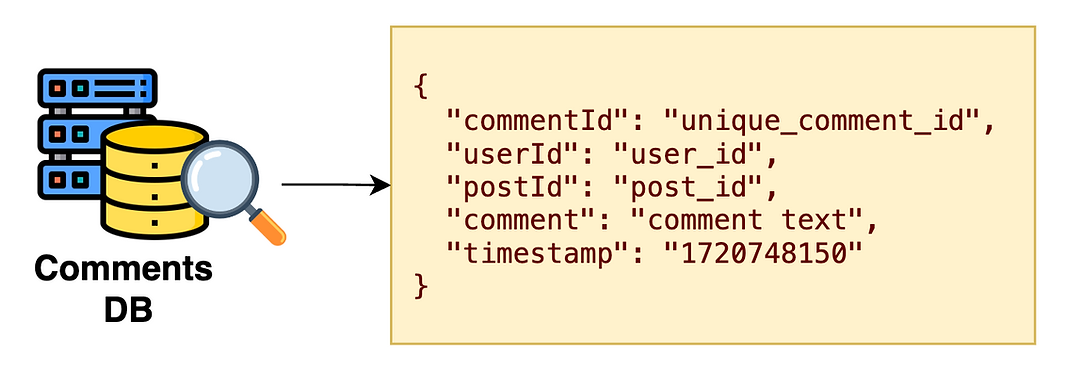
- Database Type: NoSQL
- Common Queries: Find all the comments for a post.
- Indexing:
postId

- Database Type: NoSQL
- Common Queries:
- Calculate the number of likes and put them in the Likes cache.
- Find all the users who liked a particular post.
- Indexing:
postId

- Database Type: GraphDB
- Common Queries: Quickly retrieve a user's followers and followees.
- Indexing:
userId
When you create an image or video post, we upload the media file to Object Storage. However, there’s an important detail to consider. Different devices and internet speeds need different formats and resolutions.
For example, a high-resolution image looks great on a desktop with a fast connection but may load slowly on a mobile phone with a slow connection.
To solve this, we store the media file in multiple formats and resolutions.

-
Upload to Object Storage
- When a media file (image/video) is uploaded, it is stored in Object Storage.
-
Media Processing Service
- The Media Processing Service takes the uploaded file and converts it into different formats and resolutions.
-
Store Converted Files
- The converted media files are stored back in Object Storage.
-
Adaptive Delivery
- When a user has a poor connection, a lower resolution image is returned.
- When a user has a fast connection, a high-resolution image is served.
This ensures an optimal viewing experience across different devices and network conditions.
We used Pre-Signed URLs in the create media post flow. But what exactly are they, and why do we use them? Let's break it down.
Pre-Signed URLs are special URLs that allow users to upload files directly to object storage (like Amazon S3) with temporary permissions. They are called "pre-signed" because they contain a signature that authorizes the client to upload for a limited time.
- Faster Uploads: When a client uploads directly to the object storage, it doesn't burden the server. This makes the upload faster.
- Secured & Temporary Access: These URLs expire after a short period, ensuring they can't be used forever. This enhances security and prevents unauthorized access after expiration.