AI Agent to analyze blood reports and provide detailed health insights.


Features | Tech Stack | Installation | Contributing | Author
- Intelligent agent-based architecture with multi-model cascade system
- In-context learning from previous analyses and knowledge base building
- Medical report analysis with personalized health insights
- PDF upload, validation and text extraction (up to 20MB)
- Secure user authentication and session management
- Session history with report analysis tracking
- Modern, responsive UI with real-time feedback
- Frontend Framework: Streamlit
- AI Integration: Multi-model architecture via Groq
- Primary: meta-llama/llama-4-maverick-17b-128e-instruct
- Secondary: llama-3.3-70b-versatile
- Tertiary: llama-3.1-8b-instant
- Fallback: llama3-70b-8192
- Database: Supabase
- PDF Processing: PDFPlumber
- Authentication: Supabase Auth
- Python 3.8+
- Streamlit 1.30.0+
- Supabase account
- Groq API key
- PDFPlumber
- Python-magic-bin (Windows) or Python-magic (Linux/Mac)
- Clone the repository:
git clone https://github.com/harshhh28/hia.git
cd hia- Install dependencies:
pip install -r requirements.txt- Required environment variables (in
.streamlit/secrets.toml):
SUPABASE_URL = "your-supabase-url"
SUPABASE_KEY = "your-supabase-key"
GROQ_API_KEY = "your-groq-api-key"- Set up Supabase database schema:
The application requires the following tables in your Supabase database:
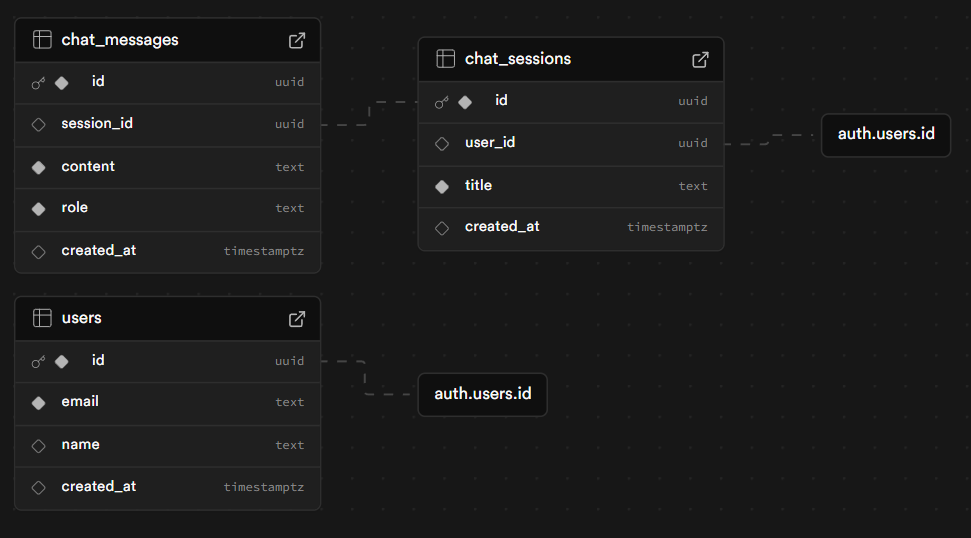
You can use the SQL script provided at public/db/script.sql [link] to set up the required database schema.
(PS: You can turn off the email confimation on signup in Supabase settings -> signup -> email)
- Run the application:
streamlit run src\main.pyhia/
├── requirements.txt
├── README.md
├── src/
│ ├── main.py # Application entry point
│ ├── auth/ # Authentication related modules
│ │ ├── auth_service.py # Supabase auth integration
│ │ └── session_manager.py # Session management
│ ├── components/ # UI Components
│ │ ├── analysis_form.py # Report analysis form
│ │ ├── auth_pages.py # Login/Signup pages
│ │ ├── footer.py # Footer component
│ │ └── sidebar.py # Sidebar navigation
│ ├── config/ # Configuration files
│ │ ├── app_config.py # App settings
│ │ └── prompts.py # AI prompts
│ ├── services/ # Service integrations
│ │ └── ai_service.py # AI service integration
│ ├── agents/ # Agent-based architecture components
│ │ ├── agent_manager.py # Agent management
│ │ └── model_fallback.py # Model fallback logic
│ └── utils/ # Utility functions
│ ├── validators.py # Input validation
│ └── pdf_extractor.py # PDF processing
Contributions are welcome! Please read our Contributing Guidelines for details on how to submit pull requests, the development workflow, coding standards, and more.
We appreciate all contributions, from reporting bugs and improving documentation to implementing new features.