You signed in with another tab or window. Reload to refresh your session.You signed out in another tab or window. Reload to refresh your session.You switched accounts on another tab or window. Reload to refresh your session.Dismiss alert
Palace is a parallel finite element solver developed by AWS Labs for full-wave 3D electromagnetic simulation, released under the Apache 2.0 open-source license. This solver supports full-wave frequency/time-domain simulation, eigenmode analysis, and parameter extraction for electrostatics/magnetostatics. It is compatible with platforms ranging from laptops to supercomputers and supports GPU acceleration, enabling the modeling of quantum computing hardware, RF/microwave devices, antennas, and other systems.
The author previously published a brief article introducing how to compile Palace on Windows, titled Compile the electromagnetic simulation solver Palace in Windows. Expanding upon that earlier work, this article details the compilation process more in-depth, with a particular focus on the compilation of dependent libraries. The dependent libraries discussed in this article are as follows:
Hypre: A large-scale linear algebra matrix computation library, using version 2.33.
MUMPS: An open-source software library for solving large-scale sparse linear systems of equations. This example uses version 5.8.1.
ARPACK-NG: A library that supports complex linear matrix computations and is used for eigenvalue computation. Primarily written in Fortran, it can be compiled independently. It is necessary to manually modify parts of the source code by using the diff files provided by Palace.
GSLib: Used for interpolation computations in high-order spectral elements.
libCEED: A linear algebra computation management framework that supports parallel computing across various CPUs, GPUs, and clusters. This example uses version 0.12.
MFEM: A flexible, efficient, and scalable finite element discretization framework used as the core solving dependency library for Palace. This example uses version 4.8.1.It is necessary to manually modify parts of the source code by using the diff files provided by Palace.
System Environment and Compilers
Operating System: Windows 11, 64-bit
Compilers: Visual Studio 2022 Community (C++17), Intel Fortran Compiler 2022, and Intel MKL 2024.
Palace Version: 0.15
Compiling Hypre
Hypre is an open-source high-performance parallel linear solver library developed by Lawrence Livermore National Laboratory (LLNL) designed specifically for large-scale scientific computing and engineering simulation. Its core objective is to solve large-scale sparse linear systems of equations (in the form of Ax=b) efficiently, particularly strong at handling ultra-large-scale problems in distributed memory parallel environments. Hypre natively supports MPI parallelism, enabling it to utilize the full computing power of distributed memory architectures, such as supercomputers and clusters, and easily handle linear systems with millions or even billions of degrees of freedom. This stark advantage distinguishes Hypre from smaller solvers (e.g., Eigen).
Compiling Hypre on Windows is simple. You can directly use the built-in CMake configuration file to generate Visual Studio project files, which will in turn produce the static library file.
When configuring CMake, set the parameters as follows:
HYPRE_WITH_MPI = ON
HYPRE_USING_OPENMP = ON
HYPRE_WITH_CUDA = OFF
HYPRE_ENABLE_SYCL = OFF
HYPRE_INSTALL_PREFIX=D:/WelSimLLC/CodeDV/3rdParty/hypre/myInstall
CMAKE_INSTALL_PREFIX=D:/WelSimLLC/CodeDV/3rdParty/hypre/myInstall
If the compilation proceeds smoothly, then the hypre.lib static library file will be generated.
Compiling MUMPS
To solve Wave Port problems, the Palace solver requires one of three direct linear algebra solvers: SuperLU, STRUMPACK, or MUMPS. MUMPS is selected as the dependent library given that the author is relatively familiar with it.
MUMPS is an open-source parallel sparse direct solver library co-developed by French institutions including INRIA and CNRS. Its core objective is to solve large-scale sparse linear systems of equations (Ax=b) using the direct method. Unlike Hypre, which primarily relies on iterative methods, MUMPS computes without iteration by leveraging matrix decomposition (LU/Cholesky) via direct methods. This approach delivers higher precision and more robustness, making it particularly well-suited for solving sparse matrix problems involving asymmetric, symmetric positive definite, or indefinite matrices.
MUMPS depends on BLAS/LAPACK (basic linear algebra libraries) and SCALAPACK (parallel linear algebra library). In this case, the dependency is the Intel MKL Library.
The original version of MUMPS does not provide a compilation method for Windows. Instead, you can opt for the scivision/mumps version available on GitHub, which offers a CMake-based compilation approach for seamless implementation. The latest version 5.8.1 was downloaded for this example.
First ensure that the environment variable contains the following configuration: MKLTOOL= C:\Program Files (x86)\Intel\oneAPI\mkl\latest
Under CMake configuration, set the following parameters:
MUMPS_openmp = ON
MUMPS_parallel = OFF
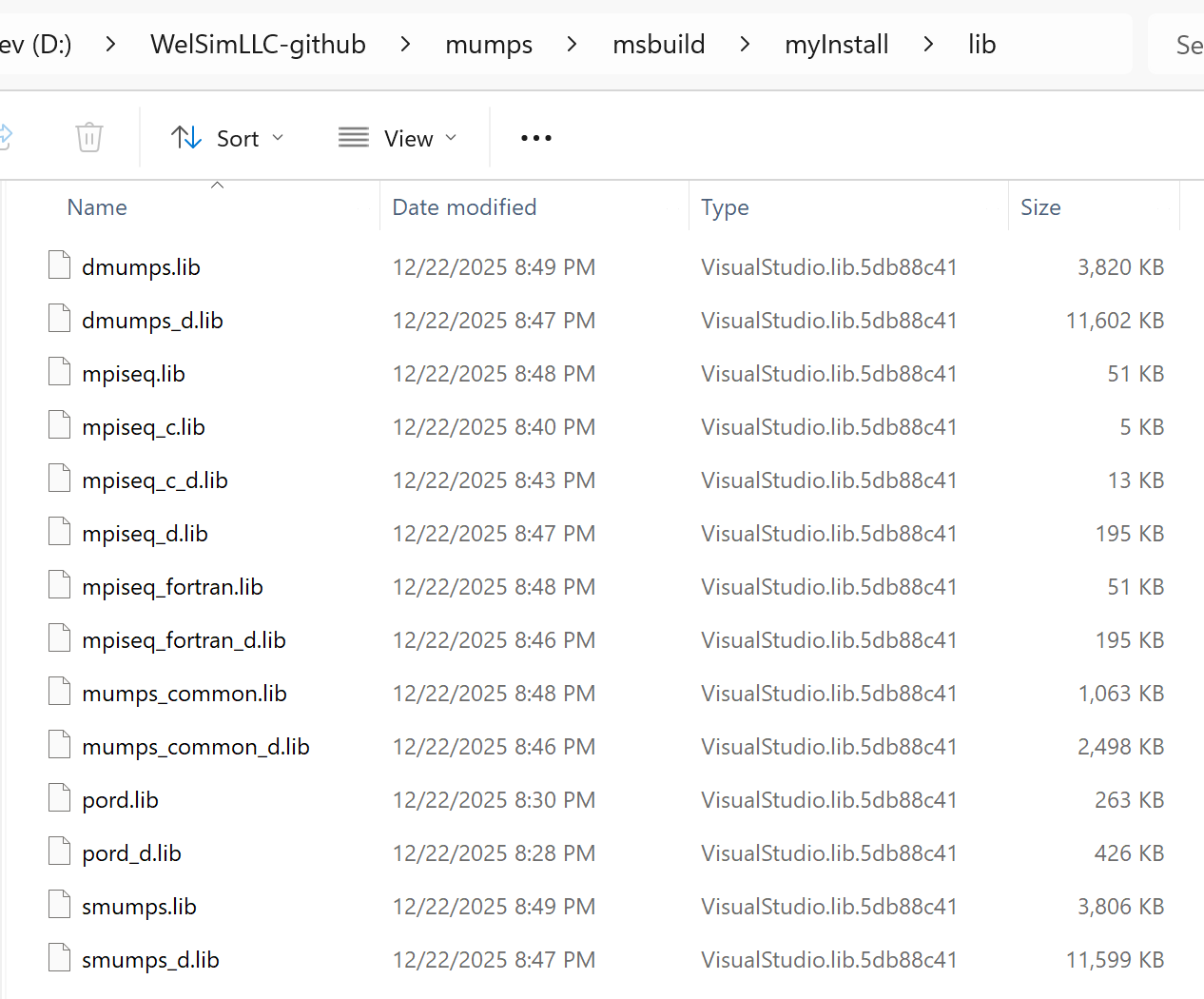
Once the Visual Studio project files are generated, compile the project to produce all static libraries of MUMPS. The generated static libraries are illustrated in the figure below.
Compiling ARPACK
For eigenvalue-related computations (e.g., eigenmode calculations), Palace requires a complex-number eigenvalue solver such as SLEPc or ARPACK. In this example, ARPACK is selected as the complex-number solver for Palace.
ARPACK is an open-source library for large-scale eigenvalue and eigenvector computations, co-developed by institutions including Rice University and Sandia National Laboratories. Its core objective is to efficiently compute a subset of eigenvalues and their corresponding eigenvectors for large sparse matrices. Unlike libraries such as Hypre and MUMPS, which are designed to solve linear systems of equations (Ax=b), ARPACK focuses specifically on tackling eigenvalue problems (Ax=λx or Ax=λBx).
Download ARPACK-NG from GitHub and use its built-in CMake build configuration. Ensure that the environment variable contains the entry MKLTOOL=C:\Program Files (x86)\Intel\oneAPI\mkl\latest; this allows CMake to automatically locate the BLAS and LAPACK libraries within MKL.Set the following parameters in CMake:
ICE = ON
Eigen = ON
Build_SHARED_LIBS = OFF
Meanwhile, you need to make corresponding modifications to the source files based on the diff files located in the extern/patch/arpack-ng folder under the Palace directory. After generating the Visual Studio project files, you can directly compile the project to obtain the ARPACK static library.
Compiling GSLib
GSLIB is an open-source parallel sparse communication library designed to efficiently support sparse data gather/scatter communication and operators in parallel numerical simulation scenarios, such as the finite element method, spectral element method, and finite difference method. It greatly simplifies the development of parallel sparse communication and lowers the barrier to distributed memory programming. Its adaptive algorithms ensure efficient communication in large-scale parallel computing, satisfying ultra-large-scale simulation requirements.
Since GSLIB does not come with CMake configuration files, it is unable to automatically generate Visual Studio project files on Windows, requiring you to create the Visual Studio project files manually. Create a new static library project named gslib-palace, and add all the source files and header files to this project.
In the preprocessor definitions of the Visual Studio project, add GSLIB_USE_CBLAS and GSLIB_USE_MKL.
During compilation, when the following error messages appear:
unary minus operator applied to unsigned type, result still unsigned
You will need to modify the code, for example, changing
p[map->n].el = -(uint)1;
to
p[map->n].el = 0-(uint)1;
This allows the compilation to succeed.
When the following error message appears:
potentially uninitialized local pointer variable 'h' used
You will need to modify the code and initialize the pointer with a NULL value.
If you receive a prompt indicating that the fgs_free function has been defined redundantly, simply comment out the fgs_setup, fgs_free, and fgs_unique functions.
Compiling libCEEM
libCEED is an efficient and scalable discretization library that focuses on high-performance computational discretization based on finite element and spectral element methods. It provides a lightweight algebraic interface for linear and nonlinear operators as well as preconditioners; it supports runtime selection and optimized implementations across a variety of computing devices such as CPUs and GPUs.
Compiling libCEED is the most challenging part of the entire task because libCEED does not provide CMake configuration files and contains numerous options. Coupled with the fact that Visual Studio does not support C99 syntax, extensive manual modifications to the source files are required, especially modifications related to dynamic arrays. For example, change the following dynamic array:
After usage, you also need to free the array from memory at the end using the free function: free(num_points);.
Certain strings containing file paths also require modification. For instance, change:
Since Visual Studio's support for weak functions differs from that of Linux, the weak functions in the source code need to be modified as follows:
Original code:
#define
 CEED_BACKEND(name, num_prefixes, ...)       \
  CEED_INTERN int name(void) __attribute__((weak)); \
  int             name(void) { return CeedRegister_Weak(__func__, num_prefixes, __VA_ARGS__); }
#include
 "ceed-backend-list.h"
Visual Studio does not support the __restrict__ keyword and requires it to be changed to __restrict.
Other minor modifications need to be made, such as replacing popen with _popen and pclose with _pclose. Additionally, there is an environment variable setting: setenv("RUST_TOOLCHAIN", "nightly", 0), which needs to be modified as follows:
To reduce complexity, this compilation supports only CPU parallel computing and does not require GPU parallel support. Therefore, in the ceed-backend-list.h file, only the following functionalities need to be enabled:
All other computing functionalities can be commented out. Upon successful compilation, the static library for libCEED will be generated.
Compiling MFEM
MFEM is the core solver of Palace, an open-source high-order finite element library led by the Lawrence Livermore National Laboratory (LLNL). Designed specifically for large-scale scientific computing and engineering simulation, its core objective is to provide a flexible, efficient, and scalable finite element discretization framework. MFEM also serves as a mainstream open-source finite element tool for computational fluid dynamics, electromagnetic simulation, structural mechanics, nuclear physics, and other fields.
Compiling MFEM is relatively straightforward. You can generate Visual Studio project files via CMake for compilation. Set the following options to ON in CMake:
MFEM_USE_MPI = ON
MFEM_USE_ZLIB = ON
MFEM_USE_METIS = ON
MFEM_USE_LAPACK = ON
MFEM_USE_LEGACY_OPENMP = ON
MFEM_THREAD_SAFE = ON
MFEM_USE_MUMPS = ON
Meanwhile, you need to make corresponding modifications to the source files based on the diff files located in the extern/patch/mfem folder under the Palace directory. Since there are quite a few source files to be modified, you should proceed with patience and care. Alternatively, you can first compile the code on Linux, then copy and overwrite the automatically modified mfem folder to the mfem directory that needs to be compiled on Windows. Generate the Visual Studio project files and compile them directly to obtain the MFEM static library.
Compiling Palace
At this point, all complex dependent libraries have been successfully compiled. Proceed to the final step of this project: use the built-in CMake configuration file to generate Visual Studio project files and compile Palace. Note that you should select the CMakeLists.txt file located in the palace subdirectory instead of the one in the root directory, as the latter is used for generating the SuperBuild.
Set the following parameters in CMake:
PALACE_WITH_ARPACK = ON
PALACE_WITH_OPENMP = ON
PALACE_WITH_SLEPC = OFF
MPI_Fortran_WORKS = C:/Program Files (x86)/Microsoft SDKs/MPI/Include/x64
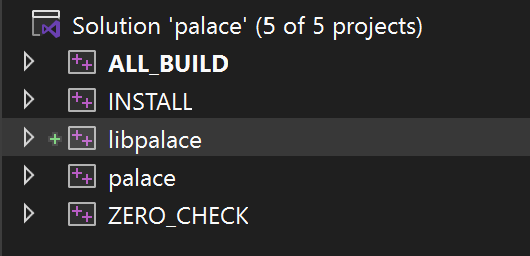
Open the generated Visual Studio project, and you will see a static library project named libpalace and an executable project named palace. If the compiler reports missing header files or the linker indicates unresolved functions during compilation, you can directly add the relevant paths and static libraries to the projects.
After completing the compilation, you can run a test on palace.exe. Note that you need to place all dynamic dependent libraries (such as the MKL dynamic libraries) in the same directory as palace.exe before running it.
Run a simple test case. The output shown below indicates that the compilation has been successful basically.
Conclusion
As open-source electromagnetic field simulation solvers are presently scarce, Palace stands out as the most feature-rich one available. As a result, Palace relies on a large number of dependent libraries, and its version is still under continuous iterations. Some of these dependencies only support Linux builds, which adds to the complexity of compiling Palace on Windows. This article documents the complete compilation process of Palace and provides a resource for the open-source community on how to build Palace for Windows.
There are also other dependent libraries that are relatively easy to compile, such as Eigen, fmt, Metis, and nlohmann/json. Experienced developers can often independently build these libraries on Windows, so it is not discussed in this article.
The author has included the compiled palace.exe executable file in the WELSIM installation package, so you are able to directly obtain the Windows version of palace.exe from the WELSIM installer without having to compile it yourself.
This article describes the configuration of Palace for CPU multi-core parallel computing. The compilation methods for GPU-accelerated versions, such as CUDA, HIP, or SYCL, will be discussed in future articles.
WelSim and the author are not affiliated with Palace, Hypre, MUMPS, ARPACK, GSLIB, libCEED, or MFEM, nor do they have any direct connections with the development teams or institutions behind these projects. The references to the names and images of these open-source software in this article are solely for the purpose of technical blog documentation and software usage guidance.
reacted with thumbs up emoji reacted with thumbs down emoji reacted with laugh emoji reacted with hooray emoji reacted with confused emoji reacted with heart emoji reacted with rocket emoji reacted with eyes emoji


Uh oh!
There was an error while loading. Please reload this page.
Uh oh!
There was an error while loading. Please reload this page.
-
Palace is a parallel finite element solver developed by AWS Labs for full-wave 3D electromagnetic simulation, released under the Apache 2.0 open-source license. This solver supports full-wave frequency/time-domain simulation, eigenmode analysis, and parameter extraction for electrostatics/magnetostatics. It is compatible with platforms ranging from laptops to supercomputers and supports GPU acceleration, enabling the modeling of quantum computing hardware, RF/microwave devices, antennas, and other systems.
The author previously published a brief article introducing how to compile Palace on Windows, titled Compile the electromagnetic simulation solver Palace in Windows. Expanding upon that earlier work, this article details the compilation process more in-depth, with a particular focus on the compilation of dependent libraries. The dependent libraries discussed in this article are as follows:
System Environment and Compilers
Compiling Hypre
Hypre is an open-source high-performance parallel linear solver library developed by Lawrence Livermore National Laboratory (LLNL) designed specifically for large-scale scientific computing and engineering simulation. Its core objective is to solve large-scale sparse linear systems of equations (in the form of Ax=b) efficiently, particularly strong at handling ultra-large-scale problems in distributed memory parallel environments. Hypre natively supports MPI parallelism, enabling it to utilize the full computing power of distributed memory architectures, such as supercomputers and clusters, and easily handle linear systems with millions or even billions of degrees of freedom. This stark advantage distinguishes Hypre from smaller solvers (e.g., Eigen).

Compiling Hypre on Windows is simple. You can directly use the built-in CMake configuration file to generate Visual Studio project files, which will in turn produce the static library file.
When configuring CMake, set the parameters as follows:
If the compilation proceeds smoothly, then the hypre.lib static library file will be generated.
Compiling MUMPS
To solve Wave Port problems, the Palace solver requires one of three direct linear algebra solvers: SuperLU, STRUMPACK, or MUMPS. MUMPS is selected as the dependent library given that the author is relatively familiar with it.
MUMPS is an open-source parallel sparse direct solver library co-developed by French institutions including INRIA and CNRS. Its core objective is to solve large-scale sparse linear systems of equations (Ax=b) using the direct method. Unlike Hypre, which primarily relies on iterative methods, MUMPS computes without iteration by leveraging matrix decomposition (LU/Cholesky) via direct methods. This approach delivers higher precision and more robustness, making it particularly well-suited for solving sparse matrix problems involving asymmetric, symmetric positive definite, or indefinite matrices.
MUMPS depends on BLAS/LAPACK (basic linear algebra libraries) and SCALAPACK (parallel linear algebra library). In this case, the dependency is the Intel MKL Library.
The original version of MUMPS does not provide a compilation method for Windows. Instead, you can opt for the scivision/mumps version available on GitHub, which offers a CMake-based compilation approach for seamless implementation. The latest version 5.8.1 was downloaded for this example.
First ensure that the environment variable contains the following configuration:
MKLTOOL= C:\Program Files (x86)\Intel\oneAPI\mkl\latestUnder CMake configuration, set the following parameters:
Once the Visual Studio project files are generated, compile the project to produce all static libraries of MUMPS. The generated static libraries are illustrated in the figure below.
Compiling ARPACK
For eigenvalue-related computations (e.g., eigenmode calculations), Palace requires a complex-number eigenvalue solver such as SLEPc or ARPACK. In this example, ARPACK is selected as the complex-number solver for Palace.
ARPACK is an open-source library for large-scale eigenvalue and eigenvector computations, co-developed by institutions including Rice University and Sandia National Laboratories. Its core objective is to efficiently compute a subset of eigenvalues and their corresponding eigenvectors for large sparse matrices. Unlike libraries such as Hypre and MUMPS, which are designed to solve linear systems of equations (Ax=b), ARPACK focuses specifically on tackling eigenvalue problems (Ax=λx or Ax=λBx).
Download ARPACK-NG from GitHub and use its built-in CMake build configuration. Ensure that the environment variable contains the entry
MKLTOOL=C:\Program Files (x86)\Intel\oneAPI\mkl\latest; this allows CMake to automatically locate the BLAS and LAPACK libraries within MKL.Set the following parameters in CMake:Meanwhile, you need to make corresponding modifications to the source files based on the diff files located in the extern/patch/arpack-ng folder under the Palace directory. After generating the Visual Studio project files, you can directly compile the project to obtain the ARPACK static library.
Compiling GSLib
GSLIB is an open-source parallel sparse communication library designed to efficiently support sparse data gather/scatter communication and operators in parallel numerical simulation scenarios, such as the finite element method, spectral element method, and finite difference method. It greatly simplifies the development of parallel sparse communication and lowers the barrier to distributed memory programming. Its adaptive algorithms ensure efficient communication in large-scale parallel computing, satisfying ultra-large-scale simulation requirements.
Since GSLIB does not come with CMake configuration files, it is unable to automatically generate Visual Studio project files on Windows, requiring you to create the Visual Studio project files manually. Create a new static library project named
gslib-palace, and add all the source files and header files to this project.In the preprocessor definitions of the Visual Studio project, add
GSLIB_USE_CBLASandGSLIB_USE_MKL.During compilation, when the following error messages appear:
You will need to modify the code, for example, changing
to
This allows the compilation to succeed.
When the following error message appears:
You will need to modify the code and initialize the pointer with a NULL value.
If you receive a prompt indicating that the
fgs_freefunction has been defined redundantly, simply comment out thefgs_setup,fgs_free, andfgs_uniquefunctions.Compiling libCEEM
libCEED is an efficient and scalable discretization library that focuses on high-performance computational discretization based on finite element and spectral element methods. It provides a lightweight algebraic interface for linear and nonlinear operators as well as preconditioners; it supports runtime selection and optimized implementations across a variety of computing devices such as CPUs and GPUs.
Compiling libCEED is the most challenging part of the entire task because libCEED does not provide CMake configuration files and contains numerous options. Coupled with the fact that Visual Studio does not support C99 syntax, extensive manual modifications to the source files are required, especially modifications related to dynamic arrays. For example, change the following dynamic array:
to:
After usage, you also need to free the array from memory at the end using the
freefunction:free(num_points);.Certain strings containing file paths also require modification. For instance, change:
to:
Since Visual Studio's support for weak functions differs from that of Linux, the weak functions in the source code need to be modified as follows:
Original code:
Modified code:
Visual Studio does not support the
__restrict__keyword and requires it to be changed to__restrict.Other minor modifications need to be made, such as replacing popen with
_popenand pclose with_pclose. Additionally, there is an environment variable setting:setenv("RUST_TOOLCHAIN", "nightly", 0), which needs to be modified as follows:To reduce complexity, this compilation supports only CPU parallel computing and does not require GPU parallel support. Therefore, in the
ceed-backend-list.hfile, only the following functionalities need to be enabled:All other computing functionalities can be commented out. Upon successful compilation, the static library for libCEED will be generated.
Compiling MFEM
MFEM is the core solver of Palace, an open-source high-order finite element library led by the Lawrence Livermore National Laboratory (LLNL). Designed specifically for large-scale scientific computing and engineering simulation, its core objective is to provide a flexible, efficient, and scalable finite element discretization framework. MFEM also serves as a mainstream open-source finite element tool for computational fluid dynamics, electromagnetic simulation, structural mechanics, nuclear physics, and other fields.
Compiling MFEM is relatively straightforward. You can generate Visual Studio project files via CMake for compilation. Set the following options to ON in CMake:
Meanwhile, you need to make corresponding modifications to the source files based on the diff files located in the extern/patch/mfem folder under the Palace directory. Since there are quite a few source files to be modified, you should proceed with patience and care. Alternatively, you can first compile the code on Linux, then copy and overwrite the automatically modified mfem folder to the mfem directory that needs to be compiled on Windows. Generate the Visual Studio project files and compile them directly to obtain the MFEM static library.
Compiling Palace
At this point, all complex dependent libraries have been successfully compiled. Proceed to the final step of this project: use the built-in CMake configuration file to generate Visual Studio project files and compile Palace. Note that you should select the CMakeLists.txt file located in the palace subdirectory instead of the one in the root directory, as the latter is used for generating the SuperBuild.
Set the following parameters in CMake:
Configure the following paths:
Open the generated Visual Studio project, and you will see a static library project named
libpalaceand an executable project namedpalace. If the compiler reports missing header files or the linker indicates unresolved functions during compilation, you can directly add the relevant paths and static libraries to the projects.After completing the compilation, you can run a test on palace.exe. Note that you need to place all dynamic dependent libraries (such as the MKL dynamic libraries) in the same directory as palace.exe before running it.
Run a simple test case. The output shown below indicates that the compilation has been successful basically.

Conclusion
As open-source electromagnetic field simulation solvers are presently scarce, Palace stands out as the most feature-rich one available. As a result, Palace relies on a large number of dependent libraries, and its version is still under continuous iterations. Some of these dependencies only support Linux builds, which adds to the complexity of compiling Palace on Windows. This article documents the complete compilation process of Palace and provides a resource for the open-source community on how to build Palace for Windows.
There are also other dependent libraries that are relatively easy to compile, such as Eigen, fmt, Metis, and nlohmann/json. Experienced developers can often independently build these libraries on Windows, so it is not discussed in this article.
The author has included the compiled palace.exe executable file in the WELSIM installation package, so you are able to directly obtain the Windows version of palace.exe from the WELSIM installer without having to compile it yourself.
This article describes the configuration of Palace for CPU multi-core parallel computing. The compilation methods for GPU-accelerated versions, such as CUDA, HIP, or SYCL, will be discussed in future articles.
WelSim and the author are not affiliated with Palace, Hypre, MUMPS, ARPACK, GSLIB, libCEED, or MFEM, nor do they have any direct connections with the development teams or institutions behind these projects. The references to the names and images of these open-source software in this article are solely for the purpose of technical blog documentation and software usage guidance.
Beta Was this translation helpful? Give feedback.
All reactions