RAM API Reference MotionExtractor
#ramMotionExtractor
ramMotionExtractor supports your selecting actor's node.
##実装 In implement, you should have instance in your scene class, and call 3 methods.
The following is an extract from example-ramMotionExtractor.
void ramMotionExtractorExampleScene::setupControlPanel(){

	/*=== register ===*/
	motionExtractor.setupControlPanel(this);

}

void ramMotionExtractorExampleScene::update(){

	/*=== update ===*/
	motionExtractor.update();

}

void ramMotionExtractorExampleScene::draw(){

	ramBeginCamera();

	/*=== Preview selected nodes ===*/
	motionExtractor.draw();

	ramEndCamera();

}
##Using When you run some scenes implemented ramMotionExtractor,you have GUI for motionExtractor right side of console panel.

###Push port You select a node,then red circle appears on node you selected. So you should push PushPort button and register node to motionExtractor. By succeed register, white wire cube appears.It is called "Port". ###Remove ports When you want to remove port you add, click node you added and push PopPort button and you can remove port selected.
If you want to clear all ports, Push clear button and clear all ports.
###Save and Load You can save & load port select data by save/load button. On default, the data will be saved as motionExt_SceneName.xml, but you can call ramMotionExtractor::Save(string file & ramMotionExtractor::Load(string file) method so you can save as optional file names.
##Connect to scenes you can use selected port in program, with the following code: ###Example:draw triangle by selected 3 points
ofVec3f vec_a = motionExtractor.getPositionAt(0);
ofVec3f vec_b = motionExtractor.getPositionAt(1);
ofVec3f vec_c = motionExtractor.getPositionAt(2);

ofSetLineWidth(3.0);
ofNoFill();
ofTriangle(vec_a, vec_b, vec_c);
ofFill();
ofSetLineWidth(1.0);
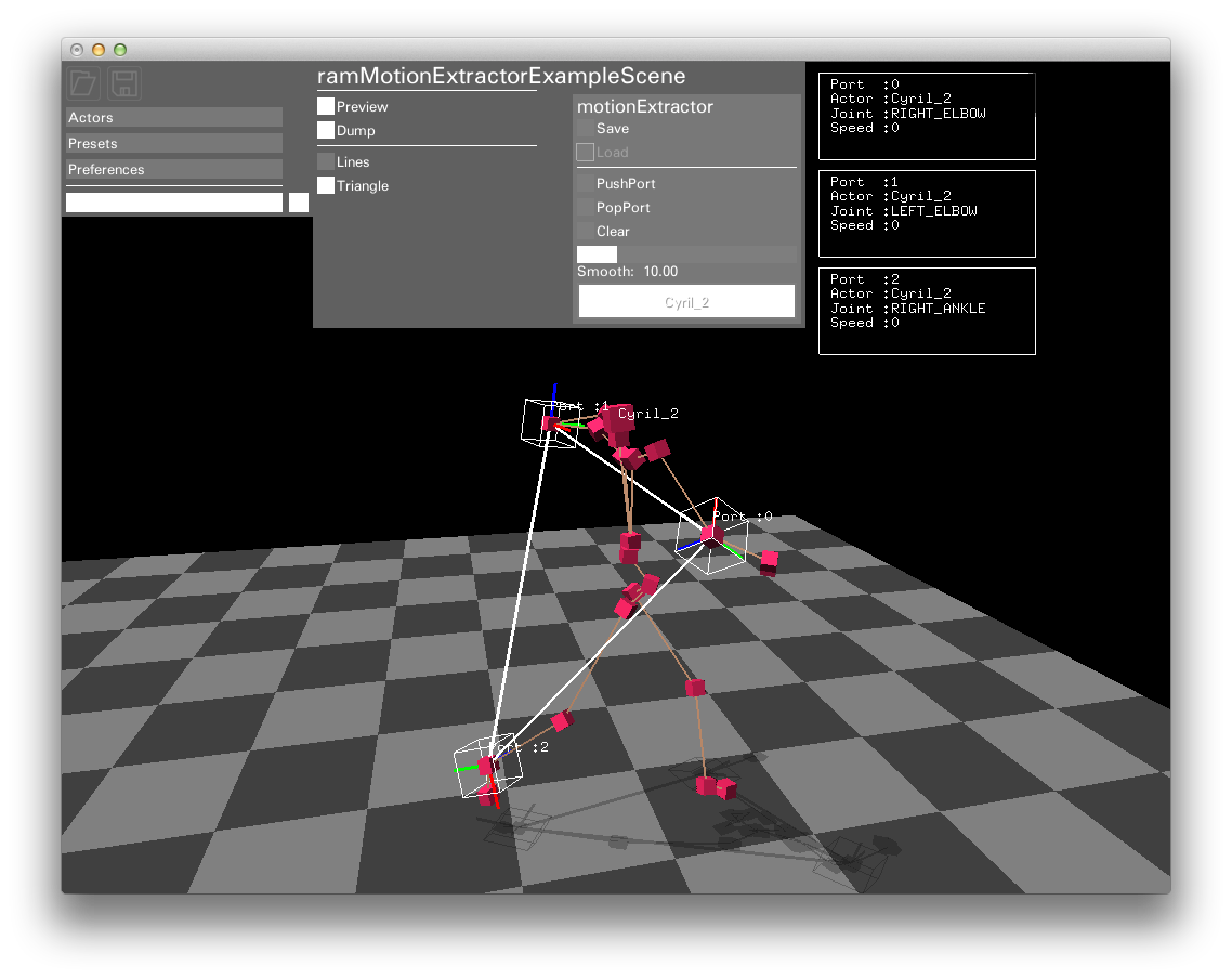
ramMotionExtractor::getPositionAt Method returns global position you selected. When no port choosed, it will return point(0,0,0).
other getters(for taking port's information)is the following:
int				getNumPort(); /* 選択されているノードの総数 */
bool			getIsExist(int port); /*指定のポートが選択されているかどうか*/

ramNode			getNodeAt(int port); /*指定したポートのramNodeデータ*/
string			getActorNameAt(int port);/*指定したポートを持つアクターの名前*/
string			getJointNameAt(int port);/*指定したポートの関節の名前*/
int				getJointIdAt(int port);/*指定したポートのジョイントID*/

ofVec3f			getPositionAt(int port,bool fixPosition = false);/*指定したポートのグローバル座標*/
ofQuaternion	getRotationAt(int port);/*指定したポートの回転角度*/

ofVec3f			getVelocityAt(int port);/*指定したポートの速度ベクトル*/
float			getVelocitySpeedAt(int port);/*指定したポートの速度ベクトルの長さ*/
ofQuaternion	getRotateVelocityAt(int port);/*指定したポートの回転速度*/
float			getDistanceAt(int port_A, int port_B);/*指定した2ポート間の距離*/
float			getAreaAt(int port_A, int port_B, int port_C);/*指定した3ポートが作る三角形の面積*/