RAM API Reference MotionExtractor
#ramMotionExtractor
ramMotionExtractor allows you to select an actor's nodes.
##Implementation To implement the ramMotionExtractor, you need an motionExtractor instance in your scene class. From there, you need to call 3 methods.
The following is an sample from example-ramMotionExtractor.
void ramMotionExtractorExampleScene::setupControlPanel(){

	/*=== register ===*/
	motionExtractor.setupControlPanel(this);

}

void ramMotionExtractorExampleScene::update(){

	/*=== update ===*/
	motionExtractor.update();

}

void ramMotionExtractorExampleScene::draw(){

	ramBeginCamera();

	/*=== Preview selected nodes ===*/
	motionExtractor.draw();

	ramEndCamera();

}
##Usage
When you use the ramMotionExtractor, it has its own GUI on the right side of the console panel

###Pushing a port When you select a node, a red circle will appear on the node you selected. If you select PushPort on the GUI, this will register the node to the motionExtractor. If this is sucessful, a white wire cube will appear. This is called a "port".
###Removing a port If you want to remove a port that you added, simply select the node by clicking it and select PopPort from the GUI. This will remove the selected port.
If you want to clear all ports, select Clear from the GUI. This will clear all ports.
###Saving and Loading You can save and load port selection data by the save and load buttons, respectively. As a default, the data will be saved with the file name motionExt_SceneName.xml, but you can call the ramMotionExtractor::Save(string file & ramMotionExtractor::Load(string file) method and save the file with a custom file name.
##Connecting to the scenes You can use the selected ports in a program by using the following code: ###Example:draw triangle by selected 3 points
ofVec3f vec_a = motionExtractor.getPositionAt(0);
ofVec3f vec_b = motionExtractor.getPositionAt(1);
ofVec3f vec_c = motionExtractor.getPositionAt(2);

ofSetLineWidth(3.0);
ofNoFill();
ofTriangle(vec_a, vec_b, vec_c);
ofFill();
ofSetLineWidth(1.0);
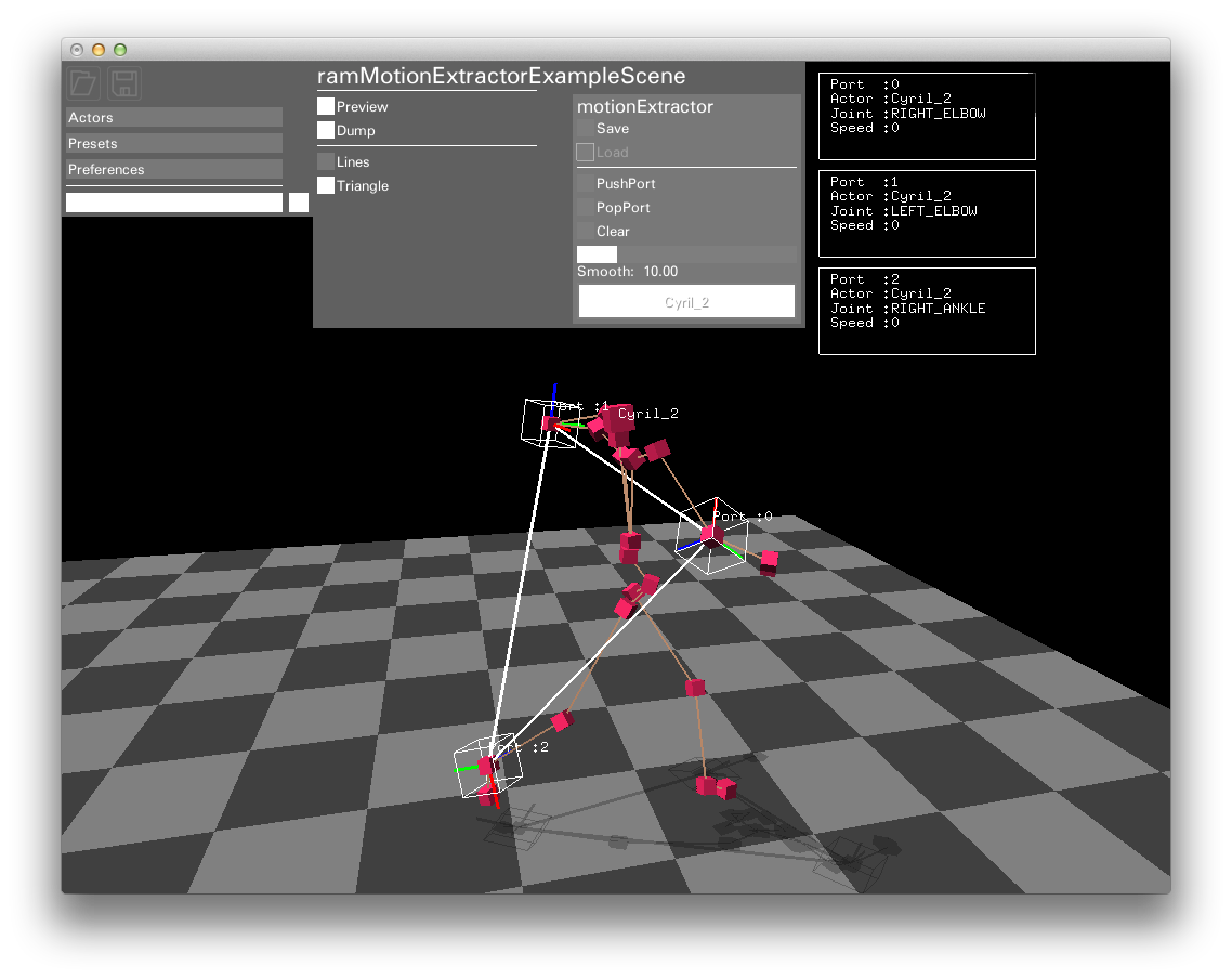
The ramMotionExtractor::getPositionAt method returns global position you selected. If no port is chosen, it will return point(0,0,0).
Other getter methods for getting informatiom from a port are as follows:
int				getNumPort();
bool			getIsExist(int port);

ramNode			getNodeAt(int port);
string			getActorNameAt(int port);
string			getJointNameAt(int port);
int				getJointIdAt(int port);

ofVec3f			getPositionAt(int port,bool fixPosition = false);
ofQuaternion	getRotationAt(int port);

ofVec3f			getVelocityAt(int port);
float			getVelocitySpeedAt(int port);
ofQuaternion	getRotateVelocityAt(int port);
float			getDistanceAt(int port_A, int port_B);
float			getAreaAt(int port_A, int port_B, int port_C);
##Editing with OSC motionExtractor can be edited via OSC messages.
The following are protocol details:
/ram/MEX/push i, i:Push port at actor(i-0), node(i-1)
/ram/MEX/pop i, i:Pop port at actor(i-0), node(i-1)
/ram/MEX/clear:Clear all ports.
/ram/MEX/save s:Save motionExtractor data with filename(s)
/ram/MEX/load s:Load motionExtractor data from filename(s)