Follow your passion & Success will follow you.
The library has many popular algorithms when working with graphs such as:
The simple thing we need to do is declare functions that are suitable for the purpose of the problem. Besides, the library that supports creating graph images with DOT Language will give us a more intuitive view.
- Declare
To use this library, add the following header:
#include "graph.h"- Building
To create a graph for your program, definition:
Graph graph = createGraph(hasWeight, isDirected);hasWeight is weighted or not
isDirected indicates whether this is a directed or undirected graph.
For example:
graph = createGraph(0, 1);i.e. this graph is unweighted and directed
To add an edge between two vertices, you must add that vertex to the graph first through:
addVertex(graph, id, "vertex name"); vertex name is at your discretion can be numbers or names of people, trees, cities, ... as long as the two different ids are not named the same
Then you add the edge between the 2 vertices:
addEdge(graph, v1, v2, weight);or for unweighted graphs:
addEdge_uw(graph, v1, v2);- Example
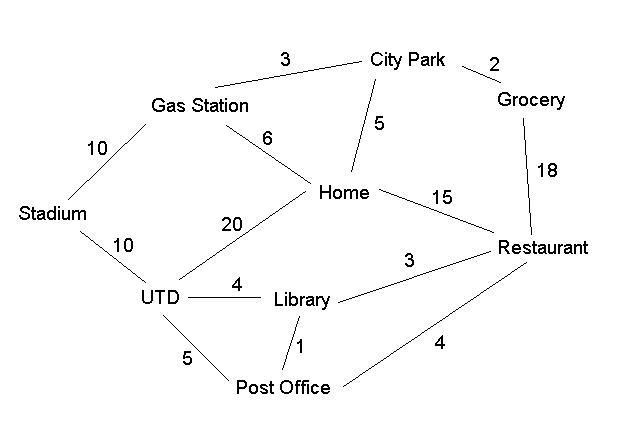
For example, when you want to solve a problem related to Minimum Spanning Tree Algorithm such as:
#include <stdio.h>
#include "graph.h"

int main()
{
    Graph graph = createGraph(1, 0);
    addVertex(graph, 0, "Stadium");
    addVertex(graph, 1, "UTD");
    addVertex(graph, 2, "Gas_Station");
    addVertex(graph, 3, "Home");
    addVertex(graph, 4, "Library");
    addVertex(graph, 5, "Post_Office");
    addVertex(graph, 6, "City_Park");
    addVertex(graph, 7, "Grocery");
    addVertex(graph, 8, "Restaurant");

    addEdge(graph, 0, 1, 10);
    addEdge(graph, 0, 2, 10);
    addEdge(graph, 1, 3, 20);
    addEdge(graph, 1, 4, 4);
    addEdge(graph, 1, 5, 5);
    addEdge(graph, 2, 3, 6);
    addEdge(graph, 2, 6, 3);
    addEdge(graph, 3, 6, 5);
    addEdge(graph, 3, 8, 15);
    addEdge(graph, 4, 5, 1);
    addEdge(graph, 4, 8, 3);
    addEdge(graph, 5, 8, 4);
    addEdge(graph, 6, 7, 2);
    addEdge(graph, 7, 8, 18);

    // Ok, it might take a little while to create the graph
    // Now you call the MST and drawGraph functions to get a better view
    MST(graph);
    drawGraph(graph);

    dropGraph(graph);
    return 0;
}- Compile
First:
gcc -g -c your_name_file.c graph.cSecond (Note: Remember to add the file libgraph.a):
gcc -g -o your_name_file your_name_file.o libgraph.aFinally, run your program:
./your_name_file- Result
File .dot :
graph GraphViz
{
 ...
 Stadium [fillcolor = "#00ffff", style = filled];
 UTD [fillcolor = "#00ffff", style = filled];
    ...
 City_Park -- Grocery [style = bold, color = "red", label = "2.00"];
 Grocery -- Restaurant [label = "18.00"];
}
and picture:
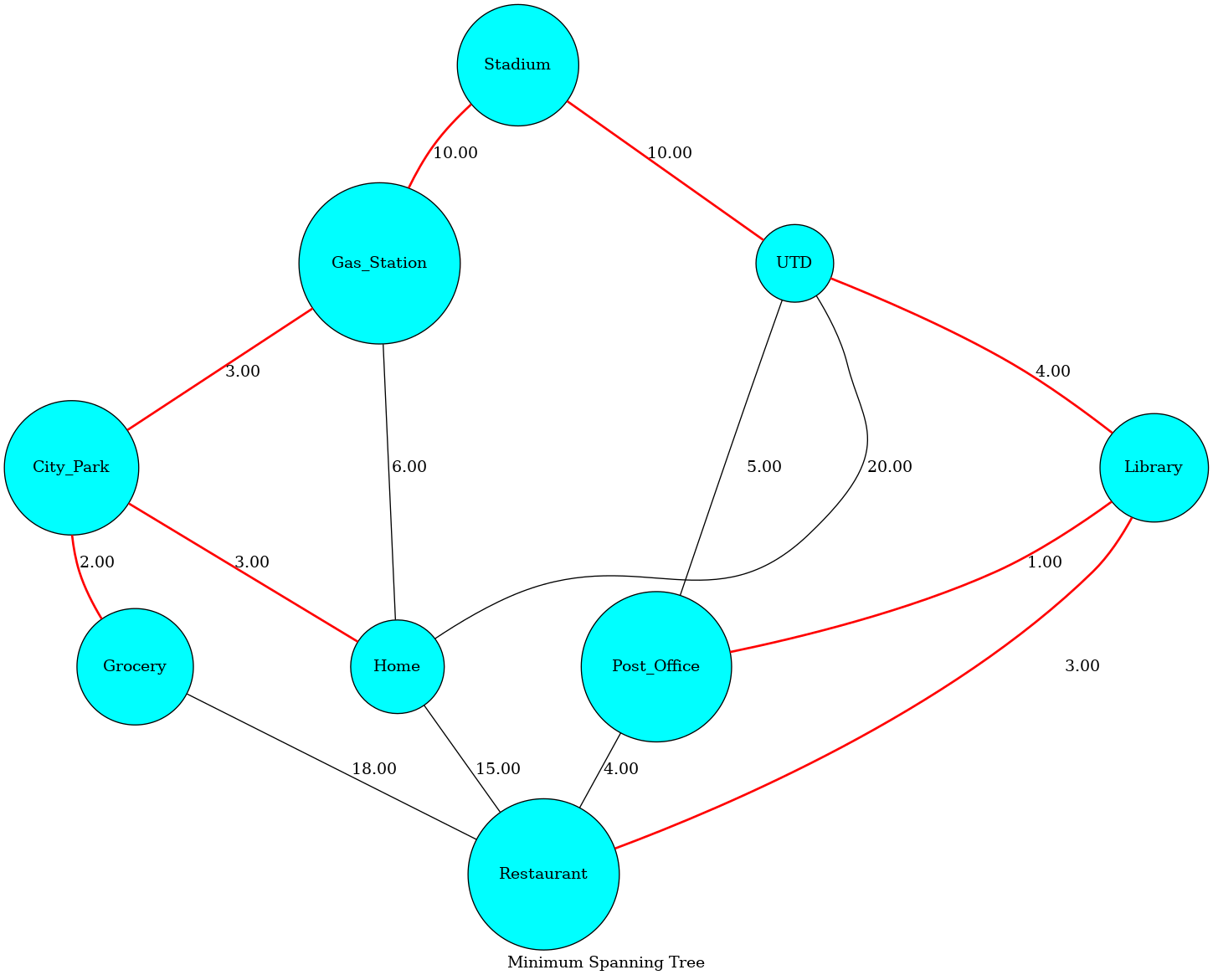
The library only supports creating images for some functions such as MST, Color, Topological and normal graph.
The library is created with:
- C
- DOT
Graph Library has been tested in Linus OS.
(C) Hoang Anh Tuan - HANOI UNIVERSITY OF SCIENCE AND TECHNOLOGY