ESP32 audio analysis component for ESPHome. Provides real-time onset/beat detection, frequency band energy, amplitude, BPM estimation with phase tracking, spectral descriptors (centroid, rolloff), and silence detection via on-device FFT processing with a dedicated FreeRTOS task. Supports three detection modes: spectral flux, bass energy, and complex domain (phase + magnitude).
Designed as the audio source for the Aqara Advanced Lighting Home Assistant integration, enabling music syncing of dynamic lighting scenes. The devices output an array of Home Assistant sensors which can also be used with any automation.
Can be adapted for any ESP32 with an I2S digital microphone. Configurations currently available for:
The best starting point for most users, readily available.
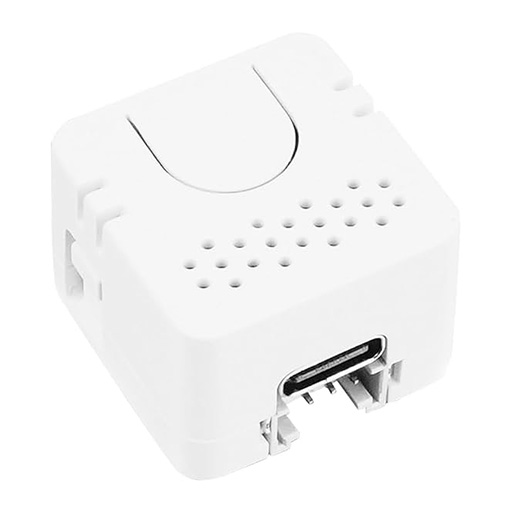
| Price | ~$13 |
| Chipset | ESP32-PICO-D4 |
| Microphone | Built-in SPM1423 PDM |
| Feedback | LED |
| Power | USB-C |
| Size | 24 x 24 x 17mm |
| Where to buy | M5Stack store, Pi Hut, Amazon US, Amazon UK, Amazon DE, Amazon FR, Amazon IT, AliExpress |
Higher-quality audio with an ES8311 codec and speaker feedback for on-device status tones.
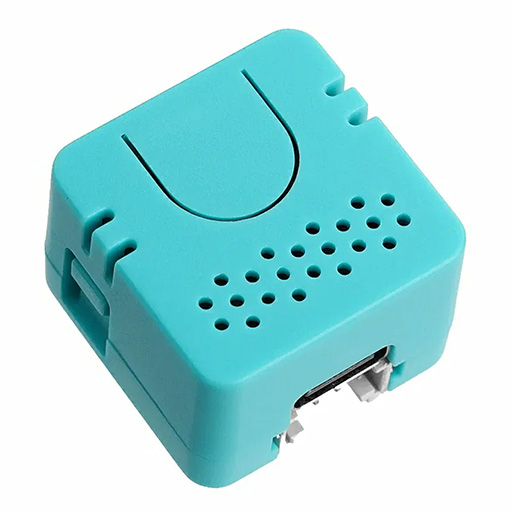
| Price | ~$15 |
| Chipset | ESP32-S3 |
| Microphone | MEMS via ES8311 ADC (I2S, 44.1kHz) |
| Audio codec | ES8311 (mic ADC + speaker DAC) |
| Feedback | Speaker tones (no LED) |
| Power | USB-C |
| Size | 24 x 24 x 17mm |
| Where to buy | M5Stack store, Pi Hut, AliExpress |
Feature-rich board with dual MEMS microphones, 7-LED ring, and optional battery power.
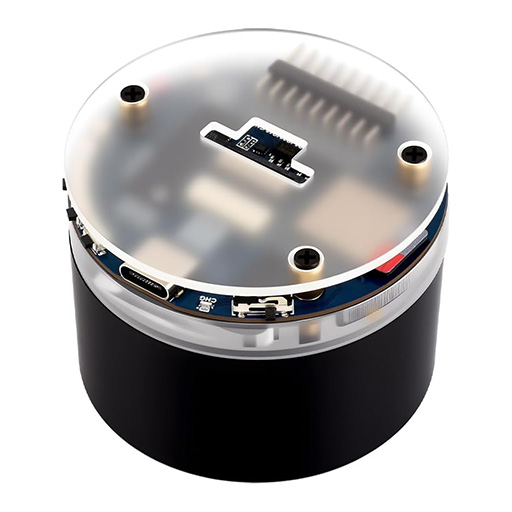
| Price | ~$16 |
| Chipset | ESP32-S3R8 (8MB PSRAM) |
| Microphone | Dual MEMS via ES7210 ADC (I2S, 44.1kHz) |
| Audio codec | ES7210 (mic) + ES8311 (speaker) |
| Feedback | LED ring |
| Power | USB-C, optional battery |
| Size | 58 x 58 x 49mm |
| Where to buy | Waveshare store, Amazon US, Amazon UK, Amazon DE, Amazon FR, AliExpress |
A compact development kit with a built-in screen, battery, and PDM microphone.
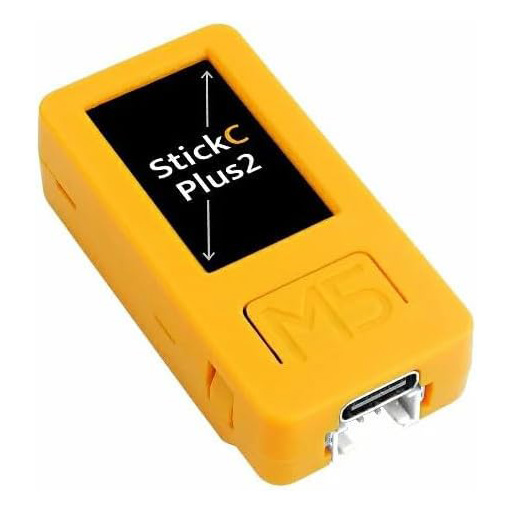
| Price | ~$20 |
| Chipset | ESP32-PICO-V3-02 |
| Microphone | Built-in SPM1423 PDM |
| Feedback | Screen |
| Power | USB-C, built-in battery |
| Size | 54 x 25 x 16mm |
| Where to buy | M5Stack store, Pi Hut, Amazon US, Amazon UK, Amazon DE, Amazon FR, Amazon IT, AliExpress |
Visit absent42.github.io/esphome-audio-reactive and click Install. Connect your ESP32 via USB — no ESPHome knowledge required.
If you prefer to compile yourself or need custom configuration:
Add to your ESPHome YAML:
external_components:
  - source: github://absent42/esphome-audio-reactive
    components: [audio_reactive]
See atom-echo.yaml, atom-echo-s3r.yaml, and waveshare-s3-audio.yaml for complete device-specific configs.
After installing, add API encryption and an OTA password to your device config.
If you use the ESPHome Dashboard (Home Assistant add-on), it generates encryption
keys automatically when you add the encryption: block.
Add these to your YAML:
api:
  encryption:
    key: !secret api_encryption_key

ota:
  - platform: esphome
    password: !secret ota_password
Then add matching values to your secrets.yaml (managed by the ESPHome Dashboard,
or created manually alongside your device YAML).
API encryption secures communication between the device and Home Assistant. The OTA password prevents unauthorized over-the-network firmware updates. Neither affects the USB web installer.
| Entity | Type | Update Rate | Description |
|---|---|---|---|
| Audio Sensor | binary_sensor | On event | Pulses on when a musical onset is detected (beat, cymbal, vocal entrance, etc.) |
| Silence | binary_sensor | On change | On when the environment is quiet (noise gate active for >1 second) |
| Bass Energy | sensor (0-1) | ~50ms | Smoothed, AGC-normalized bass band energy |
| Mid Energy | sensor (0-1) | ~50ms | Smoothed, AGC-normalized mid band energy |
| High Energy | sensor (0-1) | ~50ms | Smoothed, AGC-normalized high band energy |
| Amplitude | sensor (0-1) | ~50ms | Overall smoothed amplitude with dynamics limiting |
| BPM | sensor | ~1s | Estimated beats per minute from autocorrelation beat tracker |
| Beat Confidence | sensor (0-1) | ~1s | Confidence in the current BPM estimate (0 = unknown, 1 = locked) |
| Beat Phase | sensor (0-1) | ~50ms | Position within the current beat cycle (0 = on beat, approaches 1 before next beat) |
| Spectral Centroid | sensor (0-1) | ~50ms | Spectral "brightness" — weighted average frequency of the spectrum |
| Spectral Rolloff | sensor (0-1) | ~50ms | Frequency below which 85% of spectral energy is concentrated |
| Onset Strength | sensor (0-1) | On event | Magnitude of the most recent onset detection (0 = weak, 1 = strong) |
| Beat Sensitivity | number (1-100) | On change | Controls onset detection threshold |
| Squelch | number (0-100) | On change | Noise gate threshold (higher = requires louder signal) |
| Detection Mode | select | On change | spectral_flux (all genres), bass_energy (rhythmic), or complex_domain (phase+magnitude) |
| Microphone Mute | switch | On change | Mute/unmute the microphone (LED turns red when muted) |
| Reset AGC | button | On press | Resets automatic gain control and onset detector |
| Calibrate Quiet Room | button | On press | Calibrates noise floor from quiet room (3 seconds) |
| Calibrate Music Level | button | On press | Calibrates signal scaling from music playback (5 seconds) |
| Status LED | light | — | On-device RGB LED (ATOM Echo) |
audio_reactive:
  id: audio_analysis
  microphone: mic                 # Required: I2S microphone component ID
  update_interval: 50ms           # Processing interval (default: 50ms)
  beat_sensitivity: 50            # 1-100, higher = reacts to quieter onsets (default: 50)
  squelch: 10                     # 0-100, noise gate threshold (default: 10)
  sample_rate: 22050              # Sample rate in Hz, must match microphone config (default: 22050)
  fft_size: 512                   # FFT window size: 256 or 512 (default: 512)
  debug_logging: false            # Enable comprehensive DSP pipeline logging (default: false)

  # Automation triggers (all optional)
  on_mute_changed:                # Fired when mute state changes (button, switch, or HA)
    - ...
  on_quiet_calibration_started:   # Fired when quiet room calibration begins
    - ...
  on_quiet_calibration_complete:  # Fired when quiet room calibration finishes
    - ...
  on_music_calibration_started:   # Fired when music calibration begins
    - ...
  on_music_calibration_complete:  # Fired when music calibration finishes
    - ...
  on_silence_changed:             # Fired when silence state transitions
    - ...

# Sensors (all optional — include only what you need)
sensor:
  - platform: audio_reactive
    audio_reactive_id: audio_analysis
    bass_energy:
      name: "Bass Energy"
    mid_energy:
      name: "Mid Energy"
    high_energy:
      name: "High Energy"
    amplitude:
      name: "Amplitude"
    bpm:
      name: "BPM"
    beat_confidence:
      name: "Beat Confidence"
    beat_phase:
      name: "Beat Phase"
    centroid:
      name: "Spectral Centroid"
    rolloff:
      name: "Spectral Rolloff"
    onset_strength:
      name: "Onset Strength"

# Binary sensors
binary_sensor:
  - platform: audio_reactive
    audio_reactive_id: audio_analysis
    onset_detected:
      name: "Audio Sensor"
    silence:
      name: "Silence"

# Control entities
number:
  - platform: audio_reactive
    audio_reactive_id: audio_analysis
    beat_sensitivity:
      name: "Beat Sensitivity"
    squelch:
      name: "Squelch"

select:
  - platform: audio_reactive
    audio_reactive_id: audio_analysis
    detection_mode:
      name: "Detection Mode"      # spectral_flux, bass_energy, or complex_domain

switch:
  - platform: audio_reactive
    audio_reactive_id: audio_analysis
    microphone_mute:
      name: "Microphone Mute"

button:
  - platform: audio_reactive
    audio_reactive_id: audio_analysis
    reset_agc:
      name: "Reset AGC"
    calibrate_quiet:
      name: "Calibrate Quiet Room"
    calibrate_music:
      name: "Calibrate Music Level"
See the device YAML files and example-annotated.yaml for complete working examples with feedback wiring.
Enable comprehensive DSP pipeline logging for troubleshooting:
audio_reactive:
  debug_logging: true
When enabled, logs every 2 seconds: raw FFT magnitudes, scaled values, AGC gains, silence state, calibration state, published sensor values, sample rate, FFT size, and ring buffer fill level. Disable for production use.
For best results, calibrate the device to your environment. Calibration data persists across reboots.
Ensures the device correctly identifies silence and doesn't react to ambient noise.
- Make sure the room is quiet (no music, minimal background noise)
- Double-click the device button (Button A on M5StickC Plus2), or press Calibrate Quiet Room in Home Assistant
- The device shows green feedback (LED or screen) for 3 seconds while sampling
- Feedback flashes briefly to confirm calibration is complete
This sets the noise gate threshold and per-band noise floors based on your room's actual ambient noise level.
Teaches the device what typical music levels look like in your setup, so the sensors produce a useful 0-1 range.
- Play music at your typical listening volume
- Triple-click the device button (Button A on M5StickC Plus2), or press Calibrate Music Level in Home Assistant
- The device shows blue feedback (LED or screen) for 5 seconds while sampling
- Feedback flashes briefly to confirm calibration is complete
This sets the signal scaling factor so that typical music maps to mid-range sensor values (~0.5), giving the AGC room to normalize both quiet and loud passages.
Run quiet room calibration first, then music calibration. If you change rooms, speaker setup, or device placement, re-run both calibrations.
These devices have a single button — actions are distinguished by click pattern:
| Action | ATOM Echo | ATOM Echo S3R |
|---|---|---|
| Double click | Calibrate quiet (green LED) | Calibrate quiet (speaker tone) |
| Triple click | Calibrate music (blue LED) | Calibrate music (speaker tone) |
| Long press (1s+) | Toggle mute (red LED) | Toggle mute (speaker tone) |
Button A (front) handles all actions via click pattern. Button B (side) is exposed for custom use.
| Action | Button A | Feedback |
|---|---|---|
| Double click | Calibrate quiet room | Green screen |
| Triple click | Calibrate music level | Blue screen |
| Long press (1s+) | Toggle mute | Red screen |
The Waveshare has three dedicated buttons (K1, K2, K3) — one action per button:
| Button | Action | Feedback |
|---|---|---|
| K1 | Calibrate quiet room | Green LEDs |
| K2 | Calibrate music level | Blue LEDs |
| K3 | Toggle mute | Red LEDs |
Detects any sudden change in the frequency spectrum — kick drums, snare hits, cymbal crashes, piano attacks, violin pizzicato, vocal entrances. Works with all music genres including classical, jazz, and ambient.
Only detects bass energy threshold crossings. Optimized for rhythmic music with a prominent low-frequency beat (EDM, pop, rock, hip-hop). Includes hysteresis to prevent rapid re-triggering.
Uses both phase and magnitude information (Dixon 2006 phase advance algorithm) with spectral whitening. Distinguishes transients from sustained tones, making it better at detecting soft or subtle onsets — gentle percussion, fingerpicked guitar, or quiet vocal entrances that spectral flux might miss.
Switch between modes via the Detection Mode select entity, or the integration sets it automatically per scene.
- Audio is captured at the configured sample rate (default 22,050 Hz for ATOM Echo, 44,100 Hz for S3R and Waveshare devices)
- Ring buffer feeds samples to a dedicated FreeRTOS FFT task on core 0
- Configurable FFT window (256, 512, or 1024 samples; default 512) with 75% overlap produces frequency magnitudes
- 16 frequency bands are computed with pink noise correction
- PI-controller AGC normalizes energy values with configurable attack/release
- Spectral flux onset detection identifies musical events across all frequency bands
- Dynamics limiter and asymmetric EMA smoothing prevent jittery sensor output
- Silence detector gates output when mid+high energy is below the calibrated threshold