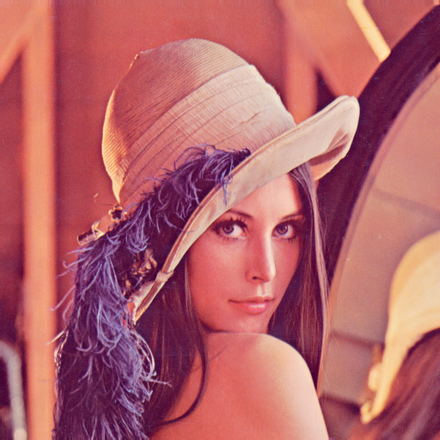
Image editing is one of the oldest uses of computers. For example, Adobe Photoshop has been around for 28 years! In this work we will make a program to manipulate images in PPM format.
PPM (portable pixmap format) is a format for storing images. You can find a more complete description of the PPM format in Wikipedia1.
In this work we consider only the P3 variant, the one in which the image is represented in the format exemplified below.
P3
# Comment
3 1 255 255 0 0 0 255
0   0 0 255
Here are the main characteristics of the PPM format:
- Lines beginning with a cardinal should be ignored because they are comments.
- The file starts with the string P3. Although there are other variants, we will consider only P3 in this work.
- The rest of the file has only whole numbers separated by spaces or line breaks. There is no practical difference between line breaks and spaces (except for comments), and there is no difference between one or more spaces or line breaks.
- The first two integers (3 and 1 in the example) represent the width and height of the image in pixels.
- The third integer (255 in the example) represents the maximum value for each color.
- The rest of the file describes the pixels of the image. In this case we have a red pixel (255 0 0), a green pixel (0 255 0) and a blue (0 0 255).
In its simplest use, the program should read one PPM file and write another one like it. The names of the input and output files are read from the console. For example, if lena.ppm is the file in figure 1a, the program should leave in the file lena2.ppm a copy of lena.ppm2.
Here is an example of using your program:
$ ghc --make p_fc00001_fc00002.hs -o photochop
[1 of 1] Compiling Main ( p_fc00001_fc00002.hs, p_fc00001_fc00002.o )
Linking photochop ...
$ ./photochop lena.ppm lena2.ppm
The above use is, fundamentally, a simple file copy. The goal of this work is much more ambitious!
Your program should support the following modifiers (flags), resulting in the images shown in figure 1:
-
Inversion horizontal (flip):
$ ./photochop lena.ppm lena2.ppm -fh -
Inversion vertical (flip):
$ ./photochop lena.ppm lena2.ppm -fv -
Half Width:
$ ./photochop lena.ppm lena2.ppm -hw -
Half height:
$ ./photochop lena.ppm lena2.ppm -hh -
Grayscale:
$ ./photochop lena.ppm lena2.ppm -gs -
Reds only (R):
$ ./photochop lena.ppm lena2.ppm -rc -
Greens only (G):
$ ./photochop lena.ppm lena2.ppm -gc -
Blues only (B):
$ ./photochop lena.ppm lena2.ppm -bc
In operations where pixels are lost (half of the width and half of the height) the elements to be combined must be averaged.
The operations can be be combined or repeated.
For example,

Figure 1: Results of using different flags.
$ ./photochop lena.ppm lena2.ppm -hh -hw -hw -hh
...should result in an image 1/4 the width and 1/4 the height of the original image.
Using the modifiers -fh -fv -hh -hw -gs, on the other hand, should return an image 1/4 the area, inverted horizontally and vertically, and in grayscale (see Figure 1j).
Note that some operations cancel each other out.
For example, the modifier sequence -fh -fv -fh -fv -fh produces the original image.
Following good Haskell language practices, you should separate the IO part from the pure part. The IO part should be restricted to as few functions as possible. This strategy allows you to easily test the most complex operations in your program, operations that should not use IO. To use the QuickCheck module to write properties.
You should write 3 properties that you consider important. Here are some suggestions:
- A twice inverted image is the original image.
- Any image has a number of pixels equal to the product of the dimensions in the image header.
- None of the pixel values are greater than the maximum value shown in the header.
- A width reduction operation followed by a height reduction operation height reduction operation keeps the width/height ratio unchanged when applied to an to an image of even width and height.
Use the quickCheck function to prepare at least three tests. The tests
are triggered using the ```-t modifier. Here is an example:
$ ./photochop -t
+++ OK, passed 100 tests.
+++ OK, passed 100 tests.
+++ OK, passed 100 tests.
- Ana Albuquerque - GitHub
- Diogo Lopes
- Grade: 20/20
Footnotes
-
The Lena is the standard image used in image processing, sort of like a Hello World. More information here https://en.wikipedia.org/wiki/Lenna. ↩