Flow Control
- Introduction
- Flow Control by Thread/QPS
- [Flow Control by Call Path](#Flow Control by Call Path)
Combined run time statistics collected in previous slots, FlowSlot will use pre-set rules to decide whether the incoming requests should be controlled.
SphU.entry (the resource name) will throw FlowException if any rule is triggered. User can customize his own logic by catching this exception.
One resource can have multiple flow rules. FlowSlot traverses these rules until one of them is triggered or all rules have been passed.
resource:resource name
count:thredholds
grade
strategy
Grade is defined by grade field in FlowRule. Here, 0 for maximum concurrent thread count and 1 for request count per second. Both concurrent thread count and request count are collected in runtime, and we this info can be checked by following command:
curl http:// localhost:8719 / tree?type = root idx id thread pass blocked success total aRt 1m-pass 1m-block 1m-all exeption
2 abc647 0 460 46 46 1 27 630 276 897 0
threads for thread count which is currently processing the resource; pass for the count of incoming request within one second; blocked for the count of requests blocked within one second; success for the count of the requests successfully within one second; RT for the average response time of the requests within a second; total for the sum of incoming requests and blocked requests within one second; 1m-pass is for the count of incoming requests within one minute; 1m-block is for the count of a request blocked within one minute; 1m -all is the total of incoming and blocked requests within 1 minute; exception is for the count of exceptions in one second.
This stage is usually used to protect resources from occupying. If a resource takes long time to finish, threads blocked in this resource will begin to occupy. The longer the response takes, the more threads may occupy.
Besides counter, there are 2 other ways to achieve this, thread pool or semaphore.
- Thread pool: Allocate a thread pool to handle these resource. When there is no more idle thread in the pool, the request is rejected without affecting other resources.
- Semaphore: Use semaphore to control the concurrent count of the threads in this resource.
The benefit of using thread pool is that, it can walk away gracefully when time out. But it also bring us the cost of context switch and additional threads. If the incoming requests is already served in a separated thread, for instance, a servlet request, it will almost double the threads count if using thread pool.
Compared to semaphore, we prefer to use counter. it is much easy to implement and can achieve the same effect.
When qps exceeds the threshold, we will take actions to control the incoming request, and is configured by "controlBehavior" field in flowrule
1. Immediately reject(RuleConstant.CONTROL_BEHAVIOR_DEFAULT) This is the default behavior. The exceeded request is rejected immediately and the FlowException is thrown
2. Warmup(RuleConstant.CONTROL_BEHAVIOR_WARM_UP) If the usage of system has been low for a while, and a large amount of requests comes, the system might not be able to handle all these requests at once. However if we steady increase the incoming request, the system can warm up and finally be able to handle all the requests. This warmup period can be configured by setting the field "warmUpPeriodSec" in flowrule.
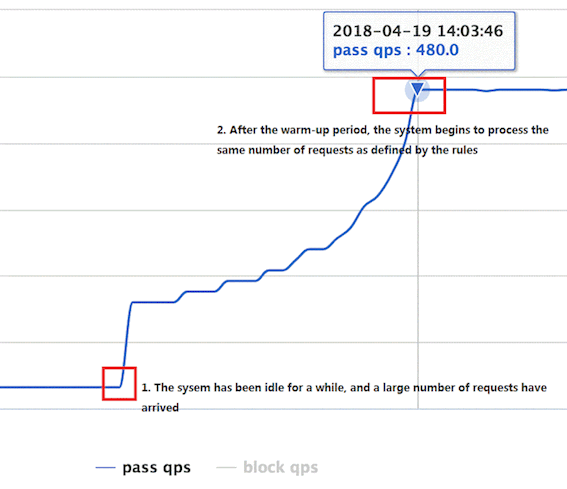 3.Rate limiter(RuleConstant.CONTROL_BEHAVIOR_RATE_LIMITER)
This strategy strictly controls the interval between requests. In other words, it allows requests to pass at a stable rate.
3.Rate limiter(RuleConstant.CONTROL_BEHAVIOR_RATE_LIMITER)
This strategy strictly controls the interval between requests. In other words, it allows requests to pass at a stable rate.
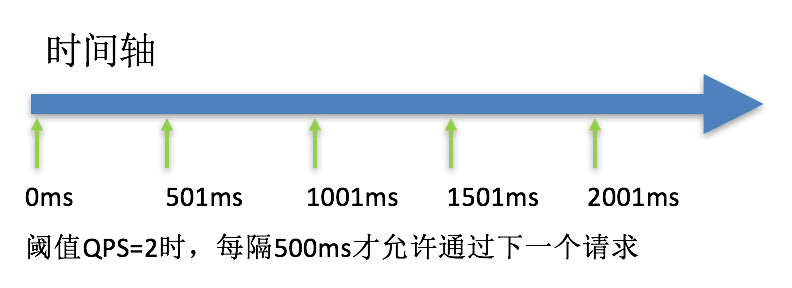
This strategy is an implement of leaky bucket (https://en.wikipedia.org/wiki/Leaky_bucket). It is used to handle the request at a stable rate and is often used to procesing burst requests instead of rejecting them. For instance, Message. When a large number of requests arrive at the same time, the system can handle all these incoming requests at its fixed rate.
We use the NodeSelectorSlot to establish the paths of resources; ClusterNodeBuilderSlot to collect the caller's run time data.
When calling ContextUtil.enter (resourceName, origin), the parameter origin indicates the identity of the caller. ClusetNodeBuilderSlot will collect this info, and use it to do flow control.
This information can be displayed by following command:
id: nodeA
idx origin  threadNum passedQps blockedQps totalQps aRt   1m-passed 1m-blocked 1m-total
1   caller1 0         0         0          0        0     0         0          0
2   caller2 0         0         0          0        0     0         0          0
The origin, can be defined by the field "limitApp" in Flow Rule. This field has following values:
- default No specific caller. If the total value of this resource exceeds the threshold defined in this rule, the incoming request will be blocked.
- <> A specific caller has exceeds the threshold defined in the rule
- other This rules applies to requests that come from a caller that is not in the origins defined explictiely for this resource.
The path is maintained in NodeSelectorSlot. for example, the resource nodea can comes from either entrance1 or entrance2.
     	          machine-root
                    /       \
                   /         \
             Entrance1     Entrance2
                /             \
               /               \
      DefaultNode(nodeA)   DefaultNode(nodeA)
We can shape the flow by setting the field "strategy" to RuleConstant.CHAIN, and "ref_identity" to a specified entrance.
For instance, two resources will access to the same database record. ResourceA will read records from the database, resource will write records to the database. The frequency of ResourceA accessing the database depends on ResourceB. We can achieve this by configuring a rule for ResourceA with the value of “strategy” field as RuleConstant.RELATE, and the value of “ref_identity“ as ResourceB.