
Replies: 8 comments 12 replies

-
|
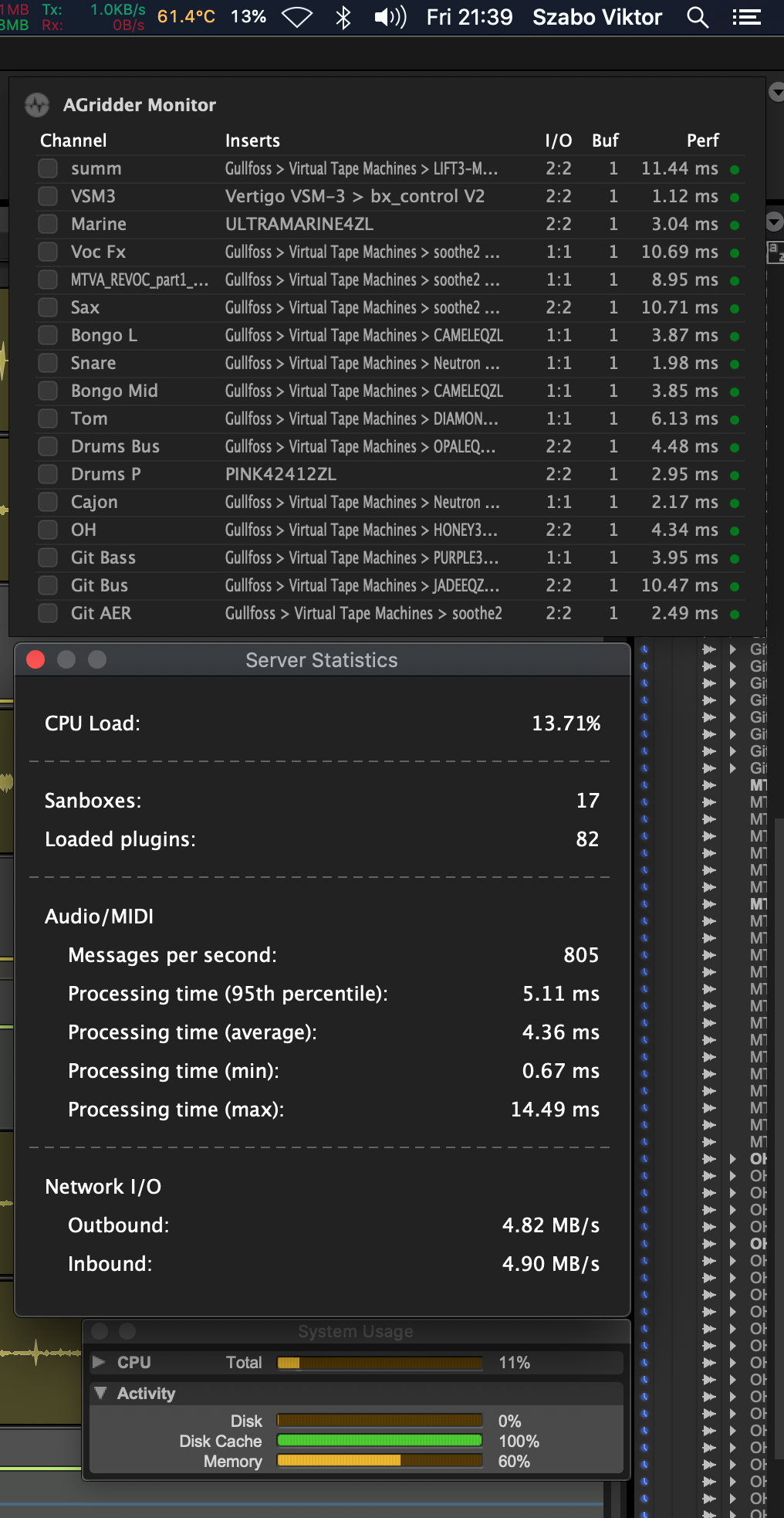
Here working like a charm. 17 AG s 82 plugins in total, and there is 40 Acustica from it. Sometimes I have click pops, when one instance goes red, but the server corrects itself. |
Beta Was this translation helpful? Give feedback.

-
|
And I mainly use acusticas, and I use the ZL versions, what uses a lot of cpu in PT but here nothing special, just less latency |
Beta Was this translation helpful? Give feedback.

-
|
Yes bro, Thumbs up to Andreas (and his team)! I'm very optimistic, but could I be doing something wrong? I shouldn't be getting 9173 errors because I'm using AG? And they go away when I disable the AG instances? |
Beta Was this translation helpful? Give feedback.
-
|
I have the cpu spikes, the -9173 codes, when one AG goes in red in communication, what I can see on the tray app. |
Beta Was this translation helpful? Give feedback.

-
Do you see errors in the plugin and server log files? |
Beta Was this translation helpful? Give feedback.
-
|
Haven't really checked the log, (I'll do that) but AG crashes sometimes and I have to either restart the server computer or re-install. |
Beta Was this translation helpful? Give feedback.

-
|
For instance like this, my experience is that the server can't catch up
with the plugins loaded in the DAW, especially you have plugins that are
communicating with each other live, for example, auto-align.
Take a deep dive and see how it works when you disable any of those plugins
I mentioned.
…On Fri, May 28, 2021 at 12:45 PM Viktor Szabó ***@***.***> wrote:
Here working like a charm. 17 AG s 82 plugins in total, and there is 40
Acustica from it.
I had cpu peaks, when the AG plugin buffering was disabled. With 1 block
works really well. I always mix at 1024 buffer
[image: Screenshot 2021-05-28 at 21 39 39]
<https://user-images.githubusercontent.com/72139943/120034703-c05ec700-bffd-11eb-9a6d-cd0fa321769c.png>
Sometimes I have click pops, when one instance goes red, but the server
corrects itself.
And the offline bounce goes with 1.9-3.0x, what usually 0.8-0.9.....
One computer, local mode sandboxing on
—
You are receiving this because you are subscribed to this thread.
Reply to this email directly, view it on GitHub
<#593 (comment)>,
or unsubscribe
<https://github.com/notifications/unsubscribe-auth/ARMAR6HJ7MVRV3B2PF5AAS3TP7XHNANCNFSM45XGEXQA>
.
--
Kevin Ma
Supported by Gmail.
|
Beta Was this translation helpful? Give feedback.
-
|
Hi CaBuffalo, |
Beta Was this translation helpful? Give feedback.
-
|
Apart from using plugins that interact, what else could cause such massive CPU overheads from only 5 plugins? |
Beta Was this translation helpful? Give feedback.

-
|
I think it's because Protools is a bitch. I'm currently trying to figure out how to use another DAW. Been using protools for 12 years... but I just can't understand why it can't use all of my cores. :( |
Beta Was this translation helpful? Give feedback.
-
|
I have high cpu usage at 96K sessions, 48K is cool |
Beta Was this translation helpful? Give feedback.
-
|
Auto align is the plugin that you can auto check phase and polarity of one Mic recorded instruments like drums. You can get more details on Soundradix website. All of the instances need to communicate with each other.
I see sound drops out occasionally. When it happens, I’ll restart the AG server or Daw. It helps.
…Sent from my iPhone
On May 28, 2021, at 8:28 PM, lesbrunn ***@***.***> wrote:
Hi CaBuffalo,
i don't quite understand this. Would you like to explain?
—
You are receiving this because you commented.
Reply to this email directly, view it on GitHub, or unsubscribe.
|
Beta Was this translation helpful? Give feedback.
-
|
Thanks, but I'm not using Auto-align in this session. Just 5 Acustica channel strips. |
Beta Was this translation helpful? Give feedback.

-
What version of pro tools do yoh use? M1 or intel and what plugin and server versions |
Beta Was this translation helpful? Give feedback.

-
|
A single core is probably crashing trying to sync all that audio and midi. It may be a Mac only problem. even for me All AG instances in Logic Pro want to sync the audio and midi using the last core or 2. Same behavior is found on abelton so I sincerely doubt that pro tools is the problem here. The only fix I've found is to increase the buffer inside the AG plugin to 2 blocks then everything goes back to normal. Now as to why this crash didn't happen before idk anything about that and I haven't tested this bug on a windows machine but I believe it has to do something with live data transfer of audio and midi. |
Beta Was this translation helpful? Give feedback.

-
|
Hello! AG is working great with pro tools and my MacBook pro With Intell, but but my MAC Studio M1 Max, the plug in not connect with the server, any help? |
Beta Was this translation helpful? Give feedback.

-
|
Hi there, Think this is actually a networking issue. Hence why it works fine for some and not others. I was getting the error in PT until I used a wired ethernet connection between the computers and entered the server IP manually in AG. Now it works like a charm. I guess my wifi/router LAN wasn't able to keep up. |
Beta Was this translation helpful? Give feedback.


Uh oh!
There was an error while loading. Please reload this page.
-
I decided to try AG in a Pro Tools session I'm working with, and the results I'm getting are very strange. If there are any AG and PT users here, I'd like them to share their experience with CPU usage. The session is a simple one for now: a bounced stereo song with 5 bounced stereo tracks of background vocals. Every other track in PT is inactive. There is an AG instance on each of the 5 stereo vocal tracks, with Acustica Big Ceil loaded on each one.
The CPU usage meter in PT shows about 4%, but I keep getting error messages that PT has run out of CPU power, and that I should disable some plugins. The AG instances are the only plugins loaded. Before I bounced and disabled the tracks, I had 85 tracks of audio with loads of plugins (without AG) running very smoothly at a 128 buffer in PT. Now only 5 AG instances brings PT to its knees. Instead of reducing the CPU load, it has increased it several times over. The error messages are continuous, like every 15 to 30s. It's impossible to work with it the way it is. Before I bounced the vocal tracks, I had 16 tracks of background vocals with AG/Slate VMR on each track. It was a total nightmare, and I only succeeded by bouncing 4 tracks at a time while the rest were de-activated. PT reverted to normal CPU usage whenever I disabled the AG instances.
Can anyone throw any light on this? Thank you.
Beta Was this translation helpful? Give feedback.
All reactions