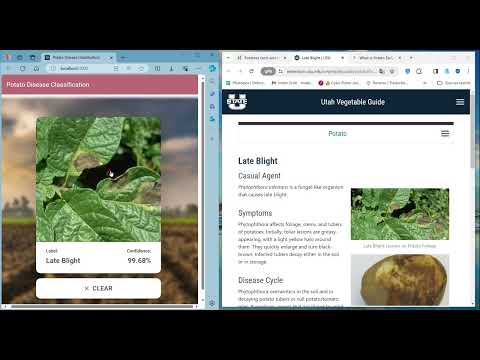
This project aims to classify potato diseases using machine learning techniques. It provides a Python-based setup for training the model and running an API for inference. Additionally, it includes instructions for setting up a frontend ReactJs website for interacting with the model.
-
Install Python: Ensure Python is installed on your system.
-
Install Python packages:
pip3 install -r training/requirements.txt
pip3 install -r api/requirements.txt
-
Run Jupyter Notebook in Browser:
jupyter notebook
-
Open
training/potato-disease-training.ipynbin Jupyter Notebook. -
Run all the Cells one by one.
-
Navigate to the API folder:
cd api -
Run the FastAPI Server using uvicorn:
uvicorn main:app --reload --host localhost
Your API is now running at
localhost:8000.
-
Navigate to the API folder:
cd api -
Run the TF Serve:
docker run -t --rm -p 8501:8501 -v /path/to/potato-disease-classification:/potato-disease-classification tensorflow/serving --rest_api_port=8501 --model_config_file=/potato-disease-classification/models.config
-
Run the FastAPI Server using uvicorn:
- Run it from
main.pyormain-tf-serving.pyusing PyCharm run option. - Or run it from the command prompt as shown below:
uvicorn main-tf-serving:app --reload --host localhost
Your API is now running at
localhost:8000. - Run it from
-
Navigate to the frontend folder:
cd frontend -
Install dependencies:
npm install
-
Start the frontend ReactJs website:
npm start
Discover how to classify potato diseases using machine learning in this demo: