


Multi-protocol censorship bypass toolkit. Deploy proxy services on any VM, connect from restricted networks, and scan for clean routes -- all from the terminal.
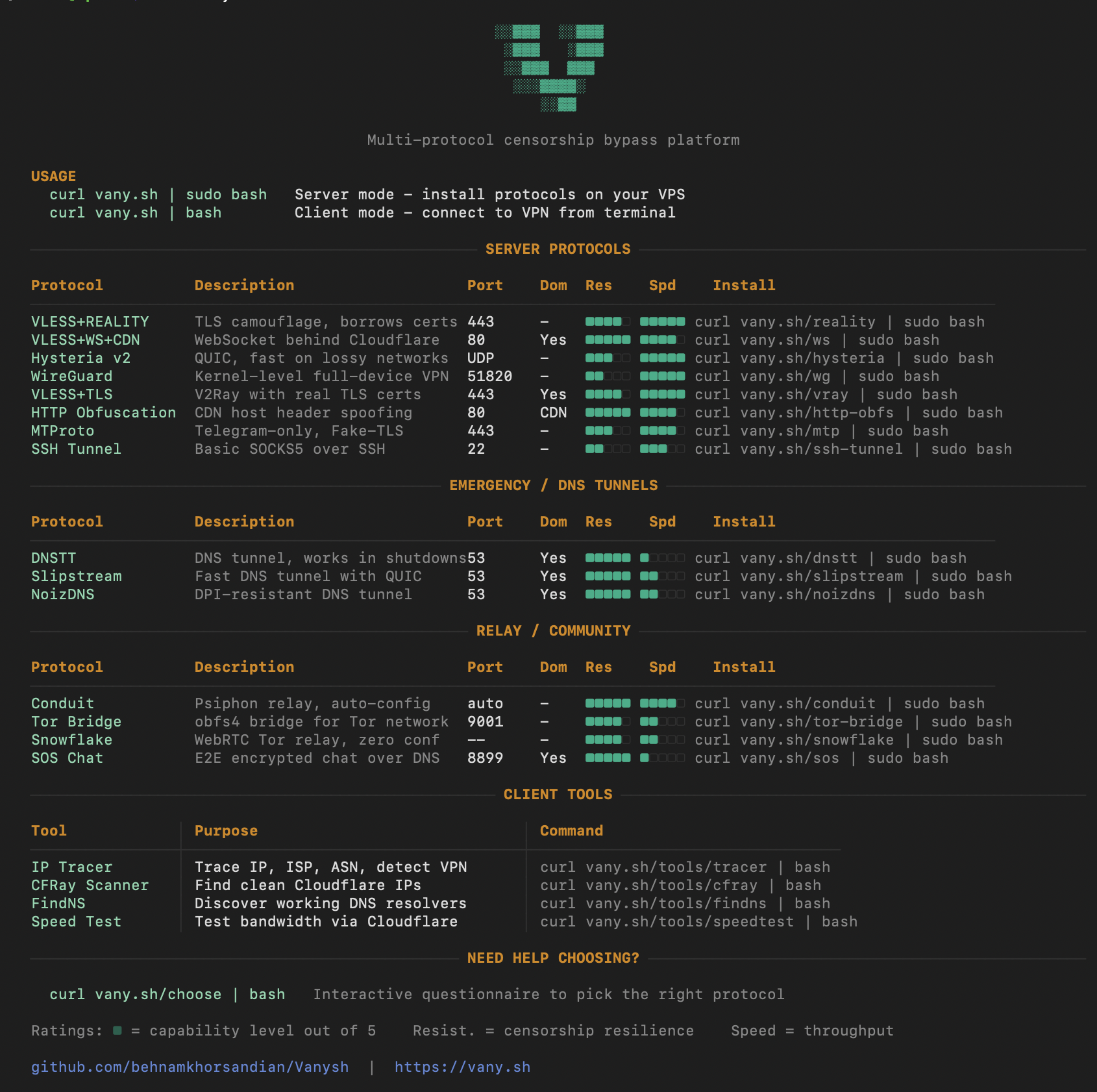
curl vany.sh                        # Browse protocol catalog (static ANSI page)
curl vany.sh | sudo bash            # Server TUI: install & manage protocols
curl vany.sh/tools/cfray | bash # Client tools: scanners & diagnosticsDownload the latest Cloak release — a self-extracting archive that bundles the entire Vany suite for offline use.
chmod +x cloak-linux-amd64.sh && ./cloak-linux-amd64.sh
cloak                               # Launch TUI
cloak tmux                           # Launch in themed tmux session
cloak box                            # Encrypted dead-drop
cloak mirrors --rescue               # Find a way to reach vany.sh
Available for Linux (amd64/arm64), macOS (Intel/Apple Silicon), and Windows (WSL). See docs/cloak.md for details.
| Protocol | Transport | Domain | Resilience | Speed | Install |
|---|---|---|---|---|---|
| Reality | VLESS+XTLS | No | High | Fast | curl vany.sh/reality | sudo bash |
| WS+CDN | VLESS+WS | Yes (CF) | High | Medium | curl vany.sh/ws | sudo bash |
| Hysteria v2 | QUIC/UDP | Optional | Medium | Very Fast | curl vany.sh/hysteria | sudo bash |
| WireGuard | UDP | No | Low | Very Fast | curl vany.sh/wg | sudo bash |
| V2Ray | VLESS+TLS | Yes | Medium | Fast | curl vany.sh/vray | sudo bash |
| HTTP Obfs | WS+CDN + Clean IPs | Yes (CF) | Very High | Medium | curl vany.sh/http-obfs | sudo bash |
| MTProto | Telegram Proxy | Optional | Medium | Fast | curl vany.sh/mtp | sudo bash |
| SSH Tunnel | SSH SOCKS5 | No | Low | Fast | curl vany.sh/ssh-tunnel | sudo bash |
| Protocol | Transport | Domain | Resilience | Speed | Install |
|---|---|---|---|---|---|
| DNSTT | DNS queries | Yes (NS) | Very High | Slow | curl vany.sh/dnstt | sudo bash |
| Slipstream | DNS tunnel | Yes (NS) | Very High | Slow | curl vany.sh/slipstream | sudo bash |
| NoizDNS | DNS (DPI-resistant) | Yes (NS) | Very High | Slow | curl vany.sh/noizdns | sudo bash |
| Protocol | Type | Domain | Install |
|---|---|---|---|
| Conduit | Psiphon relay | No | curl vany.sh/conduit | sudo bash |
| Tor Bridge | obfs4 bridge | No | curl vany.sh/tor-bridge | sudo bash |
| Snowflake | Tor relay proxy | No | curl vany.sh/snowflake | sudo bash |
| SafeBox | Encrypted dead-drop | No | vany.sh/box |
| Tool | Purpose | Command |
|---|---|---|
| CFRay | Find clean Cloudflare IPs | curl vany.sh/tools/cfray | bash |
| FindNS | Discover accessible DNS resolvers | curl vany.sh/tools/findns | bash |
| IP Tracer | Detect ISP, ASN, VPN leaks | curl vany.sh/tools/tracer | bash |
| Speed Test | Bandwidth test via Cloudflare | curl vany.sh/tools/speedtest | bash |
# SSH into your VPS, pick a protocol:
curl vany.sh/reality | sudo bash

# Manage users:
vany add reality alice
vany links alice
vany status# Find clean Cloudflare IPs for HTTP Obfuscation:
curl vany.sh/tools/cfray | bash
# Check your connection:
curl vany.sh/tools/tracer | bashUse connection links from your VPS in apps like Hiddify, v2rayNG, or WireGuard.
- Server: VPS with Ubuntu 20.04+ or Debian 11+, root access, 512MB RAM
- Client tools: Any terminal with
curlandbash - Domain: Required for WS+CDN, HTTP Obfs, DNS tunnels. Optional for others.
vany add reality alice        # Add user to Reality
vany add wg bob               # Add user to WireGuard
vany users                    # List all users
vany links alice              # Show connection links
vany remove reality alice     # Remove user
vany status                   # All services status
vany uninstall reality # Remove service| Platform | Apps |
|---|---|
| iOS | Hiddify, Shadowrocket, Streisand, WireGuard |
| Android | Hiddify, v2rayNG, WireGuard |
| Windows | Hiddify, v2rayN, WireGuard |
| macOS | Hiddify, V2rayU, WireGuard |
| Linux | v2rayA, WireGuard |
curl vany.sh                     curl vany.sh | sudo bash
     |                                |
     v                                v
 CF Worker (static ANSI)       CF Worker -> bash TUI client
                                      |
                               Docker containers on VPS
                               /opt/vany/state.json
Port 443 (TCP)
    +-> SNI: camouflage.com    -> Reality (VLESS+XTLS)
    +-> SNI: yourdomain.com    -> V2Ray (VLESS+TLS)
    +-> Path: /ws-path         -> WebSocket (VLESS+WS)
    +-> Fallback               -> Fake website

Port 8443 (UDP)                -> Hysteria v2 (QUIC)
Port 51820 (UDP)               -> WireGuard
Port 53 (UDP)                  -> DNS Tunnels (DNSTT/Slipstream/NoizDNS)
Port 9001 (TCP)                -> Tor Bridge (obfs4)
Port 22 (TCP)                  -> SSH Tunnel (SOCKS5)
- Cloak Desktop Client — Offline suite, install & usage
- Self-Hosting Guide
- Firewall Setup
- DNS Setup
- Workers Deployment
- Spot VM Recovery
- Protocol Guides: Reality | WS+CDN | WireGuard | DNSTT | V2Ray | MTP | Conduit
MIT - See LICENSE