contribute_data
For this sprint, we are adding datasets in two parts:
- suggesting a dataset
- making that dataset available via the Hugging Face Datasets Hub.
It is not required to be involved in both parts of this for each dataset. For example, you can suggest a dataset and not add it, or you could make available a dataset you didn't initially suggest.
The first way in which you can help is to suggest datasets that you think would make a good candidate for inclusion in the Hugging Face Hub.
To do this, the overall steps are:
- Checking that the dataset isn't already in the Hub
- Isn't already being tracked as part of this sprint
- Deciding if you think it's suitable for sharing.
- Creating an issue for the dataset
The primary focus of the Hugging Face hub is machine learning datasets. This means that data should have some existing or potential relevance to machine learning.
There are a few different categories of data that would be particularly useful for sharing:
-
Annotated datasets. These datasets will have some labels that can be used to evaluate or train machine learning models. For example, a dataset consisting of newspaper articles with a label for the sentiment. These don't necessarily need to have been made explicitly for the purpose of training machine learning models. For example, datasets annotated through crowdsourcing tasks may be usefully adapted for machine learning.
-
Larger text datasets could be used for training large language models.
-
Large image collections that could be used for pre-training computer vision models
Not all potential datasets will fall into one of these categories neatly. If you have a dataset that doesn't fit one of these boxes but it could still be of interest, feel free to suggest it.
For this sprint, we are using GitHub issues to propose new datasets. To open an issue, you will need a GitHub account if you don't already have an account, please singup first.
To suggest a dataset for inclusion in the sprint, use the add dataset issue template. This issue template includes a basic form which captures some important information about the dataset.
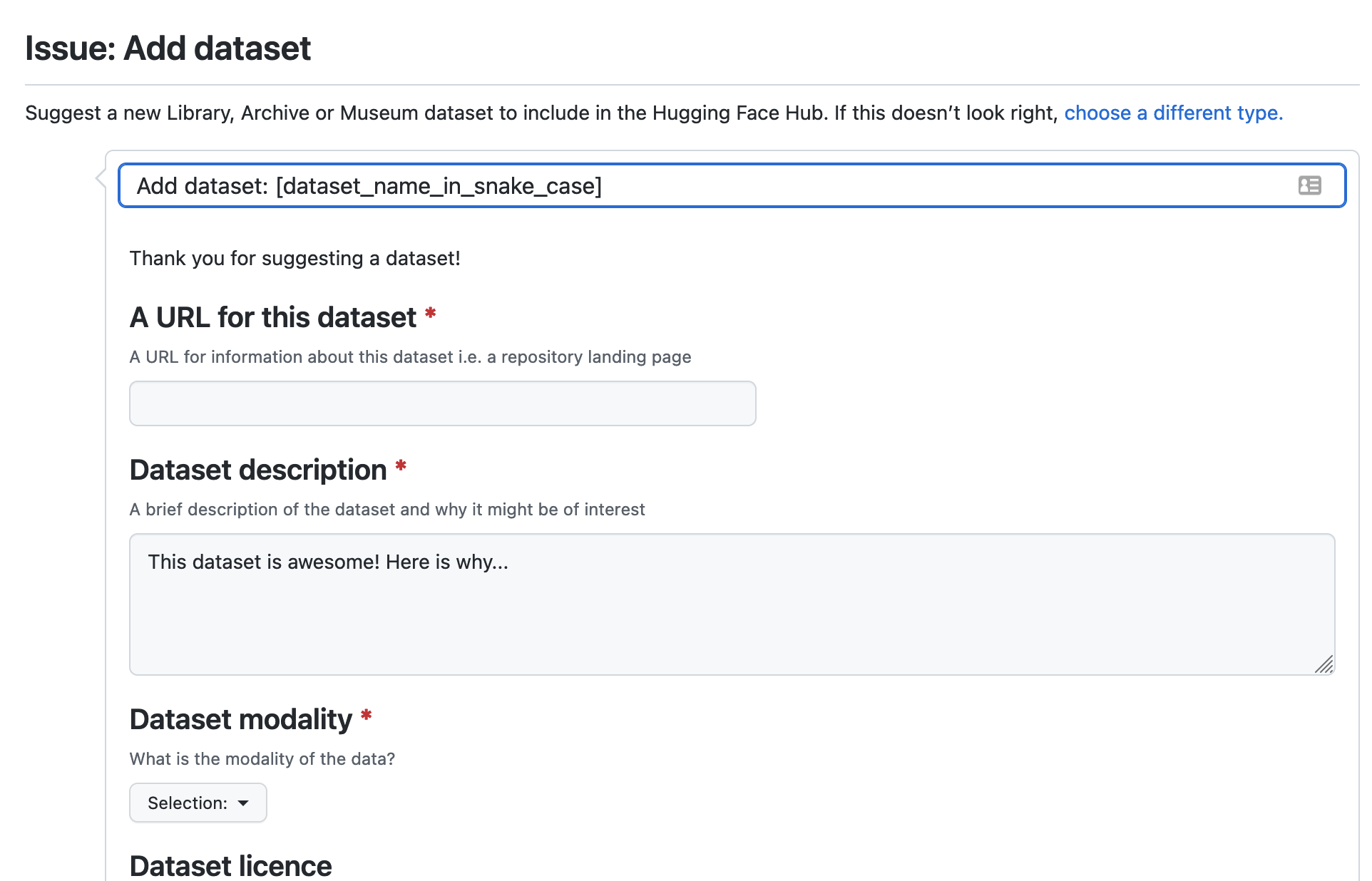
When you submit a candidate dataset through this issue template, it will be assigned the tag candidate-dataset.. One of the organizers will check if this dataset is suitable for sharing and clarify any issues before moving it to the project board we use to track datasets that we want to make available via the Hub.
If you need some inspiration on where to look for suitable datasets, you can check out this discussion thread which points to some possible places you might discover potential datasets for inclusion.
You can also contribute to making data available via the Hugging Face Hub. The overall steps for doing this are:
- claim the dataset from the project board
- make the data available via the Hub. The two main ways of doing this are:
- directly sharing the files via the Hub
- writing a dataset script
- closing the issue tracking the addition of that dataset
The following sections discuss these steps in more detail.
To add datasets to the LAM org, you will need to become a member:
- Make sure you have an account for Hugging Face. If you don't, you will need to join
- Use this link to add yourself to the biglam organization
- Decide on which dataset you want to work on from the datasets overview tab
- If it isn't yet an issue for this dataset you should first create one. This is so we can track datasets
- Assign yourself to this dataset. This lets other people know you are working on this dataset. You can do this by commenting
#selfassignin the issue for that dataset.
There are a few different ways of making datasets available via the Hugging Face Hub. The best approach will depend on the dataset you are adding.
The datasets library has support for many file types out of the box. If your dataset is one of these formats, the easiest way to share this data is to upload the files directly. The supported formats include CSV, JSON, JSON lines, text lines, and Parquet.
There are some situations where you may not want to share files directly inside the Hugging Face Hub. These include:
- When data is not in a standard format and needs some processing to prepare it
- When you want to provide different 'configurations' for loading your data, for example, allows loading only a subset of the data.
- When the data is already available in a different repository, and you want to use that as the source for loading data.
Writing a dataset script is outlined in the datasets library documentation. For the datasets for this sprint, we will create a repository under the sprint organization and upload our scripts there.
The steps for doing this are as follows:
-
- Make sure you have joined the biglam organization on the Hub
-
- Create your data loading script. It is usually easier to develop this on a local machine so you can test the script as you work on it.
-
- Once you have a script ready, create a repository for that script. Try and choose a descriptive name for the dataset. If there is an existing dataset name, it makes sense to match closely to the existing name
-
- Upload your dataset script to the repository you just created. You should make sure you name the dataset script the same name as the repository you created. This is so that the datasets library will correctly load data from this repository. For example, if you have a repository
biglam/metadata_quality, you should name the dataset loading scriptmetadata_quality.py
- Upload your dataset script to the repository you just created. You should make sure you name the dataset script the same name as the repository you created. This is so that the datasets library will correctly load data from this repository. For example, if you have a repository
-
- Once you have made your public, it's a good idea to test that everything loads correctly
It can also be helpful to look at other scripts to understand better how to structure your dataset script. Some examples are listed below:
Example data loading scripts
- Image data:
- XML https://github.com/huggingface/datasets/blob/master/datasets/bnl_newspapers/bnl_newspapers.py
- CSV https://github.com/huggingface/datasets/blob/master/datasets/amazon_polarity/amazon_polarity.py]{.underline}](https://github.com/huggingface/datasets/blob/master/datasets/amazon_polarity/amazon_polarity.py
- Text https://github.com/huggingface/datasets/blob/master/datasets/conll2003/conll2003.py
It can be beneficial to make large datasets streamable. This allows someone to work with the data even if it is too large to fit onto their machine. For some datasets, it is pretty easy to make them streamable, but for others, it can be a bit more tricky. If you get stuck with this, feel free to ask for help in the issue tracking the dataset you are working on.