
Replies: 5 comments 15 replies

-
|
Frigate 0.11 has a new ffmpeg build so if it is still occurring then seems to be expected or a deeper issue. That graph isn't super helpful, a screenshot of What resolution are your cameras? It is entirely possible that it is less work to decode the stream for the CPU (when you factor in the CPU usage needed to move the stream to / from GPU) if the cameras are low enough resolution |
Beta Was this translation helpful? Give feedback.

-
|
I noticed something similar with one of the earlier betas. Depending on which qsv arguement I used the CPU usage varied enormously. The old style args were less CPU intensive than the new but that's now reversed since beta 7. More info in #3482 . I'm now using vaapi over qsv as for some reason that lowered it even further. There is a discussion somewhere about that but I can't find it ATM. |
Beta Was this translation helpful? Give feedback.

-
|
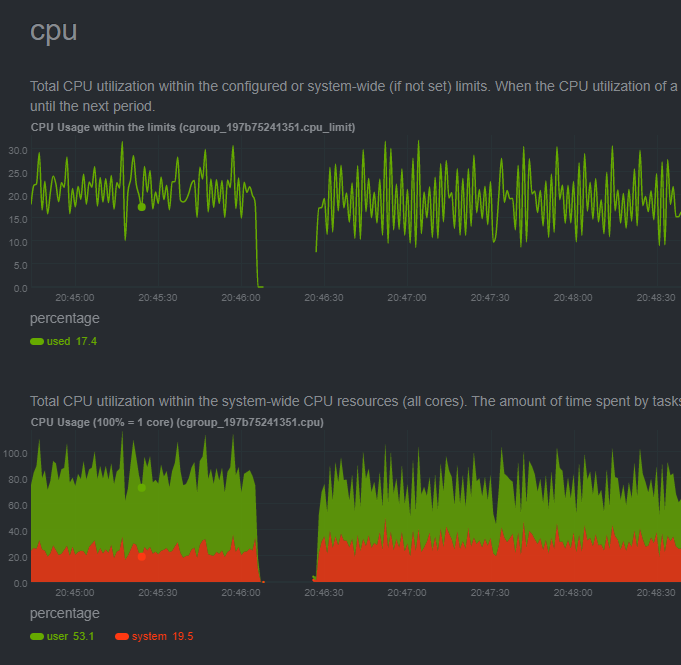
Just to add to this as I'm testing Frigate out right now. Using a Raspberry Pi 4B 4GB with two cameras to test with. Without hwaccel the CPU usage sits at around 35-45%, but if I enable it it shoots up to 85-90%. I'm deploying frigate with the helm chart on a k3s cluster btw, but specifying the tag to be The following shows the CPU graph from Netdata running on the node, right around the middle I restart the process to turn hwaccel of:
I'm just trying to set directly on the cameras, or globally, running Happy to debug further for more info. |

Beta Was this translation helpful? Give feedback.

-
|
Ah, I thought I had mentioned it in my post! Sorry, it's 1x1080p and 1x640p, so not exactly a lot. I guess it's similar to what @xconverge is seeing, that it's just more efficient on the CPU since it's not that intensive already. I was hoping though to add 2-3 more cameras in a bit, which makes me wonder if the Raspberry Pi 4B just isn't going to handle it? I thought that with hwaccel it should be fine, as I have a Coral TPU for the recognition, but if it's already struggling with the ones I have, I may need to rethink my plans. |
Beta Was this translation helpful? Give feedback.

-
|
Make sure your detect resolution in the config exactly matches the true resolution of the camera so it doesn't have to resize |
Beta Was this translation helpful? Give feedback.

-
|
That made a huge difference for me @NickM-27 ! I was using 720p for my detect, so it was resizing very often, both with hw accel and no hw accel, CPU usage is much better now! Had to tweak my zones and masks but it was worth it, awesome |
Beta Was this translation helpful? Give feedback.
-
Yeah, resize isn't done in hardware so that can use quite a bit of CPU |
Beta Was this translation helpful? Give feedback.
-
|
I am now down to around 10% usage with hwaccel enabled and very happy! interesting |
Beta Was this translation helpful? Give feedback.

-
|
Yes I am seeing the same thing and have been scratching my head over it for a few days 1 stream at 1080p without hwaccel, ~25% cpu with hwaccel (h264_v4l2m2m) ~75% cpu I dont have a benchmark to compare it against in past releases because ffmpeg was crashing after a few minutes with any of the hwaccel settings, now it runs longer just with a very high cpu usage |
Beta Was this translation helpful? Give feedback.
-
|
That might make sense, it does require CPU to move the frame between the GPU memory and general memory as well as other factors, and the CPU is probably more capable of 1080p relative to that work. A 4K camera stream would likely be a different story |
Beta Was this translation helpful? Give feedback.
-
|
I will stop scratching my head then, I agree that it seems possible, just...a pretty big jump! |
Beta Was this translation helpful? Give feedback.
-
|
Yeah, I've seen behavior with my ryzen 5700g server. Watching |
Beta Was this translation helpful? Give feedback.

-
|
This sounds like our answer then, qualitatively it seems like 1080p cameras are ever so slightly more efficient on just CPU than trying to use hwaccel while larger cameras fare better on hwaccel. I also have a 5MP stream I haven't been playing with but I might do some testing later on that on my RPi4 just to confirm nothing else weird is going on. |
Beta Was this translation helpful? Give feedback.
-
|
@DracoC77 had a note on a different thread but it is important to make sure you are setting the |
Beta Was this translation helpful? Give feedback.

-
|
I did some more testing based on various comments made in this thread: General Troubleshooting
Tested 2x 1920x1080 camera streams W/O hwaccel and WITH hwaccel:
Tested 1x 2560x1920 camera stream W/O hwaccel and WITH hwaccel:
|
Beta Was this translation helpful? Give feedback.
-
|
Interesting, I run my reolink with the http://rtmp and VA API (obviously not on an RPi). I am surprised that it doesn't like the hwaccel but without works okay. |
Beta Was this translation helpful? Give feedback.
-
|
Yea I was surprised it wasn't working either (I tried both http:// direct and also rtsp:// feeds and it behaved the same way), I suspect that it's because the RPi4 doesn't support hw decoding of H.264 above 1080p60 per their specs:
Also I'm still suspicious that with and without hwaccel on 1080p decode is a wash, it makes me think either hwaccel isn't working properly, there's something wrong with the docker/container build, or maybe its not as beneficial at lower FPS we use for detect vs. say 1080p60fps? (but if we're saying it takes the same CPU to move the 1080p frames to memory and hwaccel decode as it takes for the CPU to just decode the frames, then that statement should be true at any FPS no?) If folks have any other thoughts or testing on RPi around hwaccel, would be much appreciated. I wonder if its worth submitting an issue for further investigation. |
Beta Was this translation helpful? Give feedback.
-
|
I suspect it's just not performant and ready yet still Stuff like this: |
Beta Was this translation helpful? Give feedback.
-
To be clear I wasn't saying it's always the case, just that it can less effective be in certain circumstances
It doesn't work like that. The ignoring of fps happens after the hardware acceleration so even if you set detect fps in frigate as 5 all whatever fps are still decoded. It also depends on the camera bitrate, encoding profile (H264 Baseline, Normal, High, etc) Comparing 2 of my 5 MP cameras for example they have different CPU / GPU % usage because they are different bitrate
We've had a number of rpi users testing this. Before 0.11 moved rpi to jellyfin it was entirely broken and jellyfin fixed it for those users and provided much improved results in their case |
Beta Was this translation helpful? Give feedback.


Uh oh!
There was an error while loading. Please reload this page.
Uh oh!
There was an error while loading. Please reload this page.
-
Curious if anyone else has seen their CPU usage actually go up when they enable HW Accel on a 64-bit OS Docker instance via Raspberry Pi 4? (h264_v4l2m2m).
This has been a problem ever since I first set up frigate, was hoping the new 0.11.0-rc1 release would magically fix it but alas it's having the same issues.
GPU memory is set to 256 and shm is set to 600mb which should be more than enough for the 3x cameras I'm running. Confirmed my docker image is running in priveleged mode, also mapped all of the /dev/video* into the docker container in case that was necessary.
Tried applying hw_accel globally and also only applying the hw_accel args to the input stream/decode of specifically a few 1080p cameras (since the official raspberry pi documentation suggests thats the limit of decoding hw accel support)
Any other suggestions/things to try would be appreciated!
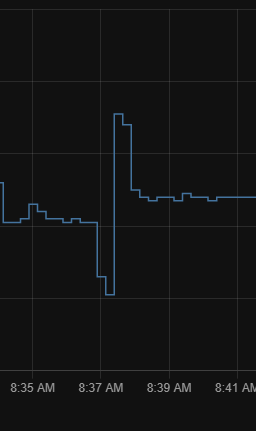
Here's a plot of CPU usage without any hw_accel arguements and after I turn it on.
Beta Was this translation helpful? Give feedback.
All reactions