TeslaLogger has capabilities to manage POIs.
You can use it to
- give names to places. Those names will show up in all Grafana Dashboards, eg. Trip
- trigger actions when you arrive / depart, see special flags below
All POIs are stored in a comma separated values file (CSV): geofence-private.csv
You can edit the geofences in admin panel / extras / geofence
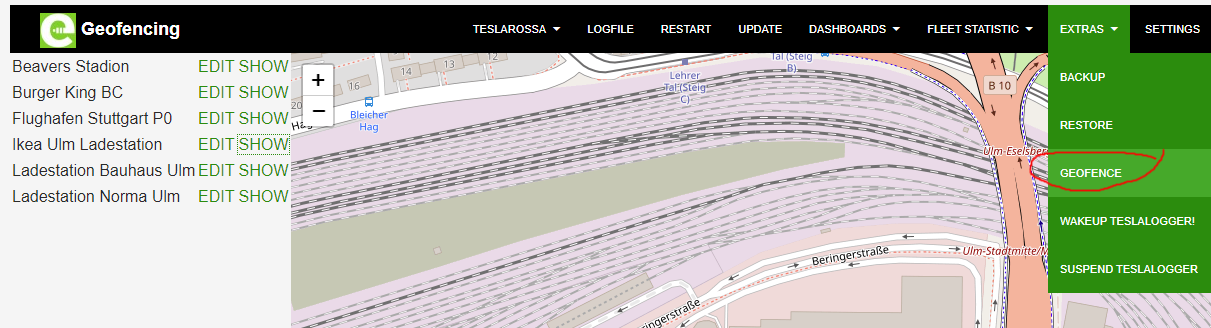
Click on edit:
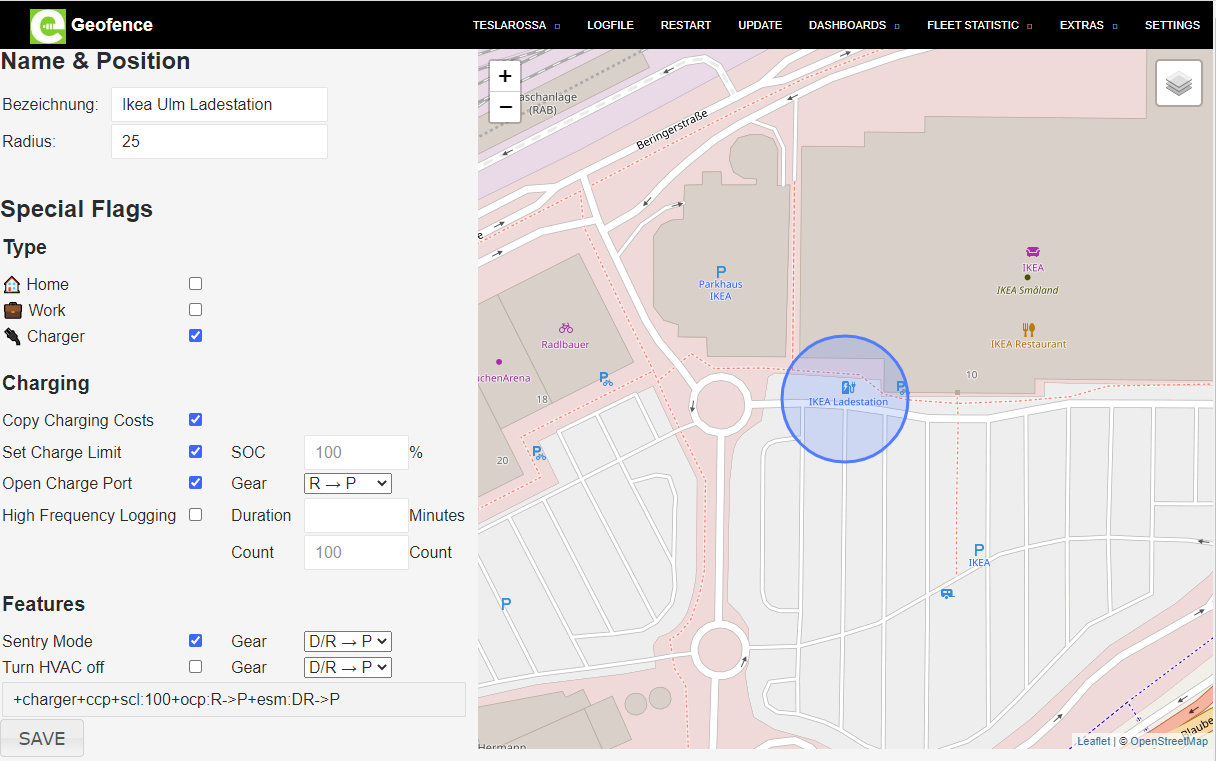
New geofences can be easily added by clicking on start address or destination address on trip dashboard

TODO
TODO
geofence-private.csv contains data records. One line is one record. Records consist of fields:
- Name. Mandatory. Must not contain ,
- Latitude. Mandatory. Floating Point number
- Longitude. Mandatory. Floating Point number
- Radius. Optional. Integer. Value in meters. Default: 50
- special flags. Optional. List of special flags and parameters, each flag starts with + Default: nothing
Example 1
Supercharger DE-Blankenfelde-Mahlow,52.308921402353334,13.444712162017824,20,+ocp:R->P+hfl:5m
- Name: Supercharger DE-Blankenfelde-Mahlow
- Latitude: 52.308921402353334
- Longitude: 13.444712162017824
- Radius: 20
- special flags: +ocp:R->P+hfl:5m
Example 2 My Home,52.39408202469785,13.542231917381288,,+scl:75
- Name: My Home
- Latitude: 52.39408202469785
- Longitude: 13.542231917381288
- Radius: empty, default of 50 is applied
- special flags: +scl:75
Records in geofence-private.csv will replace all POIs included in TeslaLogger (eg Superchargers) with the same name.
In the example above the POI Supercharger DE-Blankenfelde-Mahlow that comes with TeslaLogger by default is replaced with a custom entry with slightly different coordinates, different radius and special flags.
More than one special flag for each POI is possible. Special flags are not separated by comma, each flag starts with a +. Some flags have configuration parameters after a :
Currently there is no management interface for the browser, you have to edit the geofence-private.csv file.
+ocp
This flag is executed when the shift state of your car changes, eg. when shifting from D to R.
Configuration parameters: from->to
One or more shift states P N R D are valid for from and to.
Example: +ocp:R->P when shifting from R to P the command Open charge Port is sent to your car
Default: RND->P
+hfl
This flag is executed when charing starts. It will enable high frequency logging which tries to poll the Tesla API as often as possible.
Configuration parameters: duration
or
Configuration parameters: count
Example: +hfl:5m (log as fast as possible for 5 minutes)
Valid configuration parameters:
count: integer
duration: integer + one character (s: seconds, m: minutes, h: hours, d: days)
Default: count 100
+esm
Turn Sentry Mode on
Warning: in case of network issues or other communication problems, Sentry Mode will not be turned on!
This flag is executed when the shift state of your car changes, eg. when shifting from D to R.
Configuration parameters: from->to
One or more shift states P N R D are valid for from and to.
Example: +esm:R->P when shifting from R to P the command Enable Sentry Mode is sent to your car
Default: RND->P
+home
Marks this POI as your home address.
TODO: useful application
+work
Marks this POI as you work address.
TODO: useful application
+charger
Marks this POI as "has a charger".
+nosleep
TeslaLogger will not stop to get car data at this POI which will prevent the car from falling asleep.
+scl
This flag is executed when charing starts. It will set the charge limit.
Warning: in case of network issues or other communication problems, charge limit will not be set!
This setting will always be set when TelsaLogger changes into state charging. You can change the charge limit again in the car and/or in the app after TeslaLogger has set the charge limit. Your manual override will not be changed, except in case TeslaLogger restarts (then TL will set TL's charge limit again).
Configuration parameters: limit
Example: +scl:75 (set charge limit to 75%)
Valid configuration parameters:
limit: integer
Default: limit 80
+cof
This will turn HVAC off.
Warning: in case of network issues or other communication problems, HVAC will not be turned off!
This flag is executed when the shift state of your car changes, eg. when shifting from D to R.
Configuration parameters: from->to
One or more shift states P N R D are valid for from and to.
Example: +cof:R->P when shifting from R to P the command HVAC off is sent to your car
Default: RND->P
+ccp
When charging stops, this will try to find a previous charging session at the current location and apply charging price settings from the previous session to the latest charging session.
+ccs
When CombineChargingStates is globally disabled, it can be enabled for this POI.
+dnc
When CombineChargingStates is Globally enabled (default), charging sessions will not be combined at this POI.
+occ
When charging is complete, set a new charge limit. Useful for cars that are usually always plugged in at home and restart charging every few hours.
Example: +occ:75