Transform your ESP32-P4 display into an all-sky camera viewer with multi-image cycling, hardware acceleration, and seamless Home Assistant integration.

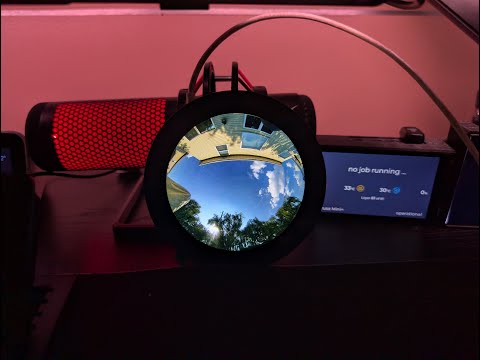



Complete user and developer documentation organized by user journey:
- 🛠 Hardware Requirements - Supported displays, ESP32-P4 specs, required libraries
- ⚡ Installation Guide - Flash firmware, compile from source, first boot WiFi setup
- ⚙️ Configuration Guide - Web UI, MQTT, multi-image setup, serial commands
- ✨ Features & Usage - Multi-image cycling, touch controls, health monitoring, Home Assistant
- 📡 OTA Updates - Wireless firmware updates with automatic rollback
- 🐛 Troubleshooting - Common issues, crash diagnosis, getting help
- 💻 System Architecture - Design overview, memory layout, control flow diagrams
- 📚 API Reference - Class documentation, REST API endpoints
- Multi-Image Display - Cycle through up to 10 image sources automatically or via API triggers
- Flexible Update Modes - Automatic cycling or API-triggered refresh for external control (v-snd-0.62+)
- Runtime Display Selection - Switch between 3.4" and 4.0" displays via Web UI without recompilation (v-snd-0.61+)
- Enhanced Brightness Control - Three modes: Manual, MQTT Auto, or Home Assistant with clear UI indication (v-snd-0.61+)
- Hardware Accelerated - ESP32-P4 PPA for fast scaling and rotation (385-507ms render time)
- High Resolution - Up to 1448×1448 pixel images with 2× scaling capability
- Per-Image Transforms - Individual scale, offset, and rotation settings for each image
- Touch Controls - Tap to navigate, double-tap to toggle modes
- Home Assistant Ready - Auto-discovery via MQTT with full control
- Web Configuration - Modern, responsive UI for all settings
- OTA Updates - Wireless firmware updates with automatic rollback
- Easy Setup - Captive portal WiFi configuration with QR code
- Waveshare 3.4" ESP32-P4 Touch LCD (800×800) ✅ Tested & Working
- Waveshare 4.0" ESP32-P4 Touch LCD (720×720) ✅ Tested & Working
Requirements: ESP32-P4 with WiFi 6, DSI display, GT911 touch, PSRAM required
💡 Both displays supported! Select display type in Web UI System settings after flashing (v-snd-0.61+)
📖 Full Details: Hardware Requirements Guide
Download Latest Release:
- Go to Releases
- Download
ESP32-P4-Allsky-Display.bin
Flash using esptool:
esptool.py --chip esp32p4 --port COM3 --baud 921600 write_flash 0x0 ESP32-P4-Allsky-Display.bin💡 NEW (v-snd-0.61+): Display type can now be changed via Web UI without recompilation! Flash the 3.4" binary, then select 4.0" display in System settings if needed.
📖 Full Instructions: Installation Guide
On first boot, the device creates a WiFi network:
- Connect to:
AllSky-Display-Setup(no password) - Scan QR Code on display or open
http://192.168.4.1 - Select network, enter password, click Connect
- Device reboots and shows IP address

📖 Full Details: Installation Guide - First Boot
Access http://[device-ip]:8080/ to configure:
- Image sources (up to 10 URLs)
- MQTT/Home Assistant settings
- Display transforms and brightness
- Cycle intervals

📖 Full Guide: Configuration Guide

Auto-Discovery: Enable MQTT in web interface, device appears automatically
Control: Brightness, cycling, image selection, transforms, system actions
📖 Full Integration Guide: Features - Home Assistant

Download: Printables.com - Desk Stand
- GitHub Issues - Report bugs or request features
- Discussions - Ask questions, share configurations
- Troubleshooting Guide - Common issues and solutions
Contributions Welcome! Fork → Create feature branch → Test → Submit PR
Open source - see LICENSE file for details
- Hardware Requirements - Displays, ESP32-P4, libraries, wiring
- Installation Guide - Flash firmware, compile from source, WiFi setup
- Configuration Guide - Web UI, MQTT, images, serial commands
- Features & Usage - Controls, health monitoring, Home Assistant
- OTA Updates - Wireless updates, A/B partitions, safety
- Troubleshooting - Common issues, crash diagnosis, diagnostics
- System Architecture - Design, memory layout, data flow
- API Reference - Classes, REST endpoints, MQTT topics
Made with ❤️ for the AllSky community