Currently Havens can be setup to use with or without agents on child nodes. However, whenever possible, we recommend using the agent image for additional stats to be sent back to the server.
Quick Comparison:
| name | secure usage Docker API | gather node metrics | do not have extra dependencies |
|---|---|---|---|
| no agent | - | - | + |
| agent image | + | + | + |
The problems listed have caused issues with agent development:
- By default, docker listens on the unix socket and is inaccessible from network. When you enable the listening on TCP port, Docker will be insecure or require additional certificate configuration 1.
- The health of the node depends on CPU and RAM usage and other additional resources like disk space. Docker can monitor only a subset of the mentioned resource.
New version (1.2) of system can work without the agent installed but we have implement the new agent with proxy of Docker connection (1.2.3). Agent is connected to Docker via unix socket. Port 8771 is opened with SSL encryption and authorization (credentials admin:password, see 'dm.auth.adminPassword' option of agent)
Copy start string from 'Admin' -> 'Add node'
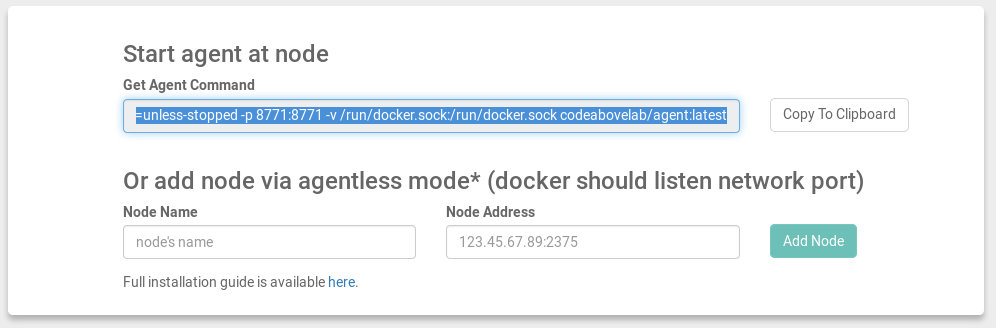 start string example:
docker run --name havenAgent -d -e "dm_agent_notifier_server=URL-TO-HOST" --restart=unless-stopped -p 8771:8771 -v /run/docker.sock:/run/docker.sock codeabovelab/agent:latest
Note that the agent is built with a self-signed certificate and cluster-manager use same certificate too. Certificate generated on each build. Therefore, when you use the agent with cluster-manager of different version, you will get an error. It can be fixed by using the same version or by setting the option 'dm.ssl.check=false' in the cluster-manager (default value is false).
The Agent sends data in JSON format to 'http://$MASTER/discovery/nodes/$NODE_NAME' (see com.codeabovelab.dm.cluman.ds.nodes.NodeAgentData ).
The cluman data is processed by TokenDiscoveryServer.registerNodeFromAgent(). Data is gathered from Docker info, optionally through psutil, and contains:
- time - local time
- name - Docker host name
- address - Docker IP address
- system
- cpuLoad - 0.0-100.0
- disks
- mount_point ->
- used - bytes
- total - bytes
- mount_point ->
- labels - key-value collection of node labels (see
--label=key=valueargument of Docker daemon) - containers
- ID
- name
- image - container image name
- labels - key-value collection of container's labels