- We will create a full-stack rails application that allows the user to retrieve information from the database as well as add content to the database.
- As part of managing parameters in Rails there is a feature known as "strong parameters"
- Strong parameters (or "strong params") are a security feature of Rails
- Strong params manage exactly what goes into creating new object instances and helps us keep unwanted information -- usually from malicious hackers -- out of the database
- can apply database queries to controller methods
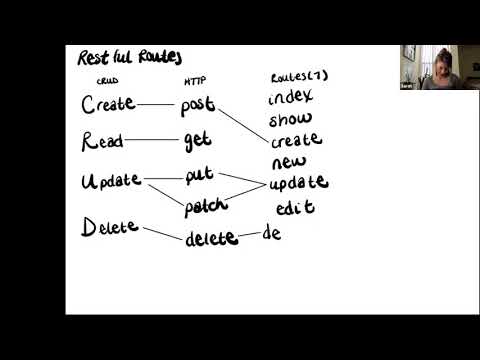
- can follow RESTful naming conventions
- can create a flow of information from view to database back to view
- can implement CRUD in a Rails application
- can create routes with correct parameters for RESTful conventions
- can apply strong params method to controller
- can permit appropriate params
- can apply private keyword to project methods
- CRUD
- RESTful routes
- Create a new Rails app in the appropriate folder: $
rails new blog_post_challenge -d postgresql -T - $
cd blog_post_challenge - Create a database: $
rails db:create - Add the dependencies for RSpec:
- $
bundle add rspec-rails - $
rails generate rspec:install - Generate the model with appropriate columns and data types
- $
rails db:migrate - Generate the controller
- Begin the rails server:
$ rails server - In a browser navigate to:
http://localhost:3000
- Did you create your database?
- Did you migrate?
- Errors? Always look at the first error in the list.
In this example, we are creating a MVP for an app that will keep track of a user's exercise. Prior to creating the functionality of our app, we need to create a model and a controller using Rails generate commands.
$ rails generate model Exercise activity:string description:string
$ rails db:migrate
$ rails generate controller Exercise
As a scaffolding step, we can add a few instances of our Exercise model to the database in Rails console. Then we can add our RESTful routes to the application. For every step, we will be adding a controller method, a route, and some code in the view.
The first step is to create a controller method that will access all the items from the database. In the index method, we are making an Active Record call that will save all the content from the database as an instance variable.
app/controllers/exercise_controller.rb
def index
  @exercises = Exercise.all
end
Next, we will make a route that will call the index method. Since we are returning content, the request type will be a get request.
config/routes.rb
get 'exercises' => 'exercise#index'
To create the view, we will add a new file to the exercise directory called index.html.erb. The file matches the name of the controller method index. In the view we will use a combination of HTML tags and embedded Ruby to map through the Active Record array and record each value into a list.
app/views/exercise/index.html.erb
<h1>Exercise App</h1>

<ul>
  <% @exercises.each do |exercise| %>
    <li>
      <%= exercise.activity %>
    </li>
  <% end %>
</ul>
Show is a RESTful route that looks for one item in the database. This is done by accessing the id of the item. Inside the show method we will make an Active Record call that will find one item by id. This id will come from the url params.
app/controllers/exercise_controller.rb
def show
  @exercise = Exercise.find(params[:id])
end
Next, we will make a route that will call the show method. Because we need to extract just one item, we need the show route to expect a param. Since we are returning content, the request type will be a get request.
config/routes.rb
get 'exercises/:id => 'exercise#show'
To create the view for show, we will add a new file to the exercise directory called show.html.erb. In the view we will use a combination of HTML tags and embedded Ruby to list the attributes of the exercise.
app/views/exercise/show.html.erb
<h3><%= @exercise.activity %></h3>
<p><% @exercise.description %></p>
As developers, we want our users to be able add information to our web application that is then stored in the database.
New is a RESTful route that displays a form for the user.
app/controllers/exercise_controller.rb
def new
end
Next, we will make a route that will take the user to a page with a form. Since we are returning content, the request type will be a get request.
config/routes.rb
get 'exercises/new => 'exercise#new'
To create the view for new, we will add a new file to the exercise directory called new.html.erb. In the view we will use a Ruby helper method to create form inputs. Each input will have a label and a text field for the user to enter content.
With the release of Rails 6, we get a very convenient method called form_with that allows us to use a series of helper methods to create form elements. Form elements are items such as text inputs, radio button, and labels. By using the form_with method we can create forms in true Ruby-like fashion. When the code renders, Rails translates it into the corresponding HTML form tags.
form_with takes a code block and passes a local variable. In this example, the variable is |form| but it can be called whatever you want as long as it clearly communicates your intent. Form helper methods are then applied to the variable form and passed a symbol of each attribute.
app/views/exercise/new.html.erb
<h3>Add a New Exercise Session</h3>
<%= form_with model: @exercise do |form| %>

  <%= form.label :activity %>
  <%= form.text_field :activity %>

  <br>
  <%= form.label :description %>
  <%= form.text_field :description %>

  <br>
  <%= form.submit 'Add Exercise' %>
<% end %>
Create is a RESTful route that submits user data to the database.
app/controllers/exercise_controller.rb
def create
  @exercise = Exercise.create(
    activity: params[:activity],
    description: params[:description]
  )
end
Next, we will make a route that will call the create method. Since we are submitting content to the database, the request type will be a post request.
config/routes.rb
post 'exercises => 'exercise#create'
There is no view associated with the create method. We should think about what kind of user experience we want to create when our user creates a new item. One option is to trigger a redirect after the successful creation of a new item.
Rails routes offers us a convenient way to reference routes by creating an alias using the keyword as. The index, show, and new routes can all have aliases. There is no need to create an alias for the create route.
config/routes.rb
get 'exercises' => 'exercise#index', as: 'exercises'
post 'exercises => 'exercise#create'
get 'exercises/new => 'exercise#new', as: 'new_exercise'
get 'exercises/:id => 'exercise#show', as: 'exercise'
These route aliases can be used in links for the view as well as in the controller methods. When referencing the route alias, _path is appended to the end of the alias.
NOTE If a route requires a param, the alias will also require a param gets passed.
app/controllers/exercise_controller.rb
def create
  @exercise = Exercise.create(exercise_params)
  if @exercise.valid?
    redirect_to exercises_path
  else
    redirect_to new_exercise_path
  end
end

private
def exercise_params
  params.require(:exercise).permit(:activity, :description)
end
link_to is a method that can help our user navigate through the application. link_to takes two arguments. One that creates the hyperlink and the other that routes the user to the appropriate place. This is a prime place to our route aliases.
This link can take our user to the form to create a new exercise session.
app/views/exercise/index.html.erb
<p><%= link_to 'New Exercise', new_exercise_path %></p>
By following the pattern of RESTful routes, we can start to implement CRUD functionality into a Rails application.
As a developer, I have been commissioned to create an application where a user can see and create blog posts.
- As a developer, I can create a full-stack Rails application.
- As a developer, my blog post can have a title and content.
- As a developer, I can add new blog posts directly to my database.
- As a user, I can see all the blog titles listed on the home page of the application.
- As a user, I can click on the title of a blog and be routed to a page where I see the title and content of the blog post I selected.
- As a user, I can navigate from the show page back to the home page.
- As a user, I see a form where I can create a new blog post.
- As a user, I can click a button that will take me from the home page to a page where I can create a blog post.
- As a user, I can navigate from the form back to the home page.
- As a user, I can click a button that will submit my blog post to the database.
- As a user, I when I submit my post, I am redirected to the home page.
- As a user, I can delete my blog post.
- As a user, I can update my blog post.
- As a developer, I can ensure that all blog posts have titles and content for each post.
- As a developer, I can ensure that all blog post titles are unique.
- As a developer, I can ensure that blog post titles are at least 10 characters.
Along with validation, strong params provide control over over what information is being allowed into a database. Strong params can dictate what attributes can be created and updated by setting restrictions on the controller methods.
To implement strong params, we will create a new method in the controller that will be passed as an argument to the create and update methods in place of the individual parameters.
Strong params have two methods: require and permit. Require does exactly what you think. It requires the attributes passed in to be present in the create or update methods. Permit allows certain items to be present but if they are not present, that is still okay. But attributes that are not listed in the strong params will not be allowed to proceed.
Private is a keyword in Ruby that restricts the scope of where a method can be called. Since strong params are only meant to be used as arguments to controller methods, we can list them as private to the controller class. That way there is no chance they can be called from somewhere else in the program.
Once the keyword private is implemented, everything below the keyword is included in its protection. So params are typically the last methods inside the controller.
When creating an API, the controller's strong parameters will be all the way down at the bottom of the file and will look something like this:
controllers/blog_posts_controller.rb
private

def blog_post_params
  params.require(:blog_post).permit(:title, :content)
end
In this method if the application asks for blog_post_params, those parameters will require a BlogPost object, formatted into a hash. At this step in the process, a new instance of BlogPost will look something like this:
{
  :blog_post => {

  }
}
Inside of that BlogPost hash, the blog_post_params method allows parameters like title and content. These are the pieces of information that can be saved into the database as part of a BlogPost.
{
  :blog_post => {
    :title => 'Rails!',
    :content => 'Learning Rails is super fun.',
  }
}
We can safely assume that these parameters correspond to columns in the BlogPost table.
In the controller's create method, we can see that this list is referenced when making a new BlogPost:
def create
  @blog_post = BlogPost.create(blog_post_params)
end
Or alternatively
def create
  @blog_post = BlogPost.new(blog_post_params)
  @blog_post.save
end
.new will create a new object, while .create will create it and save it to the database. If you use .new, you need to follow up with .save for it to actually be saved. If you have actions you wish to do before putting the object into the database, consider using .new instead.
Most of the time, strong parameters are a feature we don't have to think about. If we want to add a new attribute to BlogPost, however, it's important to remember to add it to the strong parameters list. Otherwise, our form for creating new BlogPost will silently drop the information we've told it to ignore. For example, if we created a new column for storing comments without updating our blog_post_params method, the response in the Rails server would look like this:
Started POST "/blog_posts/" for ::1 at 2016-09-14 14:27:56 -0700
Processing by BlogPostController#create as HTML
  Parameters: {"blog_post"=>{"title"=>"Rails!", "content"=>"Learning Rails is super fun.", "comments"=>"Sure is."}}
Unpermitted parameter: comments
We can see all of the parameters being sent in, but our controller recognized "comments" as an unpermitted parameter and won't save it to the database. If we update our method: