I2S Sound Buildroot Configuration
This wiki link will help in integrating audio playback on Buildroot. Target board: Raspberry Pi 3B+
- Locate the firmware config file in buildroot's defconfig file as shown below:

Add below overlays to the board's boot config file located at <Base_Directory>/buildroot/board/raspberrypi3/config_3.txt
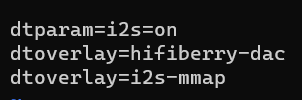
NOTE: If BR2_PACKAGE_RPI_FIRMWARE_CONFIG_FILE package is not present in defconfig file, then make use of "make menuconfig" in buildroot folder and add the package by specifying the path highlighted in the image shown above.
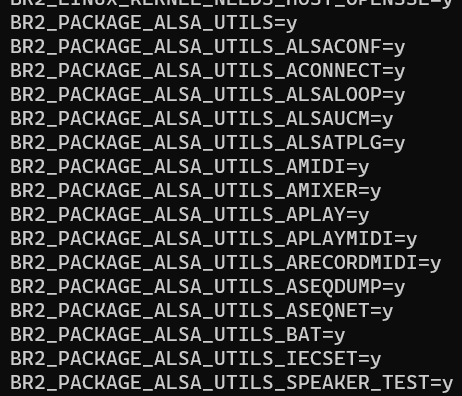
- In buildroot folder, run "make menuconfig" and enable all the ALSA (Advanced Linux Sound Architecture) drivers required for audio. "make menuconfig" --> "Target Packages" --> "Audio and video applications" --> "alsa_utils"

Recommendation is to enable all the supported tools inside alsa-utils. But if required, you can only enable required tools.
- run save-config.sh and ensure the below packages are added in defconfig file as shown below:
- Below modules are required to run audio on buildroot image:
snd_soc_pcm5102a
snd_soc_rpi_simple_soundcard
snd_soc_bcm2835_i2s
To add them, modprobe manually once the buildroot image is flashed or automate it by adding these changes as part of a start stop script as shown below:

To add rootfs overlay, follow below approach:
Create a directory at : <Base_directory>/base_external/rootfs_overlay/etc/init.d Add a new script with the details mentioned in above snapshot. Ensure BR2_ROOTFS_OVERLAY package is enabled in defconfig file with the path created in above step.
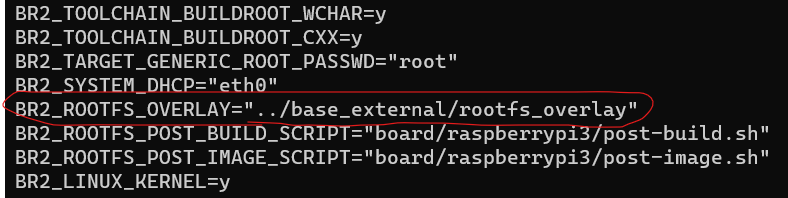
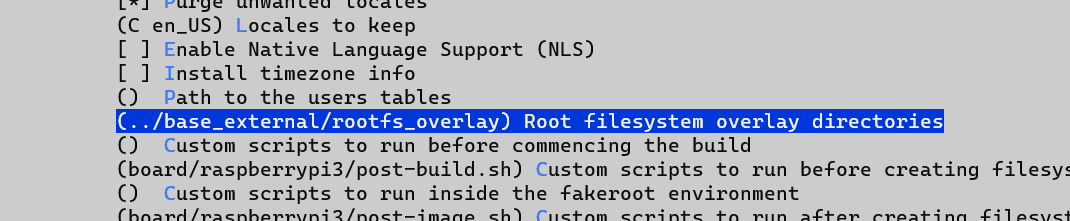
If not enabled, run "make menuconfig" in buildroot folder and enable the package with the path as shown below: "make menuconfig" --> "System Configuration"
-
Add a new package: <Base_Directory>/base_external/package/i2s_package Refer to github link: https://github.com/cu-ecen-aeld/final-project-dash6424
-
Run save-config.sh and enable the i2s_package in "make menuconfig"
-
Clean build the buildroot image and flash it on rpi
-
Verify that the audio soundcard is loaded in rpi by running aplay -L command. It should output as shown below:

This ensures that the audio related packages and overlays are present and working.
- Follow the i2s pin configuration to connect the i2s pins to HW codec or connect the speaker to audio jack and run below command: "aplay <audio_file.wav>" Enjoy the music on your devboard! :)