I2S Sound Buildroot Configuration
This wiki link will help in integrating audio playback on Buildroot. Target board: Raspberry Pi 3B+
- Locate the firmware config file in buildroot's defconfig file as shown below:
 Add below overlays to the board's boot config file located at <Base_Directory>/buildroot/board/raspberrypi3/config_3.txt
dtparam=i2s=on
dtoverlay=hifiberry-dac
dtoverlay=i2s-mmap
Add below overlays to the board's boot config file located at <Base_Directory>/buildroot/board/raspberrypi3/config_3.txt
dtparam=i2s=on
dtoverlay=hifiberry-dac
dtoverlay=i2s-mmap
NOTE: If BR2_PACKAGE_RPI_FIRMWARE_CONFIG_FILE package is not present in defconfig file, then make use of "make menuconfig" in buildroot folder and add the package by specifying the path highlighted in the image shown above.
-
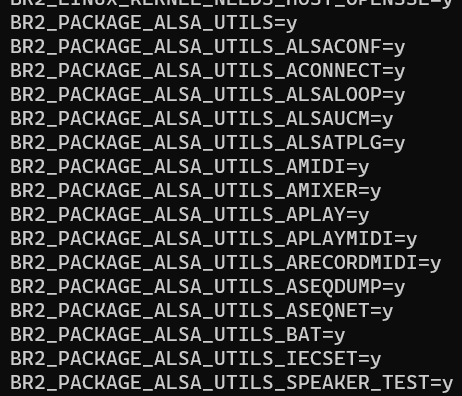
In buildroot folder, run "make menuconfig" and enable all the ALSA (Advanced Linux Sound Architecture) drivers required for audio. "make menuconfig" --> "Target Packages" --> "Audio and video applications" --> "alsa_utils"
 Recommendation is to enable all the supported tools inside alsa-utils. But if required, you can only enable required tools.
 -
run save-config.sh and ensure the below packages are added in defconfig file as shown below: