Contribute to Docs! Please see our updated Contribution Guide that provides a step-by-step video and text guide on how you can make an impact through Docs. 🌠
Welcome to the Docs GitHub repo!
We are an inclusive and passionate team of technologists and life-long learners around the world, building free programming resources for a better tomorrow. For newcomers, contributing to an open-source project for the first time can be intimidating and overwhelming. Perhaps you’re a code newbie, or maybe you’ve been tinkering for years but haven’t found that special project yet.
Good news, you are in the right place! Docs is the perfect open-contribution project for you to get started. Every part of Docs content (entries, documentation, and translations) is written by amazing creative folks like yourself.
Thanks for your interest; we'd love to have you contribute. 💖
There are many ways to contribute to Docs:
- Submit a Pull Request to edit an existing entry.
- Submit a Pull Request to create a new entry.
- Submit a bug in GitHub Issues.
- Give feedback in the Typeform Survey.
- Join the #CodecademyDocs discussion on Twitter.
If you're new to Docs and contributing for the first time, it is recommended that you visit the Issues section and ask to be assigned to an open issue that interests you. Otherwise, feel free to submit a PR by creating a new branch in your fork to create a new entry or edit an existing one.
Becoming an assignee to an issue follows this workflow:
- Comment on a thread for an open issue that you're interested in being assigned to (e.g., Issue #1026).
- Await 2-3 days for a maintainer's response to be assigned an issue. If assigned, start working on a PR. If not yet assigned, continue steps 1 and 2 until assigned an issue.
- If a PR has not been opened in 2 weeks for the issue, the issue may be reassigned to another contributor. Maintainers will do their best to notify contributors by tagging their GitHub handle along the issue thread every 5-7 days.
- Please note that you aren't allowed to claim more than 3 open issues (issues without a PR) at a time.
Contributing follows this workflow:
- Fork this project repository:

- Clone the forked repository to your computer. One option is using the HTTPS URL:
git clone https://github.com/github_username/docs.git - Create and switch into a new branch.
- Edit or create an entry and commit the changes.
- Make a PR to merge your fork with this repo:
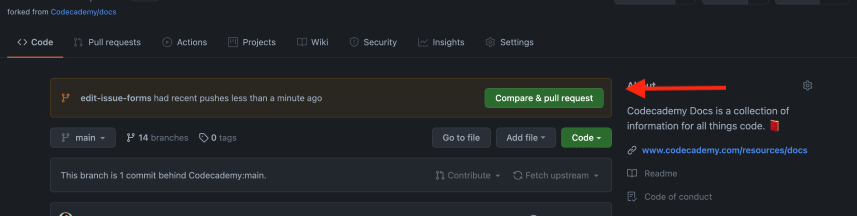
If you haven't gone through this workflow before, you can check out this GitHub tutorial (highly recommend) or this YouTube video to learn about how to make a PR from a fork using Git.
Alternatively, if you'd prefer to work directly on GitHub, you can follow the instructions in that video up to 1:18. After forking this repo, you can create your entry in your fork using the website's user interface and make a PR by pressing this handy button:

If you are uncomfortable using Git, you can also check out this YouTube video to do this all using the GitHub Desktop app.
Note: There should be some noticeable activity (such as new commits or comments) within the PR branch every 2-3 days.
There are a few tools you'll need to install in order to run our test suites locally:
- yarn: we use yarn to manage dependencies (instead of npm)
- node 16.0.0 (or newer): the tests will likely run on earlier versions of node, but if you'd like your changes to be formatted automatically when you commit then you will need to be on node 16 or greater
- nvm: while not required, we recommend using nvm to manage multiple versions of node on the same machine
With everything installed, in the repository root (whatever directory contains the package.json file), you can run:
Note: If you use
npminstead ofyarn, it is fine to do so with the commands described below.
yarn format:verifyandyarn lint:mdto validate markdown file contentsyarn testto validatecontent/directory structure
Here are some common issues and resolutions:
- The
verify_formattingis failing- Run
yarn format path/to/markdown/file.mdoryarn format:alland commit the results.
- Run
- The
verify_lintis failing- Same as above.
- If
verify_lintis still failing, runningyarn lintlocally should let you know what needs to be changed by hand.
- The
testis failing- Ensure any new markdown files have a
TitleandDescriptiondefined in their metadata. - Ensure any new markdown files only contain alphanumerics and dashes in their file names and have the same name as their parent directory.
- If that looks okay, running
yarn testlocally should let you know what the issue is.
- Ensure any new markdown files have a
Before creating new entries, poke around the /content folder. This is where all the content is stored.
Please read through the following in the /documentation folder. In these links, you'll find a write-up of our standards for content and style:
The following are templates for creating your new entries:
| Template | GitHub Example | Docs Example |
|---|---|---|
| Concept Entry Template | lists.md (Raw) | Lists |
| Term Entry Template | append.md (Raw) | Append |
| Topic Entry Template | sql.md (Raw) | SQL |
As a Docs contributor, you have the opportunity to have your Codecademy username displayed on the side of the entry!
If you wish to have your Codecademy profile listed in the entry, before making the PR, make sure that your Codecademy user profile and your GitHub are linked, and that your Codecademy profile is set to public. You can stay anonymous by not linking them.
To link your Codecademy user profile to GitHub:
- Log out of Codecademy.
- Make sure that the email address associated with your Codecademy account is the primary email associated with your GitHub account.
- Go to the Codecademy login page.
- Select the GitHub icon under "Or log in using:"
- Proceed through the OAuth process.
- Before making a PR, make sure you pushed your changes from a branch other than
main. - Name the new branch after the changes are pushed to the PR.
- Keep your PRs byte-sized. No more than 3 new entries per PR! And do not have more than 3 PRs open in a two week period!
- All contributors must sign the Contributor License Agreement (CLA) when contributing for the first time.
- All required status checks are expected to pass in each PR.
- PRs will be marked as invalid if there is no consistent activity within a 2-week period on the contributor's part and content does not meet or pass standard formatting, quality, and plagiarism checks.
- We require at least two round of reviews from the content team members. Make sure to make the changes after each round.
- Requested changes must be resolved before merging.
- Your entry will be deployed within the hour after it's merged!
- Refer to the Codecademy Markdown Style Guide.
- Technical accuracy
- Formatting standards
- Typos/bugs
- Plagiarism
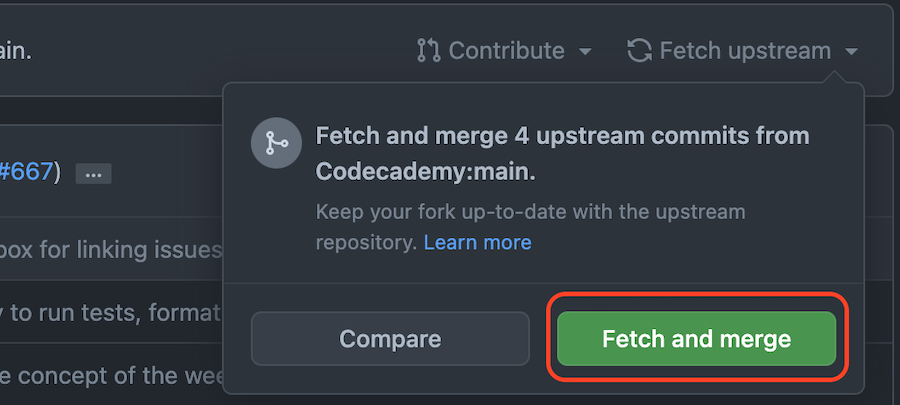
To keep your PR branch up to date, navigate to the branch on your fork. Then press Fetch upstream and Fetch and merge.

The following Git commands can be run on the command line:
git remote add upstream https://github.com/Codecademy/docs.git
git fetch upstream
git rebase upstream main
git push
Yes! You can use AI tools to help create our Docs entries. Codecademy Docs is an open-source project designed to help you learn how to contribute to open source, collaborate with the community, and use GitHub. It’s not meant to test whether you can write perfect technical content on your own.
AI can assist you with drafting, rewriting, or structuring content. However, you are responsible for ensuring your work meets Codecademy’s quality and style standards. AI is a tool to help you, but it doesn't replace the standards we expect.
You're accountable for all AI-assisted content.
You may use AI to generate drafts or refine your writing, but you must personally review and improve all AI-assisted content before submitting. Every entry must follow:
Note: If we detect plagiarism in your entry, you will be banned from contributing to Docs.
Even if AI produced the initial version of the entry, you must ensure that:
- The content is accurate, technically correct, and fact-checked.
- All explanations are clear and aligned with Codecademy Docs writing style.
- Code examples compile or run correctly when required.
- The text is not plagiarized or copied from external sources.
- The final entry sounds intentional, not generic, or filled with filler text.
- The formatting follows the Docs template exactly.
AI output often contains vague definitions, hallucinated details, or inconsistent explanations. You must correct and refine these issues before submitting a pull request.
Regardless of how you created the content, every entry must:
- Use original wording.
- Include accurate definitions and examples.
- Follow the required structure, headings, and formatting.
- Maintain a simple, educational, and neutral tone.
- Avoid unnecessary complexity or overly broad explanations.
- Fit the scope of a Docs reference entry.
Note: If your submission doesn't meet these standards, we'll ask you to revise it.
Maintainers (Codecademy’s content team who reviews all contributions) may request edits on any AI-assisted entry if it:
- Does not follow our template.
- Contains unclear, generic, or contradictory information.
- Includes mistakes or technical inaccuracies.
- Appears copied.
- Lacks the clarity expected from Docs entries.
You're expected to respond to feedback and make the requested improvements within 1 week, or your PR will be closed due to inactivity.
Remember, if you ever have any questions at all, we're always here to help in the Codecademy Forums.
If you find any bugs or errors in the content, feel free to file an issue here! 🖖