Home

This SDK (Software Development Kit) makes it easy to call Stargate and/or Astra services using idiomatic Java APIs.
-
The Stargate SDK works with both Stargate standalone installations and Stargate deployed in Astra. With standalone Stargate deployments you will initialize the framework with the class
StargateClientand provide the list of nodes. To test it locally please follow the Stargate SDK quickstart -
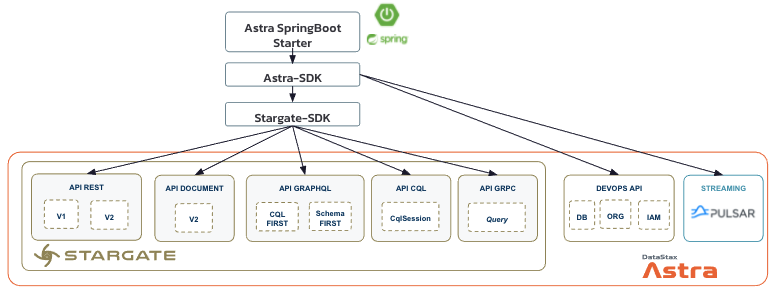
The Astra SDK reuses the previous library with Astra environments. You will then work with the class
AstraClientthat will configureStargateClientunder the hood for you. As you can see on the figure below theAstraClienthandle not only Stargate Apis but also the Astra Devops Api and Apache Pulsar deployed in Astra. To test it please follow the Astra SDK quickstart -
The Astra Spring Boot Starter provides a straight forward way to configure both
Astra SDKandSpring Data Cassandrato work with Astra. By Reading custom keys in spring bootapplication.yamlthe starter will initialize for you all the beans you need. To test it please follow the Astra Spring Boot Starter QuickStart.
- QuickStart for local Stargate
- QuickStart for Astra
- QuickStart for Astra Spring Boot Starter
- Reference Configuration for local Stargate
- Reference Configuration for Astra
You need JDK 1.8+ and a dependency management tool such as Maven or Gradle. (The SDK has been build with the HttpClient provided in JDK 11) It is a single library providing support for the 5 API(s) listed above. Please change the SDK-version with the latest version.
Maven dependency in pom.xml
<dependency>
  <groupId>com.datastax.astra</groupId>
  <artifactId>astra-sdk</artifactId>
  <version>${SDK-version}</version>
</dependency>
Gradle dependency in build.gradle
dependencies {
    astra_sdk 'com.datastax.astra:astra-sdk:${sdk-version}'
}
Initialising SDK to work with Astra
📘 (a) Prerequisite: Setup Astra your Instance
You will need an Astra account and some credentials (Astra Token). Based on the provided parameters the underlying Apis will be enabled or not. (devops, rest data, rest document graphQL, pulsar client)
Please follow those 2 tutorials to set up your Astra instance:
📘 (b) Setup AstraClient object
AstraClient client = AstraClient.builder()
 .databaseId("astra_cluster_id")           // Unique identifier for your database instance
 .cloudProviderRegion("astra_db_region")   // Cloud Provider region picked for you instance
 .keyspace("ks1")                          // (optional) Set your keyspace

 .appToken("AstraCS:......")               // App Token will be used as ApiKey for Devops, Docs and REST Api.
 .clientId("TWRvjlcrgfZYfhcxGZhUlAAA")     // Will be used as your username
 .clientSecret("7xKSrZPLbWxDJ0WXyj..")     // Will be used as your password

 .secureConnectBundle("/tmp/sec.zip")      // (optional) if not provided download in ~/.astra
 .build();
📘 (c) Overview of parameters for AstraClient.builder
| Param Name | DevOps API | REST and Docs API | GraphQL API | CqlSession API | Pulsar Client |
|---|---|---|---|---|---|
appToken (part of token) |
required |
required |
required |
-- | required |
clientId (part of token) |
optional |
-- | -- | required |
-- |
clientSecret (part of token) |
optional |
-- | -- | required |
-- |
databaseId |
-- | required |
required |
required |
-- |
database Cloud Region |
-- | required |
required |
required |
-- |
keyspace |
-- | -- | -- | optional |
-- |
| Secure Connect Bundle | -- | -- | -- | optional |
-- |
Astra is not required to work with the SDK. A standalone installation of Stargate exposes Rest,Document, Graph Apis but also the CqlSession.
📘 (a) Setup Stargate Instance
To install Stargate on your environment please check out the following guide
Instead of the token shown for Astra, you will use a user and a password and will authenticate against a dedicated authenticationUrl. Make sure to create a user at the Cassandra level and enable RBAC.
📘 (b) Setup StargateClient wrapper
StargateClient client = StargateClient.builder()
  .username("k8ssandra-superuser")           // Mandatory username
  .password("JxzrPOnvDGqfEOQ0EySQ")          // Mandatory password
  .endPointAuth("http://localhost:8081")     // Mandatory authencation url, defaulting to http://localhost:8081
  .endPointRest("http://localhost:8082")     // Rest and Document Apis
  .endPointGraphQL("http://localhost:8080")  // GraphQL Api

  // Cqlsession Only
  .addCqlContactPoint("127.0.0.", 9042)      // Contact Point
  .localDc("dc1")                            // Local Datacenter is mandatory driver 4x+
  .keypace("ks1")                            // (optional) Set your keyspace
  .build();
📘 (c) Overview of parameters for StargateClient.builder
| Param Name | REST and Doc APIs | GraphQL API | CqlSession API |
|---|---|---|---|
| username | required |
required |
required |
| password | required |
required |
required |
| Authentication endpoint | required |
required |
-- |
| Rest Api endpoint | required |
-- | -- |
| GraphQL Api endpoint | -- | required |
-- |
| Contact Points | -- | -- | required |
Local DataCenter Name (localDc) |
-- | -- | required |
| keyspace | -- | -- | optional |
To setup the SDK you can provide values using the builder as listed above but not only you can save them locally in some configuration file (.astrarc).
📘 (a) Understanding configuration file ~/.astrarc
This file uses the ini configuration formatting. A key ASTRA_DB_APPLICATION_TOKEN is associated to its value. Values are grouped in sections identified by a [name].
Sample File with 2 sections:
[default]
ASTRA_DB_APPLICATION_TOKEN=AstraCS:GmSdU.....
ASTRA_DB_CLIENT_ID=GmSdUgw....
ASTRA_DB_CLIENT_SECRET=pL7QcZgN....
ASTRA_DB_ID=33a7527a-aaf9-4f9f-9758-96216efff3d5
ASTRA_DB_KEYSPACE=ks1
ASTRA_DB_REGION=eu-central-1
ASTRA_DB_SECURE_BUNDLE=

[sandbox]
ASTRA_DB_APPLICATION_TOKEN=AstraCS:GmSdU.....
ASTRA_DB_CLIENT_ID=GmSdUgw....
ASTRA_DB_CLIENT_SECRET=pL7QcZgN....
ASTRA_DB_ID=33a7527a-aaf9-4f9f-9758-96216efff3d5
ASTRA_DB_KEYSPACE=ks1
ASTRA_DB_REGION=eu-central-1
ASTRA_DB_SECURE_BUNDLE=
The file starts with a [default] section. If nothing name is provided it will be the one to load. In the SDK this file will be associated with the class com.datastax.astra.sdk.utils.AstraRc
📘 (b) Generate an ~/.astrarc
// Generate the file in default location user home (~/.astrarc)
AstraRc.create("<your_token>");

// Generate the file in a defined location
AstraRc.create("<your_token>", new File("/tmp/astracrc"));
📘 (c) Load an ~/.astrarc file
// Load default file (~/.astrarc)
AstraRc confAstraRc1 = AstraRc.load()

// Load a file in defined location
AstraRc confAstraRc2 = AstraRc.load("/tmp/astracrc");
📘 (d) Update an ~/.astrarc file
confAstraRc1.save("sectionName", "keyName", "keyValue");The SDK can be and will be used in Docker and Kubernetes contextes. For those you provide parameters through environment variables. The SDK is ready for that here is the list of environment variables than you can provide:
| Environment Variable | Definition |
|---|---|
| STARGATE_USERNAME | User identifier to login to Stargate |
| STARGATE_PASSWORD | User password to login to Stargate |
| STARGATE_ENDPOINT_AUTH | Authentication endpoint to get a Token |
| STARGATE_ENDPOINT_REST | Endpoint for Data and Document APIs |
| STARGATE_ENDPOINT_GRAPHQL | Endpoint for GraphQL APIs |
| STARGATE_ENDPOINT_CQL | Contact Point adresse ip:port |
| STARGATE_LOCAL_DC | Local DataCenter name |
| STARGATE_KEYSPACE | Keyspace selected |
| STARGATE_ENABLE_CQL | Even with user/[assword you can disable CQL to stay stateless |
| ASTRA_DB_ID | Astra database identifier |
| ASTRA_DB_REGION | Main region for the database |
| ASTRA_DB_APPLICATION_TOKEN | Your Token AstraCS:... |
| ASTRA_DB_CLIENT_ID | ClientId part of your token |
| ASTRA_DB_CLIENT_SECRET | ClientSecret part of your token |
| ASTRA_DB_KEYSPACE | Keyspace to use in ASTRA |
| ASTRA_DB_SECURE_BUNDLE | Location where to find the secure connect bundle |
The same variables can be provided as Java parameter using the syntax -DKEY=VALUE
java -jar myapp.jar -DSTARGATE_USERNAME=cassandra -DSTARGATE_PASSWORD=cassandra