WordPress admin color scheme expressed as CSS variables using OKLCH values. Allows custom colors to the WP Admin Bar (Toolbar) and Admin Menu.
We use OKLCH since it allows subtle transformations, similar to how native WordPress color schemes use SCSS color functions.
npm install wp-admin-scheme-oklch
In your stylesheet, import the admin.css file. Then, define the css variables, scoped to #wpadminbar and #adminmenumain.
@import 'wp-admin-scheme-oklch/admin.css';

/* A purple and blue scheme */

#wpadminbar,
#adminmenumain {
  --base-color: oklch(0.359 0.144 278.697);
  --icon-color: oklch(0.785 0.115 274.713);
  --highlight-color: oklch(0.623 0.214 259.815);
  --notification-color: oklch(0.718 0.202 349.761);
  --menu-bubble-text: oklch(0.257 0.09 281.288);
}
Example:

Your stylesheet then can be loaded into the WP Admin with the admin_enqueue_scripts hook. For example:
add_action('admin_enqueue_scripts', function () {
    wp_enqueue_style('my-admin-style', get_template_directory_uri() . '/admin-style.css');
});
...and also the front-end by hooking wp_enqueue_scripts. This will make the admin bar appear the same way as logged-in users view the public website.
Note: OKLCH values are expected, since other CSS variables inherit these and some make on-the-fly adjustments. It's possible to use other color formats (e.g. hex), but all variables would need to be defined.
In its version 4, Tailwind introduced CSS variables using OKLCH for its color palette. Importing tailwind will make all their color tokens available, along with its --alpha() helper function:
@import "tailwindcss/theme.css" layer(theme);

@import 'wp-admin-scheme-oklch/admin.css';

/* A green and amber scheme */

#wpadminbar,
#adminmenumain {
  --text-color: var(--color-neutral-300);
  --base-color: var(--color-green-950);
  --icon-color: var(--color-stone-300);
  --highlight-color: var(--color-amber-500);
  --notification-color: var(--color-amber-400);

  --menu-text: --alpha(var(--color-green-50) / 80%);
  --menu-icon: --alpha(var(--color-green-50) / 40%);

  --menu-current-text: var(--color-green-950);
  --menu-current-icon: var(--color-green-950);

  --menu-highlight-text: var(--color-amber-500);
  --menu-highlight-icon: var(--color-amber-500);

  --menu-submenu-focus-text: var(--color-amber-500);

  --menu-bubble-text: var(--base-color);
}
Example:

Below are all the CSS variables available for overriding. These correspond to the SASS values from the WordPess core color schemes.
#wpadminbar,
#adminmenumain {

  --text-color: oklch(1.000 0 0);
  --base-color: oklch(0.274 0.0117 248.26);
  --icon-color: oklch(0.707 0.022 261.325);
  --highlight-color: oklch(0.5296 0.1212 239.95);
  --notification-color: oklch(0.6013 0.1789 37.55);

  /* global */

  --body-background: oklch(0.9554 0.0013 286.37);

  /* admin menu & admin-bar */

  --menu-text: var(--text-color);
  --menu-icon: var(--icon-color);
  --menu-background: var(--base-color);

  --menu-highlight-text: oklch(from var(--highlight-color) calc(l + 0.2) c h);
  --menu-highlight-icon: oklch(from var(--highlight-color) calc(l + 0.2) c h);
  --menu-highlight-background: var(--base-color);

  --menu-current-text: var(--text-color);
  --menu-current-icon: var(--text-color);
  --menu-current-background: var(--highlight-color);

  --menu-submenu-text: oklch(from var(--text-color) l c h / 70%);
  --menu-submenu-background: oklch(from var(--base-color) calc(l - 0.1) c h);
  --menu-submenu-background-alt: oklch(from var(--menu-background) calc(l + 0.1) c h);

  --menu-submenu-focus-text: oklch(from var(--highlight-color) calc(l + 0.2) c h);
  --menu-submenu-current-text: var(--text-color);

  --menu-bubble-text: var(--text-color);
  --menu-bubble-background: var(--notification-color);
  --menu-bubble-current-text: var(--menu-bubble-text);
  --menu-bubble-current-background: var(--menu-bubble-background);

  --menu-collapse-text: var(--menu-icon);

  --adminbar-avatar-frame: oklch(from var(--menu-background) calc(l + 0.07) c h);
  --adminbar-input-background: oklch(from var(--menu-background) calc(l + 0.07) c h);

  --adminbar-recovery-exit-text: var(--menu-bubble-text);
  --adminbar-recovery-exit-background: var(--menu-bubble-background);
  --adminbar-recovery-exit-background-alt: oklch(from var(--adminbar-recovery-exit-background) calc(l - 0.1) c h);
}
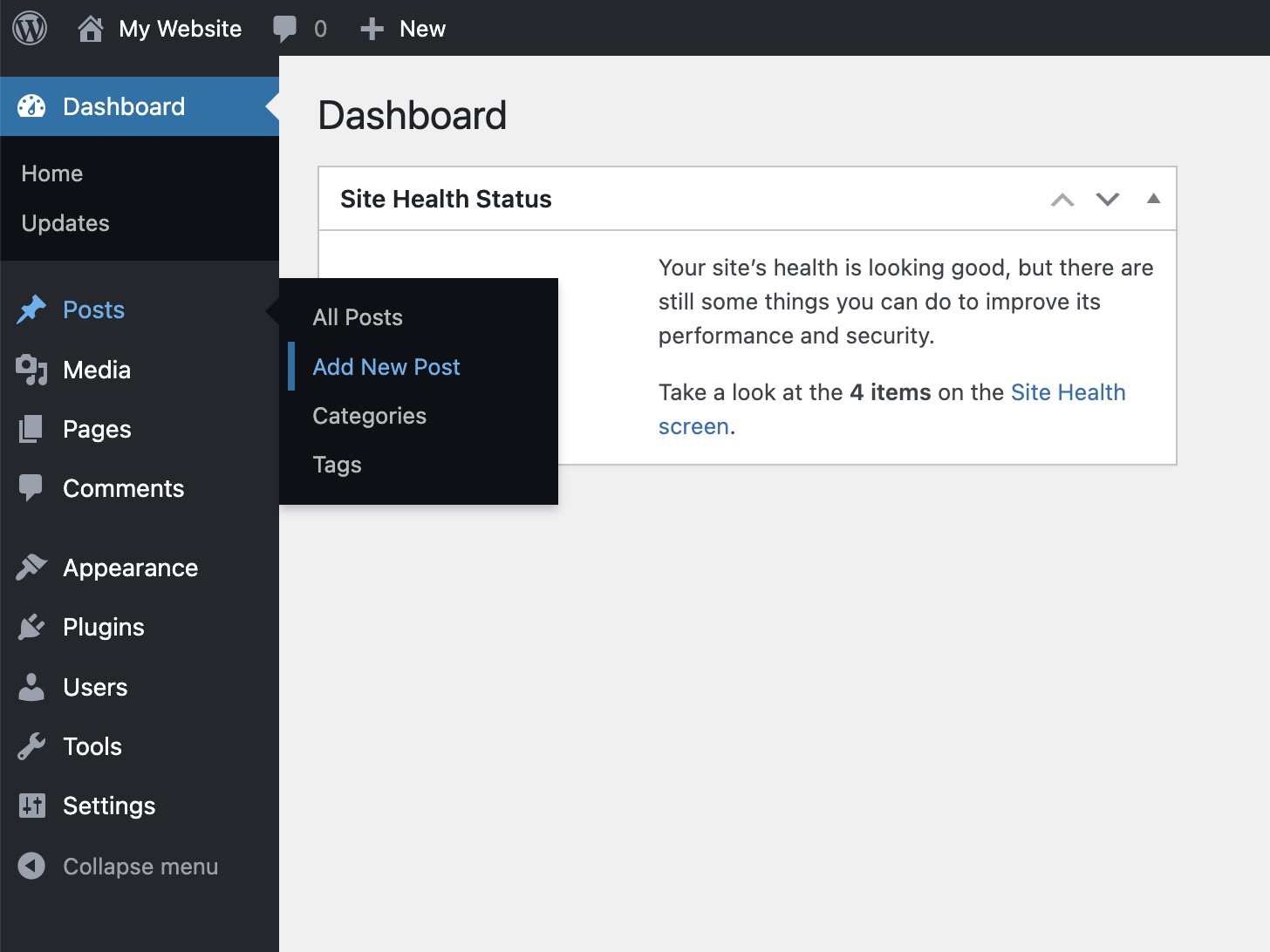
The default scheme:
ISC