-
Notifications
You must be signed in to change notification settings - Fork 2
Expand file tree
/
Copy path02-github-pages-actions.qmd
More file actions
212 lines (143 loc) · 10.9 KB
/
02-github-pages-actions.qmd
File metadata and controls
212 lines (143 loc) · 10.9 KB
1
2
3
4
5
6
7
8
9
10
11
12
13
14
15
16
17
18
19
20
21
22
23
24
25
26
27
28
29
30
31
32
33
34
35
36
37
38
39
40
41
42
43
44
45
46
47
48
49
50
51
52
53
54
55
56
57
58
59
60
61
62
63
64
65
66
67
68
69
70
71
72
73
74
75
76
77
78
79
80
81
82
83
84
85
86
87
88
89
90
91
92
93
94
95
96
97
98
99
100
101
102
103
104
105
106
107
108
109
110
111
112
113
114
115
116
117
118
119
120
121
122
123
124
125
126
127
128
129
130
131
132
133
134
135
136
137
138
139
140
141
142
143
144
145
146
147
148
149
150
151
152
153
154
155
156
157
158
159
160
161
162
163
164
165
166
167
168
169
170
171
172
173
174
175
176
177
178
179
180
181
182
183
184
185
186
187
188
189
190
191
192
193
194
195
196
197
198
199
200
201
202
203
204
205
206
207
208
209
210
211
212
---
title: "GitHub Pages and Actions"
---
## Welcome & Key Concepts
**Learning Objective:** Explore GitHub Pages and Actions and how they can work together to publish website site. Practice by publishing a Quarto site using your own GitHub account.
*Note: These are advanced topics. We are hosting this give some insight into how the pieces fit together but these tasks are not indicative of what you will be required to do in the new system.*
#### Publishing a web site
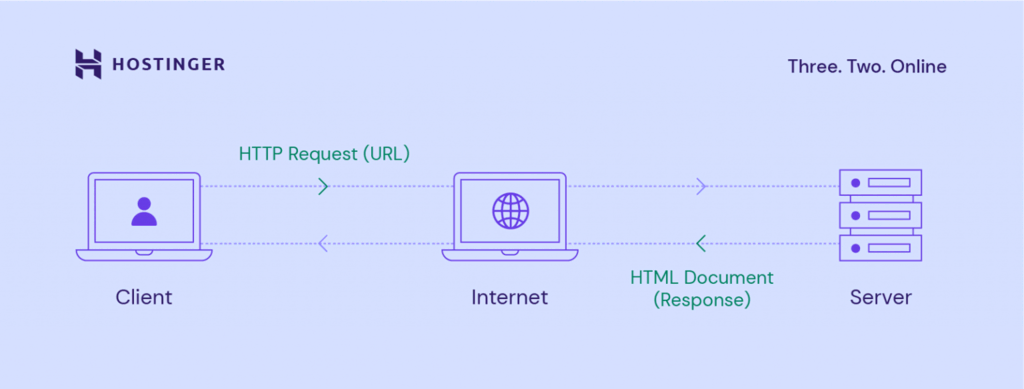
We likely all browse the web and most of us have published content on it. Outside of work you probably have used social media platforms (like YouTube, Facebook, Instagram) to publish photos, posts, or videos and other media. You may even have your own blog using a service like Wordpress.com or Ghost.com.
You may not have published a full web site before. It can get complex, but we want to mention provide a simple overview of parts that are typically present:
- a domain name (the human-readable address)
- a server or host (the place)
- application or files (the content of the web site itself)
{width=80%}
::: callout-tip
## Places to learn more
- [Mozilla MDN Web Docs: Your first website](https://developer.mozilla.org/en-US/docs/Learn_web_development/Getting_started/Your_first_website)
- [Glitch](https://glitch.com/?ref=NODESK), allows you to remix (basically fork) projects to build websites from the browser
- [Neocities](https://neocities.org/), also has all the tools to build a website in the browser
:::
#### Quarto Websites
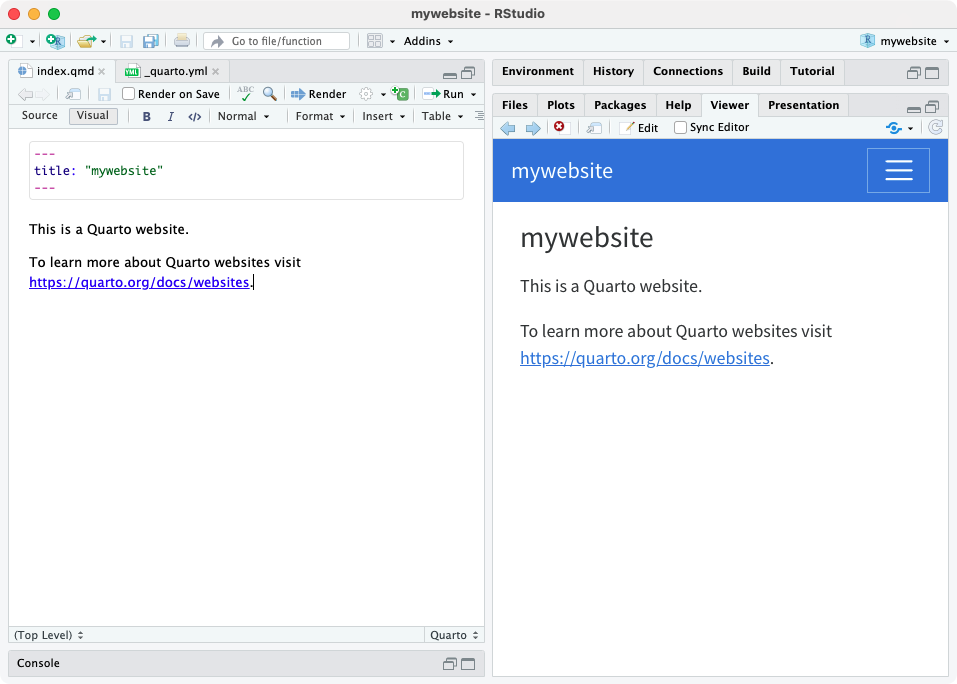
We already know Quarto is a *system* for scientific and technical publishing. It allows you to do a lot.
One thing it does is make it easy to [create websites](https://quarto.org/docs/websites/) for _document_-focused content (like a series of statements or bulletins) and streamline some steps to publish on the web. It does not work well for other types of content (say lots of videos or images) or for web sites that are heavily interactive.
{width=80%}
#### GitHub Pages
Like Quarto, GitHub also allows you to do a lot of different collaborative activities around a repository. [GitHub Pages](https://docs.github.com/en/pages/getting-started-with-github-pages/creating-a-github-pages-site) is a free way to publish a web sites, *but only for the contents of a GitHub repository*.
It helps with all the three parts you need:
- a domain name ✔️ by default, it looks like: `<https://[USER/ORG NAME].github.io/[REPO NAME]/>`
- a server or host ✔️ for free!
- application or files ✔️ the contents of the repository!
Plus it also gives us the advantages of working with git and GitHub we talked about last workshop!
You automatically keep a record of preious versions of the website, you can use the GitHub collaboration features to work together on changes, fixes or identify issues
{width=80%}
Imagine you have a big box where you keep all your drawings and stories. That box is like GitHub. You can put all sorts of things in there, like pictures, words, and even instructions for making a game.
Now, imagine you want to share your drawings and stories with your friends. GitHub Pages is like a special window you can put in your box. When you put your drawings and stories behind the window, your friends can come and look at them!
So, GitHub is like your big box for keeping things, and GitHub Pages is like a special window for showing your things to your friends. It's a way to share your creations with the world!
#### GitHub Actions
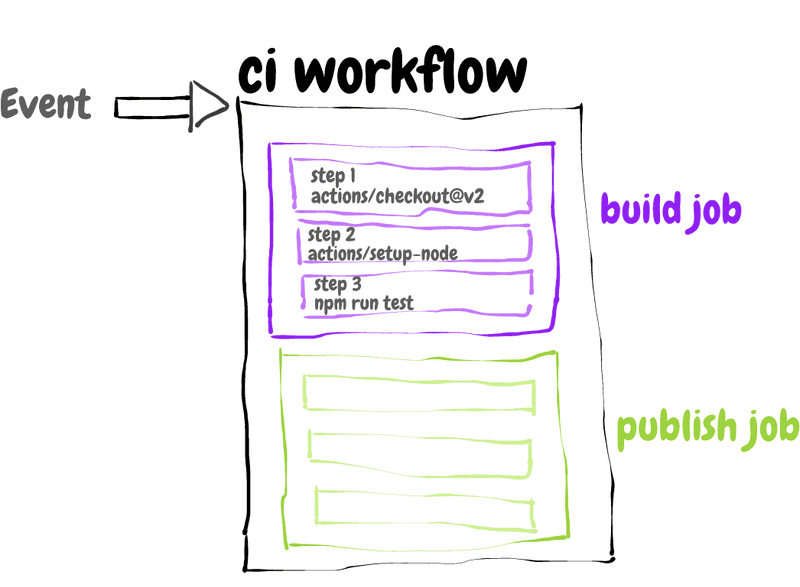
One more of those things that GitHub provides are GitHub Actions (or workflows), these allow us to automate repeatable steps or actions also anchored to a repository.
Actions are powerful and can get complex. Some other similar examples you may have encountered: Microsoft Power Automate flows, cron jobs
They are sort of like recipes: you describe the ingredients you need and then actions to take with those ingredients.
{width=80%}
::: callout-tip
## Places to learn more
- [GitHub: Examples of deploying with GitHub Actions](https://docs.github.com/en/actions/use-cases-and-examples/deploying/deploying-with-github-actions)
- [Deborah Digges: Building a GitHub Action](https://deborah-digges.github.io/2020/10/14/Building-a-Github-action/)
:::
## Create a Quarto Website
::: mark
#### **Activity**: Create a new Quarto website project and add the code to GitHub
:::
To start, you will need to create your own website project, all the files for that website in a git repo, then host that repository via GitHub.
```{=html}
<div class="accordion">
<div class="accordion-item">
<h2 class="accordion-header" id="heading1">
<button class="accordion-button collapsed" type="button" data-bs-toggle="collapse" data-bs-target="#collapse1" aria-expanded="false" aria-controls="collapse1">
<strong>Detailed Steps</strong>
</button>
</h2>
<div id="collapse1" class="accordion-collapse collapse" aria-labelledby="heading1" data-bs-parent="#accordionExample" style="">
<div class="accordion-body">
<ol>
<li>Using RStudio: Select New Project and follow the wizard to select "Quarto Website"</li>
<li>Enter a directory name <em>and create a git repository</em></li>
<li>Make the website your own, you can change the text or title of a page</li>
<li>Click the render button to preview the website locally and ensure you are happy with it</li>
<li>Switch to GitHub Desktop (or from RStudio) commit all those files and push them to GitHub.</li>
</ol>
</div>
</div>
</div>
</div>
```
Alternatively, if you want to skip this step, you can go to this template: [https://github.com/dawnbcgov/example-website](https://github.com/dawnbcgov/example-website) and make a copy or **fork** the repo
::: callout-note
## Resources used
- Quarto: [Creating a Website](https://quarto.org/docs/websites/)
:::
## Publish it to GitHub Pages
There is more than one way to publish a website using Quarto to GitHub Pages. Today we're going to use a mix of the built-in `publish` command and GitHub Actions to automate ongoing updates.
::: mark
#### **Activity**: Use `publish` to publish a new site for the first time
:::
The `quarto publish` command is an easy way to publish locally rendered documents and websites. First we have to enable some GitHub Pages options from the browser, so start at: `<https://github.com/[USER NAME]/[REPO NAME]/settings/pages>` (this URL will be specific to your repository)
After that, we are going to set up GitHub Pages to render all the site contents from our `main` branch into a website that is served from the `gh-pages` branch! (The name `gh-pages` is a convention used because "gh" is short for GitHub I guess).
```{=html}
<div class="accordion">
<div class="accordion-item">
<h2 class="accordion-header" id="heading2">
<button class="accordion-button collapsed" type="button" data-bs-toggle="collapse" data-bs-target="#collapse2" aria-expanded="false" aria-controls="collapse2">
<strong>Detailed Steps</strong>
</button>
</h2>
<div id="collapse2" class="accordion-collapse collapse" aria-labelledby="heading2" data-bs-parent="#accordionExample" style="">
<div class="accordion-body">
<ol>
<li>Follow <a href="https://quarto.org/docs/publishing/github-pages.html#publish-command">the instructions from Quarto</a> to set the <em>source branch</em> to <code>gh-pages</code> and the site directory to <em>root (/)</em></li>
<li>Add the output directory of your project (/_site/) to <code>.gitignore</code> so you don't accidentally commit all of the site output files to the main branch you are working in. (we can chat more about this)</li>
<li>From RStudio open a terminal (Tools > Terminal > New Terminal) and type <code>quarto publish gh-pages</code>.</li>
<li>Follow the command line prompts, you may be prompted to log-in to GitHub before it publishes.</li>
</ol>
</div>
</div>
</div>
</div>
```
Great! Now after every change we can manually publish an updated version of the site! What about if we want to not worry about this step? We can use an action to automate it.
::: callout-note
## Resources used
- Quarto: [Publishing > GitHub Pages](https://quarto.org/docs/publishing/github-pages.html)
- HKUST Digital Humanities: [How to host your website on GitHub Page](https://digitalhumanities.hkust.edu.hk/tutorials/how-to-host-your-website-on-github-page/)
:::
## Automate publishing with GitHub Actions (Advanced)
::: mark
#### **Activity**: Add a GitHub Action so it automagically updates on every change (Advanced)
:::
Once we have run that `publish` action locally once, we can set up an Action to re-publish (or re-build) the site as soon as a simple change was made.
Remember how in the first workshop you only had to commit your change to the `main` branch and refresh the website to see the change show up in the sidebar? That was because an action in the background was re-building the site!
_Note: this is an advanced activity so it is okay to just follow along_
```{=html}
<div class="accordion">
<div class="accordion-item">
<h2 class="accordion-header" id="heading3">
<button class="accordion-button collapsed" type="button" data-bs-toggle="collapse" data-bs-target="#collapse3" aria-expanded="false" aria-controls="collapse3">
<strong>Detailed Steps</strong>
</button>
</h2>
<div id="collapse3" class="accordion-collapse collapse" aria-labelledby="heading3" data-bs-parent="#accordionExample" style="">
<div class="accordion-body">
<ol>
<li>Make sure you have run <code>quarto publish gh-pages</code> locally, once (you should have done this in the previous step).</li>
<li>Add a GitHub Action to your GitHub repo and project by creating a file at: <code>.github/workflows/publish.yml</code> (note the dot in the first folder, you will probably need to create those folders too!)</li>
<li>Copy the contents from the Quarto docs for the <a href="https://quarto.org/docs/publishing/github-pages.html#publish-action">Publish Action file</a></li>
<li>Afterwords, move to GitHub Desktop and add or check-in all the new files or changed files. Commit those, and push to GitHub.</li>
</ol>
</div>
</div>
</div>
</div>
```
::: callout-note
## Resources used
- Quarto: [Publishing > GitHub Pages](https://quarto.org/docs/publishing/github-pages.html)
:::