1. Setup | EN
Clone AUTOMAITC1111/stable-diffusion-webui.
Screenshot

You can change the repository_url to select another repository, or specify a specific branch or commit by specifying webui_branch.
Usually, you do not need to make any changes.
Set up the StableDiffusion model.
Screenshot
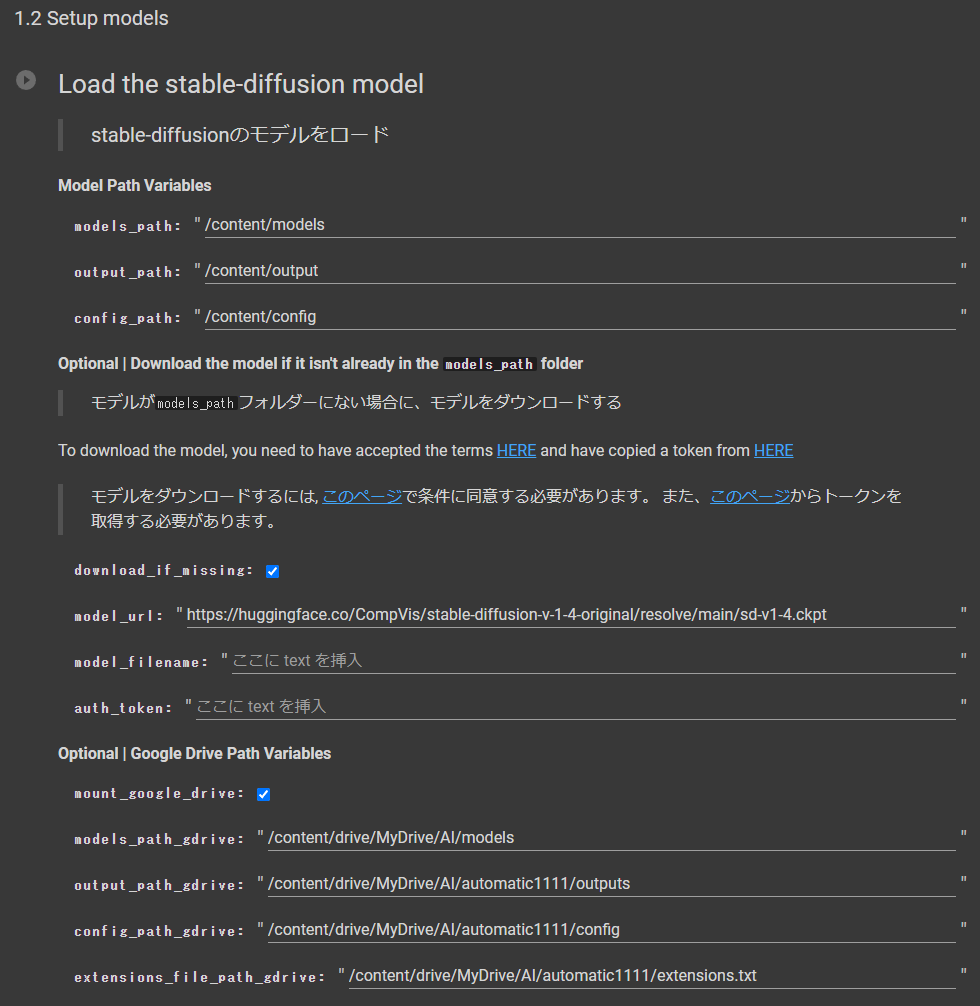
| models_path | Directory to store ckpt files. |
| output_path | Directory to save output images. |
| config_path | Directory to save config files. |
If you want to download models on Colab, check the download_if_missing checkbox and follow the steps below.
- obtain the URL to download the model and enter the link in `model_url
- if you need authentication (e.g. models that require model card agreement hosted on HuggingFace, etc.), enter a token in
auth_token. - If you want to specify a file name for saving, specify the file name in
model_filename.
By checking the mount_google_drive checkbox, you can save models, output images, config files, etc. on GoogleDrive.
This will prevent models from being downloaded again or output images from being lost even if the notebook is closed once.
*Model files can be large; please pay attention to the remaining space on your GoogleDrive.
| models_path | Directory on GoogleDrive to store ckpt files. |
| output_path | Directory on GoogleDrive to save output images. |
| config_path | Directory on GoogleDrive to save config files. |
| extensions_file_path_gdrive | The path on GoogleDrive where the text file where the list of extensions is stored is saved. |