Table of contents:
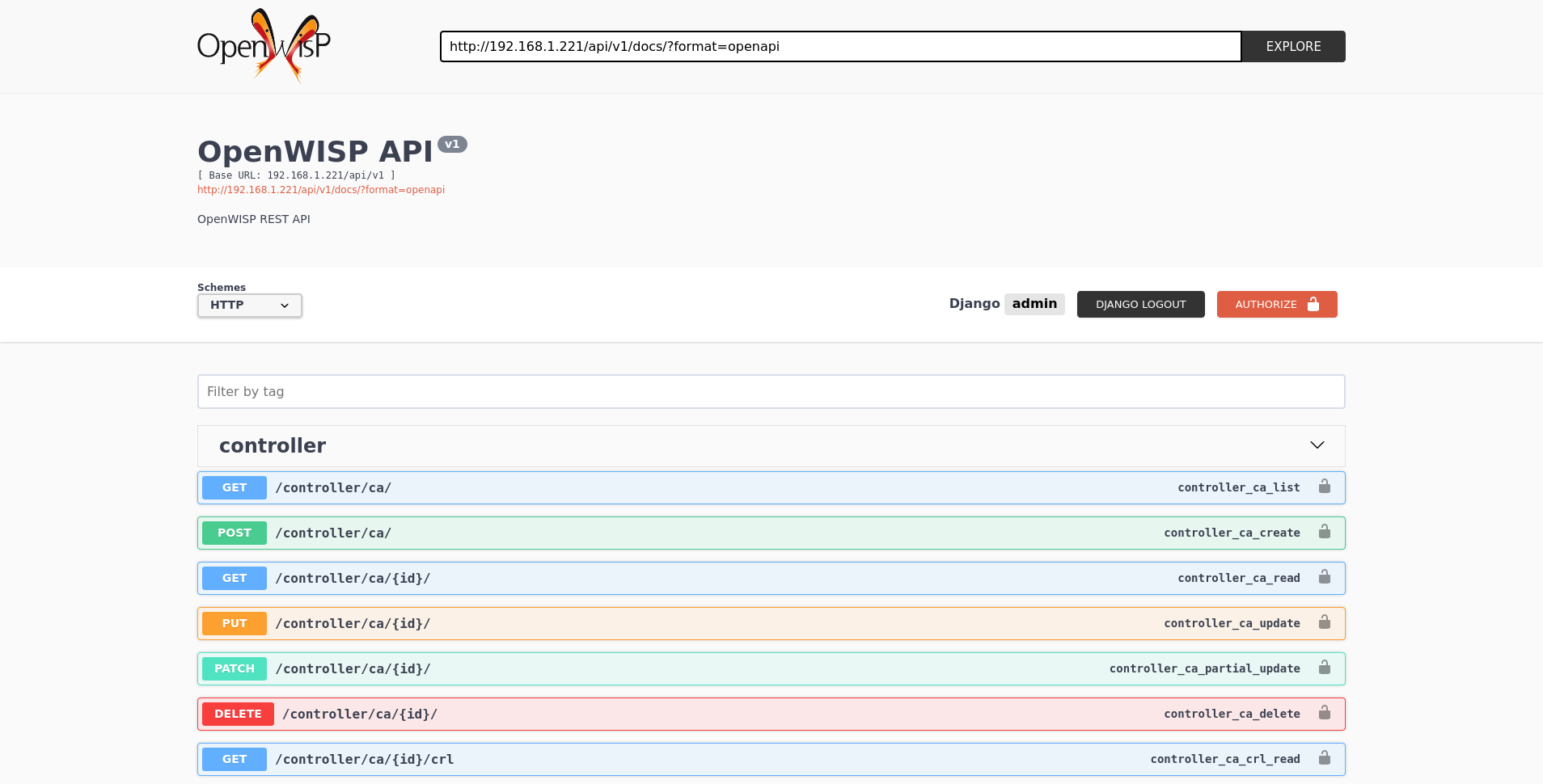
A general live API documentation (following the OpenAPI specification) at
/api/v1/docs/.
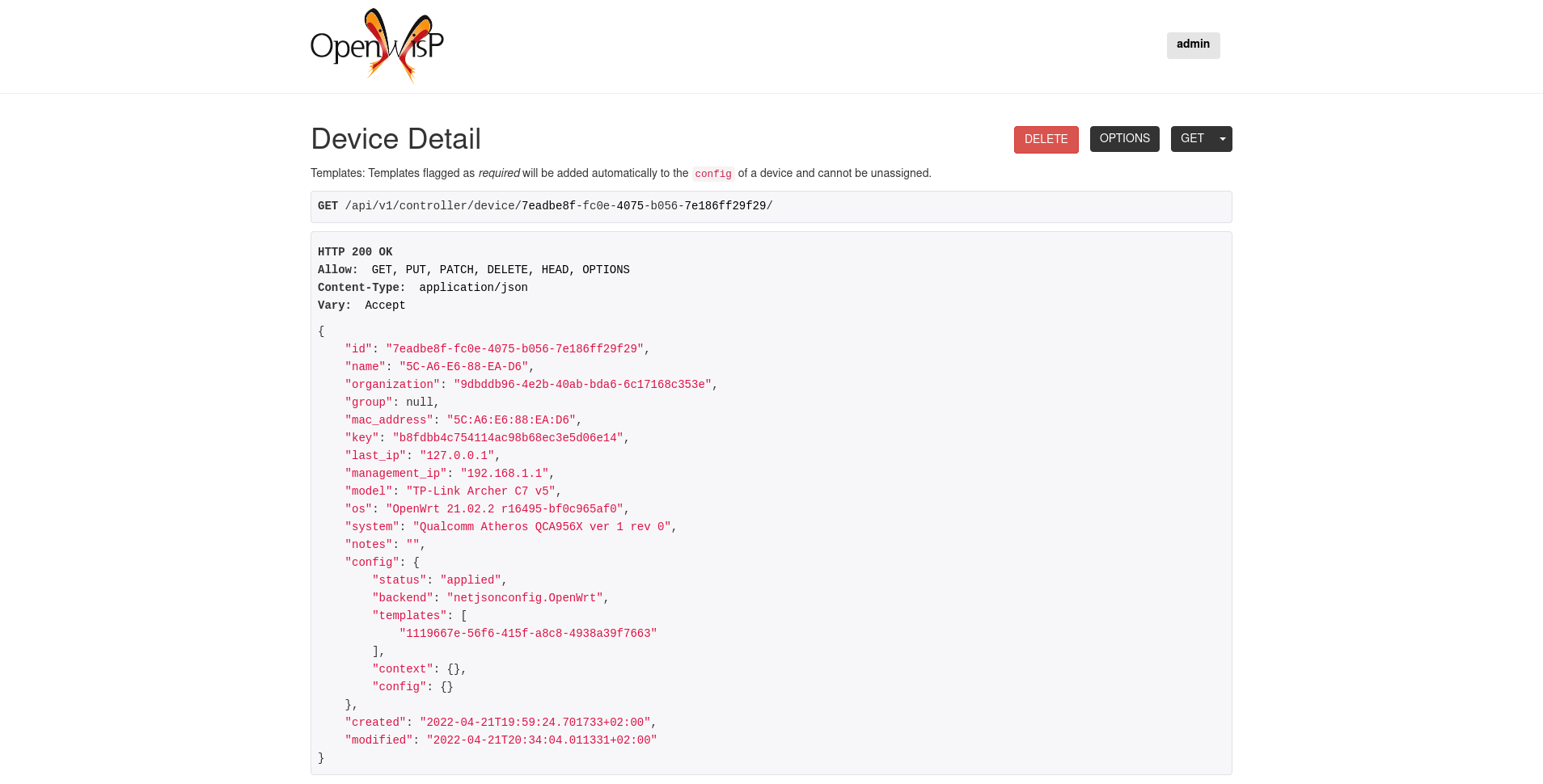
Additionally, opening any of the endpoints :ref:`listed below <controller_rest_endpoints>` directly in the browser will show the browsable API interface of Django-REST-Framework, which makes it even easier to find out the details of each endpoint.
See :ref:`authenticating_rest_api`.
When browsing the API via the :ref:`controller_live_documentation` or the :ref:`controller_browsable_web_interface`, you can also use the session authentication by logging in the django admin.
All list endpoints support the page_size parameter that allows
paginating the results in conjunction with the page parameter.
GET /api/v1/controller/template/?page_size=10
GET /api/v1/controller/template/?page_size=10&page=2
Since the detailed explanation is contained in the :ref:`controller_live_documentation` and in the :ref:`controller_browsable_web_interface` of each point, here we'll provide just a list of the available endpoints, for further information please open the URL of the endpoint in your browser.
GET /api/v1/controller/device/
Available filters
You can filter a list of devices based on their configuration status using
the status (e.g modified, applied, or error).
GET /api/v1/controller/device/?config__status={status}
You can filter a list of devices based on their configuration backend
using the backend (e.g netjsonconfig.OpenWrt or
netjsonconfig.OpenWisp).
GET /api/v1/controller/device/?config__backend={backend}
You can filter a list of devices based on their organization using the
organization_id or organization_slug.
GET /api/v1/controller/device/?organization={organization_id}
GET /api/v1/controller/device/?organization_slug={organization_slug}
You can filter a list of devices based on their configuration templates
using the template_id.
GET /api/v1/controller/device/?config__templates={template_id}
You can filter a list of devices based on their device group using the
group_id.
GET /api/v1/controller/device/?group={group_id}
You can filter a list of devices that have a device location object using
the with_geo (e.g. true or false).
GET /api/v1/controller/device/?with_geo={with_geo}
You can filter a list of devices based on their creation time using the
creation_time.
# Created exact
GET /api/v1/controller/device/?created={creation_time}

# Created greater than or equal to
GET /api/v1/controller/device/?created__gte={creation_time}

# Created is less than
GET /api/v1/controller/device/?created__lt={creation_time}
POST /api/v1/controller/device/
GET /api/v1/controller/device/{id}/
GET /api/v1/controller/device/{id}/configuration/
The above endpoint triggers the download of a tar.gz file containing
the generated configuration for that specific device.
PUT /api/v1/controller/device/{id}/
PATCH /api/v1/controller/device/{id}/
Note
To assign, unassign, and change the order of the assigned templates
add, remove, and change the order of the {id} of the templates
under the config field in the JSON response respectively.
Moreover, you can also select and unselect templates in the HTML Form
of the Browsable API.
The required template(s) from the organization(s) of the device will added
automatically to the config and cannot be removed.
Example usage: For assigning template(s) add the/their {id} to the config of a device,
curl -X PATCH \
    http://127.0.0.1:8000/api/v1/controller/device/76b7d9cc-4ffd-4a43-b1b0-8f8befd1a7c0/ \
    -H 'authorization: Bearer dc8d497838d4914c9db9aad9b6ec66f6c36ff46b' \
    -H 'content-type: application/json' \
    -d '{
            "config": {
                "templates": ["4791fa4c-2cef-4f42-8bb4-c86018d71bd3"]
            }
        }'
Example usage: For removing assigned templates, simply remove the/their {id} from the config of a device,
curl -X PATCH \
    http://127.0.0.1:8000/api/v1/controller/device/76b7d9cc-4ffd-4a43-b1b0-8f8befd1a7c0/ \
    -H 'authorization: Bearer dc8d497838d4914c9db9aad9b6ec66f6c36ff46b' \
    -H 'content-type: application/json' \
    -d '{
            "config": {
                "templates": []
            }
        }'
Example usage: For reordering the templates simply change their order from the config of a device,
curl -X PATCH \
    http://127.0.0.1:8000/api/v1/controller/device/76b7d9cc-4ffd-4a43-b1b0-8f8befd1a7c0/ \
    -H 'authorization: Bearer dc8d497838d4914c9db9aad9b6ec66f6c36ff46b' \
    -H 'cache-control: no-cache' \
    -H 'content-type: application/json' \
    -H 'postman-token: b3f6a1cc-ff13-5eba-e460-8f394e485801' \
    -d '{
            "config": {
                "templates": [
                    "c5bbc697-170e-44bc-8eb7-b944b55ee88f",
                    "4791fa4c-2cef-4f42-8bb4-c86018d71bd3"
                ]
            }
}'Note
A device must be deactivated before it can be deleted. Otherwise, an
HTTP 403 Forbidden response will be returned.
DELETE /api/v1/controller/device/{id}/
POST /api/v1/controller/device/{id}/deactivate/
POST /api/v1/controller/device/{id}/activate/
GET /api/v1/controller/device/{id}/connection/
POST /api/v1/controller/device/{id}/connection/
GET /api/v1/controller/device/{device_id}/connection/{connection_id}/
PUT /api/v1/controller/device/{device_id}/connection/{connection_id}/
PATCH /api/v1/controller/device/{device_id}/connection/{connection_id}/
DELETE /api/v1/controller/device/{device_id}/connection/{connection_id}/
GET /api/v1/connection/credential/
POST /api/v1/connection/credential/
GET /api/v1/connection/credential/{id}/
PUT /api/v1/connection/credential/{id}/
PATCH /api/v1/connection/credential/{id}/
DELETE /api/v1/connection/credential/{id}/
GET /api/v1/controller/device/{device_id}/command/
POST /api/v1/controller/device/{device_id}/command/
This endpoint allows you to execute various types of commands on a device.
Request Parameters
| Parameter | Description |
|---|---|
type |
The type of command to execute (required) |
input |
Input data for the command (format varies by type) (required) |
connection |
UUID of specific device connection to use (optional) |
The input field requires data in a specific format that depends on the
command type being executed.
Note
The following examples show payloads for the default commands shipped with OpenWISP. The available commands on a device depend on your configuration of :ref:`OPENWISP_CONTROLLER_USER_COMMANDS <openwisp_controller_user_commands>` and :ref:`OPENWISP_CONTROLLER_ORGANIZATION_ENABLED_COMMANDS` settings. For detailed information about command execution, including how to add command types, and restrict available commands per organization, see :doc:`shell-commands`.
Available Command Types
Custom Command (
custom)Execute a custom command on the device.
Input format:
{"command": "shell_command"}Example payload:
{
    "type": "custom",
    "input": {
        "command": "iwinfo"
    }
}
Reboot (
reboot)Reboot the device.
Input format:
null(no input required)Example payload:
{
    "type": "reboot",
    "input": null
}
Change Password (
change_password)Change the device's root password.
Input format:
{"password": "new_pass", "confirm_password":
"new_pass"}
Example payload:
{
    "type": "change_password",
    "input": {
        "password": "newpassword123",
        "confirm_password": "newpassword123"
    }
}
Example Request:
curl -X POST \
    http://127.0.0.1:8000/api/v1/controller/device/76b7d9cc-4ffd-4a43-b1b0-8f8befd1a7c0/command/ \
    -H 'authorization: Bearer yoursecretauthtoken' \
    -H 'content-type: application/json' \
    -d '{
            "type": "custom",
            "input": {
                "command": "uptime"
            }
}'GET /api/v1/controller/device/{device_id}/command/{command_id}/
GET /api/v1/controller/group/
Available filters
You can filter a list of device groups based on their organization using
the organization_id or organization_slug.
GET /api/v1/controller/group/?organization={organization_id}
GET /api/v1/controller/group/?organization_slug={organization_slug}
You can filter a list of device groups that have a device object using the
empty (e.g. true or false).
GET /api/v1/controller/group/?empty={empty}
POST /api/v1/controller/group/
GET /api/v1/controller/group/{id}/
PUT /api/v1/controller/group/{id}/
This endpoint allows to change the :ref:`device_group_templates` too.
GET /api/v1/controller/cert/{common_name}/group/
This endpoint can be used to retrieve group information and metadata by the common name of a certificate used in a VPN client tunnel, this endpoint is used in layer 2 tunneling solutions for firewall/captive portals.
It is also possible to filter device group by providing organization slug of certificate's organization as show in the example below:
GET /api/v1/controller/cert/{common_name}/group/?org={org1_slug},{org2_slug}
GET /api/v1/controller/device/{id}/location/
PUT /api/v1/controller/device/{id}/location/
You can create DeviceLocation object by using primary keys of existing
Location and FloorPlan objects as shown in the example below.
{
    "location": "f0cb5762-3711-4791-95b6-c2f6656249fa",
    "floorplan": "dfeb6724-aab4-4533-aeab-f7feb6648acd",
    "indoor": "-36,264"
}
Note
The indoor field represents the coordinates of the point placed on
the image from the top left corner. E.g. if you placed the pointer on
the top left corner of the floor plan image, its indoor coordinates
will be 0,0.
curl -X PUT \
    http://127.0.0.1:8000/api/v1/controller/device/8a85cc23-bad5-4c7e-b9f4-ffe298defb5c/location/ \
    -H 'authorization: Bearer dc8d497838d4914c9db9aad9b6ec66f6c36ff46b' \
    -H 'content-type: application/json' \
    -d '{
        "location": "f0cb5762-3711-4791-95b6-c2f6656249fa",
        "floorplan": "dfeb6724-aab4-4533-aeab-f7feb6648acd",
        "indoor": "-36,264"
        }'
You can also create related Location and FloorPlan objects for the
device directly from this endpoint.
The following example demonstrates creating related location object in a single request.
{
    "location": {
        "name": "Via del Corso",
        "address": "Via del Corso, Roma, Italia",
        "geometry": {
            "type": "Point",
            "coordinates": [12.512124, 41.898903]
        },
        "type": "outdoor",
    }
}
curl -X PUT \
http://127.0.0.1:8000/api/v1/controller/device/8a85cc23-bad5-4c7e-b9f4-ffe298defb5c/location/ \
-H 'authorization: Bearer dc8d497838d4914c9db9aad9b6ec66f6c36ff46b' \
-H 'content-type: application/json' \
-d '{
"location": {
"name": "Via del Corso",
"address": "Via del Corso, Roma, Italia",
"geometry": {
"type": "Point",
"coordinates": [12.512124, 41.898903]
},
"type": "outdoor"
}
}'
Note
You can also specify the geometry in Well-known text (WKT)
format, like following:
{
    "location": {
        "name": "Via del Corso",
        "address": "Via del Corso, Roma, Italia",
        "geometry": "POINT (12.512124 41.898903)",
        "type": "outdoor",
    }
}
Similarly, you can create Floorplan object with the same request. But,
note that a FloorPlan can be added to DeviceLocation only if the
related Location object defines an indoor location. The example below
demonstrates creating both Location and FloorPlan objects.
{
    "location.name": "Via del Corso",
    "location.address": "Via del Corso, Roma, Italia",
    "location.geometry.type": "Point",
    "location.geometry.coordinates": [12.512124, 41.898903],
    "location.type": "outdoor",
    "floorplan.floor": 1,
    "floorplan.image": "floorplan.png"
}
curl -X PUT \
http://127.0.0.1:8000/api/v1/controller/device/8a85cc23-bad5-4c7e-b9f4-ffe298defb5c/location/ \
-H 'authorization: Bearer dc8d497838d4914c9db9aad9b6ec66f6c36ff46b' \
-H 'content-type: multipart/form-data; boundary=----WebKitFormBoundary7MA4YWxkTrZu0gW' \
-F 'location.name=Via del Corso' \
-F 'location.address=Via del Corso, Roma, Italia' \
-F location.geometry.type=Point \
-F 'location.geometry.coordinates=[12.512124, 41.898903]' \
-F location.type=indoor \
-F floorplan.floor=1 \
-F 'floorplan.image=@floorplan.png'
Note
The example above uses multipart content-type for uploading floor
plan image.
You can also use an existing Location object and create a new floor
plan for that location using this endpoint.
{
    "location": "f0cb5762-3711-4791-95b6-c2f6656249fa",
    "floorplan.floor": 1,
    "floorplan.image": "floorplan.png"
}
curl -X PUT \
http://127.0.0.1:8000/api/v1/controller/device/8a85cc23-bad5-4c7e-b9f4-ffe298defb5c/location/ \
-H 'authorization: Bearer dc8d497838d4914c9db9aad9b6ec66f6c36ff46b' \
-H 'content-type: multipart/form-data; boundary=----WebKitFormBoundary7MA4YWxkTrZu0gW' \
-F location=f0cb5762-3711-4791-95b6-c2f6656249fa \
-F floorplan.floor=1 \
-F 'floorplan.image=@floorplan.png'
PUT /api/v1/controller/device/{id}/location/
Note
This endpoint can be used to update related Location and
Floorplan objects. Refer to the :ref:`examples in the "Create
device location" section <create_device_location>` for information on
payload format.
DELETE /api/v1/controller/device/{id}/location/
GET /api/v1/controller/device/{id}/coordinates/
Note
This endpoint is intended to be used by devices.
This endpoint skips multi-tenancy and permission checks if the device
key is passed as query_param because the system assumes that the
device is updating it's position.
curl -X GET \
    'http://127.0.0.1:8000/api/v1/controller/device/8a85cc23-bad5-4c7e-b9f4-ffe298defb5c/coordinates/?key=10a0cb5a553c71099c0e4ef236435496'
PUT /api/v1/controller/device/{id}/coordinates/
Note
This endpoint is intended to be used by devices.
This endpoint skips multi-tenancy and permission checks if the device
key is passed as query_param because the system assumes that the
device is updating it's position.
{
    "type": "Feature",
    "geometry": {
        "type": "Point",
        "coordinates": [12.512124, 41.898903]
    },
}
curl -X PUT \
'http://127.0.0.1:8000/api/v1/controller/device/8a85cc23-bad5-4c7e-b9f4-ffe298defb5c/coordinates/?key=10a0cb5a553c71099c0e4ef236435496' \
-H 'content-type: application/json' \
-d '{
"type": "Feature",
"geometry": {
"type": "Point",
"coordinates": [12.512124, 41.898903]
},
}'
GET /api/v1/controller/location/
Available filters
You can filter using organization_id or organization_slug to get
list locations that belongs to an organization.
GET /api/v1/controller/location/?organization={organization_id}
GET /api/v1/controller/location/?organization_slug={organization_slug}
POST /api/v1/controller/location/
If you are creating an indoor location, you can use this endpoint to
create floor plan for the location.
The following example demonstrates creating floor plan along with location in a single request.
{
    "name": "Via del Corso",
    "address": "Via del Corso, Roma, Italia",
    "geometry.type": "Point",
    "geometry.location": [12.512124, 41.898903],
    "type": "indoor",
    "is_mobile": "false",
    "floorplan.floor": "1",
    "floorplan.image": "floorplan.png",
    "organization": "1f6c5666-1011-4f1d-bce9-fc6fcb4f3a05"
}
curl -X POST \
http://127.0.0.1:8000/api/v1/controller/location/ \
-H 'authorization: Bearer dc8d497838d4914c9db9aad9b6ec66f6c36ff46b' \
-H 'content-type: multipart/form-data; boundary=----WebKitFormBoundary7MA4YWxkTrZu0gW' \
-F 'name=Via del Corso' \
-F 'address=Via del Corso, Roma, Italia' \
-F geometry.type=Point \
-F 'geometry.coordinates=[12.512124, 41.898903]' \
-F type=indoor \
-F is_mobile=false \
-F floorplan.floor=1 \
-F 'floorplan.image=@floorplan.png' \
-F organization=1f6c5666-1011-4f1d-bce9-fc6fcb4f3a05
Note
You can also specify the geometry in Well-known text (WKT)
format, like following:
{
    "name": "Via del Corso",
    "address": "Via del Corso, Roma, Italia",
    "geometry": "POINT (12.512124 41.898903)",
    "type": "indoor",
    "is_mobile": "false",
    "floorplan.floor": "1",
    "floorplan.image": "floorplan.png",
    "organization": "1f6c5666-1011-4f1d-bce9-fc6fcb4f3a05"
}GET /api/v1/controller/location/{pk}/
PUT /api/v1/controller/location/{pk}/
Note
Only the first floor plan data present can be edited or changed.
Setting the type of location to outdoor will remove all the floor
plans associated with it.
Refer to the :ref:`examples in the "Create device location" section <create_device_location>` for information on payload format.
DELETE /api/v1/controller/location/{pk}/
GET /api/v1/controller/location/{id}/device/
Note
this endpoint will only list locations that have been assigned to a device.
GET /api/v1/controller/location/geojson/
Available filters
You can filter using organization_id or organization_slug to get
list location of devices from that organization.
GET /api/v1/controller/location/geojson/?organization_id={organization_id}
GET /api/v1/controller/location/geojson/?organization_slug={organization_slug}
GET /api/v1/controller/floorplan/
Available filters
You can filter using organization_id or organization_slug to get
list floor plans that belongs to an organization.
GET /api/v1/controller/floorplan/?organization={organization_id}
GET /api/v1/controller/floorplan/?organization_slug={organization_slug}
POST /api/v1/controller/floorplan/
GET /api/v1/controller/floorplan/{pk}/
PUT /api/v1/controller/floorplan/{pk}/
DELETE /api/v1/controller/floorplan/{pk}/
Note
This endpoint returns device coordinates from the first floor above ground (lowest non-negative floors) by default. If a location only has negative floors (e.g. underground parking lot), then it will return the closest floor to the ground (greatest negative floor).
GET /api/v1/controller/location/{id}/indoor-coordinates/
Available filters
You can filter using floor to get list of devices and their indoor
coodinates for that floor.
GET /api/v1/controller/location/{id}/indoor-coordinates/?floor={floor}
GET /api/v1/controller/template/
Available filters
You can filter a list of templates based on their organization using the
organization_id or organization_slug.
GET /api/v1/controller/template/?organization={organization_id}
GET /api/v1/controller/template/?organization_slug={organization_slug}
You can filter a list of templates based on their backend using the
backend (e.g netjsonconfig.OpenWrt or netjsonconfig.OpenWisp).
GET /api/v1/controller/template/?backend={backend}
You can filter a list of templates based on their type using the type
(e.g. vpn or generic).
GET /api/v1/controller/template/?type={type}
You can filter a list of templates that are enabled by default or not
using the default (e.g. true or false).
GET /api/v1/controller/template/?default={default}
You can filter a list of templates that are required or not using the
required (e.g. true or false).
GET /api/v1/controller/template/?required={required}
You can filter a list of templates based on their creation time using the
creation_time.
# Created exact

GET /api/v1/controller/template/?created={creation_time}

# Created greater than or equal to

GET /api/v1/controller/template/?created__gte={creation_time}

# Created is less than

GET /api/v1/controller/template/?created__lt={creation_time}
POST /api/v1/controller/template/
GET /api/v1/controller/template/{id}/
GET /api/v1/controller/template/{id}/configuration/
The above endpoint triggers the download of a tar.gz file containing
the generated configuration for that specific template.
PUT /api/v1/controller/template/{id}/
PATCH /api/v1/controller/template/{id}/
DELETE /api/v1/controller/template/{id}/
GET /api/v1/controller/vpn/
Available filters
You can filter a list of vpns based on their backend using the backend
(e.g openwisp_controller.vpn_backends.OpenVpn or
openwisp_controller.vpn_backends.Wireguard).
GET /api/v1/controller/vpn/?backend={backend}
You can filter a list of vpns based on their subnet using the
subnet_id.
GET /api/v1/controller/vpn/?subnet={subnet_id}
You can filter a list of vpns based on their organization using the
organization_id or organization_slug.
GET /api/v1/controller/vpn/?organization={organization_id}
GET /api/v1/controller/vpn/?organization_slug={organization_slug}
POST /api/v1/controller/vpn/
GET /api/v1/controller/vpn/{id}/
GET /api/v1/controller/vpn/{id}/configuration/
The above endpoint triggers the download of a tar.gz file containing
the generated configuration for that specific VPN.
PUT /api/v1/controller/vpn/{id}/
PATCH /api/v1/controller/vpn/{id}/
DELETE /api/v1/controller/vpn/{id}/
GET /api/v1/controller/ca/
POST /api/v1/controller/ca/
POST /api/v1/controller/ca/
Note
To import an existing CA, only name, certificate and
private_key fields have to be filled in the HTML form or
included in the JSON format.
GET /api/v1/controller/ca/{id}/
PUT /api/v1/controller/ca/{id}/
PATCH /api/v1/controller/ca/{id}/
GET /api/v1/controller/ca/{id}/crl/
The above endpoint triggers the download of {id}.crl file containing
up to date CRL of that specific CA.
DELETE /api/v1/controller/ca/{id}/
POST /api/v1/controller/ca/{id}/renew/
GET /api/v1/controller/cert/
POST /api/v1/controller/cert/
POST /api/v1/controller/cert/
Note
To import an existing Cert, only name, ca, certificate and
private_key fields have to be filled in the HTML form or
included in the JSON format.
GET /api/v1/controller/cert/{id}/
PUT /api/v1/controller/cert/{id}/
PATCH /api/v1/controller/cert/{id}/
DELETE /api/v1/controller/cert/{id}/
POST /api/v1/controller/cert/{id}/renew/
POST /api/v1/controller/cert/{id}/revoke/